The DICOM RESTful Service defines several action types. An implementation shall support all the following six action types:
-
This action retrieves the set of DICOM instances associated with a given study unique identifier (UID). The response can be DICOM or bulk data depending on the "Accept" type, and is encapsulated in a multipart MIME response.
-
This action retrieves the set of DICOM instances associated with a given study and series UID. The response can be DICOM or bulk data depending on the "Accept" type, and is encapsulated in a multipart MIME response.
-
This action retrieves the DICOM instance associated with the given study, series, and SOP Instance UID. The response can be DICOM or bulk data depending on the "Accept" type, and is encapsulated in a multipart MIME response.
-
This action retrieves the DICOM frames for a given study, series, SOP Instance UID, and frame numbers. The response is pixel data, and encapsulated in a multipart MIME response.
-
This action retrieves the bulk data for a given BulkDataURI. The response is a single bulk data item.
-
This action retrieves the DICOM instances presented as the study, series, or instance metadata with the bulk data removed.
WADO-RS requests may contain the following query parameters:
-
"accept" The <accept> query parameter is specified in Section 6.1.1.5. The syntax is:
accept = "accept=" 1#media-type -
"charset" The <character-set> query parameter is specified in Section 6.1.2.2. The syntax is:
character-set = "charset" = 1#charset
WADO-RS requests shall include an "Accept" header field (see Section 6.1.1.6) specifying the Acceptable Media Types.
WADO-RS requests may optionally support the "Accept-Charset" header field. See Section 6.1.2.3.
DICOM Objects returned shall be PS3.10 binary objects encoded in a requested Transfer Syntax (Explicit VR Little Endian by default) with one message part per DICOM Instance.
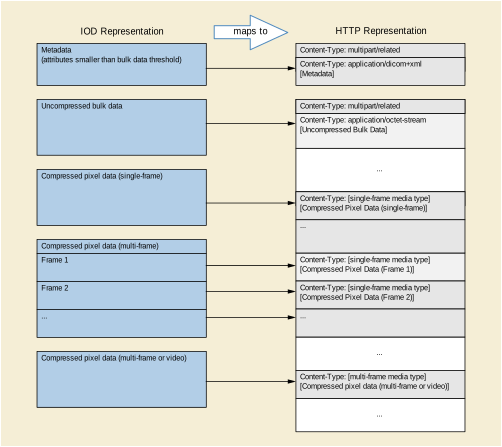
Other types of responses will be encoded in the following manner: (see Figure 6.5-1).
-
All XML responses shall be encoded as described in the Native DICOM Model defined in PS3.19 with one message part per XML object.
-
All JSON responses shall be encoded as a DICOM JSON Model Object as defined in Annex F.
-
Uncompressed bulk and pixel data shall be encoded in a Little Endian format using the application/octet-stream media type with one message part per bulk data item.
Compressed pixel data shall be encoded using the following Media Types. Media Types corresponding to several DICOM Transfer Syntax UIDs require a transfer-syntax parameter, as shown in Table 6.5-1, to disambiguate the request.
Note
For the media type image/dicom+jp2 Transfer Syntaxes, 1.2.840.10008.1.2.4.90 and 1.2.840.10008.1.2.4.91, the image does not include the jp2 wrapper.
HTTP Request field Accept is used in the header lines by the client in a HTTP protocol transaction to indicate the data responses that are acceptable from the server. HTTP Response fields Content-Type and parameters are used in the header lines by the server in a HTTP protocol transaction to indicate the type and encoding of data returning to the client. All lines are [RFC822] format headers. All HTTP header fields whose use is not defined by WADO-RS are presumed to have the meaning defined by the HTTP standard.
The server is required to support uncompressed bulk and pixel data (application/octet-stream) and must be able to deliver all bulk data in that form unless it is available only in a lossy-compressed format.
This action retrieves the set of DICOM instances associated with a given study unique identifier (UID). The response can be DICOM or bulk data depending on the "Accept" type, and is encapsulated in a multipart MIME response.
The specific Services resource to be used for the RetrieveStudy action shall be as follows:
-
-
Accept - A comma-separated list of representation schemes, in preference order, which will be accepted by the service in the response to this request. The types allowed for this request header are as follows:
-
multipart/related; type=application/dicom; [transfer-syntax={TransferSyntaxUID}]
Specifies that the response can be DICOM Instances encoded in PS3.10 format. If transfer-syntax is not specified the server can freely choose which Transfer Syntax to use for each Instance.
-
multipart/related; type=application/octet-stream
Specifies that the response can be Little Endian uncompressed bulk data.
-
multipart/related; type={MediaType}
Specifies that the response can be pixel data encoded using a {MediaType} listed in Table 6.5-1 (including parameters).
-
-
The Server shall provide the document(s) indicated in the request. In order to parse the bulk data items it is necessary to also retrieve the metadata for the Study.
The Server shall return the document(s), or an error code when the document(s) cannot be returned. If the server cannot convert all of the data to any of the requested media types/Transfer Syntaxes, then an error code shall be returned, either a "Not Acceptable" response if no data is returned or a "Partial Content" response if only some data is returned.
The client can compare the SOP Instance UIDs or BulkDataURIs in the metadata and the message response to determine which bulk data elements have been returned.
All response formats have a media type of multipart/related with a message boundary separator. The response format depends on the Accept header specified in the request.
-
The entire multipart response contains all bulk data for the specified Study that can be converted to one of the requested media types.
-
Each item in the response is one of:
-
an uncompressed bulk data element encoded in Little Endian binary format with the following headers:
-
a compressed bulk data element from a SOP Instance in the Study encoded in a single-frame compression {MediaType} with the following headers:
-
a compressed frame from a multi-frame SOP Instance in the Study encoded in a single-frame media type with the following headers:
-
a set of compressed frames from a SOP Instance in the Study encoded in a multi-frame media type with the following headers:
-