DICOM Web Services use the HTTP and HTTPS protocols as its transport medium. Web Services supports versions 1.0, 1.1 and 2 of the protocol. If an origin server supports version 2, it shall also support version 1.1. If an origin server supports version 1.1, it shall also support version 1.0.
It is recommended that user agents that want to use HTTP/2 first initiate an HTTP/1.1 connection to the origin server and then upgrade to HTTP/2. If the upgrade fails then the user agent can still use the HTTP/1.1 connection. [RFC7540] Section 3 explains how to initiate HTTP/2 connections.
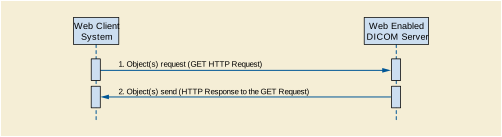
The interaction shall be as shown in Figure 6-1.
Multiple communications modes are possible:
Media types are identifiers used to define the data format of a representation. HTTP uses media types in the Content-Type and Accept header fields in order to provide open and extensible data typing and type negotiation. The syntax of media types is:
media-type = type "/" subtype *(OWS ";" OWS parameter)
    type = token
    subtype = token
    parameter = token "=" (token / quoted-string) )
The <type>/<subtype> may be followed by parameters in the form of name=value pairs.
The type, subtype, and parameter name tokens are case-insensitive, but the case sensitivity of parameter values depends on the semantics of the parameter name. The presence or absence of a parameter might be significant to the processing of a media-type, depending on its definition within the media type registry.
A parameter value can be transmitted either as a token or quoted-string. The quoted and unquoted values are equivalent.
Media types are defined in [RFC7231] Section 3.1.1.1.
IANA maintains a registry of media types at http://www.iana.org/assignments/media-types/media-types.xhtml.
Some of the services defined in this Standard support the multipart media types [RFC2387]. The syntax is:
multipart-media-type = "multipart" "/" subtype *( OWS ";" OWS parameter )
The "application/multipart-related" media type is used by the RS services. Its syntax is:
    multipart-related = "multipart/related"
                         OWS ";" OWS "type" "=" DQUOTE media-type DQUOTE
                         OWS ";" OWS "boundary" "=" boundary
                         [related-parameters]
    boundary = 0*69bchar bchar-nospace
    bchar = bchar-nospace / SP
    bchar-nospace = DIGIT / ALPHA / "'" / "(" / ") " / "+" / "_" / "," / "-"
                    / "." / "/" / ":" / "=" / "?" "/" / ":" / "=" / "?"
    related-parameters = [";" "start" "=" cid]
                         [";" "start-info" "=" cid-list]
    cid-list = cid cid-list
    cid = token / quoted-string
The "type" parameter is required. It contains the media type of the "root" body part. It always contains the special character "/" and thus requires quote marks.
The <cid> is a content identifier. It should be unique for each part of the multipart message.
Typically, the "start" and "start-info" parameters are not specified, and the "root" is the first body part.
Table 6.1.1-1 defines Resource Categories that correspond to different SOP Classes. The following sections map each Resource Category to appropriate DICOM and Rendered media types.
Table 6.1.1-1. Resource Categories
|
This category includes all resources that are instances of a multi-frame SOP Class, that are not video and that contain more than one frame. |
|
|
This category includes all resources that contain more than one frame and: |
|
|
This category includes all resources that:
|
|
|
This category includes all resources that are not included above. |
DICOM resources may be converted into non-DICOM media types in order to render them using commonly available non-DICOM software, such as browsers.
-
A DICOM SOP Instance containing an image could be rendered into the image/jpeg or image/png Rendered Media Types.
-
A DICOM SOP Instance containing a multi-frame image in a lossless transfer syntax could be rendered into a video/mpeg or video/mp4 Rendered Media Type.
-
A DICOM SOP Instance containing a Structured Report could be rendered into a text/html, text/plain, or application/pdf Rendered Media Type.
Table 6.1.1-2 specifies the meaning of media type requirements in Table 6.1.1-3.
Table 6.1.1-3 defines the Rendered Media Types by their Resource Category for the URI, WS, and RS modes.
When an image/jpeg media type is returned, the image shall be encoded using the JPEG baseline lossy 8 bit Huffman encoded non-hierarchical non-sequential process defined in ISO/IEC 10918-1.
The origin server may support additional rendered media types.
The term Acceptable Media Types denotes the media types that are acceptable to the user agent in the response. The Acceptable Media Types are those specified in:
All requests that expect a response with a payload, shall include the Accept header field. The response to a request without an Accept header field shall be 406 (Not Acceptable). Even if specific media types are provided in the <accept> query parameter, an Accept header field with one or more values shall be present, at a minimum */*.
The Acceptable Media Types shall be either DICOM media-types or Rendered media types, but not both. If the Acceptable Media Types contains both DICOM and Rendered Media Types, the origin server shall return 409 (Conflict).
The user agent may specify the relative degree of preference for media types, whether in the <accept> query parameter or the Accept header field, using the <weight> parameter. See [RFC7231] Section 5.3.1.
    weight = OWS ";" OWS "q=" qvalue
    qvalue = ("0" ["." 0*3DIGIT]) / ("1" ["." 0*3("0") ])
The <accept> query parameter is primarily designed for use in hyperlinks (URLs) embedded in documents, where the Accept header field is not accessible. It is similar to the Accept header field, except that it shall not have wildcards (<type>/* or */*).
The <accept> query parameter has the following syntax:
    accept = accept-name "=" 1#(media-type [weight])
    accept-name = "%s" quoted-string
Note
The "%s" that prefixes the <accept-name> specifies that it is a case sensitive token. See [RFC7405].
Its value is a comma-separated list of one or more <media-type>s, possibly including parameters. It shall be supported by the origin server. It is optional for the user agent.
The <accept-name> of the <accept> query parameter is defined by the Service. It is case-sensitive. Table 6.1.1-4 contains the <accept-name> of the <accept> query parameter for some services.
The <accept> query parameter should not be used when the user agent can specify the values in the Accept header field.
All media types present in an <accept> query parameter shall be compatible with a media range in the Accept header field, either explicitly or implicitly through wildcards.
The Accept header field is used to specify media ranges acceptable to the user agent. It has the following syntax:
Accept = 1#(media-range [weight])
    media-range = media-type
                  / type "/" "*" parameters
                  / "*/*" parameters
    parameters ; See Section 6.1.1
The Accept header field shall be present. Its value shall be a comma-separated list of one or more media ranges acceptable in the response. See [RFC7231] Section 5.3.2.
A media range is either a media-type or a wildcard. Wildcards use the asterisk ("*") to group media types into ranges, with <type>/* indicating all subtypes of that type, and */* indicating all media types from the target's Resource's Category.
For example, the media range "image/*" matches "image/jpeg", which is the default media type for the Single Frame Image Resource Category, and "text/*" matches "text/html", which is the default media type for the Text Resource Category. The "*/*" media range matches the default media type for the target's Resource Category.
If the origin server receives a request without an Accept header field, but that might have a response payload, it shall return a 406 (Not Acceptable).
The Selected Media Type is the media type selected by the origin server for the response payload. The media types in the <accept> query parameter and the media ranges in the Accept header field shall each be separately prioritized according to the rules defined in [RFC7231] Section 5.3.1.
The Selected Media Type is chosen as follows:
-
Select the representation with the highest priority supported media type for that category in the <accept> query parameter, which is compatible with the Accept header field.
-
If no media type in the <accept> query parameter is supported, select the highest priority supported media type for that category in the Accept header field, if any.
-
Otherwise, select the default media type for the category if the Accept header field contains a wildcard media range matching the category, if any.
For a set of media types in the <accept> query parameter (step 2 above), or for a set of media ranges in the Accept header field (step 3 above), the highest priority supported media type is determined as follows:
-
Assign a <qvalue> of 1 to any member of the set that does not have a one.
-
Assign each representation supported by the origin server the <qvalue> of the most specific media type that it matches.
-
Select the representation with the highest <qvalue>. If there is a tie, the origin server shall determine which is returned.
For example, consider an origin server that receives a request with the following Accept header field:
Accept: text/*; q=0.5, text/html; q=0.4, text/html; level=1, text/html; level=2; q=0.7, image/png, */*; q=0.4
Suppose that for the resource indicated in the request, the origin server supports representations for the following media types:
    text/html(regular, level 1 and level 2)
    text/rtf
    text/plain
    text/x-latex
These media types are assigned the following <qvalue>s, based on the media ranges above:
Although "image/png" has been assigned a default <qvalue> of 1.0, it is not among the supported media types for this resource, and thus is not listed.
The selected media type is "text/html; level=1" since it is the supported media type in the Text Category with the highest qvalue.
HTTP uses charset names to indicate or negotiate the character encoding of textual content in representations [RFC6365] Section 3.3.
Character sets may be identified using the value in the IANA Preferred MIME Name column in the IANA Character Set Registry http://www.iana.org/assignments/character-sets/character-sets.xhtml.
Character sets may be identified by using the DICOM Defined Terms for the character set. See Section C.12.1.1.2 “Specific Character Set” in PS3.3 , and Section 6.1.2.3 “Encoding of Character Repertoires” in PS3.5 .
The origin server shall support the "UTF-8" charset name for RS Retrieve Rendered, but is not required to support the DICOM Defined Term "ISO_IR 192".
charset = token / defined-term / DQUOTE defined-term DQUOTE
Some DICOM Defined Terms for character sets contain space characters; and shall be enclosed in double quotes in HTTP header fields and percent encoded in URLs.
The Conformance Statement shall document all supported character sets. The Retrieve Capabilities response for all RS Services shall also document all supported character sets.
A request without any <charset> query parameter or Accept-Charset header field implies that the user agent will accept any charset in the response.
Annex D contains a mapping of some Specific Character Set (0008,0005) Defined Terms to IANA charset tokens.
The term Acceptable Character Sets denotes the character sets that are acceptable to the user agent in the response. The Acceptable Character Sets are those specified in:
When the acceptable character sets contains a list of one or more Defined Terms they should be ordered as specified in Section C.12.1.1.2 “Specific Character Set” in PS3.3 and Section 6.1.2.3 “Encoding of Character Repertoires” in PS3.5 . This is especially important for ISO 2022 character sets.
The <character-set> query parameter is primarily designed for use in hyperlinks (URLs) embedded in documents, where the Accept-Charset header field is not accessible.
The <character-set> query parameter has the following syntax:
character-set = name "=" 1#(charset [weight])
The <character-set> query parameter value is a comma-separated list of one or more <charset>s. It is similar to the Accept-Charset header field, except that it shall not have wildcards. It shall be supported by the origin server. It is optional for the user agent.
All <charset>s present in the <character-set> query parameter may have a corresponding character set in the Accept-Charset header field, either explicitly or implicitly through wildcards.
The <name> of the <character-set> query parameter is defined by the Service. Table 6.1.2-1 contains the names of the <character-set> query parameter for some services.
The Accept-Charset header field has the following syntax:
Accept-Charset = 1#(charset [weight]) / ("*" [weight])
The user agent may provide a list of Acceptable Character Sets in the Accept-Charset header field of the request. Its value is a comma-separated list of one or more <charset>s and/or the wildcard value ("*"). It shall be supported by the origin server. It is optional for the user agent.
The values of the Accept-Charset header field values are prioritized by their <weight> parameter.
If no wildcard ("*") is present, then any character sets not explicitly mentioned in the header field are considered "not acceptable" to the client.
A request without an Accept-Charset header field implies that the user agent will accept any charset in response.
If the media type defines a "charset" parameter, it should be included with the media type in the Accept header field, rather than in the Accept-Charset header field.
The origin server shall determine the Selected Character Set(s) as follows:
-
Select the first supported character set in the "charset" parameter(s) of the Selected Media Type.
-
Otherwise, select the highest priority supported <charset> in the <character-set> query parameter.
-
Otherwise, select the highest priority supported <charset> in the Accept-Charset header field.
-
Otherwise, if the Selected Media Type has a default character set that is supported, select it.
Rendered representations returned in the response shall have all contained strings returned in the Selected Character Sets.
If the character set in which the target resource is encoded is not the Selected CharacterSet:
Note
This means that some SOP Instances may be convertible and others will not be, even though they have the same Specific Character Set (0008,0005).
All origin servers shall support conversion to the UTF-8 character set for RS Rendered Retrieve.
If the user agent chooses to perform its own conversion rather than have it done by the origin server: