B.4.2.3.3.1 Activity - Film Images
B.4.2.3.3.1.1 Description and Sequencing of Activities
A user composes images onto film sheets and requests them to be sent to a specific hardcopy device. The user can select the desired film format and number of copies. Each print-job is forwarded to the job queue and processed individually.
The Hardcopy AE is invoked by the job control interface that is responsible for processing network tasks. The job consists of data describing the images and graphics to be printed as well as the requested layout and other parameters. The film sheet is internally processed, converted to a STANDARD/1,1 page and then the page image is sent. If no association to the printer can be established, the print-job is switched to a failed state and the user informed.
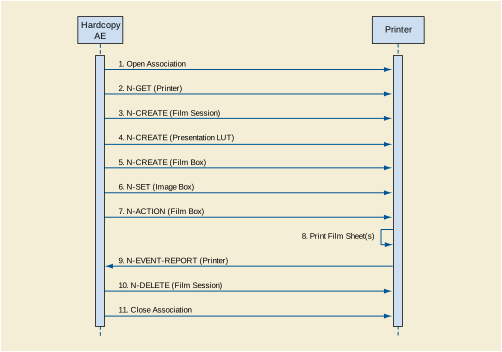
A typical sequence of DIMSE messages sent over an association between Hardcopy AE and a Printer is illustrated in Figure B.4.2-5:
-
Hardcopy AE opens an association with the Printer
-
N-GET on the Printer SOP Class is used to obtain current printer status information. If the Printer reports a status of FAILURE, the print-job is switched to a failed state and the user informed.
-
N-CREATE on the Film Session SOP Class creates a Film Session.
-
N-CREATE on the Presentation LUT SOP Class creates a Presentation LUT (if supported by the printer).
-
N-CREATE on the Film Box SOP Class creates a Film Box linked to the Film Session. A single Image Box will be created as the result of this operation (Hardcopy AE only uses the format STANDARD\1,1)
-
N-SET on the Image Box SOP Class transfers the contents of the film sheet to the printer. If the printer does not support the Presentation LUT SOP Class, the image data will be passed through a printer-specific correction LUT before being sent.
-
N-ACTION on the Film Box SOP Class instructs the printer to print the Film Box
-
The printer prints the requested number of film sheets
-
The Printer asynchronously reports its status via N-EVENT-REPORT notification (Printer SOP Class). The printer can send this message at any time. Hardcopy AE does not require the N-EVENT-REPORT to be sent. Hardcopy AE is capable of receiving an N-EVENT-REPORT notification at any time during an association. If the Printer reports a status of FAILURE, the print-job is switched to a failed state and the user informed.
-
N-DELETE on the Film Session SOP Class deletes the complete Film Session SOP Instance hierarchy.
-
Hardcopy AE closes the association with the Printer
Status of the print-job is reported through the job control interface. Only one job will be active at a time for each separate hardcopy device. If any Response from the remote Application contains a status other than Success or Warning, the Association is aborted and the related Job is switched to a failed state. It can be restarted any time by user interaction or, if configured, by automated retry.
B.4.2.3.3.1.2 Proposed Presentation Contexts
EXAMPLE-INTEGRATED-MODALITY is capable of proposing the Presentation Contexts shown in the Table below:
Table B.4.2-34. Proposed Presentation Contexts for Activity Film Images
|
Presentation Context Table
|
|
Abstract Syntax
|
Transfer Syntax
|
Role
|
Extended Negotiation
|
|
Name
|
UID
|
Name List
|
UID List
|
|
Basic Grayscale Print Management Meta
|
1.2.840.10008.5.1.1.9
|
Implicit VR Little Endian
Explicit VR Little Endian
|
1.2.840.10008.1.2
1.2.840.10008.1.2.1
|
SCU
|
None
|
|
Presentation LUT
|
1.2.840.10008.5.1.1.23
|
Implicit VR Little Endian
Explicit VR Little Endian
|
1.2.840.10008.1.2
1.2.840.10008.1.2.1
|
SCU
|
None
|
B.4.2.3.3.1.3 Common SOP Specific Conformance for All Print SOP Classes
The general behavior of Hardcopy AE during communication failure is summarized in the Table below. This behavior is common for all SOP Classes supported by Hardcopy AE.
Table B.4.2-35. Hardcopy Communication Failure Behavior
|
Exception
|
Behavior
|
|
Timeout
|
The Association is aborted using A-ABORT and the print-job is marked as failed. The reason is logged and the job failure is reported to the user via the job control application.
|
|
Association aborted by the SCP or network layers
|
The print-job is marked as failed. The reason is logged and the job failure is reported to the user via the job control application.
|
B.4.2.3.3.1.4 SOP Specific Conformance for the Printer SOP Class
Hardcopy AE supports the following DIMSE operations and notifications for the Printer SOP Class:
Details of the supported attributes and status handling behavior are described in the following subsections.
B.4.2.3.3.1.4.1 Printer SOP Class Operations (N-GET)
Hardcopy AE uses the Printer SOP Class N-GET operation to obtain information about the current printer status. The attributes obtained via N-GET are listed in the Table below:
Table B.4.2-36. Printer SOP Class N-GET Request Attributes
|
Attribute Name
|
Tag
|
VR
|
Value
|
Presence of Value
|
Source
|
|
Printer Status
|
(2110,0010)
|
CS
|
Provided by Printer
|
ALWAYS
|
Printer
|
|
Printer Status Info
|
(2110,0020)
|
CS
|
Provided by Printer
|
ALWAYS
|
Printer
|
The Printer Status information is evaluated as follows:
-
If Printer status (2110,0010) is NORMAL, the print-job continues to be printed.
-
If Printer status (2110,0010) is FAILURE, the print-job is marked as failed. The contents of Printer Status Info (2110,0020) is logged and reported to the user via the job control application.
-
If Printer status (2110,0010) is WARNING, the print-job continues to be printed. The contents of Printer Status Info (2110,0020) is logged and reported to the user via the job control application.
The behavior of Hardcopy AE when encountering status codes in a N-GET response is summarized in the Table below:
Table B.4.2-37. Printer SOP Class N-GET Response Status Handling Behavior
|
Service Status
|
Further Meaning
|
Error Code
|
Behavior
|
|
Success
|
Success
|
0000
|
The request to get printer status information was success.
|
|
*
|
*
|
Any other status code.
|
The Association is aborted using A-ABORT and the print-job is marked as failed. The status meaning is logged and reported to the user.
|
B.4.2.3.3.1.4.2 Printer SOP Class Notifications (N-EVENT-REPORT)
Hardcopy AE is capable of receiving an N-EVENT-REPORT request at any time during an association.
The behavior of Hardcopy AE when receiving Event Types within the N-EVENT-REPORT is summarized in the Table below:
Table B.4.2-38. Printer SOP Class N-EVENT-REPORT Behavior
|
Event Type Name
|
Event Type ID
|
Behavior
|
|
Normal
|
1
|
The print-job continues to be printed.
|
|
Warning
|
2
|
The print-job continues to be printed. The contents of Printer Status Info (2110,0020) is logged and reported to the user via the job-control application.
|
|
Failure
|
3
|
The print-job is marked as failed. The contents of Printer Status Info (2110,0020) is logged and reported to the user via the job-control application.
|
|
*
|
*
|
An invalid Event Type ID will cause a status code of 0113H to be returned in a N-EVENT-REPORT response.
|
The reasons for returning specific status codes in a N-EVENT-REPORT response are summarized in the Table below:
Table B.4.2-39. Printer SOP Class N-EVENT-REPORT Response Status Reasons
|
Service Status
|
Further Meaning
|
Error Code
|
Reasons
|
|
Success
|
Success
|
0000
|
The notification event has been successfully received.
|
|
Failure
|
No Such Event Type
|
0113H
|
An invalid Event Type ID was supplied in the N-EVENT-REPORT request.
|
|
Failure
|
Processing Failure
|
0110H
|
An internal error occurred during processing of the N-EVENT-REPORT. A short description of the error will be returned in Error Comment (0000,0902).
|
B.4.2.3.3.1.5 SOP Specific Conformance for the Film Session SOP Class
Hardcopy AE supports the following DIMSE operations for the Film Session SOP Class:
Details of the supported attributes and status handling behavior are described in the following subsections.
B.4.2.3.3.1.5.1 Film Session SOP Class Operations (N-CREATE)
The attributes supplied in an N-CREATE Request are listed in the Table below:
Table B.4.2-40. Film Session SOP Class N-CREATE Request Attributes
|
Attribute Name
|
Tag
|
VR
|
Value
|
Presence of Value
|
Source
|
|
Number of Copies
|
(2000,0010)
|
IS
|
1 .. 10
|
ALWAYS
|
User
|
|
Medium Type
|
(2000,0030)
|
CS
|
BLUE FILM, CLEAR FILM or PAPER
|
ALWAYS
|
User
|
|
Film Destination
|
(2000,0040)
|
CS
|
MAGAZINE or PROCESSOR
|
ALWAYS
|
User
|
The behavior of Hardcopy AE when encountering status codes in a N-CREATE response is summarized in the Table below:
Table B.4.2-41. Film Session SOP Class N-CREATE Response Status Handling Behavior
|
Service Status
|
Further Meaning
|
Error Code
|
Behavior
|
|
Success
|
Success
|
0000
|
The SCP has completed the operation successfully.
|
|
Warning
|
Attribute Value Out of Range
|
0116H
|
The N-CREATE operation is considered successful but the status meaning is logged. Additional information in the Response identifying the attributes out of range will be logged (i.e., Elements in the Modification List/Attribute List)
|
|
Warning
|
Attribute List Error
|
0107H
|
The N-CREATE operation is considered successful but the status meaning is logged. Additional information in the Response identifying the attributes will be logged (i.e., Elements in the Attribute Identifier List)
|
|
*
|
*
|
Any other status code.
|
The Association is aborted using A-ABORT and the print-job is marked as failed. The status meaning is logged and reported to the user.
|
B.4.2.3.3.1.5.2 Film Session SOP Class Operations (N-DELETE)
The behavior of Hardcopy AE when encountering status codes in a N-DELETE response is summarized in the Table below:
Table B.4.2-42. Printer SOP Class N-DELETE Response Status Handling Behavior
|
Service Status
|
Further Meaning
|
Error Code
|
Behavior
|
|
Success
|
Success
|
0000
|
The SCP has completed the operation successfully.
|
|
*
|
*
|
Any other status code.
|
The Association is aborted using A-ABORT and the print-job is marked as failed. The status meaning is logged and reported to the user.
|
B.4.2.3.3.1.6 SOP Specific Conformance for the Presentation LUT SOP Class
Hardcopy AE supports the following DIMSE operations for the Presentation LUT SOP Class:
Details of the supported attributes and status handling behavior are described in the following subsections.
B.4.2.3.3.1.6.1 Presentation LUT SOP Class Operations (N-CREATE)
The attributes supplied in an N-CREATE Request are listed in the Table below:
Table B.4.2-43. Presentation LUT SOP Class N-CREATE Request Attributes
|
Attribute Name
|
Tag
|
VR
|
Value
|
Presence of Value
|
Source
|
|
Presentation LUT Shape
|
(2050,0020)
|
CS
|
IDENTITY
|
ALWAYS
|
Auto
|
The behavior of Hardcopy AE when encountering status codes in a N-CREATE response is summarized in the Table below:
Table B.4.2-44. Presentation LUT SOP Class N-CREATE Response Status Handling Behavior
|
Service Status
|
Further Meaning
|
Error Code
|
Behavior
|
|
Success
|
Success
|
0000
|
The SCP has completed the operation successfully.
|
|
Warning
|
Requested Min Density or Max Density outside of printer's operating range
|
B605H
|
The N-CREATE operation is considered successful but the status meaning is logged.
|
|
*
|
*
|
Any other status code.
|
The Association is aborted using A-ABORT and the print-job is marked as failed. The status meaning is logged and reported to the user.
|
|
Service Status
|
Further Meaning
|
Error Code
|
Behavior
|
|
Success
|
Success
|
0000
|
The SCP has completed the operation successfully.
|
B.4.2.3.3.1.7 SOP Specific Conformance for the Film Box SOP Class
Hardcopy AE supports the following DIMSE operations for the Presentation LUT SOP Class:
Details of the supported attributes and status handling behavior are described in the following subsections.
B.4.2.3.3.1.7.1 Film Box SOP Class Operations (N-CREATE)
The attributes supplied in an N-CREATE Request are listed in the Table below:
Table B.4.2-45. Film Box SOP Class N-CREATE Request Attributes
|
Attribute Name
|
Tag
|
VR
|
Value
|
Presence of Value
|
Source
|
|
Image Display Format
|
(2010,0010)
|
CS
|
STANDARD\1,1
|
ALWAYS
|
Auto
|
|
Referenced Film Session Sequence
|
(2010,0500)
|
SQ
|
|
ALWAYS
|
Auto
|
|
>Referenced SOP Class UID
|
(0008,1150)
|
UI
|
1.2.840.10008.5.1.1.1
|
ALWAYS
|
Auto
|
|
>Referenced SOP Instance UID
|
(0008,1155)
|
UI
|
From created Film Session SOP Instance
|
ALWAYS
|
Auto
|
|
Film Orientation
|
(2010,0040)
|
CS
|
PORTRAIT or LANDSCAPE
|
ALWAYS
|
User
|
|
Film Size ID
|
(2010,0050)
|
CS
|
14INX17IN, 14INX14IN, 11INX14IN, 11INX11IN, 85INX11IN, 8INX10IN
|
ALWAYS
|
User
|
|
Magnification Type
|
(2010,0060)
|
CS
|
REPLICATE, BILINEAR, CUBIC or NONE
|
ALWAYS
|
User
|
|
Border Density
|
(2010,0100)
|
CS
|
BLACK or WHITE
|
ALWAYS
|
User
|
|
Max Density
|
(2010,0130)
|
US
|
0 .. 310
|
ALWAYS
|
Auto
|
|
Min Density
|
(2010,0120)
|
US
|
0 .. 50
|
ALWAYS
|
Auto
|
|
Illumination
|
(2010,015E)
|
US
|
0 .. 5000
|
ALWAYS
|
User
|
|
Reflective Ambient Light
|
(2010,0160)
|
US
|
0 .. 100
|
ALWAYS
|
User
|
|
Referenced Presentation LUT Sequence
|
(2050,0500)
|
SQ
|
Only sent if Presentation LUT SOP Class has been negotiated.
|
ANAP
|
Auto
|
|
>Referenced SOP Class UID
|
(0008,1150)
|
UI
|
1.2.840.10008.5.1.1.23
|
ALWAYS
|
Auto
|
|
>Referenced SOP Instance UID
|
(0008,1155)
|
UI
|
From created Presentation LUT SOP Instance
|
ALWAYS
|
Auto
|
The behavior of Hardcopy AE when encountering status codes in a N-CREATE response is summarized in the Table below:
Table B.4.2-46. Film Box SOP Class N-CREATE Response Status Handling Behavior
|
Service Status
|
Further Meaning
|
Error Code
|
Behavior
|
|
Success
|
Success
|
0000
|
The SCP has completed the operation successfully.
|
|
Warning
|
Requested Min Density or Max Density outside of printer's operating range
|
B605H
|
The N-CREATE operation is considered successful but the status meaning is logged.
|
|
*
|
*
|
Any other status code.
|
The Association is aborted using A-ABORT and the print-job is marked as failed. The status meaning is logged and reported to the user.
|
B.4.2.3.3.1.7.2 Film Box SOP Class Operations (N-ACTION)
An N-ACTION Request is issued to instruct the Print SCP to print the contents of the Film Box. The Action Reply argument in an N-ACTION response is not evaluated.
The behavior of Hardcopy AE when encountering status codes in a N-ACTION response is summarized in the Table below:
Table B.4.2-47. Film Box SOP Class N-ACTION Response Status Handling Behavior
|
Service Status
|
Further Meaning
|
Error Code
|
Behavior
|
|
Success
|
Success
|
0000
|
The SCP has completed the operation successfully. The film has been accepted for printing.
|
|
Warning
|
Film Box SOP Instance hierarchy does not contain Image Box SOP Instances (empty page)
|
B603H
|
The Association is aborted using A-ABORT and the print-job is marked as failed. The status meaning is logged and reported to the user.
|
|
Warning
|
Image size is larger than Image Box size. The image has been demagnified.
|
B604H
|
The N-ACTION operation is considered successful but the status meaning is logged.
|
|
Warning
|
Image size is larger than Image Box size. The image has been cropped to fit.
|
B609H
|
The N-ACTION operation is considered successful but the status meaning is logged.
|
|
Warning
|
Image size or Combined Print Image Size is larger than Image Box size. The image or combined Print Image has been decimated to fit.
|
B60AH
|
The N-ACTION operation is considered successful but the status meaning is logged.
|
|
Failure
|
Unable to create Print Job SOP Instance; print queue is full.
|
C602
|
The Association is aborted using A-ABORT and the print-job is marked as failed. The status meaning is logged and reported to the user.
|
|
Failure
|
Image size is larger than Image Box size.
|
C603
|
The Association is aborted using A-ABORT and the print-job is marked as failed. The status meaning is logged and reported to the user.
|
|
Failure
|
Combined Print Image Size is larger than Image Box size.
|
C613
|
The Association is aborted using A-ABORT and the print-job is marked as failed. The status meaning is logged and reported to the user.
|
|
*
|
*
|
Any other status code.
|
The Association is aborted using A-ABORT and the print-job is marked as failed. The status meaning is logged and reported to the user.
|
B.4.2.3.3.1.8 SOP Specific Conformance for the Image Box SOP Class
Hardcopy AE supports the following DIMSE operations for the Image Box SOP Class:
Details of the supported attributes and status handling behavior are described in the following subsections.
B.4.2.3.3.1.8.1 Image Box SOP Class Operations (N-SET)
The attributes supplied in an N-SET Request are listed in the Table below:
Table B.4.2-48. Image Box SOP Class N-SET Request Attributes
|
Attribute Name
|
Tag
|
VR
|
Value
|
Presence of Value
|
Source
|
|
Image Position
|
(2020,0010)
|
US
|
1
|
ALWAYS
|
Auto
|
|
Basic Grayscale Image Sequence
|
(2020,0110)
|
SQ
|
|
ALWAYS
|
Auto
|
|
>Samples Per Pixel
|
(0028,0002)
|
US
|
1
|
ALWAYS
|
Auto
|
|
>Photometric Interpretation
|
(0028,0004)
|
CS
|
MONOCHROME2
|
ALWAYS
|
Auto
|
|
>Rows
|
(0028,0010)
|
US
|
Depends on film size
|
ALWAYS
|
Auto
|
|
>Columns
|
(0028,0011)
|
US
|
Depends on film size
|
ALWAYS
|
Auto
|
|
>Pixel Aspect Ratio
|
(0028,0034)
|
IS
|
1\1
|
ALWAYS
|
Auto
|
|
>Bits Allocated
|
(0028,0100)
|
US
|
8
|
ALWAYS
|
Auto
|
|
>Bits Stored
|
(0028,0101)
|
US
|
8
|
ALWAYS
|
Auto
|
|
>High Bit
|
(0028,0102)
|
US
|
7
|
ALWAYS
|
Auto
|
|
>Pixel Representation
|
(0028,0103)
|
US
|
0
|
ALWAYS
|
Auto
|
|
>Pixel Data
|
(7FE0,0010)
|
OB
|
Pixels of rendered film sheet
|
ALWAYS
|
Auto
|
The behavior of Hardcopy AE when encountering status codes in a N-SET response is summarized in the Table below:
Table B.4.2-49. Image Box SOP Class N-SET Response Status Handling Behavior
|
Service Status
|
Further Meaning
|
Error Code
|
Behavior
|
|
Success
|
Success
|
0000
|
The SCP has completed the operation successfully. Image successfully stored in Image Box.
|
|
Warning
|
Image size is larger than Image Box size. The image has been demagnified.
|
B604H
|
The N-SET operation is considered successful but the status meaning is logged.
|
|
Warning
|
Requested Min Density or Max Density outside of printer's operating range.
|
B605H
|
The N-SET operation is considered successful but the status meaning is logged.
|
|
Warning
|
Image size is larger than Image Box size. The image has been cropped to fit.
|
B609H
|
The N-SET operation is considered successful but the status meaning is logged.
|
|
Warning
|
Image size or Combined Print Image Size is larger than Image Box size. The image or combined Print Image has been decimated to fit.
|
B60AH
|
The N-SET operation is considered successful but the status meaning is logged.
|
|
Failure
|
Image size is larger than Image Box size.
|
C603
|
The Association is aborted using A-ABORT and the print-job is marked as failed. The status meaning is logged and reported to the user.
|
|
Failure
|
Insufficient memory in printer to store the image.
|
C605
|
The Association is aborted using A-ABORT and the print-job is marked as failed. The status meaning is logged and reported to the user.
|
|
Failure
|
Combined Print Image Size is larger than Image Box size.
|
C613
|
The Association is aborted using A-ABORT and the print-job is marked as failed. The status meaning is logged and reported to the user.
|
|
*
|
*
|
Any other status code.
|
The Association is aborted using A-ABORT and the print-job is marked as failed. The status meaning is logged and reported to the user.
|