Table of Contents
- Notice and Disclaimer
- Foreword
- 1. Scope and Field of Application
- 2. Normative References
- 3. Definitions
- 4. Symbols and Abbreviations
- 5. Conventions
- 6. Purpose of a Conformance Statement
- 7. Conformance Requirements
- A. DICOM Conformance Statement Template (Normative)
-
- A.0. Cover Page
- A.1. Conformance Statement Overview
- A.2. Table of Contents
- A.3. Introduction
- A.4. Networking
-
- A.4.1. Implementation Model
- A.4.2. AE Specifications:
- A.4.3. Network Interfaces
- A.4.4. Configuration
- A.5. Media Interchange
- A.6. Transformation of DICOM to CDA
- A.7. Support of Character Sets
- A.8. Security
- A.9. Annexes
- B. Conformance Statement Sample Integrated Modality (Informative)
-
- B.0. Cover Page
- B.1. Conformance Statement Overview
- B.2. Table of Contents
- B.3. Introduction
- B.4. Networking
-
- B.4.1. Implementation Model
- B.4.2. AE Specifications
-
- B.4.2.1. Storage Application Entity Specification
-
- B.4.2.1.1. SOP Classes
- B.4.2.1.2. Association Policies
- B.4.2.1.3. Association Initiation Policy
- B.4.2.1.4. Association Acceptance Policy
-
- B.4.2.1.4.1. Activity - Receive Storage Commitment Response
- B.4.2.2. Workflow Application Entity Specification
- B.4.2.3. Hardcopy Application Entity Specification
-
- B.4.2.3.1. SOP Classes
- B.4.2.3.2. Association Policies
- B.4.2.3.3. Association Initiation Policy
-
- B.4.2.3.3.1. Activity - Film Images
-
- B.4.2.3.3.1.1. Description and Sequencing of Activities
- B.4.2.3.3.1.2. Proposed Presentation Contexts
- B.4.2.3.3.1.3. Common SOP Specific Conformance for All Print SOP Classes
- B.4.2.3.3.1.4. SOP Specific Conformance for the Printer SOP Class
- B.4.2.3.3.1.5. SOP Specific Conformance for the Film Session SOP Class
- B.4.2.3.3.1.6. SOP Specific Conformance for the Presentation LUT SOP Class
- B.4.2.3.3.1.7. SOP Specific Conformance for the Film Box SOP Class
- B.4.2.3.3.1.8. SOP Specific Conformance for the Image Box SOP Class
- B.4.2.3.4. Association Acceptance Policy
- B.4.3. Network Interfaces
- B.4.4. Configuration
- B.5. Media Interchange
- B.6. Support of Character Sets
- B.7. Security
- B.8. Annexes
-
- B.8.1. IOD Contents
- B.8.2. Data Dictionary of Private Attributes
- B.8.3. Coded Terminology and Templates
- B.8.4. Grayscale Image Consistency
- B.8.5. Standard Extended / Specialized / Private SOP Classes
- B.8.6. Private Transfer Syntaxes
- C. Conformance Statement Sample DICOMRis Interface (Informative)
-
- C.0. Cover Page
- C.1. Conformance Statement Overview
- C.2. Table of Contents
- C.3. Introduction
- C.4. Networking
-
- C.4.1. Implementation Model
- C.4.2. AE Specifications
-
- C.4.2.1. DICOMSRV AE Specification
-
- C.4.2.1.1. SOP Classes
- C.4.2.1.2. Association Policies
- C.4.2.1.3. Association Initiation Policy
- C.4.2.1.4. Association Acceptance Policy
- C.4.3. Network Interfaces
- C.4.4. Configuration
- C.5. Media Interchange
- C.6. Support of Character Sets
- C.7. Security
- C.8. Annexes
- D. Conformance Statement Sample DICOM Image Viewer (Informative)
-
- D.0. Cover Page
- D.1. Conformance Statement Overview
- D.2. Table of Contents
- D.3. Introduction
- D.4. Networking
-
- D.4.1. Implementation Model
- D.4.2. AE Specifications
-
- D.4.2.1. ECHO-SCP
-
- D.4.2.1.1. SOP Classes
- D.4.2.1.2. Association Policies
- D.4.2.1.3. Association Initiation Policy
- D.4.2.1.4. Association Acceptance Policy
- D.4.2.2. STORAGE-SCP
-
- D.4.2.2.1. SOP Classes
- D.4.2.2.2. Association Policies
- D.4.2.2.3. Association Initiation Policy
- D.4.2.2.4. Association Acceptance Policy
- D.4.2.3. STORAGE-SCU
-
- D.4.2.3.1. SOP Classes
- D.4.2.3.2. Association Policies
- D.4.2.3.3. Association Initiation Policy
- D.4.2.3.4. Association Acceptance Policy
- D.4.2.4. FIND-SCU
-
- D.4.2.4.1. SOP Classes
- D.4.2.4.2. Association Policies
- D.4.2.4.3. Association Initiation Policy
- D.4.2.4.4. Association Acceptance Policy
- D.4.2.5. MOVE-SCU
-
- D.4.2.5.1. SOP Classes
- D.4.2.5.2. Association Policies
- D.4.2.5.3. Association Initiation Policy
- D.4.2.5.4. Association Acceptance Policy
- D.4.3. Network Interfaces
- D.4.4. Configuration
- D.5. Media Interchange
- D.6. Support of Character Sets
- D.7. Security
- D.8. Annexes
- E. Conformance Statement Example Print Server (Informative)
-
- E.0. Cover Page
- E.1. Conformance Statement Overview
- E.2. Table of Contents
- E.3. Introduction
- E.4. Networking
-
- E.4.1. Implementation Model
- E.4.2. AE Specifications
-
- E.4.2.1. Print Server Management (SCP) Application Entity Specification
-
- E.4.2.1.1. SOP Classes
- E.4.2.1.2. Association Establishment Policy
- E.4.2.1.3. Association Initiation Policy
- E.4.2.1.4. Association Acceptance Policy
-
- E.4.2.1.4.1. Activity - Print Server Management
-
- E.4.2.1.4.1.1. Description and Sequencing of Activities
- E.4.2.1.4.1.2. Accepted Presentation Contexts
- E.4.2.1.4.1.3. SOP Specific Conformance
-
- E.4.2.1.4.1.3.1. Specific Conformance for Verification SOP Class
- E.4.2.1.4.1.3.2. Specific Conformance to Grayscale Print Management Meta SOP Class
- E.4.2.1.4.1.3.3. Specific Conformance to Basic Annotation Box SOP Class
- E.4.2.1.4.1.3.4. Specific Conformance to Print Job Box SOP Class
- E.4.2.1.4.1.3.5. Specific Conformance for Presentation LUT Box SOP Class
- E.4.2.1.4.1.3.6. Specific Conformance for Printer Configuration SOP Class
- E.4.3. Network Interfaces
- E.4.4. Configuration
- E.5. Media Interchange
- E.6. Support of Character Sets
- E.7. Security
- E.8. Annexes
- F. DICOM Conformance Statement Query-Retrieve-Server (Informative)
-
- F.0. Cover Page
- F.1. Conformance Statement Overview
- F.2. Table of Contents
- F.3. Introduction
- F.4. Networking
-
- F.4.1. Implementation Model
- F.4.2. AE Specifications
-
- F.4.2.1. STORAGE-SCU Application Entity Specification
- F.4.2.2. QUERY-RETRIEVE-SCP Application Entity Specification
- F.4.2.3. STORAGE-SCP Application Entity Specification
-
- F.4.2.3.1. SOP Classes
- F.4.2.3.2. Association Policies
- F.4.2.3.3. Association Initiation Policy
- F.4.2.3.4. Association Acceptance Policy
-
- F.4.2.3.4.1. Activity - Receive Images and Storage Commitment Requests
-
- F.4.2.3.4.1.1. Description and Sequencing of Activity
- F.4.2.3.4.1.2. Accepted Presentation Contexts
- F.4.2.3.4.1.3. SOP Specific Conformance for Verification SOP Class
- F.4.2.3.4.1.4. SOP Specific Conformance for Storage SOP Classes
- F.4.2.3.4.1.5. SOP Specific Conformance for Storage Commitment SOP Class
- F.4.3. Network Interfaces
- F.4.4. Configuration
- F.5. Media Interchange
- F.6. Support of Extended Character Sets
- F.7. Security
- F.8. Annexes
- G. Conformance Statement Sample ImageViewer with Hanging Protocol Support (Informative)
-
- G.0. Cover Page
- G.1. Conformance Statement Overview
- G.2. Table of Contents
- G.3. Introduction
- G.3.2. Audience, Remarks, Terms and Definitions, Basics of DICOM Communication, Abbreviations, References
- G.3.3. Additional Remarks for This Example
- G.4. Networking
-
- G.4.1. Implementation Model
- G.4.2. AE Specifications
-
- G.4.2.1. STORAGE-SCP
-
- G.4.2.1.1. SOP Classes
- G.4.2.1.2. Association Policies
- G.4.2.1.3. Association Initiation Policy
- G.4.2.1.4. Association Acceptance Policy
- G.4.2.2. STORAGE-SCU
-
- G.4.2.2.1. SOP Classes
- G.4.2.2.2. Association Policies
- G.4.2.2.3. Association Initiation Policy
- G.4.2.2.4. Association Acceptance Policy
- G.4.2.3. FIND-SCU
-
- G.4.2.3.1. SOP Classes
- G.4.2.3.2. Association Policies
- G.4.2.3.3. Association Initiation Policy
- G.4.2.3.4. Association Acceptance Policy
- G.4.2.4. MOVE-SCU
-
- G.4.2.4.1. SOP Classes
- G.4.2.4.2. Association Policies
- G.4.2.4.3. Association Initiation Policy
- G.4.2.4.4. Association Acceptance Policy
- G.4.3. Network Interfaces
- G.4.3.3. IPv4 and IPv6 Support
- G.4.4. Configuration
- G.5. Media Interchange
- G.6. Support of Character Sets
- G.7. Security
- G.8. Annexes
- H. DICOM Conformance Statement Medication-System-Gateway (Informative)
-
- H.0. Cover Page
- H.1. Conformance Statement Overview
- H.2. Table of Contents
- H.3. Introduction
- H.4. Networking
-
- H.4.1. Implementation Model
- H.4.2. AE Specifications
-
- H.4.2.1. PHARMACY-SCP Application Entity Specification
-
- H.4.2.1.1. SOP Classes
- H.4.2.1.2. Association Policies
- H.4.2.1.3. Association Initiation Policy
- H.4.2.1.4. Association Acceptance Policy
-
- H.4.2.1.4.1. Activity - Handling Query Requests
-
- H.4.2.1.4.1.1. Description and Sequencing of Activity
- H.4.2.1.4.1.2. Accepted Presentation Contexts
- H.4.2.1.4.1.3. SOP Specific Conformance for Verification SOP Class
- H.4.2.1.4.1.4. SOP Specific Conformance for Product Characteristics Query SOP Class
- H.4.2.1.4.1.5. SOP Specific Conformance for Substance Approval Query SOP Class
- H.4.2.1.4.1.6. PHARMACY-SCP AE C-FIND Response Behavior
- H.4.2.2. MAR-SCP Application Entity Specification
- H.4.3. Network Interfaces
- H.4.4. Configuration
- H.5. Media Interchange
- H.6. Support of Extended Character Sets
- H.7. Security
- I. Conformance Statement Sample WADO Service (Informative)
-
- I.0. Cover Page
- I.1. Conformance Statement Overview
- I.2. Table of Contents
- I.3. Introduction
- I.4. Networking
-
- I.4.1. Implementation Model
- I.4.2. AE Specifications
-
- I.4.2.1. WADO-WS Specifications
- I.4.2.2. WADO-URI Specification
- I.4.2.3. WADO-RS Specifications
- I.4.3. Network Interfaces
- I.4.4. Configuration
- I.5. Media Interchange
- I.6. Support of Character Sets
- I.7. Security
- I.8. Annexes
- J. Conformance Statement Sample STOW Service (Informative)
- K. Conformance Statement Sample QIDO-RS Provider (Informative)
-
- K.0. Cover Page
- K.1. Conformance Statement Overview
- K.2. Table of Contents
- K.3. Introduction
- K.4. Networking
- K.5. Media Interchange
- K.6. Support of Character Sets
- K.7. Security
- L. Conformance Statement Sample DICOM-RTV Service Provider (Informative)
- M. Conformance Statement Sample DICOM-RTV Service Consumer (Informative)
List of Figures
- 5.1-1. Application Entity Convention
- 5.1-2. Real-World Activity Convention
- 5.1-3. Local Relationship Convention
- 5.1-4. Associations Convention
- 5.1-5. File-Set Access
- A.4.1-1. Functional Overview
- A.5.1-1. Application Data Flow Diagram
- B.4.1-1. Application Data Flow Diagram
- B.4.1-2. Sequencing Constraints
- B.4.2-1. Sequencing of Activity - Send Images
- B.4.2-2. Sequencing of Activity - Receive Storage Commitment Response
- B.4.2-3. Sequencing of Activity - Worklist Update
- B.4.2-4. Sequencing of Activity - Acquire Images
- B.4.2-5. Sequencing of Activity - Film Images
- B.5.1-1. Application Data Flow Diagram for Media Storage
- C.4.1-1. DICOM Standard Interface
- C.4.1-2. Sequencing Constraints
- C.4.2-1. Sequencing Diagram for Activity: Configured AE Requests MWL Query
- C.4.2-2. Sequencing Diagram for Activity: Configured AE Makes Procedure Step Request
- D.4.1-1. Implementation Model
- D.5.1-1. Implementation Model
- E.4.1-1. Application Data Flow Diagram
- E.4.1-2. Print Server Management Sequence
- F.4.1-1. Example-Query-Retrieve-Server DICOM Data Flow Diagram
- F.4.1-2. Sequencing Constraints
- F.4.2-1. Sequencing of Activity - Send Images Requested By an External Peer AE
- F.4.2-2. Sequencing of Activity - Handling Query and Retrieval Requests
- F.4.2-3. Sequencing of Activity - Send Storage Commitment Notification Over New Association
- F.4.2-4. Sequencing of Activity - Receive Images and Storage Commitment Requests
- G.4.1-1. Implementation Model
- H.4.2-1. Example-Medication-System-Gateway DICOM Data Flow Diagram
- I.4.1-1. Application Data Flow Diagram
- J.4.1-1. Application Data Flow Diagram
- K.4.1-1. Application Data Flow Diagram
- L.4.1-1. Application Data Flow Diagram
- M.4.1-1. Application Data Flow Diagram
List of Tables
- A.1-1. Network Services
- A.1-2. UID Values
- A.1-3. Media Services
- A.4.2-1. SOP Class(Es) for "Application Entity <1>"
- A.4.2-2. DICOM Application Context
- A.4.2-3. Number of Associations as an Association Initiator for "Application Entity <1>"
- A.4.2-4. Number of Associations as an Association Acceptor for "Application Entity <1>"
- A.4.2-5. Asynchronous Nature as an Association Initiator for "Application Entity <1>"
- A.4.2-6. DICOM Implementation Class and Version for "Application Entity <1>"
- A.4.2-7. Proposed Presentation Contexts for "Application Entity <1>"
- A.4.2-8. Extended Negotiation as a SCU
- A.4.2-9. DICOM Command Response Status Handling Behavior
- A.4.2-10. DICOM Command Communication Failure Behavior
- A.4.2-11. Acceptable Presentation Contexts For"Application Entity <1>" and "Activity <2>"
- A.4.2-12. Extended Negotiation as a SCP
- 4.2-13. Storage C-STORE Response Status
- A.4.3-1. System Management Profiles Table
- A.4.4-1. AE Title Configuration Table
- A.4.4-2. Configuration Parameters Table
- A.5.2-1. AE Related Application Profiles, Real-World Activities, and Roles
- A.9.3-1. Context Groups
- B.1-1. Network Services
- B.1-2. Media Services
- B.3.1. Revision History
- B.4.2-1. SOP Classes for AE Storage
- B.4.2-2. DICOM Application Context for AE Storage
- B.4.2-3. Number of Associations Initiated for AE Storage
- B.4.2-4. Number of Associations Accepted for AE Storage
- B.4.2-5. Asynchronous Nature as a SCU for AE Storage
- B.4.2-6. DICOM Implementation Class and Version for AE Storage
- B.4.2-7. Proposed Presentation Contexts for Activity Send Images
- B.4.2-8. Storage C-STORE Response Status Handling Behavior
- B.4.2-9. Storage Communication Failure Behavior
- B.4.2-10. Storage Commitment N-ACTION Response Status Handling Behavior
- B.4.2-11. Storage Commitment Communication Failure Behavior
- B.4.2-12. Storage Commitment N-EVENT-REPORT Behavior
- B.4.2-13. Storage Commitment N-EVENT-REPORT Response Status Reasons
- B.4.2-14. Association Rejection Reasons
- B.4.2-15. Acceptable Presentation Contexts for Activity Receive Storage Commitment Response
- B.4.2-16. SOP Classes for AE Workflow
- B.4.2-17. DICOM Application Context for AE Workflow
- B.4.2-18. Number of Associations Initiated for AE Workflow
- B.4.2-19. Asynchronous Nature as a SCU for AE Workflow
- B.4.2-20. DICOM Implementation Class and Version for AE Workflow
- B.4.2-21. Proposed Presentation Contexts for Activity Worklist Update
- B.4.2-22. Modality Worklist C-FIND Response Status Handling Behavior
- B.4.2-23. Modality Worklist Communication Failure Behavior
- B.4.2-24. Worklist Request Identifier
- B.4.2-25. Proposed Presentation Contexts for Real-World Activity Acquire Images
- B.4.2-26. MPPS N-CREATE / N-SET Response Status Handling Behavior
- B.4.2-27. MPPS Communication Failure Behavior
- B.4.2-28. MPPS N-CREATE / N-SET Request Identifier
- B.4.2-29. SOP Classes for AE Hardcopy
- B.4.2-30. DICOM Application Context for AE Hardcopy
- B.4.2-31. Number of Associations Initiated for AE Hardcopy
- B.4.2-32. Asynchronous Nature as a SCU for AE Hardcopy
- B.4.2-33. DICOM Implementation Class and Version for AE Hardcopy
- B.4.2-34. Proposed Presentation Contexts for Activity Film Images
- B.4.2-35. Hardcopy Communication Failure Behavior
- B.4.2-36. Printer SOP Class N-GET Request Attributes
- B.4.2-37. Printer SOP Class N-GET Response Status Handling Behavior
- B.4.2-38. Printer SOP Class N-EVENT-REPORT Behavior
- B.4.2-39. Printer SOP Class N-EVENT-REPORT Response Status Reasons
- B.4.2-40. Film Session SOP Class N-CREATE Request Attributes
- B.4.2-41. Film Session SOP Class N-CREATE Response Status Handling Behavior
- B.4.2-42. Printer SOP Class N-DELETE Response Status Handling Behavior
- B.4.2-43. Presentation LUT SOP Class N-CREATE Request Attributes
- B.4.2-44. Presentation LUT SOP Class N-CREATE Response Status Handling Behavior
- B.4.2-45. Film Box SOP Class N-CREATE Request Attributes
- B.4.2-46. Film Box SOP Class N-CREATE Response Status Handling Behavior
- B.4.2-47. Film Box SOP Class N-ACTION Response Status Handling Behavior
- B.4.2-48. Image Box SOP Class N-SET Request Attributes
- B.4.2-49. Image Box SOP Class N-SET Response Status Handling Behavior
- B.4.3-1. Supported Physical Network Interfaces
- B.4.3-2. Supported System Management Profiles
- B.4.3-3. Supported DHCP Parameters
- B.4.4-1. AE Title Configuration Table
- B.4.4-2. Device Configuration Parameters Obtained From LDAP Server
- B.4.4-3. AE Configuration Parameters Obtained From LDAP Server
- B.4.4-4. Network Connection Configuration Parameters Obtained From LDAP Server
- B.4.4-5. Device Configuration Parameters Updated On LDAP Server
- B.4.4-6. Network Connection Configuration Parameters Updated On LDAP Server
- B.4.4-7. Storage AE Configuration Parameters Updated On LDAP Server
- B.4.4-8. Workflow AE Configuration Parameters Updated On LDAP Server
- B.4.4-9. Hardcopy AE Configuration Parameters Updated On LDAP Server
- B.4.4-10. Configuration Parameters Table
- B.5.1-1. DICOM Implementation Class and Version for Media Storage
- B.5.2-1. Application Profiles, Activities and Roles for Offline-Media
- B.5.2-2. IODs, SOP Classes and Transfer Syntaxes for OfflineMedia
- B.5.4-1. AE Title Configuration Table
- B.8.1-1. IOD of Created Rf SOP Instances
- B.8.1-2. IOD of Created Grayscale Softcopy Presentation State SOP Instances
- B.8.1-3. Patient Module of Created SOP Instances
- B.8.1-4. General Study Module of Created SOP Instances
- B.8.1-5. Patient Study Module of Created SOP Instances
- B.8.1-6. General Series Module of Created SOP Instances
- B.8.1-7. General Equipment Module of Created SOP Instances
- B.8.1-8. Private Application Module of Created SOP Instances
- B.8.1-9. General Image Module of Created Rf SOP Instances
- B.8.1-10. Image Pixel Module of Created Rf SOP Instances
- B.8.1-11. Cine Module of Created Rf SOP
- B.8.1-12. Multi-Frame Module of Created Rf SOP Instances
- B.8.1-13. Frame Pointers Module of Created Rf SOP Instances
- B.8.1-14. Mask Module of Created Rf SOP Instances
- B.8.1-15. X-Ray Image Module of Created Rf SOP Instances
- B.8.1-16. X-Ray Acquisition Module of Created Rf SOP Instances
- B.8.1-17. Modality LUT Module of Created Rf SOP Instances
- B.8.1-18. VOI LUT Module of Created RF SOP Instances
- B.8.1-19. SOP Common Module of Created Rf SOP Instances
- B.8.1-20. Presentation Series Module of Created GSPS SOP Instances
- B.8.1-21. Presentation State Module of Created GSPS SOP Instances
- B.8.1-22. Display Shutter Module of Created GSPS SOP Instances
- B.8.1-23. Displayed Area Module of Created GSPS SOP Instances
- B.8.1-24. Graphic Annotation Module of Created GSPS SOP Instances
- B.8.1-25. Spatial Transformation Module of Created GSPS SOP Instances
- B.8.1-26. Graphic Layer Module of Created GSPS SOP Instances
- B.8.1-27. Modality LUT Module of Created GSPS SOP Instances
- B.8.1-28. Softcopy VOI LUT Module of Created GSPS SOP Instances
- B.8.1-29. Softcopy Presentation LUT Module of Created GSPS SOP Instances
- B.8.1-30. SOP Common Module of Created GSPS SOP Instances
- B.8.1-31. Attribute Mapping Between Modality Worklist, Image and MPPS
- B.8.2-1. Data Dictionary of Private Attributes
- C.1-1. Network Services
- C.3.1-1. Revision History
- C.4.2-1. SOP Classes for AE DICOMSRV
- C.4.2-2. DICOM Application Context
- C.4.2-3. Number of Associations as an SCP for AE DICOMSRV
- C.4.2-4. DICOM Implementation Class and Version for DICOMSRV
- C.4.2-5. Scheduled Procedure Step Entry Actions Table
- C.4.2-6. Acceptable Presentation Contexts for AE DICOMSRV and Real-World Activity 'Configured AE Requests MWL Query'
- C.4.2-7. Modality Worklist Optional Return Keys Supported
- C.4.2-8. MWL C-FIND Response Status Reasons
- C.4.2-9. Acceptable Presentation Contexts for AE DICOMSRV and Real-World Activity "Configured AE Makes Procedure Step Request"
- C.4.2-10. Supported N-SET/N-CREATE Attributes for MPPS
- C.4.2-11. MPPS N-CREATE/N-SET Response Status Reasons
- C.4.2-12. Acceptable Presentation Contexts for AE DICOMSRV and Real-World Activity Configured AE Requests Verification
- C.4.2-13. AE Title Configuration Table
- C.4.2-14. Configuration Parameters Table
- C.8.1-1. Attributes in MPPS IOD Used By DICOMRis Applications
- C.8.1-2. HL7/Modality Worklist Attribute Mapping
- C.8.1-3. Coerced Fields for Modality Performed Procedure Step
- C.8.1-4. DICOMRis Controlled Terminology Usage
- D.1-1. Network Services
- D.1-2. Media Services
- D.3.1-1. Revision History
- D.4.2-1. SOP Classes Supported By ECHO-SCP
- D.4.2-2. Maximum PDU Size Received as a SCP for ECHO-SCP
- D.4.2-3. Number of Associations as a SCP for ECHO-SCP
- D.4.2-4. DICOM Implementation Class and Version for ECHO-SCP
- D.4.2-5. Acceptable Presentation Contexts for ECHO-SCP and Receive Echo Request
- D.4.2-6. SOP Classes Supported By STORAGE-SCP
- D.4.2-7. Maximum PDU Size Received as a SCP for STORAGE-SCP
- D.4.2-8. Number of Associations as a SCP for STORAGE-SCP
- D.4.2-9. DICOM Implementation Class and Version for STORAGE-SCP
- D.4.2-10. Acceptable Presentation Contexts for STORAGE-SCP and Receive Storage Request
- D.4.2-11. Response Status for STORAGE-SCP and Receive Storage Request
- D.4.2-12. SOP Classes Supported By STORAGE-SCU
- D.4.2-13. Maximum PDU Size Received as a SCP for STORAGE-SCU
- D.4.2-14. Number of Associations as a SCP for STORAGE-SCU
- D.4.2-15. DICOM Implementation Class and Version for STORAGE-SCU
- D.4.2-16. Proposed Presentation Contexts for STORAGE-SCU and Receive Storage Request
- D.4.2-17. Response Status for STORAGE-SCU and Receive Storage Request
- D.4.2-18. SOP Classes Supported By FIND-SCU
- D.4.2-19. Maximum PDU Size Received as a SCP for FIND-SCU
- D.4.2-20. Number of Associations as a SCP for FIND-SCU
- D.4.2-21. DICOM Implementation Class and Version for FIND-SCU
- D.4.2-22. Proposed Presentation Contexts for FIND-SCU and Query Remote AE
- D.4.2-23. Study Root Request Identifier for FIND-SCU
- D.4.2-24. Response Status for FIND-SCU and Query Remote AE Request
- D.4.2-25. SOP Classes Supported By MOVE-SCU
- D.4.2-26. Maximum PDU Size Received as a SCP for MOVE-SCU
- D.4.2-27. Number of Associations as a SCP for MOVE-SCU
- D.4.2-28. DICOM Implementation Class and Version for MOVE-SCU
- D.4.2-29. Proposed Presentation Contexts for MOVE-SCU and Retrieve From Remote AE
- D.4.2-30. Study Root Request Identifier for MOVE-SCU
- D.4.2-31. Response Status for MOVE-SCU and Retrieve From Remote AE Request
- D.4.4-1. Configuration Parameters Table
- D.5.2-1. Application Profiles, Activities, and Roles for MEDIA-FSR
- D.6.2-1. Supported Specific Character Set Defined Terms
- E.1-1. Network Services
- E.3.1-1. Revision History
- E.4.2-1. SOP Classes for AE Print Server (SCP)
- E.4.2-2. DICOM Application Context for AE Print SCP
- E.4.2-3. Number of Associations Accepted for AE Print Server Management (SCP)
- E.4.2-4. Number of Associations Initiated for Connectivity
- E.4.2-5. Asynchronous Nature as a SCP for AE Print Server (SCP)
- E.4.2-6. DICOM Implementation Class and Version for AE Print SCP
- E.4.2-7. Proposed Presentation Context for Connectivity Verification
- E.4.2-8. C-ECHO Response Status Handling Behavior
- E.4.2-9. Association Rejection Reasons
- E.4.2-10. Accepted Presentation Contexts for Print Server Management Activity
- E.4.2-11. C-ECHO Response Status Handling Reasons
- E.4.2-12. SOP Classes for Basic Grayscale Print Management Meta SOP Class
- E.4.2-13. Print Server SCP Communication Failure Reasons
- E.4.2-14. Basic Film Session SOP Class N-CREATE Request Attributes
- E.4.2-15. Film Session SOP Class N-CREATE Response Status Handling Reasons
- E.4.2-16. Film Session SOP Class N-SET Response Status Handling Reasons
- E.4.2-17. Film Session SOP Class N-DELETE Response Status Handling Reasons
- E.4.2-18. Film Session SOP Class N-ACTION Response Status Handling Reasons
- E.4.2-19. Basic Film Box SOP Class N-CREATE Request Attributes
- E.4.2-20. Annotation Display Formats
- E.4.2-21. Film Box SOP Class N-CREATE Response Status Handling Behavior
- E.4.2-22. Basic Film Box SOP Class N-SET Request Attributes
- E.4.2-23. Film Box SOP Class N-SET Response Status Handling Behavior
- E.4.2-24. Film Box SOP Class N-DELETE Response Status Handling Behavior
- E.4.2-25. Film Box SOP Class N-ACTION Response Status Handling Behavior
- E.4.2-26. Image Box SOP Class N-SET Request Attributes
- E.4.2-27. Image Box SOP Class N-SET Response Status Handling Behavior
- E.4.2-28. Printer SOP Class N-GET Request Attributes
- E.4.2-29. Printer SOP Class N-GET Response Status Handling Behavior
- E.4.2-30. Printer SOP Class N-EVENT-REPORT Attributes
- E.4.2-31. Printer SOP Class N-EVENT-REPORT Behavior
- E.4.2-32. Basic Annotation Box SOP Class N-SET Request Attributes
- E.4.2-33. Basic Annotation Box SOP Class N-SET Response Status Handling Behavior
- E.4.2-34. Print Job SOP Class N-EVENT-REPORT Attributes
- E.4.2-35. Print Job SOP Class N-EVENT-REPORT Notification Events Information
- E.4.2-36. Print Job SOP Class N-GET Request Attributes
- E.4.2-37. Print Job SOP Class N-GET Response Status Handling Behavior
- E.4.2-38. Presentation LUT SOP Class N-CREATE Request Attributes
- E.4.2-39. Presentation LUT SOP Class N-CREATE Response Status Handling Behavior
- E.4.2-40. Printer Configuration SOP Class N-GET Response Attributes
- E.4.3-1. Supported Physical Network Interfaces
- E.4.4-1. AE Title Configuration Table
- E.4.4-2. Configuration Parameters Table
- E.8.1-1. Print Server Attribute Mapping
- E.8.2-1. Data Dictionary of Private Attributes
- F.1-1. Network Services
- F.3.1-1. Revision History
- F.4.2-1. SOP Classes for STORAGE-SCU AE
- F.4.2-2. DICOM Application Context for STORAGE-SCU AE
- F.4.2-3. Number of Associations as a SCU for STORAGE-SCU AE
- F.4.2-4. Asynchronous Nature as a SCU for STORAGE-SCU AE
- F.4.2-5. DICOM Implementation Class and Version for STORAGE-SCU AE
- F.4.2-6. Proposed Presentation Contexts By the STORAGE-SCU AE
- F.4.2-7. STORAGE-SCU AE C-STORE Response Status Handling Behavior
- F.4.2-8. STORAGE-SCU AE Communication Failure Behavior
- F.4.2-9. SOP Classes for QUERY-RETRIEVE-SCP AE
- F.4.2-10. DICOM Application Context for QUERY-RETRIEVE-SCP AE
- F.4.2-11. Number of Simultaneous Associations as a SCP for QUERY-RETRIEVE-SCP AE
- F.4.2-12. Asynchronous Nature as a SCP for QUERY-RETRIEVE-SCP AE
- F.4.2-13. DICOM Implementation Class and Version for QUERY-RETRIEVE-SCP AE
- F.4.2-14. Association Rejection Reasons
- F.4.2-15. Accepted Presentation Contexts By the QUERY-RETRIEVE-SCP AE
- F.4.2-16. Patient Root C-FIND SCP Supported Elements
- F.4.2-17. Study Root C-FIND SCP Supported Elements
- F.4.2-19. QUERY-RETRIEVE-SCP AE C-FIND Response Status Return Behavior
- F.4.2-20. QUERY-RETRIEVE-SCP AE C-MOVE Response Status Return Behavior
- F.4.2-21. QUERY-RETRIEVE-SCP AE Communication Failure Behavior
- F.4.2-22. SOP Classes for STORAGE-SCP AE
- F.4.2-23. DICOM Application Context for STORAGE-SCP AE
- F.4.2-24. Number of Simultaneous Associations as an SCP for STORAGE-SCP AE
- F.4.2-25. Asynchronous Nature as a SCP for STORAGE-SCP AE
- F.4.2-26. Outstanding Storage Commitment Push Model Requests for STORAGE-SCP AE
- F.4.2-27. DICOM Implementation Class and Version for STORAGE-SCP AE
- F.4.2-28. Proposed Presentation Contexts By the STORAGE-SCP AE
- F.4.2-29. Association Rejection Reasons
- F.4.2-30. Accepted Presentation Contexts By STORAGE-SCP AE
- F.4.2-31. STORAGE-SCP AE C-STORE Response Status Return Reasons
- F.4.2-32. STORAGE-SCP AE Storage Service Communication Failure Reasons
- F.4.2-33. Supported Referenced SOP Classes in Storage Commitment Push Model N-ACTION Requests
- F.4.2-34. STORAGE-SCP AE Storage Commitment Push Model N-ACTION Response Status Return Behavior
- F.4.2-35. STORAGE-SCP AE N-EVENT-REPORT Response Status Handling Behavior
- F.4.2-36. STORAGE-SCP AE Storage Commitment Push Model Communication Failure Behavior
- F.4.3-1. Supported Physical Network Interfaces
- F.4.3-2. Supported System Management Profiles
- F.4.3-3. Supported DHCP Parameters
- F.4.4-1. Default Application Entity Characteristics
- F.4.4-2. Configuration Parameters
- F.8.1-1. Supported Composite Image SOP Classes for Display
- F.8.1-2. Significant Elements in Received Composite SOP Instances
- F.8.1-3. Significant Elements in Exported Composite SOP Instances
- G.1-1. Network Services
- G.3.1-1. Revision History
- G.4.2-1. SOP Classes Supported By STORAGE-SCP
- G.4.2-2. Maximum PDU Size Received as a SCP for STORAGE-SCP
- G.4.2-3. Number of Associations as a SCP for STORAGE-SCP
- G.4.2-4. DICOM Implementation Class and Version for STORAGE-SCP
- G.4.2-5. Accepted Presentation Contexts for STORAGE-SCP and Receive Storage Request
- G.4.2-6. Response Status for STORAGE-SCP and Receive Storage Request
- G.4.2-7. SOP Classes Supported By STORAGE-SCU
- G.4.2-8. Maximum PDU Size Received as a SCP for STORAGE-SCU
- G.4.2-9. Number of Associations as a SCP for STORAGE-SCU
- G.4.2-10. DICOM Implementation Class and Version for STORAGE-SCU
- G.4.2-11. Proposed Presentation Contexts for STORAGE-SCU and Receive Storage Request
- G.4.2-12. Response Behavior for STORAGE-SCU and Send Storage Request
- G.4.2-13. SOP Classes Supported By FIND-SCU
- G.4.2-14. Maximum PDU Size Received as a SCP for FIND-SCU
- G.4.2-15. Number of Associations as a SCP for FIND-SCU
- G.4.2-16. DICOM Implementation Class and Version for FIND-SCU
- G.4.2-17. Proposed Presentation Contexts for FIND-SCU and Query Remote AE
- G.4.2.3.3.1.3.1-1. Hanging Protocol Information Model C-FIND SOP Specific Conformance
- G.4.2-19. Response Status for FIND-SCU and Query Remote AE Request
- G.4.2-20. SOP Classes Supported By MOVE-SCU
- G.4.2-21. Maximum PDU Size Received as a SCP for MOVE-SCU
- G.4.2-27. Number of Associations as a SCP for MOVE-SCU
- G.4.2-23. DICOM Implementation Class and Version for MOVE-SCU
- G.4.2-24. Proposed Presentation Contexts for MOVE-SCU and Retrieve From Remote AE
- G.4.2-25. Request Identifier for MOVE-SCU
- G.4.2-26. Response Status for MOVE-SCU and Retrieve From Remote AE Request
- G.4.4-1. Configuration Parameters Table
- G.6.2-1. Supported Specific Character Set Defined Terms
- G.8.1-1. IOD of Created Hanging Protocol SOP Instances
- G.8.1-2. SOP Common Module of Created SOP Instances
- G.8.1-3. Hanging Protocol Definition Module of Created SOP Instances
- G.8.1-4. Hanging Protocol Environment Module of Created SOP Instances
- G.8.1-5. Hanging Protocol Display Module of Created SOP Instances
- H.1-1. Network Services
- H.3.1-1. Revision History
- H.4.2-1. SOP Classes for PHARMACY-SCP AE
- H.4.2-2. DICOM Application Context for PHARMACY-SCP AE
- H.4.2-3. Number of Simultaneous Associations as a SCP for PHARMACY-SCP AE
- H.4.2-4. Asynchronous Nature as a SCP for PHARMACY-SCP AE
- H.4.2-5. DICOM Implementation Class and Version for PHARMACY-SCP AE
- H.4.2-6. Association Rejection Reasons
- H.4.2-7. PHARMACY-SCP AE Communication Failure Behavior
- H.4.2-8. Accepted Presentation Contexts By the PHARMACY-SCP AE
- H.4.2-9. Return Key Attributes Supported for Product Characteristics Query
- H.4.2-10. Product Parameter Sequence Item Concepts Supported
- H.4.2-11. Matching Key Attributes Supported for Substance Approval Query
- H.4.2-12. Return Key Attributes Supported for Substance Approval Query
- H.4.2-13. PHARMACY-SCP AE C-FIND Response Status Return Behavior
- H.4.2-14. SOP Classes for MAR-SCP AE
- H.4.2-15. DICOM Application Context for MAR-SCP AE
- H.4.2-16. Number of Simultaneous Associations as an SCP for MAR-SCP AE
- H.4.2-17. Asynchronous Nature as a SCP for MAR-SCP AE
- H.4.2-18. DICOM Implementation Class and Version for MAR-SCP AE
- H.4.2-19. Association Rejection Reasons
- H.4.2-20. PHARMACY-SCP AE Communication Failure Behavior
- H.4.2-21. Accepted Presentation Contexts By MAR-SCP AE
- H.4.2-22. Attributes of Logging Request Imported to Mar Database
- H.4.2-23. MAR-SCP AE N-ACTION Response Status Return Reasons
- H.4.3-1. Supported Physical Network Interfaces
- H.4.3-2. Supported System Management Profiles
- H.4.3-3. Supported DHCP Parameters
- H.4.4-1. Default Application Entity Characteristics
- H.4.4-2. Configuration Parameters
- I.1-1. Network Services
- I.3.1-1. Revision History
- I.4.2-1. WADO-WS Retrieve Imaging Document Set Specification
- I.4.2-3. WADO-WS Retrieve Rendered Imaging Documents Specification
- I.4.2-4. Number of WS Requests Supported
- I.4.2-5. WADO-URI Retrieve Imaging Documents Specification
- I.4.2-6. WADO-URI Retrieve Rendered Imaging Documents Specification
- I.4.2-7. Number of HTTP Requests Supported
- I.4.2.3-1. WADO-RS Retrieve Study
- I.4.2.3-2. WADO-RS Retrieve Series
- I.4.2.3-3. WADO-RS Retrieve Instance
- I.4.2.3-4. WADO-RS Retrieve Frames
- I.4.2.3-5. WADO-RS Retrieve Bulk Data
- I.4.2.3-6. WADO-RS Retrieve Metadata
- I.4.2.3-7. Number of Rs Requests Supported
- J.1-1. Network Services
- J.3.1-1. Revision History
- J.4.2-1. STOW-RS Store Instances Specification
- J.4.2-4. Number of HTTP Requests Supported
- J.4.2.2.4.4-1. HTTP Standard Response Codes
- K.1-1. Network Services
- K.3.1-1. Revision History
- K.4.2-1. QIDO-RS Search for Studies Specification
- K.4.2-1a. QIDO-RS Study Attribute Matching
- K.4.2-2. QIDO-RS Search for Series Specification
- K.4.2-2a. QIDO-RS Series Attribute Matching
- K.4.2-3. QIDO-RS Search for Instances Specification
- K.4.2-3a. QIDO-RS Instance Attribute Matching
- K.4.2-4. Number of HTTP Requests Supported
- K.4.2-5. HTTP Standard Response Codes
- L.1-1. Network Services
- L.3.1-1. Revision History
- L.4.2-1. SOP Classes for DICOM-RTV AE
- L.4.2-2. DICOM-RTV Instances Specification
- L.4.2-3. DICOM-RTV Screen Resolutions
- M.1-1. Network Services
- M.3.1-1. Revision History
- M.4.2-1. SOP Classes for DICOM-RTV AE
- M.4.2-2. DICOM-RTV Instances Specification
- M.4.2-3. DICOM-RTV Screen Resolutions
The information in this publication was considered technically sound by the consensus of persons engaged in the development and approval of the document at the time it was developed. Consensus does not necessarily mean that there is unanimous agreement among every person participating in the development of this document.
NEMA standards and guideline publications, of which the document contained herein is one, are developed through a voluntary consensus standards development process. This process brings together volunteers and/or seeks out the views of persons who have an interest in the topic covered by this publication. While NEMA administers the process and establishes rules to promote fairness in the development of consensus, it does not write the document and it does not independently test, evaluate, or verify the accuracy or completeness of any information or the soundness of any judgments contained in its standards and guideline publications.
NEMA disclaims liability for any personal injury, property, or other damages of any nature whatsoever, whether special, indirect, consequential, or compensatory, directly or indirectly resulting from the publication, use of, application, or reliance on this document. NEMA disclaims and makes no guaranty or warranty, expressed or implied, as to the accuracy or completeness of any information published herein, and disclaims and makes no warranty that the information in this document will fulfill any of your particular purposes or needs. NEMA does not undertake to guarantee the performance of any individual manufacturer or seller's products or services by virtue of this standard or guide.
In publishing and making this document available, NEMA is not undertaking to render professional or other services for or on behalf of any person or entity, nor is NEMA undertaking to perform any duty owed by any person or entity to someone else. Anyone using this document should rely on his or her own independent judgment or, as appropriate, seek the advice of a competent professional in determining the exercise of reasonable care in any given circumstances. Information and other standards on the topic covered by this publication may be available from other sources, which the user may wish to consult for additional views or information not covered by this publication.
NEMA has no power, nor does it undertake to police or enforce compliance with the contents of this document. NEMA does not certify, test, or inspect products, designs, or installations for safety or health purposes. Any certification or other statement of compliance with any health or safety-related information in this document shall not be attributable to NEMA and is solely the responsibility of the certifier or maker of the statement.
This DICOM Standard was developed according to the procedures of the DICOM Standards Committee.
The DICOM Standard is structured as a multi-part document using the guidelines established in [ISO/IEC Directives, Part 2].
DICOM® is the registered trademark of the National Electrical Manufacturers Association for its standards publications relating to digital communications of medical information, all rights reserved.
HL7® and CDA® are the registered trademarks of Health Level Seven International, all rights reserved.
SNOMED®, SNOMED Clinical Terms®, SNOMED CT® are the registered trademarks of the International Health Terminology Standards Development Organisation (IHTSDO), all rights reserved.
LOINC® is the registered trademark of Regenstrief Institute, Inc, all rights reserved.
Conformance Statements are critical to interoperability because they provide important information for implementers and system integrators in order to determine whether or not applications do interoperate. In addition, when issues occur, they provide a source of information in order to potentially resolve any problems. Lastly, it is important to provide potential implementers with a consistent template for generating these documents.
PS3.2 defines principles that implementations claiming conformance to the Standard shall follow. PS3.2 specifies:
-
the minimum general conformance requirements that must be met by any implementation claiming conformance to the DICOM Standard. Additional conformance requirements for particular features, Service Classes, Information Objects, and communications protocols may be found in the conformance sections of other Parts of the DICOM Standard;
-
the purpose and structure of a Conformance Statement. PS3.2 provides a framework by which conformance information can be placed into a Conformance Statement as dictated by the conformance sections of other Parts of the DICOM Standard.
The DICOM Standard does not specify:
-
testing or validation procedures to assess an implementation's conformance to the Standard;
-
testing or validation procedures to assess whether an implementation matches to its Conformance Statement;
-
what optional features, Service Classes, or Information Objects should be supported for a given type of device.
The following standards contain provisions, which, through reference in this text, constitute provisions of this Standard. At the time of publication, the editions indicated were valid. All standards are subject to revision, and parties to agreements based on this Standard are encouraged to investigate the possibilities of applying the most recent editions of the standards indicated below.
[ISO/IEC Directives, Part 2] 2016/05. 7.0. Rules for the structure and drafting of International Standards. http://www.iec.ch/members_experts/refdocs/iec/isoiecdir-2%7Bed7.0%7Den.pdf .
[ISO 7498-1] 1994. Information Processing Systems - Open Systems Interconnection - Basic Reference Model.
For the purposes of this Standard the following definitions apply.
3.1 Reference Model Definitions
This Part makes use of the following terms defined in [ISO 7498-1]:
- Application Entity (AE)
-
See [ISO 7498-1].
- Application Entity Title
-
See [ISO 7498-1].
- Protocol Data Unit
-
See [ISO 7498-1].
- Transfer Syntax
-
See [ISO 7498-1].
3.2 ACSE Service Definitions
This Part makes use of the following terms defined in [ISO 8649]:
- Association
-
See [ISO 8649].
- Association Initiator
-
See [ISO 8649].
3.3 Presentation Service Definitions
This Part makes use of the following terms defined in [ISO 8822]:
- Abstract Syntax
-
See [ISO 8822].
- Abstract Syntax Name
-
See [ISO 8822].
- Presentation Context
-
See [ISO 8822].
- Transfer Syntax Name
-
See [ISO 8822].
3.4 DICOM Introduction and Overview Definitions
This Part makes use of the following terms defined in PS3.1:
3.5 DICOM Information Object Definitions
This Part makes use of the following terms defined in PS3.3:
3.6 DICOM Service Class Specification Definitions
This Part makes use of the following terms defined in PS3.4:
3.7 DICOM Data Structure and Encoding Definitions
This Part makes use of the following terms defined in PS3.5:
3.8 DICOM Message Exchange Definitions
This Part makes use of the following terms defined in PS3.7:
3.9 DICOM Upper Layer Service Definitions
This Part makes use of the following terms defined in PS3.8:
3.10 Media Storage and File Format for Data Interchange
This Part makes use of the following terms defined in PS3.10:
3.11 DICOM Conformance
This Part uses the following definitions:
- Standard SOP Class
-
A SOP Class defined in the DICOM Standard that is used in an implementation with no modifications.
- Standard Extended SOP Class
-
A SOP Class defined in the DICOM Standard extended in an implementation with additional Type 3 Attributes. The additional Attributes may either be drawn from the Data Dictionary in PS3.6, or may be Private Attributes. The semantics of the related Standard SOP Class shall not be modified by the additional Type 3 Attributes when absent. Therefore, the Standard Extended SOP Class utilizes the same UID as the related Standard SOP Class.
- Specialized SOP Class
-
A SOP Class derived from a Standard SOP Class that has been specialized in an implementation by additional Type 1, 1C, 2, 2C, or 3 Attributes, by enumeration of specific permitted values for Attributes, or by enumeration of specific permitted Templates. The additional Attributes may either be drawn from the Data Dictionary in PS3.6, or may be Private Attributes. The enumeration of permitted Attribute values or Templates shall be a subset of those permitted in the related Standard SOP Class. Since the semantics of the related Standard SOP Class may be modified by the additional Attributes, a Specialized SOP Class utilizes a Privately Defined UID that differs from the UID for the related Standard SOP Class.
Note
-
Since a Specialized SOP Class has a different UID than a Standard or Standard Extended SOP Class, other DICOM implementations may not recognize the Specialized SOP Class. Because of this limitation, a Specialized SOP Class should only be used when a Standard or Standard Extended SOP Class would not be appropriate. Before different implementations can exchange Instances in a Specialized SOP Class, the implementations must agree on the UID, content (in particular the additional Type 1, 1C, 2, and 2C Attributes), and semantics of the Specialized SOP Class. A Specialized SOP Class may be used to create a new or experimental SOP Class that is closely related to a Standard SOP Class.
-
The Association Negotiation for a Specialized SOP Class may include a SOP Class Common Extended Negotiation Sub-Item (as defined in PS3.7) for identification of the Service Class and of the Related General SOP Class from which it was specialized. This may allow a receiving application, without prior agreement on the Specialized SOP Class IOD, to process Instances of that class as if they were instances of a Related General SOP Class.
-
- Private SOP Class
-
A SOP Class that is not defined in the DICOM Standard, but is published in an implementation's Conformance Statement.
Note
Since a Private SOP Class is not defined in the DICOM Standard, other DICOM implementations may not recognize the Private SOP Class. Because of this limitation, a Private SOP Class should only be used when a Standard or Standard Extended SOP Class would not be appropriate. In order for different implementations to exchange Instances in a Private SOP Class, the implementations must agree on the UID, content (in particular the Type 1, 1C, 2, and 2C Attributes), and semantics of the Private SOP Class. A Private SOP class may be used to create a totally new or experimental SOP Class.
- Standard Attribute
-
An Attribute defined in the Data Dictionary in PS3.6.
- Private Attribute
- Standard Application Profile
-
An Application Profile defined in the DICOM Standard that is used in an implementation with no modifications.
- Augmented Application Profile
-
An Application Profile derived from a Standard Application Profile by incorporating support for additional Standard or Standard Extended SOP Classes.
- Private Application Profile
-
An Application Profile that is not defined in the DICOM Standard, but is published in an implementation's Conformance Statement.
- Security Profile
-
A mechanism for selecting an appropriate set of choices from the Parts of the DICOM Standard along with corresponding security mechanisms (e.g., encryption algorithms) for the support of security facilities.
- Transformation of DICOM SR to CDA
-
A mechanism for mapping and transforming DICOM SR objects to HL7 CDA documents.
The following symbols and abbreviations are used in this Part.
- ACR
- ACSE
- AE
- ANSI
- AP
- API
- ASCII
- CEN TC251
-
Comite Europeen de Normalisation-Technical Committee 251-Medical Informatics
- DICOM
- DIMSE
- DIMSE-C
- DIMSE-N
- FSC
- FSR
- FSU
- HISPP
- HL7
- IE
- IEEE
- IOD
- ISO
- ISP
- JIRA
-
Japan Medical Imaging and Radiological Systems Industries Association
- MSDS
- NEMA
- OSI
- PDU
- REST
- RESTful
-
A RESTful Web service is a Web service implemented using REST architecture and HTTP (see http://www.ics.uci.edu/~fielding/pubs/dissertation/fielding_dissertation.pdf)
- RWA
- SCP
- SCU
- SOP
- STOW-RS
- TCP/IP
- UID
- UML
- WADO-RS
- WADO-URI
In a Conformance Statement, the relationships between Real-World Activities and Application Entities are illustrated by an Application Data Flow Diagram.
An Application Entity is depicted as a box in an Application Data Flow Diagram, shown in Figure 5.1-1

A Real-World Activity is depicted as a circle in an Application Data Flow Diagram, shown in Figure 5.1-2.

Circles representing multiple Real-World Activities may overlap, indicating a degree of overlap in the Real-World Activities.
A relationship between a local Real-World Activity and an Application Entity is depicted within an Application Data Flow Diagram by placing the local Real-World Activity to the left of the related Application Entity with a dashed line between them as shown in Figure 5.1-3.

An Application Entity may be associated with multiple Real-World Activities.
A Real-World Activity may be associated with multiple Application Entities.
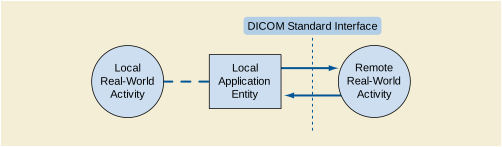
An association between a local Application Entity and a remote Application Entity over a network supporting a remote Real-World Activity is depicted within an Application Data Flow Diagram by placing the remote Real-World Activity to the right of the related local Application Entity with one or two arrows drawn between them as shown in Figure 5.1-4. The dashed line represents the DICOM Standard Interface between the local Application Entities, and whatever remote Application Entities that handle the remote Real-World Activities. An arrow from the local Application Entity to the remote Real-World Activity indicates that an occurrence of the local Real-World Activity will cause the local Application Entity to initiate an association for the purpose of causing the remote Real-World Activity to occur. An arrow from the remote Real-World Activity to the local Application Entity indicates that the local Application Entity expects to receive an association request when the remote Real-World Activity occurs, causing the local Application Entity to perform the local Real-World Activity.
Application Entities exchanging information on media use the DICOM File Service as specified in PS3.10 for access to, or creation of, File-sets. This File Service provides operations that support three basic roles, which are File-set Creator (FSC), File-set Reader (FSR), and File-set Updater (FSU).
These roles are depicted on an Application Data Flow diagram by directional arrows placed between the local Application Entities and the DICOM Storage Media on which the roles are applied.


Figure 5.1-5 illustrates the three basic roles.
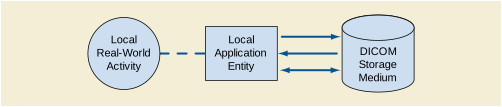
The local interactions shown on the left between a local Real-World activity and a local Application Entity are depicted by a dashed line. The arrows on the right represent access by the local Application Entity to a File-set on the DICOM Storage Medium. When an Application Entity supports several roles, this combination is depicted with multiple arrows corresponding to each of the roles. The dotted arrow symbolizes the removable nature of media for an interchange application.
An implementation need not employ all the optional components of the DICOM Standard. After meeting the minimum general requirements, a conformant DICOM implementation may utilize whatever SOP Classes, communications protocols, Media Storage Application Profiles, optional (Type 3) Attributes, codes and controlled terminology, etc., needed to accomplish its designed task.
Note
In fact, it is expected that an implementation might only support the SOP Classes related to its Real World Activities. For example, a simple film digitizer may not support the SOP Classes for other imaging modalities since such support may not be required. On the other hand, a complex storage server might be required to support SOP Classes from multiple modalities in order to adequately function as a storage server. The choice of which components of the DICOM Standard are utilized by an implementation depends heavily on the intended application and is beyond the scope of this Standard.
In addition, the DICOM Standard allows an implementation to extend or specialize the DICOM defined SOP Classes, as well as define Private SOP classes.
A Conformance Statement allows a user to determine which optional components of the DICOM Standard are supported by a particular implementation, and what additional extensions or specializations an implementation adds. By comparing the Conformance Statements from two different implementations, a knowledgeable user should be able to determine whether and to what extent communications might be supported between the two implementations.
Different structures are used for the content of Conformance Statements depending on whether the implementation supports a DICOM network interface, a DICOM Media Storage interface, or a combination thereof. In the latter case, a single Conformance Statement shall be provided that consists of the appropriate sections.
The first part of the conformance statement contains a DICOM Conformance Statement Overview, which is typically a one-page description in the beginning of the document providing a high level description and also listing the Networking and Media Service Classes, including their roles (SCU/SCP, FSC, FSR, etc.).
The networking section of a Conformance Statement consists of the following major parts:
-
a functional overview containing the Application Data Flow Diagram that shows all the Application Entities, including any sequencing constraints among them. It also shows how they relate to both local and remote Real World Activities;
-
a more detailed specification of each Application Entity, listing the SOP Classes supported and outlining the policies with which it initiates or accepts associations;
-
for each Application Entity and Real-World Activity combination, a description of proposed (for Association Initiation) and acceptable (for Association Acceptance) Presentation Contexts;
Note
A Presentation Context consists of an Abstract Syntax plus a list of acceptable Transfer Syntaxes. The Abstract Syntax identifies one SOP Class or Meta SOP Class (a collection of related SOP Classes identified by a single Abstract Syntax UID). By listing the Application Entities with their proposed and accepted Presentation Contexts, the Conformance Statement is identifying the set of Information Objects and Service Classes that are recognized by this implementation;
-
for each SOP Class related to an Abstract Syntax, a list of any SOP options supported;
-
a set of communications protocols that this implementation supports;
-
a description of any extensions, specializations, and publicly disclosed privatizations in this implementation;
-
a description of any implementation details that may be related to DICOM conformance or interoperability;
-
a description of what codes and controlled terminology mechanisms are used.
The media storage section of a Conformance Statement consists of the following major parts:
-
a functional overview containing the Application Data Flow Diagram that shows all the Application Entities, including any sequencing constraints among them. It also shows how they relate to both local and remote Real-World Activities;
-
a more detailed specification of each Application Entity listing the Media Storage Application Profiles supported (this defines SOP Classes supported and media selected), which outlines the policies with which it creates, reads, or updates File-sets on the media;
-
for each Media Storage SOP Class related to a media storage Application Profile, a list of any SOP options supported;
-
for each Media Storage SOP Class related to a media storage Application Profile, a list of optional Transfer Syntaxes supported;
-
a description of any extensions, specializations, and publicly disclosed privatizations in this implementation such as Augmented or Private Application Profiles;
-
a description of any implementation details that may be related to DICOM conformance or interoperability;
-
a description of what codes and controlled terminology mechanisms are used.
An implementation claiming DICOM conformance may choose to support one of the following:
-
network conformance according to Section 7.1 (DICOM Network Conformance Requirements);
-
media storage conformance according to Section 7.2 (DICOM Media Storage Conformance Requirements);
An implementation claiming DICOM network conformance shall:
-
conform to the minimum conformance requirements defined in this section;
-
provide with the implementation a Conformance Statement structured according to the rules and policies in this Part including Annex A;
-
conform to at least one Standard or Standard Extended SOP class as defined in PS3.4;
Note
Conformance to a Standard or Standard Extended SOP class implies conformance to the related IOD outlined in PS3.3, the Data Elements defined in PS3.6, and the operations and notifications defined in PS3.7.
-
comply with the rules governing SOP Class types outlined in Section 7.3;
-
accept a Presentation Context for the Verification SOP Class as an SCP if the implementation accepts any DICOM association requests;
-
produce and/or process Data Sets as defined in PS3.5;
An implementation claiming DICOM Media Interchange conformance shall:
-
conform to the minimum conformance requirements defined in this section;
-
provide with the implementation a Conformance Statement structured according to the rules and policies in this Part including Annex C;
-
conform to at least one Standard Application Profile as defined in PS3.11;
-
support one of the Physical Media and associated Media Format, as specified by PS3.12;
-
comply with the rules governing SOP Class types outlined in Section 7.3;
-
comply with the specific rules governing media storage Application Profile according to their types as specified in Section 7.4. No other types of Application Profiles may be used;
-
read as an FSR or FSU all SOP Classes defined as mandatory by each of the supported Application Profiles encoded in any of the mandatory Transfer Syntaxes.
-
write as an FSC or FSU all SOP Classes defined as mandatory by each of the supported Application Profiles in one of the mandatory Transfer Syntaxes;
-
be able to gracefully ignore any Standard, Standard Extended, Specialized or Private SOP Classes that may be present on the Storage Medium but are not defined in any of the Application Profiles to which conformance is claimed.
Note
There may be more than one Application Profile used to create or read a File-set on a single physical medium (e.g., a medium may have a File-set created with Standard and Augmented Application Profiles).
-
be able to gracefully ignore Directory Records in the DICOMDIR file that do not correspond to Directory Records defined in any of the Application Profiles to which conformance is claimed.
-
access the File-set(s) on media using the standard roles defined in PS3.10;
-
produce and/or process Data Sets as defined in PS3.5 encapsulated in DICOM Files;
-
obtain legitimate right to a registered <org id> for creating UIDs (see PS3.5) if an implementation utilizes Privately Defined UIDs (i.e., UIDs not defined in the DICOM Standard).
An implementation that does not meet all the above requirements shall not claim conformance to DICOM for Media Storage Interchange.
Each SOP Class published in a Conformance Statement is one of four basic types. Each SOP Class in an implementation claiming conformance to the DICOM Standard shall be handled in accordance with the following rules, as dictated by the type of SOP Class.
Standard SOP Classes conform to all relevant Parts of the DICOM Standard with no additions or changes.
To claim conformance to a Standard SOP Class, an implementation shall make a declaration of this fact in its Conformance Statement, and identify its selected options, roles, and behavior.
Standard Extended SOP Classes shall:
-
not change the semantics of any Standard Attribute of that Standard SOP Class;
-
not contain any Private Type 1, 1C, 2, or 2C Attributes, nor add additional Standard Type 1, 1C, 2 or 2C Attributes;
-
not change any Standard Type 3 Attributes to Type 1, 1C, 2, or 2C;
-
use the same UID as the Standard SOP Class on which it is based.
A Standard Extended SOP Class may include Standard and/or Private Type 3 Attributes beyond those defined in the IOD on which it is based as long as the Conformance Statement identifies the added Attributes and defines their relationship with the PS3.3 information model. If additional Type 3 Attributes drawn from the Data Dictionary in PS3.6 are sent that affect the encoding of other Attributes, or whose encoding depends on the values of other Attributes, their presence and use shall be consistent.
Note
E.g., An Attribute such as Pixel Padding Value (0028,0120) with a dictionary VR of US or SS would not be allowed to be present without Pixel Representation (0028,0103) also being present to resolve the encoding ambiguity. Further, Pixel Padding Value would not be allowed to be present in the absence of the Pixel Data (7FE0,0010) to which it applies.
An implementation claiming conformance with a Standard Extended SOP Class shall identify in its Conformance Statement the Standard SOP Class being extended, the options, roles, and behavior selected, and describe the Attributes being added with the Standard SOP Class's IOD Model and Modules.
Specialized SOP Classes shall:
-
contain additional Standard and/or Private Type 1, 1C, 2, or 2C Attributes;
-
add Private and Standard Type 3 Attributes, which may or may not be published in the Conformance Statement.
-
enumerate the permitted values for Attributes within the set allowed by the Standard SOP Class;
-
enumerate the permitted Templates for Content Items within the set allowed by the Standard SOP Class.
An implementation claiming conformance with a Specialized SOP Class shall include in its Conformance Statement the identity of the Standard SOP Class being specialized, a description of usage of all Standard and Private Type 1, 1C, 2, and 2C Attributes in the Specialized SOP Class, a description of the constraints on Attributes values and Templates, and the associated Privately Defined UID.
-
be completely conformant to relevant Parts of the DICOM Standard with the possible exception that support of the DICOM Default Transfer Syntax or a Transfer Syntax mandated by a media storage Application Profile is not required;
-
not change the PS3.6 specification of any Standard Attributes;
-
use a Privately Defined UID for its SOP Class (i.e., shall not be identified with a DICOM Defined UID);
-
not change existing DICOM File Services defined in PS3.10 or extend them in a manner that jeopardizes interoperability.
-
use or apply DIMSE Services to privately defined or altered IODs (i.e., not necessarily be based on a Standard SOP Class);
-
use or apply Media Storage Operations to privately defined or altered IODs (i.e., not necessarily be based on a Standard SOP Class);
-
designate any Standard Attribute as Type 1, 1C, 2, or 2C regardless of the Type of the Attribute in other IODs;
-
include Private and Standard Type 3 Attributes, which may or may not be published in the Conformance Statement.
An implementation claiming conformance with a Private SOP Class shall provide a PS3.3, PS3.4, and PS3.6-like description of the Private SOP Class in the implementation's Conformance Statement, including descriptions of the usage of all Standard and Private Type 1, 1C, 2, or 2C Attributes in the SOP Class, the DICOM Information Model, and the Privately Defined UIDs.
Note
Unpublished SOP Classes (i.e., SOP Classes that are not defined in the DICOM Standard and are not defined in the Conformance Statement) are permitted in order to allow an implementation to support other abstract syntaxes within the DICOM Application Context. Such unpublished SOP Classes would utilize Privately Defined UIDs. The presence of an unpublished SOP Class does not prevent the implementation from being DICOM conformant but would have no meaning to other implementations and may be ignored.
Application Profile used in a Conformance Statement shall be of one of three basic types. Each Application Profile in an implementation claiming conformance to the DICOM Standard shall be handled in accordance with the following rules, as dictated by the type of Application Profile.
A Standard Application Profile shall:
-
support only one of the Physical Media and associated Media Format, as specified by PS3.12.
To claim conformance to a Standard Application Profile, an implementation shall make a declaration of this fact in its Conformance Statement, and identify its selected options, roles, and behavior.
An implementation of a Standard Application Profile may extend Standard SOP Classes of this Standard application profile. Such Standard Extended SOP Classes shall meet the requirements specified in Section 7.3.
An Augmented Application Profile shall:
An Augmented Application Profile may:
-
include one or more Standard or Standard Extended SOP Classes in addition to those of the corresponding Standard Application Profile. These additional SOP Classes may be mandatory or optional;
-
include the extensions (e.g., additional required keys, additional directory records) to the Basic Directory Information Object corresponding to the SOP Classes defined in a);
To claim conformance to an Augmented Application Profile, an implementation shall make a declaration of this fact in its Conformance Statement, and shall identify the Standard Application Profile from which it is derived and specify the augmentations. The implementation shall also identify its selected options, roles, and behavior.
An implementation of a Augmented Application Profile may:
-
extend Standard SOP Classes of the corresponding Standard application profile. Such Standard Extended SOP Classes shall meet the requirements specified in Section 7.3;
-
also claim conformance to the Standard Application Profile on which this Augmented Profile is based. In this case, FSC and FSU implementations shall be able to restrict their behavior to the Standard Application Profile (i.e., provide a means to write only the Standard or Standard Extended SOP Classes defined in the corresponding Standard Application Profile).
A Private Application Profile:
-
conforms to PS3.10 and to the Media Storage Service Class specified in PS3.4;
-
support only one of the Physical Media and associated Media Format, as specified by PS3.12;
-
complies with the rules governing SOP Classes in Section 7.3.
To claim conformance to a Private Application Profile, an implementation shall make a declaration of this fact in its Conformance Statement, and shall provide a description of the Application Profile patterned after the descriptions in PS3.11. The implementation shall also identify its selected options, roles, and behavior.
Note
An implementation that does not meet the provisions of Section 7, including the types of Application Profile, is not conformant to DICOM and so is outside the scope of DICOM conformance. Such an implementation is not an Application Profile in DICOM terminology. For example, if an implementation chooses to write DICOM files onto media that is not in PS3.12, or use a file system not defined for a specific media type in PS3.12, then that implementation cannot claim that it conforms to the DICOM Standard using that media or file system.
DICOM does not define conformance of a piece of medium in a generic sense. DICOM conformance of a piece of medium can only be evaluated within the scope of one or more media storage Application Profiles that define specific contexts for interoperability.
DICOM specifies methods for providing security at different levels of the ISO OSI Basic Reference Model through the use of mechanisms specific to a particular layer. The methods for applying these mechanisms are described in the various parts of the DICOM Standard. Some mechanisms and algorithms are specified in PS3.15 as Security Profiles. An implementation's Conformance Statement describes which Security Profiles can be used by that application.
Note
For example, the Basic TLS Secure Transport Connection Profile defines a mechanism for authenticating entities participating in the exchange of data, and for protecting the integrity and confidentiality of information during interchange.
An implementation shall list in its Conformance Statement any Security Profiles that it supports, how it selects which Security Profiles it uses, how it uses features of that Security Profile, and any extensions it makes to that Security Profile.
An implementation shall list in its Conformance Statement any additional use of the User Identity association negotiation sub-item that is not specified in a standard Security Profile.
DICOM specifies the transformation of DICOM SR objects to CDA documents in PS3.20.
This transformation is unidirectional (DICOM SR to HL7 CDA). Conformance statements shall at a minimum state conformance to the top level templates used for the SR document and the CDA document.
This Annex is a template that shall be used to generate a DICOM Conformance Statement. The document is hierarchically structured in three different levels:
-
A DICOM Conformance Statement Overview, which is typically one page, geared towards people that want to get a quick overview of the functionality and services.
-
For Networking and Media, the relationship between the AEs, followed by the information for each AE
-
For the services supported as SCU and SCP all the SOP specific details
Annexes are provided to specify the Object descriptions (IODs), with specifics about the field usage as well as the data dictionaries.
Note
The numbering scheme for numbering paragraphs in this document is to be used as a guideline in preparing the outline of the Conformance Statement. Although strongly encouraged, the Conformance Statement is not required to have exactly the same paragraph numbers because a particular Conformance Statement might have special considerations, which will cause the outline to differ in certain details from the outline of this document. In addition, a vendor might have internal company guidelines prescribing a specific format. Note however, that the overall structure, tables, definition of variables and information such as headers, should be strictly followed.
The Overview consist of typically 5-10 lines describing the network services and media storage capabilities supported by the product in layman's terms (i.e., no DICOM acronyms should be used).
A table of Supported Networking DICOM Service (SOP) Classes is provided with roles (User/Provider), organized in 4 categories:
The first column shall specify the SOP Classes exactly as named in PS3.6., Registry of DICOM Unique Identifiers. The phrase "and specializations" may be added to indicate support of all specializations negotiated through the SOP Class Common Extended Negotiation. If the implementation supports all SOP Classes of a particular Service Class through SOP Class Common Extended Negotiation, the first column shall specify "All services of the <x> Service Class".
The services can be specified as a SCU, SCP or as an Option, which means that it is either configurable or that it can be purchased separately.
Note
Verification SCP (C-Echo) is not included in the table above because it is required for any Acceptor of an Association. The Verification SCU details are covered in the details of the conformance statement.
The SOP Classes are categorized as follows:
Table A.1-2. UID Values
A table of Supported Media Storage Application Profiles (with roles) is provided, organized in categories:
Table A.1-3. Media Services
The introduction specifies product and relevant disclaimers as well as any general information that the vendor feels is appropriate.
The following subsections are suggested:
The revision history provides dates and differences of the different releases of the product and the Conformance Statement.
The audience is specified with their assumed pre-knowledge. The following example may be used as a template:
This document is written for the people that need to understand how <Product Name> will integrate into their healthcare facility. This includes both those responsible for overall imaging network policy and architecture, as well as integrators who need to have a detailed understanding of the DICOM features of the product. This document contains some basic DICOM definitions so that any reader may understand how this product implements DICOM features. However, integrators are expected to fully understand all the DICOM terminology, how the tables in this document relate to the product's functionality, and how that functionality integrates with other devices that support compatible DICOM features.
Any important remarks, disclaimers, and general information are specified. The following example may be used as a template:
The scope of this DICOM Conformance Statement is to facilitate integration between <Product Name> and other DICOM products. The Conformance Statement should be read and understood in conjunction with the DICOM Standard. DICOM by itself does not guarantee interoperability. The Conformance Statement does, however, facilitate a first-level comparison for interoperability between different applications supporting compatible DICOM functionality.
This Conformance Statement is not supposed to replace validation with other DICOM equipment to ensure proper exchange of intended information. In fact, the user should be aware of the following important issues:
-
The comparison of different Conformance Statements is just the first step towards assessing interconnectivity and interoperability between the product and other DICOM conformant equipment.
-
Test procedures should be defined and executed to validate the required level of interoperability with specific compatible DICOM equipment, as established by the healthcare facility.
If the product has an IHE Integration Statement, the following statement may be applicable:
<Product Name> has participated in an industry-wide testing program sponsored by Integrating the Healthcare Enterprise (IHE). The IHE Integration Statement for <Product Name>, together with the IHE Technical Framework, may facilitate the process of validation testing.
Terms and definitions should be listed here. The following example may be used as a template:
Informal definitions are provided for the following terms used in this Conformance Statement. The DICOM Standard is the authoritative source for formal definitions of these terms.
- Abstract Syntax
-
The information agreed to be exchanged between applications, generally equivalent to a Service/Object Pair (SOP) Class. Examples: Verification SOP Class, Modality Worklist Information Model Find SOP Class, Computed Radiography Image Storage SOP Class.
- Application Entity (AE)
-
An end point of a DICOM information exchange, including the DICOM network or media interface software; i.e., the software that sends or receives DICOM information objects or messages. A single device may have multiple Application Entities.
- Application Entity Title (AET)
-
The externally known name of an Application Entity, used to identify a DICOM application to other DICOM applications on the network.
- Application Context
-
The specification of the type of communication used between Application Entities. Example: DICOM network protocol.
- Association
-
A network communication channel set up between Application Entities.
- Attribute
-
A unit of information in an object definition; a data element identified by a tag. The information may be a complex data structure (Sequence), itself composed of lower level data elements. Examples: Patient ID (0010,0020), Accession Number (0008,0050), Photometric Interpretation (0028,0004), Procedure Code Sequence (0008,1032).
- Information Object Definition (IOD)
-
The specified set of Attributes that comprise a type of data object; does not represent a specific instance of the data object, but rather a class of similar data objects that have the same properties. The Attributes may be specified as Mandatory (Type 1), Required but possibly unknown (Type 2), or Optional (Type 3), and there may be conditions associated with the use of an Attribute (Types 1C and 2C). Examples: MR Image IOD, CT Image IOD, Print Job IOD.
- Joint Photographic Experts Group (JPEG)
-
A set of standardized image compression techniques, available for use by DICOM applications.
- Media Application Profile
-
The specification of DICOM information objects and encoding exchanged on removable media (e.g., CDs).
- Module
-
A set of Attributes within an Information Object Definition that are logically related to each other. Example: Patient Module includes Patient Name, Patient ID, Patient Birth Date, and Patient Sex.
- Negotiation
-
First phase of Association establishment that allows Application Entities to agree on the types of data to be exchanged and how that data will be encoded.
- Presentation Context
-
The set of DICOM network services used over an Association, as negotiated between Application Entities; includes Abstract Syntaxes and Transfer Syntaxes.
- Protocol Data Unit (PDU)
-
A packet (piece) of a DICOM message sent across the network. Devices must specify the maximum size packet they can receive for DICOM messages.
- Security Profile
-
A set of mechanisms, such as encryption, user authentication, or digital signatures, used by an Application Entity to ensure confidentiality, integrity, and/or availability of exchanged DICOM data.
- Service Class Provider (SCP)
-
Role of an Application Entity that provides a DICOM network service; typically, a server that performs operations requested by another Application Entity (Service Class User). Examples: Picture Archiving and Communication System (image storage SCP, and image query/retrieve SCP), Radiology Information System (modality worklist SCP).
- Service Class User (SCU)
-
Role of an Application Entity that uses a DICOM network service; typically, a client. Examples: imaging modality (image storage SCU, and modality worklist SCU), imaging workstation (image query/retrieve SCU).
- Service/Object Pair Class (SOP Class)
-
The specification of the network or media transfer (service) of a particular type of data (object); the fundamental unit of DICOM interoperability specification. Examples: Ultrasound Image Storage Service, Basic Grayscale Print Management.
- Service/Object Pair Instance (SOP Instance)
-
An information object; a specific occurrence of information exchanged in a SOP Class. Examples: a specific x-ray image.
- Tag
-
A 32-bit identifier for a data element, represented as a pair of four digit hexadecimal numbers, the "group" and the "element". If the "group" number is odd, the tag is for a private (manufacturer-specific) data element. Examples: (0010,0020) [Patient ID], (07FE,0010) [Pixel Data], (0019,0210) [private data element].
- Transfer Syntax
-
The encoding used for exchange of DICOM information objects and messages. Examples: JPEG compressed (images), little endian explicit value representation.
- Unique Identifier (UID)
-
A globally unique "dotted decimal" string that identifies a specific object or a class of objects; an ISO-8824 Object Identifier. Examples: Study Instance UID, SOP Class UID, SOP Instance UID.
- Value Representation (VR)
-
The format type of an individual DICOM data element, such as text, an integer, a person's name, or a code. DICOM information objects can be transmitted with either explicit identification of the type of each data element (Explicit VR), or without explicit identification (Implicit VR); with Implicit VR, the receiving application must use a DICOM data dictionary to look up the format of each data element.
A layman's introduction to DICOM may be included here. The following example may be used as a template:
This section describes terminology used in this Conformance Statement for the non-specialist. The key terms used in the Conformance Statement are highlighted in italics below. This section is not a substitute for training about DICOM, and it makes many simplifications about the meanings of DICOM terms.
Two Application Entities (devices) that want to communicate with each other over a network using DICOM protocol must first agree on several things during an initial network "handshake". One of the two devices must initiate an Association (a connection to the other device), and ask if specific services, information, and encoding can be supported by the other device (Negotiation).
DICOM specifies a number of network services and types of information objects, each of which is called an Abstract Syntax for the Negotiation. DICOM also specifies a variety of methods for encoding data, denoted Transfer Syntaxes. The Negotiation allows the initiating Application Entity to propose combinations of Abstract Syntax and Transfer Syntax to be used on the Association; these combinations are called Presentation Contexts. The receiving Application Entity accepts the Presentation Contexts it supports.
For each Presentation Context, the Association Negotiation also allows the devices to agree on Roles - which one is the Service Class User (SCU - client) and which is the Service Class Provider (SCP - server). Normally the device initiating the connection is the SCU, i.e., the client system calls the server, but not always.
The Association Negotiation finally enables exchange of maximum network packet (PDU) size, security information, and network service options (called Extended Negotiation information).
The Application Entities, having negotiated the Association parameters, may now commence exchanging data. Common data exchanges include queries for worklists and lists of stored images, transfer of image objects and analyses (structured reports), and sending images to film printers. Each exchangeable unit of data is formatted by the sender in accordance with the appropriate Information Object Definition, and sent using the negotiated Transfer Syntax. There is a Default Transfer Syntax that all systems must accept, but it may not be the most efficient for some use cases. Each transfer is explicitly acknowledged by the receiver with a Response Status indicating success, failure, or that query or retrieve operations are still in process.
Two Application Entities may also communicate with each other by exchanging media (such as a CD-R). Since there is no Association Negotiation possible, they both use a Media Application Profile that specifies "pre-negotiated" exchange media format, Abstract Syntax, and Transfer Syntax.
Abbreviations should be listed here. These may be taken from the following list, deleting terms that are not used within the Conformance Statement, and adding any additional terms that are used:
- AE
- AET
- CAD
- CDA
- CD-R
- CSE
- CR
- CT
- DHCP
- DICOM
- DIT
- DN
- DNS
- DX
- FSC
- FSU
- FSR
- GSDF
- GSPS
- HIS
- HL7
- IHE
- IOD
- IPv4
- IPv6
- ISO
- IO
- JPEG
- LDAP
- LDIF
- LUT
- MAR
- MPEG
- MG
- MPPS
- MR
- MSPS
- MTU
- MWL
- NM
- NTP
- O
- OP
- OSI
- PACS
- PET
- PDU
- R
- RDN
- RF
- RIS
- RT
- SC
- SCP
- SCU
- SOP
- SPS
- SR
- TCP/IP
- U
- UL
- US
- VL
- VR
- XA
Referenced documents should be listed here, including appropriate product manuals (such as service manuals that specify how to set DICOM communication parameters). References to the DICOM Standard should provide the URL for the free published version of the Standard, but should not specify a date of publication:
NEMA PS3 Digital Imaging and Communications in Medicine (DICOM) Standard, available free at http://medical.nema.org/
This section contains the networking related services (vs. the media related ones).
The Implementation model consists of three sections: the Application Data Flow Diagram, specifying the relationship between the Application Entities and the "external world" or Real-World activities, a functional description of each Application Entity, and the sequencing constraints among them.
As part of the Implementation model, an Application Data Flow Diagram shall be included. This diagram represents all of the Application Entities present in an implementation, and graphically depicts the relationship of the AEs use of DICOM to Real-World Activities as well as any applicable User interaction. Figure A.4.1-1 is a template for such a Data Flow Diagram.
In this illustration, according to figure A.4.1-1, an occurrence of local Real-World Activity A will cause local Application Entity <1> to initiate an association for the purpose of causing Real-World Activity X to occur remotely. It also shows that Real-World Activities B and Y are interactively related via Application Entity <2>, with B being local and Y Remote, and that local Application Entity 3 expects to receive an association request when remote Real-World Activity Z occurs so that it can perform Real-World Activity C and/or D. When the performance of Real-World activities relies on interactions within the implementation, one may depict the circles as overlapping as shown in Figure A.4.1-1. Any such overlap shall be discussed in this section of a Conformance Statement.
Typically, there is a one to one relationship between an AE and an AE Title. Devices may be capable of configuring the relationship between AE and AE Title (e.g., by merging Application Entities to use a single AE Title). This is specified in the configuration section.
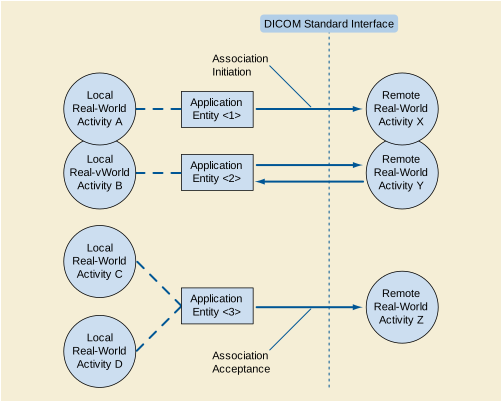
The Application Data Flow Diagram shall contain overview text with one bullet per AE. Each bullet should provide an overview of each one of the AEs, in relationship to their real-world activities, AE network exchanges and external real-world activities.
This Part shall contain a functional definition for each individual local Application Entity. This shall describe in general terms the functions to be performed by the AE, and the DICOM services used to accomplish these functions. In this sense, "DICOM services" refers not only to DICOM Service Classes, but also to lower level DICOM services, such as Association Services.
If applicable, this section shall contain a description of sequencing as well as potential constraints, of Real-World Activities, including any applicable user interactions, as performed by all the Application Entities. A UML sequence diagram, which depicts the Real-World Activities as vertical bars and shows the events exchanged between them as arrows, is strongly recommended.
The next section in the DICOM Conformance Statement is a set of Application Entity Specifications. There shall be one such specification for each Application Entity. Each individual AE Specification has a subsection, A.4.2.x. There are as many of these subsections as there are different AEs in the implementation. That is, if there are two distinct AEs, then there will be two subsections, A.4.2.1, and A.4.2.2.
Every detail of this specific Application Entity shall be completely specified under this section.
AEs that utilize the DIMSE services shall have the following sections.
The specification for an Application Entity shall contain a statement of the form:
"This Application Entity provides Standard Conformance to the following SOP Class(es) :"
Each AE Specification shall contain a description of the General Association Establishment and Acceptance policies of the AE.
The number of simultaneous associations, which an Application Entity may support as a SCU or SCP, shall be specified. Any rules governing simultaneity of associations shall be defined here.
Note
For example an AE may have the capability to have up to 10 simultaneous associations, but may limit itself to have no more than 2 with any particular other AE. There may also be policies based upon combinations of simultaneous Real-World Activities.
If the implementation supports negotiation of multiple outstanding transactions, this shall be stated here, along with the maximum number of outstanding transactions supported.
This describes the conditions under which the AE will initiate an association.
If applicable, this section shall contain a description of sequencing of the events for "Activity <1>" (substitute actual activity name), including any applicable user interactions, which this specific AE performs. A UML sequence diagram, which depicts the Application Entity and Real-World Activities as vertical bars and shows the events exchanged between them as arrows, is strongly recommended.
Note
An example of a situation in which such a description is required is an AE, which supports both the Storage Service Class and the Modality Performed Procedure SOP Class. Some implementations might store the images before sending the final MPPS N-SET message while other implementations might send the final MPPS N-SET message before sending the images.
Each time an association is initiated, the Association Initiator proposes a number of Presentation Contexts to be used on that association. In this subsection, the Presentation Contexts proposed by "Application Entity <1>" for "Activity <1>" shall be defined in a table with the following format:
Table A.4.2-7. Proposed Presentation Contexts for "Application Entity <1>"
|
None |See Note <1> | See Table A.4.2-8 |
|||||
Note
<1>: <Describe the content of any extended negotiation done for the SOP Classes of this Presentation Context. One note may serve multiple Presentation Contexts, as a single Abstract Syntax often corresponds to a single SOP class, which may appear in different Presentation Contexts.>
In Table A.4.2-7, the following meanings are assigned to the fields:
If the AE through this Real World Activity might propose any of the SOP Classes of a particular Service Class (e.g., the Storage Service Class), the Abstract Syntax Name and UID shall be those of the Service Class. This section shall describe the conditions under which a SOP Class of that Service Class will be proposed in a Presentation Context.
Note
For instance, an AE may receive instances of a non-preconfigured SOP Class through support of SOP Class Common Extended Negotiation. These instances may be limited to specializations of a particular SOP Class, or they may be any SOP Class within the Service Class, and any such limits should be described.
This section shall describe the conditions under which the AE may change the SOP Class UID of SOP Instances sent, due to fall-back mechanisms.
Note
For instance, if the SCP does not accept the proposed Abstract Syntax (SOP Class) for which there is a Related General SOP Class that was accepted, the AE may modify SOP Instances of the refused SOP Class to use the Related General SOP Class for transmission.
In the event that the Abstract Syntax of the Presentation Context represents a Meta-SOP Class (that is, it includes many SOP Classes) and extended negotiation is supported for some of these SOP Classes, the following table is required to define this extended negotiation. This table is referenced in Table A.4.2-7:
Note
<1>: <Describe the content of any extended negotiation done for this SOP Class. One note may serve multiple Presentation Contexts, as a SOP class that may appear in different Presentation Contexts and/or Meta SOP Classes>
The implementation of the initiator shall document which Transfer Syntax will be chosen in case multiple Transfer Syntaxes are accepted during the Association Acceptance.
This section includes the SOP specific behavior, i.e., error codes, error and exception handling, time-outs, etc. The information shall be as described in the SOP specific Conformance Statement section of PS3.4 (or relevant private SOP definition). It shall include the content of any extended negotiation. Keys shall be specified including how they are used (Matching, return keys, interactive query, whether they are displayed to the user, universal and/or list matching, etc.).
In particular, the behavior associated with the exchange of images available to the AE only in a lossy compressed form shall be documented. For example, if a lossy compressed transfer syntax is not negotiated, will the AE decompress the image data and send it using one of the negotiated transfer syntaxes.
All details regarding the specific conformance, including response behavior to all status codes, both from an application level and communication errors shall be provided in the form of a table as follows:
The behavior of the AE during communication failure is summarized in a table as follows:
Each AE Specification shall contain a description of the Association Acceptance policies of the AE. This describes the conditions under which the AE will accept an association.
Table A.4.2-11. Acceptable Presentation Contexts For"Application Entity <1>" and "Activity <2>"
|
None |See Note <1>| See Table A.4.2-12 |
|||||
Note
<1>: <Describe the content of any extended negotiation done for the SOP Classes of this Presentation Context. In particular, acceptance of specialized SOP Classes of the Abstract Syntax specified in this Presentation Context shall be noted. One note may serve multiple Presentation Contexts, as a single Abstract Syntax often corresponds to a single SOP class, which may appear in different Presentation Contexts>
In Table A.4.2-11, the following meanings are assigned to the fields:
<name_a> This is the name of the Abstract Syntax to be used with this Presentation Context.
<AS_UID_a> This is the UID of the Abstract Syntax to be used for this Presentation Context.
<XS_Name_a> This is the name of a Transfer Syntax that may be used for this Presentation Context.
<XS_UID_a> The UID of the corresponding transfer syntax.
If the AE through this Real World Activity supports all SOP Classes of a particular Service Class (e.g., the Storage Service Class) through SOP Class Common Extended Negotiation, the Abstract Syntax Name and UID shall be those of the Service Class, and this shall be noted under Extended Negotiation.
In the event that the Abstract Syntax of the Presentation Context represents a Meta-SOP Class (that is, it includes many SOP Classes) and extended negotiation is supported for some of these SOP Classes, the following table is required to define this extended negotiation. This table is referenced in Table A.4.2-11
Note
<1>: <Describe the content of any extended negotiation done for this SOP Class. One note may serve multiple Presentation Contexts, as a SOP class, which may appear in different Presentation Contexts, and/or Meta SOP Classes>
Any rules that govern the acceptance of presentation contexts for this AE shall be stated here as well. This includes rules for which combinations of Abstract/Transfer Syntaxes are acceptable, and rules for prioritization of presentation contexts. Rules that govern selection of transfer syntax within a presentation context shall be stated here.
This section includes the SOP specific behavior, i.e., error codes, error and exception handling, time-outs, etc. The information shall be as described in the SOP specific Conformance Statement section of PS3.4 (or relevant private SOP definition).
The behavior of an Application Entity shall be summarized as shown in Table 4.2-13. Standard as well as the manufacturer specific status codes and their corresponding behavior shall be specified.
An Application Entity that supports Web services shall have the following sections:
Details of this specific Application Entity shall be specified under this section.
All WADO-URI services that are supported shall be listed. Other WADO-URI services that are not supported may be indicated.
For each supported service, the parameters and restrictions on those parameters shall be described.
Any connection policies such as restrictions on the number of connections, support for pipeline requests, etc. shall be described.
All RESTful services that are supported shall be listed. Other RESTful services that are not supported may be indicated.
For each supported service, the parameters and restrictions on those parameters shall be described.
Any connection policies such as restrictions on the number of connections, support for pipeline requests, etc. shall be described.
Additional protocols such as used for configuration management are listed here. Any conformance to specific System Management Profiles defined in PS3.15 shall be listed per the following table.
If the implementation conforms to the Basic Network Address Management Profile as a DHCP Client actor (see PS3.15), the use of DHCP to configure the local IP address and hostname shall be described.
Note
The hostname is an alias for the IP address, and has no semantic relationship to AE titles. It is solely a convenience for configuration description.
If the implementation conforms to the Basic Network Address Management Profile as a DNS Client actor (see PS3.15), the use of DNS to obtain IP addresses from hostname information shall be described.
If the implementation conforms to the Basic Time Synchronization profile as an NTP Client or SNTP Client, the available NTP configuration alternatives shall be described. If the implementation conforms to the Basic Time Synchronization Profile as an NTP Server, the available server configuration alternatives shall be described. Any device specific requirements for accuracy or maximum allowable synchronization error shall be described.
If there is support for WADO (see PS3.18) the options supported and any restrictions shall be described.
Any implementation's DICOM conformance may be dependent upon configuration, which takes place at the time of installation. Issues concerning configuration shall be addressed in this section.
An important installation issue is the translation from AE title to Presentation Address. How this is to be performed shall be described in this section.
Note
There does not necessarily have to be a one to one relationship between AE titles and Application Entities. If so, this should be made clear in the tables.
The local AE title mapping and configuration shall be specified. The following table shall be used:
If the implementation conforms to the Application Configuration Management Profile as an LDAP Client actor (see PS3.15), any use of LDAP to configure the local AE titles shall be described. Any conformance to the Update LDAP Server option shall be specified, together with the values for all component object attributes in the update sent to the LDAP Server.
Configuration of remote host names and port numbers shall be specified here.
Configuration of the remote AET port number, host-names, IP addresses and capabilities shall be specified. If applicable, multiple remote SCPs can be specified.
If the implementation conforms to the Application Configuration Management Profile as an LDAP Client actor (see PS3.15), any use of LDAP to configure the remote device addresses and capabilities shall be described. The LDAP queries used to obtain remote device component object attributes shall be specified.
The specification of important operational parameters, and if configurable, their default value and range, shall be specified here. The parameters that apply to all Application Entities should be specified in a "General Parameters" section while those specific to particular Application Entities should be specified in separate sections specific to each AE. The following table, which is shown here with a recommended baseline of parameters, shall be used:
Table A.4.4-2. Configuration Parameters Table
Note
In particular when accommodating Multi-frame objects (e.g., Ultrasound Multi-frame, NM, XA, RF), a receiver might have a certain restriction with regard to its maximum length. This restriction should be specified here.
Additional configuration parameters such as hardware options for e.g., a printer shall be specified as well.
The Implementation Model shall identify the DICOM Application Entities in a specific implementation and relate the Application Entities to Real-World Activities.
As part of the Implementation Model, an Application Data Flow Diagram shall be included. This diagram represents all of the Application Entities present in an implementation and graphically depicts the relationship of the AEs use of DICOM to real world activities. Figure A.5.1-1 is a template for such a Data Flow Diagram. Accompanying the Application Data Flow Diagram shall be a discussion of the Application Data Flow represented.
In this illustration, according to Figure A.5.1-1, an occurrence of local Real-World Activity A or B will cause the local Application Entity 1 to initiate either creation of a File-set on a medium (FSC) for the purpose of interchange with a remote Real-World Activity X or to access a File-set on a medium for reading (FSR). The remote Real-World Activity X accesses the medium physically transferred from Real-World Activity A or B.
An occurrence of Real-World Activity C will cause the local Application Entity 2 to update a File-set (FSU) on a mounted medium.
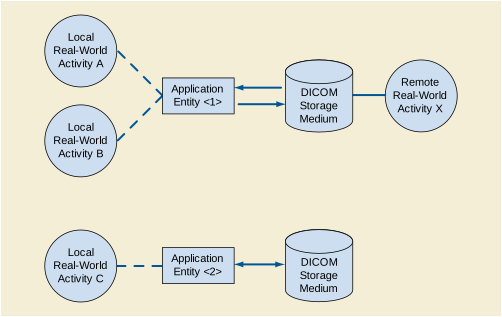
Note
If the AE expects a remote Real-World Activity to access the media for a specific purpose, this should be shown in the Application Data Flow Diagram as well as described in Section Section A.5.1.1.
The next part of the Conformance Statement shall contain a functional definition for each local Application Entity. This shall describe in general terms the functions to be performed by the AE, and the DICOM services used to accomplish these functions. In this sense "DICOM services" refers not only to DICOM Service Classes, but also to lower level DICOM services, such as the Media File System and mapping to particular Media Formats.
If applicable, this section shall contain a description of sequencing of Real World Activities that the AEs require.
Note
An example of a situation in which a such a description is required is an AE that supports roles as a File-set Updater and File-set Reader. In some instances, the File-set will be updated then read (e.g., for verification); and in other instances, may be read first to determine if the File-set needs to be updated.
This section shall be used to list the values assigned to the File Meta Information attributes (see PS3.10) that pertain to the Implementation Class and Version. These are:
The next section in the DICOM Conformance Statement is a set of Application Entity Specifications. There shall be one such specification for each Application Entity type.
The following table, Table A.5.2-1, shows that for one or more Application Profiles in the first column, there are a number of Real-World Activities in the second column and the roles required for each of these Real-World Activities in the third column
This section shall also contain any general policies that apply to all of the AEs described in subsequent section.
This section shall contain the values of the File Meta Information that pertain to the Application Entity (see PS3.10). These are:
If Private Information is used in the Application Profile File Meta Information, the following two File Meta Information attributes may be documented:
The first sentence in this section shall state the Roles and Media Storage Service Class Options supported by the "Application Entity <1>".
The AE Specification shall contain a description of the Real-World Activities, which invoke the particular AE. There will be one section, A.5.2.1.2.i where i increments for each RWA, per Real-World Activity.
The Application Profile that is used by the AE described in A.5.2-1 is specified in this section.
The options used in the Application Profiled specified in Table A.5.2-1 shall be detailed in this section. There will be separate sections for each option specified for the AP. If there are no options used in the Application Profile specified in A.5.2.x, this section may be omitted.
This Section shall be used for the description of Augmented and Private Application Profiles.
Any Augmented Application Profiles used by an AE shall be described in these sections. The rules governing the structure of an Augmented AP shall be described.
Each Augmented Application Profile shall have a section A.5.3.1.x that describes the specific features of the Application Profile that make it Augmented. These shall be described in the three repeating sections that follow.
The additional SOP Classes beyond those specified in the Standard AP on which this Augmented AP is based shall be detailed in this section.
The rules that govern construction of a Private Application Profile shall be described. This section shall be used to describe the details of the Private AP.
Note
-
Refer to PS3.11 for a description of constructing a Private Application Profile.
-
If the AP deviates from the rules governing a Private AP in any manner, it is non-conformant and is outside the scope of this Standard.
The supported SR objects and corresponding template identifiers shall be described. The release version and template identifier of the generated valid CDA documents shall be documented. The transformation process may be described by reference to a specific Annex of PS3.20.
Any support for Character Sets beyond the Default Character Repertoire in Network and Media Services shall be described here.
-
The behavior when an unsupported character set is received shall be documented.
-
Character set configuration capabilities, if any, shall be specified.
-
Mapping and/or conversion of character sets across Services and Instances shall be specified.
-
Query capabilities for attributes that include non-default character sets, both for the Worklist service class and Query service class shall be specified. Behavior of attributes using extended character sets by a C-FIND, both as SCU and SCP request and response, shall be specified. In particular the handling of Person Names (VR of PN) shall be specified.
-
The presentation of the characters to a user, i.e., capabilities, font limitations and/or substitutions shall be specified.
Any support for Security Profiles as defined in PS3.15 shall be described here. Any extensions to Security Profiles shall be described, e.g., extended schema for audit trail messages.
An implementation shall declare which level of security features it supports, including such things as:
This section specifies each IOD created (including Private IODs). It should specify the Attribute Name, tag, VR, and Value. The Value should specify the range and source (e.g., User input, Modality Worklist, automatically generated, etc.). For content items in templates, the range and source of the concept name and concept values should be specified. Whether the value is always present or not shall be specified.
Recommended abbreviations to be used for the tables are:
VNAP Value Not Always Present (attribute sent zero length if no value is present)
ANAP Attribute Not Always Present
ALWAYS Always Present with a value
EMPTY Attribute is sent without a value
Recommended abbreviations to be used for the source of the data values in the tables are:
USER the attribute value source is from User input
AUTO the attribute value is generated automatically
MWL,MPPS, etc. the attribute value is the same as the value received using a DICOM service such as Modality Worklist, Modality Performed Procedure Step, etc.
CONFIG the attribute value source is a configurable parameter
Specification of a company web address can refer to sample SOP Instances that are available.
Each Application that depends on certain fields to function correctly should specify which ones are required for it to perform its intended function.
When attributes are used by different SOP Classes, e.g., Modality Worklist, Storage and Modality Performed Procedure Step, this mapping shall be specified. For devices that specify other external protocols, such as HL7, mapping of their fields into the DICOM attributes is not required but highly recommended.
A SCU might coerce certain Attributes, e.g., the Patient Name. A SCP might provide a different value of an Attribute than was received. These changes shall be specified here. An example is Patient Name, which could be modified using available information from either an internal database or obtained from an Information System/Information Manager. Another example is the generation of a new SOP Instance UID for an existing instance. The conditions influencing such coercion should be specified..
Any private Attributes should be specified, including their VR, VM and which are known to be safe from identity leakage. Private SOP Classes and Transfer syntaxes should be listed. Whether or not private Attributes are described in Private Data Element Characteristics Sequence (0008,0300) should be specified in Section A.9.1 IOD Contents.
Support for Coded Terminology and templates shall be described here.
Each Context Group (i.e., use of coded terminology in a specific context) shall be specified here with its default value set, and whether the value set is configurable. The configurable options are specified.
Table A.9.3-1. Context Groups
The Default Value Set may be an extension of a standard context group ("extended CID xxx"). If used, a table shall be provided specifying the extended context group, the Context Group Local Version (0008,0107) value and the Context Group Creator UID (0008,010D).
This section describes the specification of any private context groups that are used. It shall follow the format for context groups specified in PS3.16.
This section specifies any extensions to standard templates and/or any private templates that are used, and defines them. Definitions shall follow the format for templates specified in PS3.16
This section describes Standard Extended SOP Class, Specialized SOP Class, or Private SOP Class that are used.
This section describes any private Transfer Syntaxes that are listed in the Transfer Syntax Tables.
This section describes particular private transfer syntax. It shall follow the guidelines specified in PS3.5.
This document is an example DICOM Conformance Statement for a fictional image acquisition modality called EXAMPLE-INTEGRATED-MODALITY produced by a fictional vendor called EXAMPLE-IMAGING-PRODUCTS.
As stated in the annex title, this document is truly informative, and not normative. A conformance statement of an actual product might implement additional services and options as appropriate for its specific purpose. In addition, an actual product might implement the services described in a different manner and, for example, with different characteristics and/or sequencing of activities. In other words, this conformance statement example does not intend to standardize a particular manner that a product might implement DICOM functionality.
Company Name: EXAMPLE-IMAGING-PRODUCTS.
Product Name: SAMPLE INTEGRATED MODALITY
This fictional product EXAMPLE-INTEGRATED-MODALITY implements the necessary DICOM services to download work lists from an information system, save acquired RF images and associated Presentation States to a network storage device or CD-R, print to a networked hardcopy device and inform the information system about the work actually done.
Table B.1-1 provides an overview of the network services supported by EXAMPLE-INTEGRATED-MODALITY.
Note
Table B.1-2 provides an overview of the Media Storage Application Profiles supported by Example-Integrated-Modality.
See example text in Section A.3.
This document is a sample DICOM Conformance Statement created for DICOM PS3.2. It is to be used solely as an example to illustrate how to create a DICOM Conformance Statement for an acquisition modality. The subject of the document, EXAMPLE-INTEGRATED-MODALITY, is a fictional product.
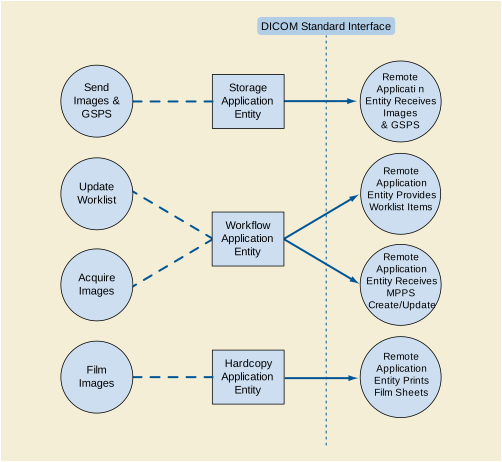
-
The Storage Application Entity sends images and Presentation States to a remote AE. It is associated with the local real-world activity "Send Images & GSPS". "Send Images & GSPS" is performed upon user request for each study completed or for specific images selected. When activated by user's settings (auto-send), each marked set of images and associated Presentation States can be immediately stored to a preferred destination whenever a Patient/Study is closed by the user. If the remote AE is configured as an archive device the Storage AE will request Storage Commitment and if a commitment is successfully obtained will record this information in the local database.
-
The Workflow Application Entity receives Worklist information from and sends MPPS information to a remote AE. It is associated with the local real-world activities "Update Worklist" and "Acquire Images". When the "Update Worklist" local real-world activity is performed the Workflow Application Entity queries a remote AE for worklist items and provides the set of worklist items matching the query request. "Update Worklist" is performed as a result of an operator request or can be performed automatically at specific time intervals. When the "Acquire Images" local real-world activity is performed the Workflow Application Entity creates and updates Modality Performed Procedure Step instances managed by a remote AE. Acquisition of images will result in automated creation of an MPPS Instance. Completion of the MPPS is performed as the result of an operator action.
-
The Hardcopy Application Entity prints images on a remote AE (Printer). It is associated with the local real-world activity "Film Images". "Film Images" creates a print-job within the print queue containing one or more virtual film sheets composed from images selected by the user.
The existence of a send-job queue entry with associated network destination will activate the Storage AE. An association request is sent to the destination AE and upon successful negotiation of a Presentation Context the image transfer is started. If the association cannot be opened, the related send-job is set to an error state and can be restarted by the user via job control interface. By default, the Storage AE will not try to initiate another association for this send-job automatically. However, an automatic retry (retry-timer, retrycount) can be configured by a CSE.
Worklist Update attempts to download a Worklist from a remote node. If the Workflow AE establishes an Association to a remote AE, it will transfer all worklist items via the open Association. During receiving the worklist response items are counted and the query processing is canceled if the configurable limit of items is reached. The results will be displayed in a separate list, which will be cleared with the next Worklist Update.
The Workflow AE performs the creation of a MPPS Instance automatically whenever images are acquired. Further updates on the MPPS data can be performed interactively from the related MPPS user interface. The MPPS "Complete" or "Discontinued" states can only be set from the user interface.
The existence of a print-job in the print queue will activate the Hardcopy AE. An association is established with the printer and the printer's status determined. If the printer is operating normally, the film sheets described within the print-job will be printed. Changes in printer status will be detected (e.g., out of film) and reported to the user. If the printer is not operating normally, the print-job will set to an error state and can be restarted by the user via the job control interface.

Under normal scheduled workflow conditions the sequencing constraints illustrated in Figure B.4.1-2 apply:
-
Receive Worklist of Modality Scheduled Procedure Steps (MSPS)
-
Store acquired images and any associated Grayscale Softcopy Presentation State (GSPS) instances.
-
If the Image Manager is configured as an archive device the Storage AE will request Storage Commitment for the images and associated GSPS instances.
Other workflow situations (e.g., unscheduled procedure steps) will have other sequencing constraints. Printing could equally take place after the acquired images have been stored. Printing could be omitted completely if no printer is connected or hard copies are not required.
EXAMPLE-INTEGRATED-MODALITY provides Standard Conformance to the following SOP Classes:
The DICOM standard application context name for DICOM is always proposed:
EXAMPLE-INTEGRATED-MODALITY initiates one Association at a time for each destination to which a transfer request is being processed in the active job queue list. Only one job will be active at a time, the other remains pending until the active job is completed or failed.
EXAMPLE-INTEGRATED-MODALITY accepts Associations to receive N-EVENT-REPORT notifications for the Storage Commitment Push Model SOP Class.
A user can select images and presentation states and request them to be sent to multiple destinations (up to 3). Each request is forwarded to the job queue and processed individually. When the "Auto-send" option is active, each marked instance or marked set of instances stored in database will be forwarded to the network job queue for a pre-configured auto-send target destination. Which instances will be automatically marked and the destination where the instances are automatically sent to can be configured. The "Auto-send" is triggered by the Close Patient user application.
The Storage AE is invoked by the job control interface that is responsible for processing network archival tasks. The job consists of data describing the instances marked for storage and the destination. An internal daemon process triggered by a job for a specific network destination initiates a C-STORE request to store images. If the process successfully establishes an Association to a remote Application Entity, it will transfer each marked instance one after another via the open Association. Status of the transfer is reported through the job control interface. Only one job will be active at a time. If the C-STORE Response from the remote Application contains a status other than Success or Warning, the Association is aborted and the related Job is switched to a failed state. It can be restarted any time by user interaction or, if configured, by automated retry.
The Storage AE attempts to initiate a new Association in order to issue a C-STORE request. If the job contains multiple images then multiple C-STORE requests will be issued over the same Association.
If the Remote AE is configured as an archive device the Storage AE will, after all images and presentation states have been sent, transmit a single Storage Commitment request (N-ACTION) over the same Association. Upon receiving the N-ACTION response the Storage AE will delay releasing the Association for a configurable amount of time. If no N-EVENT-REPORT is received within this time period the Association will be immediately released (i.e., notification of Storage Commitment success or failure will be received over a separate association). However, the Storage AE is capable of receiving an N-EVENT-REPORT request at any time during an association provided a Presentation Context for the Storage Commitment Push Model has been successfully negotiated (i.e., the N-ACTION is sent at the end of one association and the N-EVENT-REPORT is received during an association initiated for a subsequent send job or during an association initiated by the Remote AE for the specific purpose of sending the N-EVENT-REPORT).
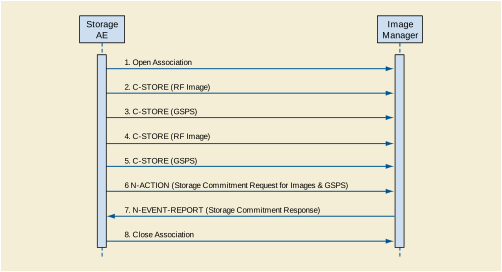
A possible sequence of interactions between the Storage AE and an Image Manager (e.g., a storage or archive device supporting the Storage and Storage Commitment SOP Classes as an SCP) is illustrated in Figure B.4.2-1:
-
An acquired RF image is transmitted to the Image Manager using a C-STORE request and the Image Manager replies with a C-STORE response (status success).
-
A GSPS instance is transmitted to the Image Manager using a C-STORE request and the Image Manager replies with a C-STORE response (status success).
-
Another acquired RF image is transmitted to the Image Manager using a C-STORE request and the Image Manager replies with a C-STORE response (status success).
-
Another GSPS instance is transmitted to the Image Manager using a C-STORE request and the Image Manager replies with a C-STORE response (status success).
-
An N-ACTION request is transmitted to the Image Manager to obtain storage commitment of previously transmitted RF images and GSPS instances. The Image Manager replies with a N-ACTION response indicating the request has been received and is being processed.
-
The Image Manager immediately transmits an N-EVENT-REPORT request notifying the Storage AE of the status of the Storage Commitment Request (sent in step 6 using the N-ACTION message). The Storage AE replies with a N-EVENT-REPORT response confirming receipt. The Image Manager could send this message at any time or omit it entirely in favor of transmitting the N-EVENT-REPORT over a separate dedicated association (see note).
-
The Storage AE closes the association with the Image Manager.
Note
Many other message sequences are possible depending on the number of images and GSPS instances to be stored, support for Storage Commitment and when the SCP sends the N-EVENT-REPORT. The N-EVENT-REPORT can also be sent over a separate association initiated by the Image Manager (see Section B.4.2.1.4.1 on Activity - Receive Storage Commitment Response).
EXAMPLE-INTEGRATED-MODALITY is capable of proposing the Presentation Contexts shown in the following table:
Presentation Contexts for X-Ray Radio Fluoroscopic Image Storage or Grayscale Softcopy Presentation State Storage will only be proposed if the Send Job contains instances for these SOP Classes.
A Presentation Context for the Storage Commitment Push Model will only be proposed if the Remote AE is configured as an archive device.
All Image & Presentation State Storage SOP Classes supported by the Storage AE exhibit the same behavior, except where stated, and are described together in this section.
If X-Ray Radio Fluoroscopic Image Storage SOP Instances are included in the Send Job and a corresponding Presentation Context is not accepted then the Association is aborted using AP-ABORT and the send job is marked as failed. The job failure is logged and reported to the user via the job control application.
If Grayscale Softcopy Presentation State Storage SOP Instances are included in the Send Job and a corresponding Presentation Context cannot be negotiated then Grayscale Softcopy Presentation State Storage SOP Instances will not be sent and a warning is logged. Any remaining Image Storage SOP Instances included in the Send Job will be transmitted. Failure to negotiate a Presentation Context for Grayscale Softcopy Presentation State Storage does not in itself cause the Send Job to be marked as failed. The behavior of Storage AE when encountering status codes in a C-STORE response is summarized in the Table below:
Table B.4.2-8. Storage C-STORE Response Status Handling Behavior
The behavior of Storage AE during communication failure is summarized in the Table below:
Table B.4.2-9. Storage Communication Failure Behavior
A failed send job can be restarted by user interaction. The system can be configured to automatically resend failed jobs if a transient status code is received. The delay between resending failed jobs and the number of retries is also configurable.
The contents of X-Ray Radio Fluoroscopic Image Storage SOP Instances created by EXAMPLE-INTEGRATED-MODALITY conform to the DICOM X-Ray Radio Fluoroscopic Image IOD definition and are described in Section B.8.1.
The contents of Grayscale Softcopy Presentation State Storage SOP Instances created by EXAMPLE-INTEGRATED-MODALITY conform to the DICOM Grayscale Softcopy Presentation State IOD and are described in Section B.8.1.
Grayscale Softcopy Presentation State Storage SOP Instances are created upon user request (e.g., explicitly via "Save" or implicitly via "Close Patient") in order to save the most recent visual appearance of an image (e.g., window center/width, shutters, graphic annotations). When saving the visual appearance, a default Presentation Label will be supplied, which the user can change. The user also has the possibility to enter a detailed Presentation Description. If multiple images from the same study are being displayed the request to save the visual appearance will create one or more Presentation States referencing all displayed images. If images from multiple studies are being displayed at least a separate Presentation State will be created for each study.
When displaying an existing image the most recently saved Grayscale Softcopy Presentation State containing references to the image will be automatically applied. The user has the option to select other Presentation States that also reference the image.
Grayscale Softcopy Presentation State Storage SOP Instances created by EXAMPLE-INTEGRATED-MODALITY will only reference instances of X-Ray Radio Fluoroscopic Image Storage SOP Instances.
Graphical annotations and shutters are only stored in Grayscale Softcopy Presentation State objects. Remote AEs that do not support the Grayscale Softcopy Presentation State Storage SOP Class will not have access to graphical annotations or shutters created by EXAMPLE-INTEGRATED-MODALITY.
The Storage AE will request storage commitment for instances of the X-Ray Radio Fluoroscopic Image Storage SOP Class and Grayscale Softcopy Presentation State Storage SOP Class if the Remote AE is configured as an archive device and a presentation context for the Storage Commitment Push Model has been accepted.
The Storage AE will consider Storage Commitment failed if no N-EVENT-REPORT is received for a Transaction UID within a configurable time period after receiving a successful N-ACTION response (duration of applicability for a Transaction UID).
The Storage AE does not send the optional Storage Media FileSet ID & UID Attributes or the Referenced Study Component Sequence Attribute in the N-ACTION
The behavior of Storage AE when encountering status codes in a N-ACTION response is summarized in the Table below:
Table B.4.2-10. Storage Commitment N-ACTION Response Status Handling Behavior
The behavior of Storage AE during communication failure is summarized in the Table below:
Table B.4.2-11. Storage Commitment Communication Failure Behavior
The Storage AE is capable of receiving an N-EVENT-REPORT notification if it has successfully negotiated a Presentation Context for the Storage Commitment Push Model (i.e., only associations established with archive devices).
Upon receipt of a N-EVENT-REPORT the timer associated with the Transaction UID will be canceled.
The behavior of Storage AE when receiving Event Types within the N-EVENT-REPORT is summarized in the Table below.
Table B.4.2-12. Storage Commitment N-EVENT-REPORT Behavior
The reasons for returning specific status codes in a N-EVENT-REPORT response are summarized in the Table below.
Table B.4.2-13. Storage Commitment N-EVENT-REPORT Response Status Reasons
The Storage AE will accept associations in order to receive responses to a Storage Commitment Request.
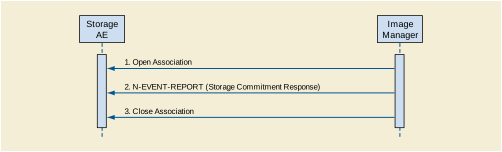
A possible sequence of interactions between the Storage AE and an Image Manager (e.g., a storage or archive device supporting Storage Commitment SOP Classes as an SCP) is illustrated in the Figure above:
-
The Image Manager opens a new association with the Storage AE.
-
The Image Manager sends an N-EVENT-REPORT request notifying the Storage AE of the status of a previous Storage Commitment Request. The Storage AE replies with a N-EVENT-REPORT response confirming receipt.
-
The Image Manager closes the association with the Storage AE.
The Storage AE may reject association attempts as shown in the Table below. The Result, Source and Reason/Diag columns represent the values returned in the appropriate fields of an ASSOCIATE-RJ PDU (see Section 9.3.4 in PS3.8 ). The contents of the Source column is abbreviated to save space and the meaning of the abbreviations are:
Table B.4.2-14. Association Rejection Reasons
The Storage AE will accept Presentation Contexts as shown in the Table below.
The Storage AE will prefer to select the Explicit VR Little Endian Transfer Syntax if multiple transfer syntaxes are offered. The Storage AE will only accept the SCU role (which must be proposed via SCP/SCU Role Selection Negotiation) within a Presentation Context for the Storage Commitment Push Model SOP Class.
Upon receipt of a N-EVENT-REPORT the timer associated with the Transaction UID will be canceled.
The behavior of Storage AE when receiving Event Types within the N-EVENT-REPORT is summarized in Table B.4.2-12.
The reasons for returning specific status codes in a N-EVENT-REPORT response are summarized in Table B.4.2-13.
The Storage AE provides standard conformance to the Verification SOP Class as an SCP. If the C-ECHO request was successfully received, a 0000 (Success) status code will be returned in the C-ECHO response. Otherwise, a C000 (Error - Cannot Understand) status code will be returned in the C-ECHO response.
EXAMPLE-INTEGRATED-MODALITY provides Standard Conformance to the following SOP Classes:
The DICOM standard application context name for DICOM is always proposed:
EXAMPLE-INTEGRATED-MODALITY initiates one Association at a time for a Worklist request.
The request for a Worklist Update is initiated by user interaction, i.e., pressing the buttons "Worklist Update"/"Patient Worklist Query" or automatically at specific time intervals, configurable by the user. With "Worklist Update" the automated query mechanism is performed immediately on request, while with "Patient Worklist Query" a dialog to enter search criteria is opened and an interactive query can be performed.
The interactive Patient Worklist Query will display a dialog for entering data as search criteria. When the Query is started on user request, only the data from the dialog will be inserted as matching keys into the query.
With automated worklist queries (including "Worklist Update") the EXAMPLE-INTEGRATED-MODALITY always requests all items for a Scheduled Procedure Step Start Date (actual date), Modality (RF) and Scheduled Station AE Title. Query for the Scheduled Station AE Title is configurable by a Service Engineer.
Upon initiation of the request, the EXAMPLE-INTEGRATED-MODALITY will build an Identifier for the C-FIND request, will initiate an Association to send the request and will wait for Worklist responses. After retrieval of all responses, EXAMPLE-INTEGRATED-MODALITY will access the local database to add or update patient demographic data. To protect the system from overflow, the EXAMPLE-INTEGRATED-MODALITY will limit the number of processed worklist responses to a configurable maximum. During receiving the worklist response items are counted and the query processing is canceled by issuing a C-FIND-CANCEL if the configurable limit of items is reached. The results will be displayed in a separate list, which will be cleared with the next worklist update.
EXAMPLE-INTEGRATED-MODALITY will initiate an Association in order to issue a C-FIND request according to the Modality Worklist Information Model.
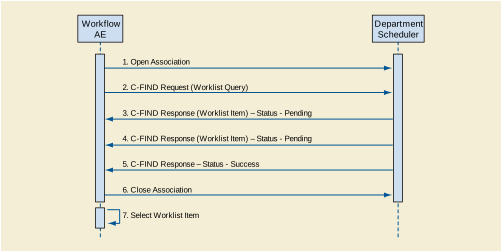
A possible sequence of interactions between the Workflow AE and a Departmental Scheduler (e.g., a device such as a RIS or HIS that supports the Modality Worklist SOP Class as an SCP) is illustrated in the Figure above:
-
The Worklist AE opens an association with the Departmental Scheduler
-
The Worklist AE sends a C-FIND request to the Departmental Scheduler containing the Worklist Query attributes.
-
The Departmental Scheduler returns a C-FIND response containing the requested attributes of the first matching Worklist Item.
-
The Departmental Scheduler returns another C-FIND response containing the requested attributes of the second matching Worklist Item.
-
The Departmental Scheduler returns another C-FIND response with status Success indicating that no further matching Worklist Items exist. This example assumes that only 2 Worklist items match the Worklist Query.
-
The Worklist AE closes the association with the Departmental Scheduler.
-
The user selects a Worklist Item from the Worklist and prepares to acquire new images.
EXAMPLE-INTEGRATED-MODALITY will propose Presentation Contexts as shown in the following table:
The behavior of EXAMPLE-INTEGRATED-MODALITY when encountering status codes in a Modality Worklist C-FIND response is summarized in the Table below. If any other SCP response status than "Success" or "Pending" is received by EXAMPLEINTEGRATED-MODALITY, a message "query failed" will appear on the user interface.
Table B.4.2-22. Modality Worklist C-FIND Response Status Handling Behavior
The behavior of EXAMPLE-INTEGRATED-MODALITY during communication failure is summarized in the Table below.
Table B.4.2-23. Modality Worklist Communication Failure Behavior
Acquired images will always use the Study Instance UID specified for the Scheduled Procedure Step (if available). If an acquisition is unscheduled, a Study Instance UID will be generated locally.
The Table below provides a description of the EXAMPLEINTEGRATED-MODALITY Worklist Request Identifier and specifies the attributes that are copied into the images. Unexpected attributes returned in a C-FIND response are ignored.
Requested return attributes not supported by the SCP are set to have no value. Non-matching responses returned by the SCP due to unsupported optional matching keys are ignored. No attempt is made it filter out possible duplicate entries.
Note
If an extended character set is used in the Request Identifier, Specific Character Set (0008,0005) will be included in the Identifier with the value "ISO_IR 100" or "ISO_IR 144" (see Section B.6). Otherwise, Specific Character Set (0008,0005) will not be sent
The above tables should be read as follows:
- Module Name
-
The name of the associated module for supported worklist attributes.
- Attribute Name
-
Attributes supported to build an EXAMPLEINTEGRATED-MODALITY Worklist Request Identifier.
- Tag
- VR
- M
-
Matching keys for (automatic) Worklist Update. A "S" will indicate that EXAMPLE-INTEGRATED-MODALITY will supply an attribute value for Single Value Matching, a "R" will indicate Range Matching and a "*" will denote wild card matching. It can be configured if "Scheduled Station AE Title" is additionally supplied "(S) " and if Modality is set to RF or SC.
- R
-
Return keys. An "x" will indicate that EXAMPLE-INTEGRATED-MODALITY will supply this attribute as Return Key with zero length for Universal Matching. The EXAMPLE-INTEGRATED-MODALITY will support retired date format (yyyy.mm.dd) for "Patient's Birth Date" and "Scheduled Procedure Step Start Date" in the response identifiers. For "Scheduled Procedure Step Start Time" also retired time format as well as unspecified time components are supported.
- Q
-
Interactive Query Key. An "x" " will indicate that EXAMPLE-INTEGRATED-MODALITY will supply this attribute as matching key, if entered in the Query Patient Worklist dialog. For example, the Patient Name can be entered thereby restricting Worklist responses to Procedure Steps scheduled for the patient.
- D
-
Displayed keys. An "x" indicates that this worklist attribute is displayed to the user during a patient registration dialog. For example, Patient Name will be displayed when registering the patient prior to an examination.
- IOD
-
An "x" indicates that this Worklist attribute is included into all Object Instances created during performance of the related Procedure Step.
The default Query Configuration is set to "Modality" (RF) and "Date" (date of today). Optionally, additional matching for the own AET is configurable.
After Patient registration, the EXAMPLE-INTEGRATED-MODALITY is awaiting the 1st application of X-Ray Dose to the patient. The trigger to create a MPPS SOP Instance is derived from this event. An Association to the configured MPPS SCP system is established immediately and the related MPPS SOP Instance will be created.
A manual update can be performed with the MPPS user interface where is it possible to set the final state of the MPPS to "COMPLETED" or "DISCONTINUED". In the "Discontinued" case the user can also select the discontinuation reason from a list corresponding to CID 9300 “Procedure Discontinuation Reasons”. A MPPS Instance that has been sent with a state of "COMPLETED" or "DISCONTINUED" can no longer be updated.
The EXAMPLE-INTEGRATED-MODALITY will support creation of "unscheduled cases" by allowing MPPS Instances to be communicated for locally registered Patients.
The EXAMPLE-INTEGRATED-MODALITY only supports a 0-to-1 relationship between Scheduled and Performed Procedure Steps.
EXAMPLE-INTEGRATED-MODALITY will initiate an Association to issue an:
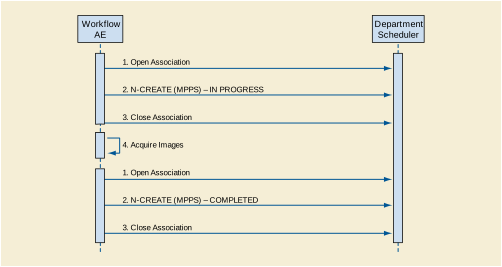
A possible sequence of interactions between the Workflow AE and a Departmental Scheduler (e.g., a device such as a RIS or HIS that supports the MPPS SOP Class as an SCP) is illustrated in Figure B.4.2-4:
-
The Worklist AE opens an association with the Departmental Scheduler
-
The Worklist AE sends an N-CREATE request to the Departmental Scheduler to create an MPPS instance with status of "IN PROGRESS" and create all necessary attributes. The Departmental Scheduler acknowledges the MPPS creation with an N-CREATE response (status success).
-
The Worklist AE closes the association with the Departmental Scheduler.
-
The Worklist AE opens an association with the Departmental Scheduler.
-
The Worklist AE sends an N-SET request to the Departmental Scheduler to update the MPPS instance with status of "COMPLETED" and set all necessary attributes. The Departmental Scheduler acknowledges the MPPS update with an N-SET response (status success).
-
The Worklist AE closes the association with the Departmental Scheduler.
EXAMPLE-INTEGRATED-MODALITY will propose Presentation Contexts as shown in the following table:
The behavior of EXAMPLE-INTEGRATED-MODALITY when encountering status codes in an MPPS N-CREATE or N-SET response is summarized in Table B.4.2-26. If any other SCP response status than "Success" or "Warning" is received by EXAMPLEINTEGRATED-MODALITY, a message "MPPS update failed" will appear on the user interface.
Table B.4.2-26. MPPS N-CREATE / N-SET Response Status Handling Behavior
The behavior of EXAMPLE-INTEGRATED-MODALITY during communication failure is summarized in the Table below:
Table B.4.2-28 provides a description of the MPPS N-CREATE and N-SET request identifiers sent by EXAMPLE-INTEGRATED-MODALITY. Empty cells in the N-CREATE and N-SET columns indicate that the attribute is not sent. An "x" indicates that an appropriate value will be sent. A "Zero length" attribute will be sent with zero length.
Table B.4.2-28. MPPS N-CREATE / N-SET Request Identifier
|
From Modality Worklist or user input (all 5 components). The user can modify values provided via Modality Worklist. |
||||
|
From Modality Worklist or user input. The user can modify values provided via Modality Worklist. |
||||
|
From Modality Worklist or user input. The user can modify values provided via Modality Worklist. |
||||
|
From Modality Worklist or user input. The user can modify values provided via Modality Worklist. |
||||
|
From Modality Worklist or user input. The user can modify values provided via Modality Worklist. |
||||
|
Performed Procedure Step Discontinuation Reason Code Sequence |
If Performed Procedure Step Status (0040,0252) is "DISCONTINUED" then a single item will be present containing a user-selected entry drawn from CID 9300 “Procedure Discontinuation Reasons”. |
|||
|
From Modality Worklist or user input. The user can modify the description provided via Modality Worklist. |
||||
|
From Modality Worklist or user input. The user can modify values provided via Modality Worklist. |
||||
EXAMPLE-INTEGRATED-MODALITY provides Standard Conformance to the following SOP Classes:
The DICOM standard application context name for DICOM is always proposed:
EXAMPLE-INTEGRATED-MODALITY initiates one Association at a time for each configured hardcopy device. Multiple hardcopy devices can be configured.
A user composes images onto film sheets and requests them to be sent to a specific hardcopy device. The user can select the desired film format and number of copies. Each print-job is forwarded to the job queue and processed individually.
The Hardcopy AE is invoked by the job control interface that is responsible for processing network tasks. The job consists of data describing the images and graphics to be printed as well as the requested layout and other parameters. The film sheet is internally processed, converted to a STANDARD/1,1 page and then the page image is sent. If no association to the printer can be established, the print-job is switched to a failed state and the user informed.
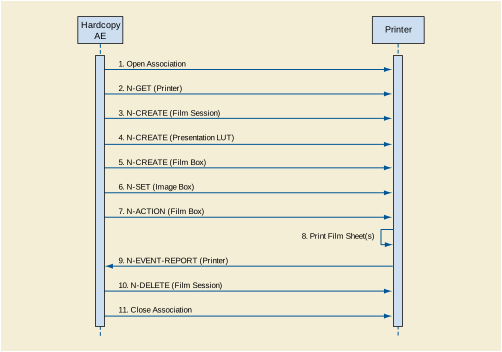
A typical sequence of DIMSE messages sent over an association between Hardcopy AE and a Printer is illustrated in Figure B.4.2-5:
-
N-GET on the Printer SOP Class is used to obtain current printer status information. If the Printer reports a status of FAILURE, the print-job is switched to a failed state and the user informed.
-
N-CREATE on the Film Session SOP Class creates a Film Session.
-
N-CREATE on the Presentation LUT SOP Class creates a Presentation LUT (if supported by the printer).
-
N-CREATE on the Film Box SOP Class creates a Film Box linked to the Film Session. A single Image Box will be created as the result of this operation (Hardcopy AE only uses the format STANDARD\1,1)
-
N-SET on the Image Box SOP Class transfers the contents of the film sheet to the printer. If the printer does not support the Presentation LUT SOP Class, the image data will be passed through a printer-specific correction LUT before being sent.
-
N-ACTION on the Film Box SOP Class instructs the printer to print the Film Box
-
The Printer asynchronously reports its status via N-EVENT-REPORT notification (Printer SOP Class). The printer can send this message at any time. Hardcopy AE does not require the N-EVENT-REPORT to be sent. Hardcopy AE is capable of receiving an N-EVENT-REPORT notification at any time during an association. If the Printer reports a status of FAILURE, the print-job is switched to a failed state and the user informed.
-
N-DELETE on the Film Session SOP Class deletes the complete Film Session SOP Instance hierarchy.
Status of the print-job is reported through the job control interface. Only one job will be active at a time for each separate hardcopy device. If any Response from the remote Application contains a status other than Success or Warning, the Association is aborted and the related Job is switched to a failed state. It can be restarted any time by user interaction or, if configured, by automated retry.
EXAMPLE-INTEGRATED-MODALITY is capable of proposing the Presentation Contexts shown in the Table below:
The general behavior of Hardcopy AE during communication failure is summarized in the Table below. This behavior is common for all SOP Classes supported by Hardcopy AE.
Table B.4.2-35. Hardcopy Communication Failure Behavior
Hardcopy AE supports the following DIMSE operations and notifications for the Printer SOP Class:
Details of the supported attributes and status handling behavior are described in the following subsections.
Hardcopy AE uses the Printer SOP Class N-GET operation to obtain information about the current printer status. The attributes obtained via N-GET are listed in the Table below:
The Printer Status information is evaluated as follows:
-
If Printer status (2110,0010) is NORMAL, the print-job continues to be printed.
-
If Printer status (2110,0010) is FAILURE, the print-job is marked as failed. The contents of Printer Status Info (2110,0020) is logged and reported to the user via the job control application.
-
If Printer status (2110,0010) is WARNING, the print-job continues to be printed. The contents of Printer Status Info (2110,0020) is logged and reported to the user via the job control application.
The behavior of Hardcopy AE when encountering status codes in a N-GET response is summarized in the Table below:
Hardcopy AE is capable of receiving an N-EVENT-REPORT request at any time during an association.
The behavior of Hardcopy AE when receiving Event Types within the N-EVENT-REPORT is summarized in the Table below:
Table B.4.2-38. Printer SOP Class N-EVENT-REPORT Behavior
The reasons for returning specific status codes in a N-EVENT-REPORT response are summarized in the Table below:
Table B.4.2-39. Printer SOP Class N-EVENT-REPORT Response Status Reasons
Hardcopy AE supports the following DIMSE operations for the Film Session SOP Class:
Details of the supported attributes and status handling behavior are described in the following subsections.
The attributes supplied in an N-CREATE Request are listed in the Table below:
The behavior of Hardcopy AE when encountering status codes in a N-CREATE response is summarized in the Table below:
Table B.4.2-41. Film Session SOP Class N-CREATE Response Status Handling Behavior
Hardcopy AE supports the following DIMSE operations for the Presentation LUT SOP Class:
Details of the supported attributes and status handling behavior are described in the following subsections.
The attributes supplied in an N-CREATE Request are listed in the Table below:
The behavior of Hardcopy AE when encountering status codes in a N-CREATE response is summarized in the Table below:
Table B.4.2-44. Presentation LUT SOP Class N-CREATE Response Status Handling Behavior
Hardcopy AE supports the following DIMSE operations for the Presentation LUT SOP Class:
Details of the supported attributes and status handling behavior are described in the following subsections.
The attributes supplied in an N-CREATE Request are listed in the Table below:
Table B.4.2-45. Film Box SOP Class N-CREATE Request Attributes
The behavior of Hardcopy AE when encountering status codes in a N-CREATE response is summarized in the Table below:
Table B.4.2-46. Film Box SOP Class N-CREATE Response Status Handling Behavior
An N-ACTION Request is issued to instruct the Print SCP to print the contents of the Film Box. The Action Reply argument in an N-ACTION response is not evaluated.
The behavior of Hardcopy AE when encountering status codes in a N-ACTION response is summarized in the Table below:
Table B.4.2-47. Film Box SOP Class N-ACTION Response Status Handling Behavior
Hardcopy AE supports the following DIMSE operations for the Image Box SOP Class:
Details of the supported attributes and status handling behavior are described in the following subsections.
The attributes supplied in an N-SET Request are listed in the Table below:
The behavior of Hardcopy AE when encountering status codes in a N-SET response is summarized in the Table below:
Table B.4.2-49. Image Box SOP Class N-SET Response Status Handling Behavior
EXAMPLE-INTEGRATED-MODALITY supports a single network interface. One of the following physical network interfaces will be available depending on installed hardware options:
EXAMPLE-INTEGRATED-MODLALITY conforms to the System Management Profiles listed in the Table below. All requested transactions for the listed profiles and actors are supported. Support for optional transactions are listed in the Table below:
DHCP can be used to obtain TCP/IP network configuration information. The network parameters obtainable via DHCP are shown in the Table below. The Default Value column of the table shows the default used if the DHCP server does not provide a value. Values for network parameters set in the Service/Installation tool take precedence over values obtained from the DHCP server. Support for DHCP can be configured via the Service/Installation Tool. The Service/Installation tool can be used to configure the machine name. If DHCP is not in use, TCP/IP network configuration information can be manually configured via the Service/Installation Tool.
If the DHCP server refuses to renew a lease on the assigned IP address all active DICOM Associations will be aborted.
DNS can be used for address resolution. If DHCP is not in use or the DHCP server does not return any DNS server addresses, the identity of a DNS server can be configured via the Service/Installation Tool. If a DNS server is not in use, local mapping between hostname and IP address can be manually configured via the Service/Installation Tool.
The NTP client implements the optional Find NTP Server Transaction. The NTP client will issue an NTP broadcast to identify any local NTP servers. If no local servers can found via NTP broadcast, the NTP Servers identified by DHCP will be used as time references. Additionally, one or more NTP Servers can be configured via the Service/Installation Tool. If no NTP Servers are identified then the local clock will be used as a time reference and a warning written to the system log files.
LDAP can be used to obtain information about network Application Entities. The identity of an LDAP server can be obtained using the Find LDAP Server Transaction of the DICOM Application Configuration Management Profile (i.e., a DNS SRV RR query for the LDAP service) and the first LDAP server returned will be used. The Service/Installation Tool can also be used to manually configure the identity of an LDAP server (a manually entered value takes precedence).
LDAP Basic Authentication can be configured via the Service/Installation Tool by specifying a bind DN and password. If LDAP Basic Authentication is not configured the LDAP client will bind anonymously.
The supported LDAP Security Profiles are:
The use of LDAP to publish and obtain device configuration information is described in Section B.4.4.
All local applications use the AE Titles and TCP/IP Ports configured via the Service/Installation Tool. The Field Service Engineer can configure the TCP Port via the Service/Installation Tool. No Default AE Titles are provided. The AE Titles must be configured during installation. The local AE Title used by each individual application can be configured independently of the AE Title used by other local applications. If so configured, all local AEs are capable of using the same AE Title.
The Service/Installation Tool can be used to specify that an LDAP Server be the master of local configuration information. The Query LDAP Server transaction of the Network Configuration Profile is used to obtain configuration information. The LDAP
Server will be queried for updated information at boot time but the query can also be manually invoked from the Service/Installation Tool. A search is performed for an LDAP entity within the DICOM configuration sub-tree having an identical device name (as entered in the Service/Installation Tool). The local configuration will be updated to match the central configuration (i.e., AE Titles, TCP Port Numbers, Peer AEs, Private Data, etc). The central configuration information will be checked for consistency before the local configuration is updated.
The configuration parameters that can be updated by the central LDAP server and can affect the local configuration for the device are listed in the Table below:
Table B.4.4-2. Device Configuration Parameters Obtained From LDAP Server
The Application Entities described by the LDAP server are matched to the supported local application entities (Storage, Workflow or Hardcopy) by inspecting the private information within the dicomVendorData attribute for each dicomNetworkAE.
The configuration parameters that can be updated by the central LDAP server and affect the local configuration for each supported local AE are listed in the Table below:
Table B.4.4-3. AE Configuration Parameters Obtained From LDAP Server
The configuration parameters that can be updated by the central LDAP server and affect the local configuration for the network connection are listed in the Table below:
The Service/Installation Tool can be used to publish local configuration information to the LDAP Server.
The LDAP client will bind to the server using LDAP Basic Authentication (or anonymously if LDAP Basic Authentication is not configured). The LDAP Client expects that the necessary DICOM Root objects exist in the LDAP DIT and performed searches to identify the following information:
-
The DN of the dicomConfigurationRoot identifying the root if all DICOM Configuration information.
-
The DN of the dicomDevicesRoot under which new devices can be inserted
-
The DN of the dicomUniqueAETitlesRegistryRoot under which unique AE Titles can be registered
-
The DN of any existing dicomDevice object that represents the device hosting the LDAP client (dicomDeviceName identical to locally configured device name).
Modifications can be made to existing LDAP entries for the device or new entries will be created if necessary. It is possible to manually assign AE Titles for each local Application Entity or to automatically generate random AE Titles. In both cases, the LDAP server is queried to determine that the AE Titles are currently unused.
Two different methods (Manual and Automatic) are supported to update the LDAP server and an appropriate method must be selected depending on the security policies enforced by the LDAP server.
-
An LDIF file (RFC 2489) will be created containing all new or updated LDAP objects and attributes. The objects will be appropriately located in the server's LDAP tree. The LDIF file will be written to the local file system or to exchangeable media (e.g., floppy). The file can be transferred to the LDAP server and imported using server specific tools.
-
The LDAP client will attempt to register unique AE Titles. If the manually chosen AE Titles are manually already in use the update will be aborted and new AE Titles must be chosen. If AE Titles were randomly selected the LDAP client will use the random AE Title allocation technique described by the "Update LDAP Server" transaction of the DICOM Application Configuration Management Profile.
-
The LDAP client will create new LDAP objects or update existing objects as necessary at appropriate locations in the server's LDAP tree.
-
If the server refuses any object creation or update operation the Automatic Update will be aborted. In case of failure, the LDAP server may contain partial configuration information that must be corrected by the LDAP server administrator.
The same set of LDAP objects and attributes will be entered into the LDAP DIT for both the Manual and Automatic Update methods. Values for all configurable attributes can be entered using Service/Installation Tool. Table B.4.4-5 lists the attributes and default values created for the installed device.
Table B.4.4-6 lists the attributes and default values used to describe the network configuration:
The Table below lists the attributes and default values used to describe the Storage AE:
Table B.4.4-7. Storage AE Configuration Parameters Updated On LDAP Server
The Table below lists the attributes and default values used to describe the Workflow AE:
Table B.4.4-8. Workflow AE Configuration Parameters Updated On LDAP Server
The Table below lists the attributes and default values used to describe the Hardcopy AE:
Table B.4.4-9. Hardcopy AE Configuration Parameters Updated On LDAP Server
The AE Title, host names and port numbers of remote applications are configured using the EXAMPLE-INTEGRATED-MODALITY Service/Installation Tool.
The EXAMPLE-INTEGRATED-MODALITY Service/Installation Tool must be used to set the AE Titles, port-numbers, host-names and capabilities for the remote Storage SCPs. Associations will only be accepted from known AE Titles and associations from unknown AE Titles will be rejected (an AE Title is known if it can be selected within the Service/Installation Tool). Multiple remote Storage SCPs can be defined. Any Storage SCP can be configured to be an "Archive" device causing storage commitment to be requested for images or presentation states transmitted to the device.
If an LDAP server is available, the Service/Installation Tool will search for suitable remote Storage SCPs and present these for selection. If the LDAP object for the Storage AE contains one or more dicomPeerAETitle attributes then only these Peer AEs will be available for selection. Otherwise, remote AEs will only be available for selection if they support compatible SOP Classes as an SCP. If a remote AE is attached to a device containing a dicomDeviceType attribute with value "ARCHIVE" it will be automatically configured as an "Archive" device provided the AE also supports Storage Commitment as an SCP.
These LDAP-assisted selection policies can be overridden and a search performed for a specific device or AE Title.
The EXAMPLE-INTEGRATED-MODALITY Service/Installation Tool must be used to set the AE Title, port-number, host-name and capabilities of the remote Modality Worklist SCP. Only a single remote Modality Worklist SCP can be defined.
If an LDAP server is available, the Service/Installation Tool will search for suitable remote Modality Worklist SCPs and present these for selection. Remote AEs will only be available for selection if they support the Modality Worklist SOP Class as an SCP. If a remote AE is attached to a device containing a dicomDeviceType attribute with value "DSS" (Department System Scheduler) it will be presented as the preferred selection.
The EXAMPLE-INTEGRATED-MODALITY Service/Installation Tool must be used to set the AE Title, port-number, host-name and capabilities of the remote MPPS SCP. Only a single remote MPPS SCP can be defined.
If an LDAP server is available, the Service/Installation Tool will search for suitable remote MPPS SCPs and present these for selection. Remote AEs will only be available for selection if they support the MPPS SOP Class as an SCP. If a remote AE is attached to a device containing a dicomDeviceType attribute with value "DSS" (Department System Scheduler) it will be presented as the preferred selection.
The EXAMPLE-INTEGRATED-MODALITY Service/Installation Tool must be used to set the AEs' AE Titles, port-numbers, host-names, IPaddresses and capabilities for the remote Print SCPs.
Multiple remote Print SCPs can be defined.
If an LDAP server is available, the Service/Installation Tool will search for suitable remote Print SCPs and present these for selection. Remote AEs will only be available for selection if they support the Basic Grayscale Print Management Meta SOP Class as an SCP. If a remote AE is attached to a device containing a dicomDeviceType attribute with value "PRINT" (Hard Copy Print Server) it will be presented as the preferred selection.
A large number of parameters related to acquisition and general operation can be configured using the Service/Installation Tool. The Table below only shows those configuration parameters relevant to DICOM communication. See the EXAMPLEINTEGRATED-MODALITY Service Manual for details on general configuration capabilities.
Table B.4.4-10. Configuration Parameters Table
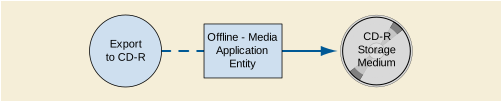
The Offline-Media Application Entity exports images and Presentation States to a CD-R Storage medium. It is associated with the local real-world activity "Export to CD-R". "Export to CD-R" is performed upon user request for selected patients, studies, series or instances (images or presentation states).
Activation of the "Export to CD-R" icon or menu entry will pass the currently selected patients, studies, series or instances (images or presentation states) to the Offline-Media Application Entity. The SOP Instances associated with the selection will be collected into one or more export jobs. The contents of each export job will be written to a single CD-R media.
At least one image or presentation state must exist and be selected before the Offline-Media Application Entity can be invoked. The operator can insert a new CD-R media at any time before or after invocation of the Offline-Media Application Entity. The Offline-Media Application Entity will wait indefinitely for a media to be inserted before starting to write to the CD-R device. If no CD-R media is available the export job can be canceled from the job queue.
The Offline-Media Application Entity provides standard conformance to the Media Storage Service Class. The Application Profiles and roles are listed below:
The Source Application Entity Title included in the File Meta Header is configurable (see Section B.5.4).
The Offline-Media Application Entity acts as an FSC when requested to export SOP Instances from the local database to a CD-R medium.
A dialogue will be presented allowing the user to modify the suggested media label and provides control over the available media capacity. If the contents of the current selection do not fit on a single media an automatic separation into multiple export jobs will be suggested that can be adapted by the user.
The user will be prompted to insert an empty CD-R for each export job. The contents of the export job will be written together with a corresponding DICOMDIR to a single-session CDR. Writing in multi-session mode is not supported. The user can cancel an export job in the job queue.
All EXAMPLE-INTEGRATED-MODALITY DICOM applications support the
ISO_IR 100 (ISO 8859-1:1987 Latin Alphabet No. 1 supplementary set)
ISO_IR 144 (ISO 8859-5:1988 Latin/Cyrillic Alphabet supplementary set)
If the EXAMPLE-INTEGRATED-MODALITY is configured for Cyrillic character set support, ISO_IR 144 will be used automatically.
EXAMPLE-INTEGRATED-MODALITY does not support any specific security measures.
It is assumed that EXAMPLE-INTEGRATED-MODALITY is used within a secured environment. It is assumed that a secured environment includes at a minimum:
-
Firewall or router protections to ensure that only approved external hosts have network access to EXAMPLEINTEGRATED-MODALITY.
-
Firewall or router protections to ensure that EXAMPLEINTEGRATED-MODALITY only has network access to approved external hosts and services.
-
Any communication with external hosts and services outside the locally secured environment use appropriate secure network channels (e.g., such as a Virtual Private Network (VPN) )
Other network security procedures such as automated intrusion detection may be appropriate in some environments. Additional security features may be established by the local security policy and are beyond the scope of this conformance statement.
Examples of X-Ray Radiofluoroscopic images and Grayscale Softcopy Presentation States created by EXAMPLE-INTEGRATED-MODALITY can be downloaded from:
http://www.example-imaging-products.nocom/example-integrated-modality/example-images
Table B.8.1-1 specifies the attributes of an X-Ray Radiofluoroscopic Image transmitted by the EXAMPLE-INTEGRATED-MODALITY storage application.
Table B.8.1-2 specifies the attributes of a Grayscale Softcopy Presentation State transmitted by the EXAMPLEINTEGRATED-MODALITY storage application.
The following tables use a number of abbreviations. The abbreviations used in the "Presence of …" column are:
The abbreviations used in the "Source" column:
Note
All dates and times are encoded in the local configured calendar and time. Date, Time and Time zone are configured using the Service/Installation Tool.
Table B.8.1-3. Patient Module of Created SOP Instances
Table B.8.1-6. General Series Module of Created SOP Instances
Table B.8.1-8. Private Application Module of Created SOP Instances
Table B.8.1-9. General Image Module of Created Rf SOP Instances
|
Baseline Context ID is 4009 (see also Section B.8.6) |
The EXAMPLE-INTEGRATED-MODALITY storage application does not receive SOP Instances. The usage of attributes received via Modality Worklist is described in Section B.4.2.2.3.1.3.
The relationships between attributes received via Modality Worklist, stored in acquired images and communicated via MPPS are summarized in Table B.8.1-31. The format and conventions used in DICOM Table B.8.1-31 are the same as the corresponding table in Section J.6 in PS3.17 .
The Private Attributes added to created SOP Instances are listed in the Table below. EXAMPLE-INTEGRATED-MODALITY reserves blocks of private attributes in groups 0009, 0019 and 0029. Further details on usage of these private attributes are contained in Section B.8.1.
The Workflow AE is capable of supporting arbitrary coding schemes for Procedure and Protocol Codes. The contents of Requested Procedure Code Sequence (0032,1064) and Scheduled Protocol Code Sequence (0040,0008) supplied in Worklist Items will be mapped to Image IOD and MPPS attributes as described in Table B.8.1-31. During installation, a service technician will establish a mapping between the site-specific codes and the Protocol Names used internally to identify acquisition protocols.
The contents of Anatomic Region Sequence (0008,2218) in generated images will be filled with an anatomic code selected by the user from a catalog. The default catalog of anatomic codes corresponds to CID 4009 “DX Anatomy Imaged” but can be extended using the Service/Installation Tool.
The contents of Performed Procedure Step Discontinuation Reason Code Sequence (0040,0281) for a discontinued MPPS will be filled with a code selected by the user from a fixed list corresponding to CID 9300 “Procedure Discontinuation Reasons”.
The high resolution display monitor attached to EXAMPLEINTEGRATED-MODALITY can be calibrated according to the Grayscale Standard Display Function (GSDF). The Service/Installation Tool is used together with a luminance meter to measure the Characteristic Curve of the display system and the current ambient light. See the EXAMPLE-INTEGRATED-MODALITY Service Manual for details on the calibration procedure and supported calibration hardware. The result of the calibration procedure is a Monitor Correction LUT that will be active within the display subsystem after a system reboot.
No Specialized or Private SOP Classes are supported.
The X-Ray Radiofluoroscopic Image Storage SOP Class is extended to create a Standard Extended SOP Class by addition of standard and private attributes to the created SOP Instances as documented in Section B.8.1.
This document is an example DICOM Conformance Statement for a product that supports DICOM SOP Classes frequently associated with a Radiology Information System or RIS. The product whose conformance is being documented, DICOMRis, and the manufacturer, Hospital Systems, are fictional.
As stated in the annex title, this document is truly informative, and not normative. A conformance statement of an actual product might implement additional services and options as appropriate for its specific purpose. In addition, an actual product might implement the services described in a different manner and, for example, with different characteristics and/or sequencing of activities. In other words, this conformance statement example does not intend to standardize a particular manner that a product might implement DICOM functionality.
Company Name: EXAMPLE RIS Products.
Product Name: SAMPLE DICOMRis Interface
Hospital Systems' DICOMRis is a suite of applications that implement a full-featured Radiology Information System (RIS). DICOMRis includes features typically associated with a RIS, including interfaces to various Hospital Information Systems, Patient Tracking, Results Reporting, Film Tracking, Management Reporting, PACS Integration, etc. The DICOMRis GUI-based client application, RisView, runs on a Windows 95/98/NT platform; the server platform is Digital Unix.
As part of PACS Integration DICOMRis supports several DICOM Service Classes, using DICOMTool's DICOM Toolkit, to provide the following capabilities:
Allowing Modalities to query for worklists of procedures to be performed and for patient and procedure demographics. DICOMRis processes these queries by directly accessing the DICOMRis database, which is automatically updated with appropriate data through the normal operations of the RIS.
Updating the DICOMRis database in response to Procedure Step transactions initiated by Modalities as they perform examinations. Relevant data contained in these transactions may be viewed using RisView.
See example text in Section A.3.
IHE Radiology Technical Framework, Revision 7.0, ACC/HIMSS/RSNA, 2006.
Logical Observation Identifier Names and Codes (LOINC). Regenstrief Institute. Indianapolis. 2018.http://loinc.org/
This document is a sample DICOM Conformance Statement created for DICOM PS3.2. It is to be used solely as an example to illustrate how to create a DICOM Conformance Statement for a departmental information system supporting DICOM Modality Worklist and Modality Performed Procedure Step Services. The subject of the document, DICOMRis, is a fictional product.
DICOMRis Database The database that indexes procedures, orders and patients
DICOMSRV DICOM MWL and MPPS application
RisView DICOMRis' GUI-based application providing views into the DICOMRis' Database, reporting function, etc.
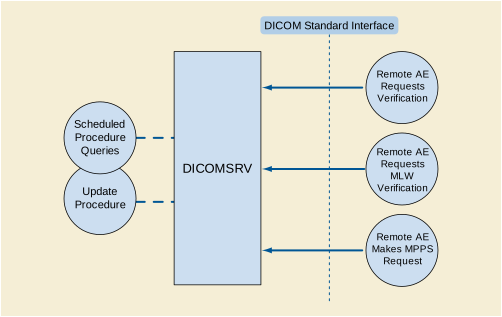
The DICOMRis DICOMSRV application provides access to Scheduled Procedure information, supports updating of the RIS database as procedures are performed. The various flows in the diagram above are described as follows
DICOMSRV accepts associations for Verification from Verification SCUs and responds automatically with Success status
DICOMSRV accepts Association Requests for Modality Worklist from MWL SCUs and responds to queries from these SCUs. When a query is received DICOMSRV engages in local real-world activity Scheduled Procedure Queries. This results in a set of matching responses that DICOMSRV returns to the MWL SCU.
DICOMSRV accepts Association Requests for Modality Performed Procedure Step from MPPS SCUs and responds to N-CREATE and N-SET Requests from these SCUs. When an N-CREATE or N-SET is received DICOMSRV engages in local real-world activity Update Procedure. This results in updates to the DICOMRis Database per the contents of the received message. DICOMSRV then returns N-SET or N-CREATE status to the MPPS SCU.
DICOMSRV is a background process running on a Unix server. A single instance of DICOMSRV is started at System boot but multiple instances may be running at any one time as a result of forking of additional processes. The application may be started/restarted interactively via a utility. In addition, there is a monitoring process that may be configured to restart the application automatically should it crash. Events are logged to application-specific log files with a time stamp. Multiple logging levels are supported. At the lowest logging level the following are logged:
Higher levels of logging can be configured to cause dumping of the contents of DICOM Service and Association messages..
DICOMSRV will listen for connection requests at the Presentation Address configured for its AE Title. This application is an implementation of a concurrent server; it forks a new process for each connection request it receives. Each forked process exists for the life of a single association and then exits. DICOMSRV will accept Presentation Contexts for the Modality Worklist, Modality Performed Procedure Step and Verification SOP Classes. Validation of DICOM Service Request messages is configurable using command-line parameters and may return Failure status in the event of an invalid Service Request according to the specifications in the standard. Upon receipt of a Verification Request DICOMSRV will respond with a successful Verification response. When a MWL query is received DICOMSRV will query the DICOMRis database for a list of Scheduled Procedure Steps matching the query and will return a pending C-Find response for each match. Before DICOMRis can include patient and order information in response to a Modality Worklist query, patients must be registered and there must be orders for those patients in the DICOMRis database.. Registration and order information is typically interfaced to DICOMRis from a HIS but can also be entered directly into DICOMRis using DICOMRis's registration and order entry applications. Reception of an MPPS N-Create or N-Set Request may result in updates to various tables in the DICOMRis database and may result in changes to the procedure state of the Requested Procedure(s) referenced within the message. If an MPPS message containing non-matching demographic data is received, this will be logged, an exception document generated and an entry added to an exception table in the database.
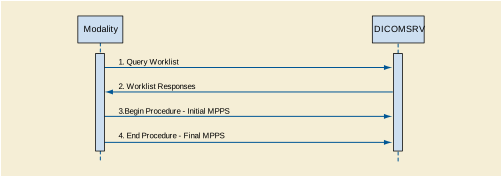
Under normal circumstances the sequencing depicted above applies:
-
The Modality queries for a worklist of Scheduled Procedure Steps
-
DICOMSRV searches its database and returns matches to the query
-
The Modality begins performance of a Procedure Step and sends the MPPS N-CREATE
-
The Modality completes or discontinues the procedure and sends the MPPS N-SET with status of COMPLETE or DISCONTINUED
The workflow above is not the only one possible. For example, in a Trauma or unscheduled flow there may be no worklist query prior to the performance of the procedure and the sending of MPPS messages. The flow would also be altered if the Modality did not support both Modality Worklist and MPPS. The Description and Sequencing of Activities and the SOP Specific Conformance sections below for the respective Real World Activities provide additional detail
This application provides Standard Conformance to the following DICOM SOP Classes:
DICOMSRV will support as many simultaneous associations as SCP as are requested by Workflow SCUs up to a configurable maximum. DICOMSRV limits the number of concurrent associations to a given Workflow SCU as described below.
DICOMSRV will accept associations for the MWL, MPPS and Verification SOP Classes as an SCP. The job runs in the background and forks a new process for each connection request from a Remote AE
When Modality Worklist SCUs query DICOMSRV the queries run against the Scheduled Procedure Step Worklist (referred to hereafter as the 'SPS Worklist' or 'Worklist') in the DICOMRis database. There is a configurable mapping between the Universal Service ID contained in the HL7 Order messages (see Table C.8.1-4) and one or more Requested Procedures within the DICOMRis database. A Requested Procedure may, in turn, map to 1 or more Scheduled Procedure Steps though the relation is usually 1-to-1. This mapping is also site-configurable. The relation between Accession Number (0008,0050) and Requested Procedure ID (0040,1001) is 1-to-1 within DICOMRis and these attributes have the same value in all MWL responses. Scheduled Procedure Step entries are added and removed from the Worklist as follows:
-
Add Scheduled Procedure Step Entries Normal Pathway - As orders are received from the HIS via HL7 or entered using DICOMRis' Ordering and Scheduling application, additions are made to the SPS Worklist in the DICOMRis database per the mapping specified above.
-
Add Scheduled Procedure Step Entries Exception Pathway - Users can interactively create additional Scheduled Procedure Step entries for a given Requested Procedure using the Procedure Update application. It may be necessary to create additional entries under certain conditions such as when it is discovered that a procedure must be redone after having previously been marked as completed. This does not apply to canceled procedures
-
Remove Scheduled Procedure Step Entries Normal Pathway - An SPS entry is removed from the SPS Worklist under the following circumstances:
-
As mentioned previously, DICOMRis supports common RIS function to set the state of the procedure as it progresses from being ordered to being resulted and signed. Setting the procedure state may be initiated interactively via the Procedure Update application or as a result of various events. An entry in the SPS Worklist is removed when the Requested Procedure that is the parent of the SPS is set to a configured status. This configuration is system-wide applying equally to all procedures.
-
If configured to change the state of a Requested Procedure on receipt of an MPPS N-CREATE or N-SET referencing the procedure then the change in state may result in removal of SPS entries related to the procedure as described above
-
Remove Entries Exception Pathway - When a procedure is canceled all SPS entries related to that procedure are removed from the Worklist.
Remove Entries Maintenance Pathway - SPS entries that are still in the Worklist a configurable time after their scheduled start date/time will be removed by a day-end maintenance job.
In the table below the following applies:
Table C.4.2-5. Scheduled Procedure Step Entry Actions Table
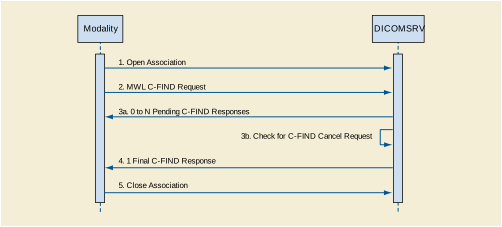
The figure above is a possible sequence of messages between a Modality Worklist SCU and DICOMSRV.
-
The Modality opens an Association with DICOMSRV for the purpose of querying for a Modality Worklist
-
DICOMSRV queries its database using the attributes from the C-FIND Request and returns 0 to N C-FIND responses depending on matches returned from the database. DICOMSRV checks for a C-FIND Cancel Request after a configured number of responses are sent. If a Cancel is received then no further Pending responses are sent.
Table C.4.2-6. Acceptable Presentation Contexts for AE DICOMSRV and Real-World Activity 'Configured AE Requests MWL Query'
DICOMSRV does not support matching on any optional matching key attributes.
DICOMSRV supports case-insensitive matching on the following Person Name Value Representation elements:
DICOMSRV supports optional return key attributes as described in the table below.
Table C.4.2-7. Modality Worklist Optional Return Keys Supported
DICOMSRV returns C-FIND response statuses as specified below.
Table C.4.2-8. MWL C-FIND Response Status Reasons
When a configured remote AE sends a conformant association request including one of the Modality Performed Procedure Step Presentation Contexts in the table below then DICOMSRV will accept the Association.
As mentioned above, DICOMSRV is started at system boot time and is thus ready to process MPPS messages at any time thereafter. The sequencing diagram below specifies a common flow of messages related to this activity. Prior to this sequence of messages it is necessary that orders have been received from the HIS interface or created via DICOMRis Ordering and Scheduling application. Attributes from the orders and created procedures, usually queried using MWL, will be included in the MPPS messages the Modality sends to DICOMSRV. Key attributes in the MPPS N-CREATE and N-SET, specified below, are extracted and matched against values in the DICOMRis database. A match allows full update of all applicable DICOMRis database tables.
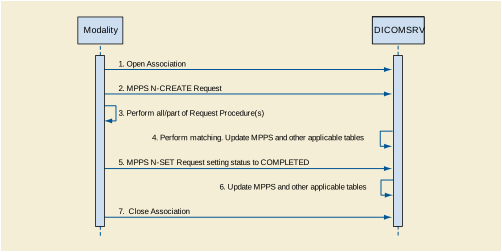
The figure above is a possible sequence of messages and events for the Configured AE Makes Procedure Step Request activity.
-
The Modality opens an Association to update DICOMSRV using MPPS
-
The Modality sends an N-CREATE Request to indicate that it is performing one or more Requested Procedures
-
DICOMSRV stores the MPPS and executes the matching algorithm described in the conformance section below. If a successful match is found, then updates to various tables per the N-CREATE are performed. See Table C.4.2-10 for additional detail. In the matching case, the procedure state of the procedure(s) referenced in the MPPS is updated if so configured
-
The Modality sends an N-SET setting the status of the MPPS to COMPLETED
-
DICOMSRV stores the MPPS. If the N-CREATE for this step matched then updates are performed as specified in step 4
DICOMSRV also supports the 5 IHE Unidentified Patient Use Cases. Cases 1, 2 and 4 are transparent to the MPPS SCU and follow the normal flow. In case 3, the patient upon whom a given procedure must be immediately performed has been registered on the HIS and has a valid Patient ID but has no order specifying the applicable procedure. DICOMSRV recognizes this case when an MPPS N-CREATE is received with a matching Patient ID, zero-length Accession Number (0008,0050) and Requested Procedure ID (0040,1001). If the MPPS SCU is configured for support of IHE Trauma cases, DICOMSRV will order a procedure corresponding to the code contained in the Procedure Code Sequence (0008,1032), if this code is recognized, or will order a default procedure based on configuration. If the default procedure is ordered then a user may modify the procedure using DICOMRis Ordering and Scheduling application.
In case 5, there is no existing registration or order for a patient on whom a procedure must be immediately performed. Values are entered on the Modality identifying the patient and procedure. DICOMSRV recognizes this case when an MPPS N-CREATE is received containing a Patient ID within a configured range. This range will never contain Patient IDs created in the normal flow. If the MPPS SCU is configured for support of IHE Trauma cases, DICOMSRV will register the patient with the Patient ID provided and will order a procedure as described above.
Table C.4.2-9. Acceptable Presentation Contexts for AE DICOMSRV and Real-World Activity "Configured AE Makes Procedure Step Request"
DICOMSRV's preferred Transfer Syntax is Explicit VR Little Endian and this will be selected if offered.
The table below lists all Modality Performed Procedure Step attributes, whether they may be created by N-CREATE and updated by N-SET and what parts of the DICOMRis database they are used to update. All MPPS messages and thus their attributes are stored for the configurable Purge Period described below. The 'Database Updates' column considers updates separate from the storage of MPPS messages. If no value is present this indicates that there are is no update to the database associated with the given element.
Table C.4.2-10. Supported N-SET/N-CREATE Attributes for MPPS
The list below details the behavior of DICOMSRV on occurrence of certain MPPS events and with respect to the coercion of attributes and duration of storage of MPPS messages:
-
Reception of a New MPPS Instance - The MPPS message is stored in the database. DICOMSRV will then extract the Patient ID (0020,0010) and as many Accession Numbers (0008,0050) as there are items in the Scheduled Step Attribute Sequence (0040,0270) from the N-CREATE and try to match these values against the Patient Medical Record Number and one or more Accession Numbers in the DICOMRis database. If a non-matching N-CREATE is received, it and any following N-SETs will be marked as exceptions. These exceptions can be reconciled using the RisView application. Otherwise, DICOMSRV will:
-
Update its database with values contained in the N-CREATE per table above.
-
Update the state of each referenced procedure if so configured.
-
Update of MPPS to 'DISCONTINUED' or 'COMPLETED' - The N-SET is stored in the database. If the preceding N-CREATE matched then the following is done:
-
The attribute values in the N-SET will be used to update the DICOMRis database per table above.
-
Update the state of each referenced procedure if so configured.
-
Coercion of Attributes - DICOMSRV will coerce attributes as specified in Table C.8.1-3. This coercion may occur when a given step is set to the 'IN PROGRESS' or 'COMPLETED' or 'DISCONTINUED'
-
Storage Duration for MPPS Messages - MPPS messages are purged from the DICOMRis database after a configurable period of time has elapsed since the step has been set to a final state or was last updated.
Table C.4.2-11. MPPS N-CREATE/N-SET Response Status Reasons
A remote AE sends an Echo Request to verify that DICOMSRV is awake and listening. DICOMSRV responds with success status as long as the request can be parsed.
Table C.4.2-12. Acceptable Presentation Contexts for AE DICOMSRV and Real-World Activity Configured AE Requests Verification
Depending on configuration, DICOMSRV may or may not accept multiple presentation contexts containing the same abstract syntax.
Transfer Syntaxes in addition to the default Implicit VR Little Endian may be configured for a given Abstract Syntax using DICOM Tool's configuration files. When this is done, the first Transfer Syntax encountered in the configuration file, which matches a Transfer Syntax offered for a given Presentation Context, will be selected as the accepted Transfer Syntax for that Presentation Context.
DHCP support can be configured using the Configuration application. If DHCP is not configured a static IP address is assigned.
If DNS support exists on the local network, then DNS is used for address resolution. The address of the DNS server is retrieved using DHCP if the DHCP option is enabled. If DNS is not supported then the hostnames and addresses are configured in the local hosts file.
The AE Title and port of DICOMSRV is configurable by the user from a GUI-based configuration application. The IP Address is picked by the site and may be changed by a Field Engineer.
DICOMSRV configuration parameters related to DICOM communications are below. A blank cell under the 'Default Value' heading indicates that there is no default value for the specific configuration attribute.
Table C.4.2-14. Configuration Parameters Table
Fields from MPPS such as technique and supplies and how they are used.
Table C.8.1-1. Attributes in MPPS IOD Used By DICOMRis Applications
The mapping between attributes received via HL7 from the HIS and those supplied in Modality Worklist is configurable. The default mapping is contained in the table below. Empty cells indicate that there is no mapping for the specific attribute
Table C.8.1-2. HL7/Modality Worklist Attribute Mapping
Table C.8.1-3. Coerced Fields for Modality Performed Procedure Step
DICOMRis's usage of Coding Schemes is specified in the table below. This table lists the Coding Schemes used by DICOMRis for attributes it originates. Usage of Controlled Terminology by Applications sending IODs to DICOMRis is discussed in the relevant SOP Specific Conformance sections above. The Procedure and Protocol Codes in the DICOMRis database can be exported to files and transferred across the network using the Configuration Utility. This allows Modalities to access and incorporate these codes if so desired.
Table C.8.1-4. DICOMRis Controlled Terminology Usage
This document is an example DICOM Conformance Statement for a fictional image display device for DICOM images and spectroscopy objects obtained over the network, from interchange media, or from PS3.10 files loaded from the local file system.
As stated in the annex title, this document is truly informative, and not normative. A conformance statement of an actual product might implement additional services and options as appropriate for its specific purpose. In addition, an actual product might implement the services described in a different manner and, for example, with different characteristics and/or sequencing of activities. In other words, this conformance statement example does not intend to standardize a particular manner that a product might implement DICOM functionality.
Company Name: EXAMPLE-Viewing PRODUCTS.
Product Name: SAMPLE DICOM Image Viewer
The application supports querying a remote system for a list of DICOM objects that may then be retrieved to the local system. It also supports sending locally loaded images across the network to another system.
All storage SOP Classes defined as of DICOM 2002 can be received, stored and transmitted by the application, but only images and spectroscopy objects may be loaded and viewed. All single and multi-frame with grayscale and RGB color (but not palette color, except for Enhanced MR images) images may be displayed.
Only hierarchical query and retrieval is supported.
See example text in Section A.3.
This document is a sample DICOM Conformance Statement created for DICOM PS3.2. It is to be used solely as an example to illustrate how to create a DICOM Conformance Statement for a workstation supporting a variety of types of DICOM images. The subject of the document, SAMPLE DICOM IMAGE VIEWER, is a fictional product.
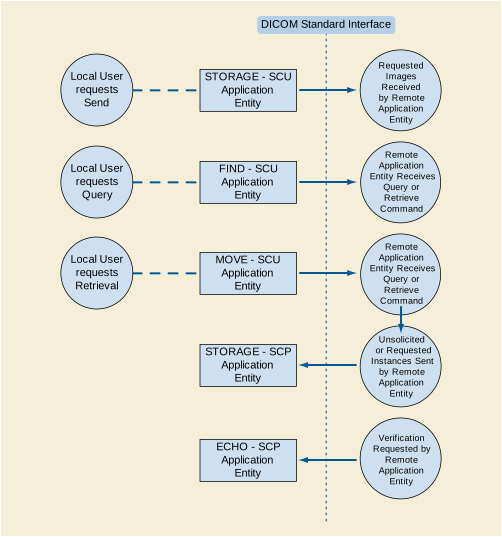
The application is a single pure Java application that provides both a user interface, internal database and network listener that spawns additional threads as necessary to handle incoming connections, as well as media support.
Conceptually the network services may be modeled as the following separate AEs, though in fact all the AEs share a single (configurable) AE Title:
ECHO-SCP waits in the background for connections, will accept associations with Presentation Contexts for SOP Class of the Verification Service Class, and will respond successfully to echo requests.
STORAGE-SCP waits in the background for connections, will accept associations with Presentation Contexts for SOP Classes of the Storage Service Class, and will store the received instances to the local database where they may subsequently be listed and viewed through the user interface.
STORAGE-SCU is activated through the user interface when a user selects instances from the local database or a DICOMDIR, or the currently displayed instance, and requests that they be sent to a remote AE (selected from a pre-configured list).
ECHO-SCP provide Standard Conformance to the following SOP Class(es) :
When ECHO-SCP accepts an association, it will respond to echo requests. If the Called AE Title does not match the pre-configured AE Title shared by all the SCPs of the application, the association will be rejected.
ECHO-SCP will always accept any Presentation Context for the supported SOP Classes with the supported Transfer Syntaxes. More than one proposed Presentation Context will be accepted for the same Abstract Syntax if the Transfer Syntax is supported, whether or not it is the same as another Presentation Context.
ECHO-SCP prefers explicit Transfer Syntaxes. If offered a choice of Transfer Syntaxes in a Presentation Context, it will apply the following priority to the choice of Transfer Syntax:
ECHO-SCP will accept duplicate Presentation Contexts, that is, if it is offered multiple Presentation Contexts, each of which offers acceptable Transfer Syntaxes, it will accept all Presentation Contexts, applying the same priority for selecting a Transfer Syntax for each.
STORAGE-SCP provide Standard Conformance to the following SOP Class(es) :
STORAGE-SCP accepts but never initiates associations.
When STORAGE-SCP accepts an association, it will respond to storage requests. If the Called AE Title does not match the pre-configured AE Title shared by all the SCPs of the application, the association will be rejected.
As instances are received they are copied to the local file system and a record inserted into the local database. If the received instance is a duplicate of a previously received instance, the old file and database record will be overwritten with the new one.
Table D.4.2-10. Acceptable Presentation Contexts for STORAGE-SCP and Receive Storage Request
|
See Table D.4.2-6 |
See Table D.4.2-6 |
||||
STORAGE-SCP provides standard conformance to the Storage Service Class.
When displaying an image in the viewing application, the newest Grayscale Softcopy Presentation State containing references to the image will be automatically applied and the GSPS Presentation Label and Presentation description will be displayed. The user has the option to select any other Presentation States that also references the image. If no Presentation State references the image then no Presentation State will be applied by default.
The Mask Subtraction transformation is not supported by this implementation. It is not possible display Presentation States containing the Mask Subtraction Sequence (0028,6100).
All of the Image Storage SOP Classes listed in Table D.4.2-6 are supported as references from instances of the Grayscale Softcopy Presentation State Storage SOP Class.
STORAGE-SCP will always accept any Presentation Context for the supported SOP Classes with the supported Transfer Syntaxes. More than one proposed Presentation Context will be accepted for the same Abstract Syntax if the Transfer Syntax is supported, whether or not it is the same as another Presentation Context.
STORAGE-SCP prefers explicit Transfer Syntaxes. If offered a choice of Transfer Syntaxes in a Presentation Context, it will apply the following priority to the choice of Transfer Syntax:
STORAGE-SCP will accept duplicate Presentation Contexts, that is, if it is offered multiple Presentation Contexts, each of which offers acceptable Transfer Syntaxes, it will accept all Presentation Contexts, applying the same priority for selecting a Transfer Syntax for each.
STORAGE-SCU provide Standard Conformance to the following SOP Class(es) :
STORAGE-SCU initiates but never accepts associations.
STORAGE-SCU attempts to initiate a new association for each instance it attempts to transfer.
For each instance selected from the user interface to be transferred, a single attempt will be made to transmit it to the selected remote AE. If the send fails, for whatever reason, no retry will be performed, and an attempt will be made to send the next instance.
Table D.4.2-16. Proposed Presentation Contexts for STORAGE-SCU and Receive Storage Request
|
See Table D.4.2-12 |
See Table D.4.2-12 |
||||
STORAGE-SCU will propose Presentation Contexts only for the SOP Class of the instance that is to be transferred.
For that SOP Class, STORAGE-SCU will propose multiple Presentation Contexts, one for each of the supported Transfer Syntaxes, and an additional Presentation Context with all of the supported Transfer Syntaxes, in order to determine which Transfer Syntaxes the remote SCP supports, and which it prefers.
STORAGE-SCU prefers explicit Transfer Syntaxes. If offered a choice of Transfer Syntaxes in the accepted Presentation Contexts, it will apply the following priority to the choice of Presentation Context to use for the C-STORE operation:
FIND-SCU provide Standard Conformance to the following SOP Class(es) :
FIND-SCU attempts to initiate a new association when the user performs the query action from the user interface. If this involves recursive queries for lower query levels in the hierarchy, these will be performed on the same association.
A single attempt will be made to query the remote AE. If the query fails, for whatever reason, no retry will be performed.
Table D.4.2-22. Proposed Presentation Contexts for FIND-SCU and Query Remote AE
|
See Table D.4.2-18 |
See Table D.4.2-18 |
||||
FIND-SCU will propose multiple Presentation Contexts, one for each of the supported Transfer Syntaxes, and an additional Presentation Context with all of the supported Transfer Syntaxes, in order to determine which Transfer Syntaxes the remote SCP supports, and which it prefers.
FIND-SCU provides standard conformance to the supported C-FIND SOP Classes.
Only a single information model, Study Root, is supported.
All queries are initiated at the highest level of the information model (the STUDY level), and then for each response received, recursively repeated at the next lower levels (the SERIES and then IMAGE levels), in order to completely elucidate the "tree" of instances available on the remote AE (from which the user may subsequently request a retrieval at any level).
No CANCEL requests are ever issued.
Unexpected attributes returned in a C-FIND response (those not requested) are listed in the browser at the appropriate level if present in the dictionary. Requested return attributes not returned by the SCP are ignored. Non-matching responses returned by the SCP due to unsupported (hopefully optional) matching keys are not filtered locally by the FIND-SCU and thus will still be presented in the browser. No attempt is made to filter out duplicate responses.
Specific Character Set will always be included at every query level. If present in the response, Specific Character Set will be used to identify character sets other than the default character set for display of strings in the browser.
The types of Matching supported by the C-FIND SCU. An "S" indicates the identifier attribute uses Single Value Matching, an "R" indicates Range Matching, a n"*"indicates wild card matching, a 'U' indicates Universal Matching, and an 'L' indicates that UID lists are sent. "NONE" indicates that no matching is supported, but that values for this Element are requested to be returned (i.e., universal matching), and "UNIQUE" indicates that this is the Unique Key for that query level, in which case Universal Matching or Single Value Matching is used depending on the query level.
FIND-SCU prefers explicit Transfer Syntaxes. If offered a choice of Transfer Syntaxes in the accepted Presentation Contexts, it will apply the following priority to the choice of Presentation Context to use for the C-STORE operation:
FIND-SCU will behave as described in Table D.4.2-24 in response to the status returned in the C-FIND response command message(s).
Table D.4.2-24. Response Status for FIND-SCU and Query Remote AE Request
MOVE-SCU provide Standard Conformance to the following SOP Class(es) :
MOVE-SCU attempts to initiate a new association when the user performs the retrieve action from the user interface.
For the entity (study, series or instance) selected from the user interface to be retrieved, a single attempt will be made to retrieve it from the selected remote AE. If the retrieve fails, for whatever reason, no retry will be performed.
Table D.4.2-29. Proposed Presentation Contexts for MOVE-SCU and Retrieve From Remote AE
|
See Table D.4.2-25 |
See Table D.4.2-25 |
||||
MOVE-SCU will propose multiple Presentation Contexts, one for each of the supported Transfer Syntaxes, and an additional Presentation Context with all of the supported Transfer Syntaxes, in order to determine which Transfer Syntaxes the remote SCP supports, and which it prefers.
MOVE-SCU provides standard conformance to the supported C-MOVE SOP Classes.
Only a single information model, Study Root, is supported.
A retrieval will be performed at the STUDY, SERIES or IMAGE level depending on what level of entity has been selected by the user in the browser.
No CANCEL requests are ever issued.
The retrieval is performed from the AE that was specified in the Retrieve AE attribute returned from the query performed by FIND-SCU. The instances are retrieved to the current application's local database by specifying the destination as the AE Title of the STORE-SCP AE of the local application. This implies that the remote C-MOVE SCP must be preconfigured to determine the presentation address corresponding to the STORE-SCP AE. The STORE-SCP AE will accept storage requests addressed to it from anywhere, so no pre-configuration of the local application to accept from the remote AE is necessary (except in so far as it was necessary to configure FIND-SCU).
MOVE-SCU prefers explicit Transfer Syntaxes. If offered a choice of Transfer Syntaxes in the accepted Presentation Contexts, it will apply the following priority to the choice of Presentation Context to use for the C-STORE operation:
MOVE-SCU will behave as described in the Table below in response to the status returned in the C-MOVE response command message(s).
Table D.4.2-31. Response Status for MOVE-SCU and Retrieve From Remote AE Request
Since the C-MOVE operation is dependent on completion of C-STORE sub-operations that are occurring on a separate association, the question of failure of operations on the other association(s) must be considered.
MOVE-SCU completely ignores whatever activities are taking place in relation to the STORAGE-SCP AE that is receiving the retrieved instances. Once the C-MOVE has been initiated it runs to completion (or failure) as described in the C-MOVE response command message(s). There is no attempt by MOVE-SCU to confirm that instances have actually been successfully received or locally stored.
Whether or not completely or partially successfully retrievals are made available in the local database to the user is purely dependent on the success or failure of the C-STORE sub-operations, not on any explicit action by MOVE-SCU.
Whether or not the remote AE attempts to retry any failed C-STORE sub-operations is beyond the control of MOVE-SCU.
If the association on which the C-MOVE was issued is aborted for any reason, whether or not the C-STORE sub-operations continue is dependent on the remote AE; the local STORAGE-SCP will continue to accept associations and storage operations regardless.
The application is indifferent to the physical medium over which TCP/IP executes, which is dependent on the underlying operating system and hardware.
All configuration is performed through the use of Java properties file(s) stored in pre-defined locations that are specific to the underlying operating system. Refer to the Release Notes for specific details.
The Calling AE Title of the local application is configurable in the preferences file, and is shared by all of the AEs. The mapping of the logical name by which remote AEs are described in the user interface to Called AE Titles as well as presentation address (hostname or IP address and port number) is configurable in the preferences file.
Table D.4.4-1. Configuration Parameters Table
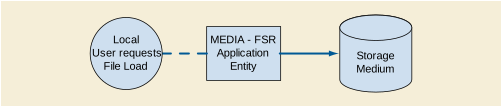
The application is a single pure Java application that provides a user interface, network support and media support as a File Set Reader.
Conceptually it may be modeled as the following single AE:
In effect, the application is media-neutral, since the user is required to browse and locate the DICOMDIR file. Furthermore, any DICOM image or spectroscopy object encoded in one of the standard uncompressed Transfer Syntaxes may be loaded, even in the absence of a PS3.10 compliant meta-information header, in which case a "best guess" at the Transfer Syntax will be made.
Compressed Transfer Syntaxes are not supported, which limits the Media Application Profiles supported.
MEDIA-FSR provides standard conformance to the Media Storage Service Class.
Note
The application is media neutral and dependent on the underlying hardware. Any (non-secure) General Purpose Profile can be supported.
MEDIA-FSR is activated through the user interface when a user selects the File load operation.
If the loaded file is a DICOMDIR, a browser will be displayed, from which instances may be selected and in turn loaded for display, imported into the local database or sent to a remote AE over the network.
If the file is an image or spectroscopy instance, it will be loaded and displayed.
The application supports all extended character sets defined in the DICOM 2002 standard, including single-byte and multi-byte character sets as well as code extension techniques using ISO 2022 escapes.
Support extends to correctly decoding and displaying the correct symbol for all names and strings found in the DICOMDIR, in storage instances from media and received over the network, and in the local database.
No specific support for sorting of strings other than in the default character set is provided in the browsers.
In addition to the default character repertoire, the Defined Terms for Specific Character Set in Table D.6.2-1 are supported:
Whether or not characters are displayed correctly depends on the presence of font support in the underlying operating system. Typically, as described in the Release Notes, it may be necessary for the user to add one of the "all Unicode" fonts to their system configuration in order to correctly display characters that would not typically be used in the default locale.
No SOP Class specific fields are required.
The local database, remote query and directory browsers make use of the conventional identification attributes to distinguish patients, studies, series and instances. In particular, if two patients have the same value for Patient ID, they will be treated as the same in the browser and the local database.
The value for Code Meaning will be displayed for all code sequences. No local lexicon is provided to look up alternative code meanings.
The high resolution display monitor attached to the product can be calibrated according to the Grayscale Standard Display Function (GSDF). The Service/Installation Tool is used together with a luminance meter to measure the Characteristic Curve of the display system and the current ambient light. See the product Service Manual for details on the calibration procedure and supported calibration hardware. The result of the calibration procedure is a Monitor Correction LUT that will be active within the display subsystem after a system reboot.
This document is a sample DICOM Conformance Statement for a fictional Print Server (SCP) Management System, called EXAMPLE-PRINT-SERVER-MANAGEMENT (also called Print Server) produced by a fictional vendor called EXAMPLE-IMAGING-PRODUCTS.
As stated in the annex title, this document is truly informative, and not normative. A conformance statement of an actual product might implement additional services and options as appropriate for its specific purpose. In addition, an actual product might implement the services described in a different manner and, for example, with different characteristics and/or sequencing of activities. In other words, this conformance statement example does not intend to standardize a particular manner that a product might implement DICOM functionality.
Company Name: EXAMPLE-PrintingPRODUCTS.
Product Name: EXAMPLE-PRINT-SERVER
This fictional product EXAMPLE-PRINT-SERVER-MANAGEMENT implements the necessary DICOM services to facilitate the Print (SCP) Imaging Management in the healthcare departments, managing Print imaging over a network on Medical Laser Imaging Systems. It enables the capabilities to capture images at any networked DICOM modality and then print them anywhere they're needed in the medical facility.
Furthermore, before sending the images to be printed the EXAMPLE-PRINT-SERVER-MANAGEMENT will apply image processing, using presentation parameters and LUT to improve the image presentation quality and consistency. Moreover, it will manage the printing presentation format and the Printer queue and Configuration.
Table E.1-1 provides an overview of the network services supported by EXAMPLE-PRINT-SERVER-MANAGEMENT.
See example text in Section A.3.
This document is a sample DICOM Conformance Statement created for DICOM PS3.2. It is to be used solely as an example to illustrate how to create a DICOM Conformance Statement for a print server system supporting DICOM Print Services. The subject of the document, EXAMPLE-PRINT-SERVER-MANAGEMENT, is a fictional product.
This implementation model uses the DICOM Basic Print Management Meta SOP Class to receive studies for the Medical Imager. Multiple associations to Print SCUs are supported.

The Print Server is receiving the Images with the Presentation and Annotation information, it Apply it on the images and creates a print-job within the print queue, containing one or more film pages composed from images selected by the client Print SCU. Furthermore, it also manages the Printer Status and Configuration.
The Print Server System acquires the images with the demographics and presentation information from the connected Print Composer (SCU) that is Grouped with a Workstation or an Archive device. Studies are temporarily stored on disk. The images are then processed and formatted and finally queued as a print job on the Printer queue. If the Printer is operating normally, then the film sheets described in the print-job will be printed. Changes in the Printer operation status will be detected (e.g., film Magazine empty) and reported back to the Print SCU. If the Printer is not operating normally, then the print-job will be set to an error state and can be restarted by the user via the job control interface.
The Print Server Management includes:
The Printer Status and Configuration can be requested at any time by the Print SCU, while the Print Server will update the Print SCU asynchronously whenever the Printer status get changed. Furthermore, the Print Server provides in addition a Service operation of checking the networking connectivity to it's Print SCU using the Verification SOP Class.
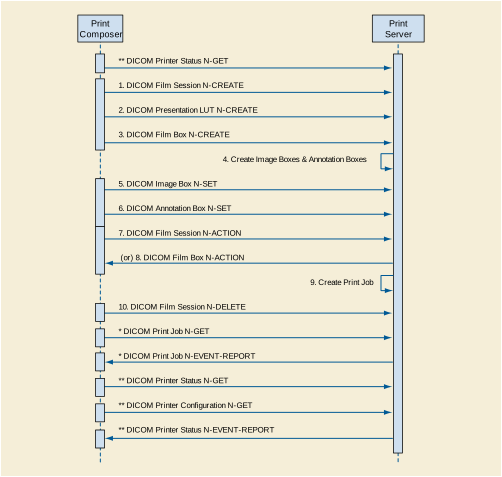
Note
The Print Server Management workflow activities in the sequence order as described in Figure E.4.1-2 apply:
The following additional activities are asynchronous mode and they can be send any time the Print Server is up and running:
* DICOM Print Job N-GET, request the execution status of a Print Job.
* DICOM Print Job N-EVENT-REPORT, report an update on the execution status of a Print Job.
** DICOM Printer Status N-GET - Request a Printer Status, anytime the Printer is ON.
** DICOM Printer Configuration N-GET - Request the Printer configuration, anytime the Printer is ON.
** DICOM Printer Status N-EVENT-REPORT - Report the Printer Status Changed.
The EXAMPLE-PRINT-SERVER-MANAGEMENT provides Standard Conformance to the following SOP Classes:
The Print Server Management System will accept associations while configured as an Print SCP and while a valid local Printer destination exists.
The DICOM standard application context name for DICOM is always accepted
The EXAMPLE-PRINT-SERVER-MANAGEMENT will accept Up to 8 simultaneous delivery Associations. If an attempt is made to open more than 8 simultaneous Associations, the Print Server System will reject the additional Associations (A-ASSOCIATE-RJ).
EXAMPLE-PRINT-SERVER-MANAGEMENT will also initiate one Association at a time for each destination to which a connectivity verification request is being processed. Only one connectivity verification job will be active at a time, the other remains pending until the active job is completed or failed.
The EXAMPLE-PRINT-SERVER-MANAGEMENT initiates Associations only for the purpose of verifying a DICOM connection.
The EXAMPLE-PRINT-SERVER-MANAGEMENT is capable of proposing the Presentation Contexts as shown in the following table:
A remote peer DICOM Application Entity, acting as an Print SCU, establishes an association with the EXAMPLE-PRINT-SERVER-MANAGEMENT that accepts these Associations for the purpose of receiving images and image presentation related data for image processing and printing on a hard copy medium.
When an association has been established the Sequencing of Real-World Activities is as described in Section E.4.1.3.
The Print Server (SCP) AE may reject association attempts as shown in Table E.4.2-9. The Result, Source and Reason/Diag columns represent the values returned in the appropriate fields of an ASSOCIATE-RJ PDU (see Section 9.3.4 “A-ASSOCIATE-RJ PDU Structure” in PS3.8 ). The contents of the Source column is abbreviated to save space and the meaning of the abbreviations are:
Table E.4.2-9. Association Rejection Reasons
EXAMPLE-PRINT-SERVER-MANAGEMENT will accept Presentation Contexts as shown in the following table:
The Print Server Management AE will prefer to accept the Explicit VR Little Endian Transfer Syntax if multiple transfer syntaxes are offered. Furthermore, At the time of association establishment, the Print Server Management confirms, returning a list of presentation contexts that were proposed by the Print SCU and that will be supported by the Print Server Management.
The EXAMPLE-PRINT-SERVER-MANAGEMENT provides standard conformance to the DICOM Verification Service Class as a SCP. The status code for the C-ECHO is in the following table:
The EXAMPLE-PRINT-SERVER-MANAGEMENT supports the following mandatory SOP classes as defined by the Basic Grayscale Print Management Meta SOP Class:
The Common SOP Specific Conformance for all Print SOP Classes, including the general behavior of Print Server Management AE during communication failure is summarized in the following table:
Table E.4.2-13. Print Server SCP Communication Failure Reasons
The specific SOP Conformance statement for each of the Basic Grayscale Print Management Meta SOP Class components is described in the subsequent sections.
The EXAMPLE-PRINT-SERVER-MANAGEMENT provides support for the following DIMSE Services:
The EXAMPLE-PRINT-SERVER-MANAGEMENT provides the following support for the Film Session attributes sent by the N-CREATE DIMSE service::
Table E.4.2-14. Basic Film Session SOP Class N-CREATE Request Attributes
|
CURRENT (See Section E.8.5.1) |
||||
|
CURRENT (See Section E.8.5.1) |
||||
The Print Server Management behavior and specific status codes sent for the N-CREATE of a specific Film Session is described in the following table:
Table E.4.2-15. Film Session SOP Class N-CREATE Response Status Handling Reasons
The EXAMPLE-PRINT-SERVER-MANAGEMENT provides the support for the Film Session attributes sent by the N-SET DIMSE service identically as it is described for the Film Session with N-CREATE, Table E.4.2-15.
The Print Server Management behavior and specific status codes sent for the N-SET of a specific Film Session is described in the following table:
Table E.4.2-16. Film Session SOP Class N-SET Response Status Handling Reasons
The Print Server Management behavior and specific status codes sent for the N-DELETE of a specific Film Session is described in the following table:
Table E.4.2-17. Film Session SOP Class N-DELETE Response Status Handling Reasons
The receipt of the N-ACTION will result in submitting a print job to print all the films of the film session in the order that they were received. The Film Session N-ACTION arguments are defined in the DICOM Standard Table H.4-3 “N-ACTION Arguments” in PS3.4 . The number of films that can be stored for print is limited by the size of the Printer's installed disk space and the number of images sent by the connected Print SCU simultaneously.
The Print Server Management behavior and specific status codes sent for the N-ACTION of a specific Film Session is described in the following table:
Table E.4.2-18. Film Session SOP Class N-ACTION Response Status Handling Reasons
The EXAMPLE-PRINT-SERVER-MANAGEMENT provides support for the following DIMSE Services:
The EXAMPLE-PRINT-SERVER-MANAGEMENT provides the following support for the Film Box attributes sent by the N-CREATE DIMSE service
Note
-
See the addition value "CURRENT" in Section E.8.5.1
-
Annotation Display Format Id1 - instructs the Print Server Management System to create annotation boxes and set the format of the annotation boxes. The currently loaded machine resident font will be used. See table below.
-
Smoothing Type - If Magnification Type is CUBIC, this attribute allows the SCU to specify the various smoothing effects provided by the interpolation algorithm in the Laser Imager. 0 specifies replicate, and 1 through 15 specifies various levels of smoothing.
-
Border Density - allows the density of the areas surrounding and between images on the film to be either dark or white.
-
Trim - specifies whether a trim box be printed around each image on film. The trim density is the opposite of the border density.
The following table describes the annotation formats are supported:
Table E.4.2-20. Annotation Display Formats
The Print Server Management behavior and specific status codes sent for the N-CREATE of a specific Film Box is described in the following table:
Table E.4.2-21. Film Box SOP Class N-CREATE Response Status Handling Behavior
The EXAMPLE-PRINT-SERVER-MANAGEMENT provides the support for the following Film Box attributes sent by the N-SET DIMSE service:
Table E.4.2-22. Basic Film Box SOP Class N-SET Request Attributes
Note
-
Smoothing Type 2- If Magnification Type is CUBIC, this attribute allows the SCU to specify the various smoothing effects provided by the interpolation algorithm in the Laser Imager. 0 specifies replicate, and 1 through 15 specifies various levels of smoothing.
-
Border Density 3- allows the density of the areas surrounding and between images on the film to be either dark or white.
-
Trim4 - specifies whether a trim box be printed around each image on film. The trim density is the opposite of the border density.
The Print Server Management behavior and specific status codes sent for the N-SET of a specific Film Box is described in the following table:
Table E.4.2-23. Film Box SOP Class N-SET Response Status Handling Behavior
The EXAMPLE-PRINT-SERVER-MANAGEMENT provides the support for deleting the last created Film Box.
The specific behavior and status codes sent for the N-DELETE of the last created Film Box is described in the following table:
The EXAMPLE-PRINT-SERVER-MANAGEMENT provides the support for submitting the print job for printing the specific Film Box. The Film BOX N-ACTION arguments are defined in the DICOM Standard Table H.4-8 “N-ACTION Arguments” in PS3.4 .
The specific behavior and status codes sent for the N-ACTION of the specific Film Box is described in the following table:
Table E.4.2-25. Film Box SOP Class N-ACTION Response Status Handling Behavior
The EXAMPLE-PRINT-SERVER-MANAGEMENT provides the following support for the attributes contained in the N-SET DIMSE Service of the Basic Grayscale Image Box SOP Class:
Note
-
Max Rows and Columns - The Maximum number of printable pixel matrix per supported Media size
-
Magnification Type - Same as the attribute Magnification Type in Film Box, but used here for image based setting. If not specified, the value of this attribute inherits from Magnification Type in Film Box.
-
Smoothing Type - If Magnification Type was cubic, this attribute allows the Laser Imager interpolation algorithm to be further defined.
-
See the addition value in Section E.8.5.1
The Print Server Management behavior and specific status codes sent for the N-SET of a specific Image Box is described in the following table:
Table E.4.2-27. Image Box SOP Class N-SET Response Status Handling Behavior
The EXAMPLE-PRINT-SERVER-MANAGEMENT supports the following DIMSE operations and notifications for the Printer SOP Class:
Details of the supported attributes and status-handling behavior are described in the following subsections.
The Print SCU uses the Printer SOP Class N-GET operation to obtain information about the current Printer status. The attributes obtained via N-GET are listed in the table below.
The following tables (listing attributes are sent by the SCP) use a number of abbreviations. The abbreviations used in the "Presence of Value" column are:
VNAP: Value Not Always Present (attribute sent zero length if no value is present)
ANAP: Attribute Not Always Present
EMPTY: Attribute is sent without a value
NS: Not supported - attribute is not being sent
Table E.4.2-28. Printer SOP Class N-GET Request Attributes
The Printer Status information is evaluated as follows:
-
If Printer status (2110,0010) is NORMAL, the print-job continues to be printed.
-
If Printer status (2110,0010) is FAILURE, the print-job is marked as failed. The contents of Printer Status Info (2110,0020) is logged
-
If Printer status (2110,0010) is WARNING, the print-job continues to be printed. The content of Printer Status Info (2110,0020) is logged.
The following status codes may be returned in response to Printer N-GET:
Table E.4.2-29. Printer SOP Class N-GET Response Status Handling Behavior
EXAMPLE-PRINT-SERVER-MANAGEMENT can be configured to send the Printer status information using the N-EVENT-REPORT DIMSE Service, asynchronously to all associated SCU that support the Printer SOP class. When the printer status is NORMAL, no attribute is sent. When the printer status is either WARNING or FAILURE, the following attributes are sent:
Table E.4.2-30. Printer SOP Class N-EVENT-REPORT Attributes
The EXAMPLE-PRINT-SERVER-MANAGEMENT behavior when sending the N-EVENT-REPORT is summarized in the following table:
Table E.4.2-31. Printer SOP Class N-EVENT-REPORT Behavior
The EXAMPLE-PRINT-SERVER-MANAGEMENT creates the Basic Annotation Box SOP instance at the time the Basic Film Box SOP instance is created, based on the value of the attribute Annotation Display Format ID (2010,0030) of the Basic Film Box.
The created Basic Annotation Box SOP instance can be updated with the N-SET DIMSE service. The following table describes the attributes that can be updated:
Table E.4.2-32. Basic Annotation Box SOP Class N-SET Request Attributes
The Print Server Management behavior and specific status codes sent for the N-SET of a specific Annotation Box is described in the following table:
Table E.4.2-33. Basic Annotation Box SOP Class N-SET Response Status Handling Behavior
The EXAMPLE-PRINT-SERVER-MANAGEMENT supports the following DIMSE operations and notifications for the Print Job SOP Class:
Details of the supported attributes and status-handling behavior are described in the following subsections.
The EXAMPLE-PRINT-SERVER-MANAGEMENT can be configured to report the status of the Print job using the N-EVENT-REPORT DIMSE Service, asynchronously to the associated SCU that created the job and establishes the association to support the Print Job SOP Class. The Print Job N-EVENT-REPORT will provide the following information:
Table E.4.2-34. Print Job SOP Class N-EVENT-REPORT Attributes
For each status type: PENDING, PRINTING, DONE and FAILURE, the following print job attributes are returned to the SCU:
If the Event Type is Failure or Pending then the error/pending condition is sent to the SCU through the Execution Status Info element (2100,0030), as described in Table E.4.2-35.
When the Event Type is Done or Printing the Print Server is deleting the Print Job SOP Instance after receiving a confirmation from the Print SCU.
The EXAMPLE-PRINT-SERVER-MANAGEMENT support the Print Job N-GET requests. When a Print SCU needs to monitor the status of a print job, it can either maintain its association until the Print Server Management System notifies the SCU that the print job has completed, or it may open a new association with the Print Server Management System to track the print job using the Print Job SOP Class N-GET status.
The following table describes the Print Server Management System responds to a N-GET Print Job DIMSE Service request and returns the following attributes in support of Print Job SOP Class.
Table E.4.2-36. Print Job SOP Class N-GET Request Attributes
The following table describes the status codes and behavior of the Print Server reply in response to Print Job N-GET requested by the Print SCU:
Table E.4.2-37. Print Job SOP Class N-GET Response Status Handling Behavior
The Print Server Management System supports the Presentation LUT SOP class as SCP. Print SCU may negotiate this support and create a Presentation LUT instance prior to the creation of Film Boxes or Image Boxes. Multiple Presentation LUT instances are supported in an association, but only one instance will be supported for each image.
The SCU shall send either Presentation LUT Sequence or the Presentation LUT Shape. These values are mutually exclusive and the action will result in an error if neither or both are present. The presence of the Presentation LUT instance overrides any Data Set in the Configuration Information attribute (2010,0150) of the Film Box or Image Box.
The Print Server Management System provides support for the following DIMSE Services:
The Print Server Management System supports the following attributes of the
N-CREATE DIMSE Service of the Presentation LUT SOP Class:
Table E.4.2-38. Presentation LUT SOP Class N-CREATE Request Attributes
The Print Server Management behavior and specific status codes sent for the N-CREATE of a specific Presentation LUT is described in the following table:
Table E.4.2-39. Presentation LUT SOP Class N-CREATE Response Status Handling Behavior
When a N-DELETE DIMSE service is requested with a specific Presentation LUT SOP instance, the Print Server Management System will not delete the specified Presentation LUT SOP instance as long as there are outstanding references to it. Otherwise, it deletes the specified Presentation LUT SOP instance.
The EXAMPLE-PRINT-SERVER-MANAGEMENT supports the DICOM standard (PS3.14) Grayscale Standard Display Function (GSDF) for Consistent Presentation of Displayed and Printed Images. The Image Consistency is achieved through the support of the Presentation LUT (transforming the image pixels value in to the Standard Presentation P-values) and then Transforming the Image pixel values from the standard Presentation (P-value) space to the Optical Density space. Calibrating the Imager Printer Device to adjust the Printer Imager characteristic curve to fit the GSDF curve. The EXAMPLE-PRINT-SERVER-MANAGEMENT Service Manual describes in details the Imager Printer calibration to the DICOM GSDF curve.
The EXAMPLE-PRINT-SERVER-MANAGEMENT is supporting the Printer Configuration N-GET requested by the Print SCU. The following table describes the Printer Configuration attributes:
Table E.4.2-40. Printer Configuration SOP Class N-GET Response Attributes
Note
See the addition value "CURRENT" in Section E.8.5.1
The EXAMPLE-PRINT-SERVER-MANAGEMENT supports a single network interface. One of the following physical network interfaces will be available depending on installed hardware options:
DHCP can be used to obtain TCP/IP network configuration information (e.g., own TCP/IP address, net-mask, default gateway, DNS server, etc). Support for DHCP can be configured via the Configuration Service/Installation Tool. . If DHCP is not in use, TCP/IP network configuration information can be manually configured via the Service/Installation Tool.
DNS can be used for address resolution. If DHCP is not in use, the identity of a DNS server can be configured via the Service/Installation Tool. If a DNS server is not in use, local mapping between hostname and TCP/IP address can be manually configured via the Service/Installation Tool.
All local applications use the AETs and TCP/IP Ports configured via the Service/Installation Tool. The Field Service Engineer can configure the IP Address via the Service/Installation Tool. No Default AE Titles are provided. The AE Titles must be configured during installation. The local AET used by each individual application can be configured independently of the AET used by other local applications. If so configured, all local AEs are capable of using the same AET.
The EXAMPLE-PRINT-SERVER-MANAGEMENT is configured via the Configuration Service/Installation Tool as follows
The AET, host names and port numbers of remote applications are configured using the EXAMPLE-PRINT-SERVER-MANAGEMENT Service/Installation Tool.
The EXAMPLE-PRINT-SERVER-MANAGEMENT Service/Installation tool must be used to set the AETs, port-numbers, host-names, Local Network Host Name, Router Address(Gateway), Sub-net Mask, IP-addresses (if no DHCP is used) and other capabilities for the remote Print SCUs. Multiple remote Print SCUs can be defined.
A large number of parameters related to Print Management, Communications and general operation can be configured using the Service/Installation Tool. The following table shows those configuration parameters relevant to DICOM communication. See the EXAMPLE-PRINT-SERVER-MANAGEMENT Configuration Service Manual for details on general configuration capabilities.
Table E.4.4-2. Configuration Parameters Table
The EXAMPLE-PRINT-SERVER-MANAGEMENT supports the following Character sets:
ISO_IR 100 (ISO 8859-1:1987 Latin Alphabet No. 1 supplementary set)
ISO_IR 144 (ISO 8859-5:1988 Latin/Cyrillic Alphabet supplementary set)
The EXAMPLE-PRINT-SERVER-MANAGEMENT creates the following IOD types of instances: Image Boxes, Annotation Boxes, Print Jobs, Printer, and Printer Configuration.
The attributes of the created IODs are described in the SOP Specific Conformance, Section E.4.2.1.4.1.3.
The usage of attributes received in the IODs sent by the Print SCU is described in the SOP Specific Conformance, Section E.4.2.1.4.1.3.
The following table is a mapping table of attributes that can be set by different Print IODs. If more then one IOD is setting the same element, then the value will be over-written by the IOD's value in the order from left to right, such that the Printer Configuration (PC) specific element values (as described in the mapping table #45) is in lowest order might be overwritten by any other IOD.
Print Management IODs Abbreviations
The IODs in the above table are in the order from Left to Right over-writing values that are already set by previous IODs. For Example: the Print Priority element can be set by both the Film Session and the Print Job, however if both IODs are setting this values then the Print Job Print Priority value will over write the Film Session Print Priority value.
The EXAMPLE-PRINT-SERVER-MANAGEMENT AE System reserves private attribute values in group 2001. The private attributes added to created SOP instances are listed in the following table:
The EXAMPLE-PRINT-SERVER-MANAGEMENT is not using any Codes (SNOMED) or Controlled Terminology, such as the use of the DICOM Content Mapping Resource (DCMR).
The EXAMPLE-PRINT-SERVER-MANAGEMENT AE supports the Grayscale Standard Display Function (GSDF) as described in PS3.14, for the Printer Calibration and Hardcopy Image Consistency.
The EXAMPLE-PRINT-SERVER-MANAGEMENT is making the following extensions to DICOM SOP Classes:
SOP Class : Basic Film Session SOP
Attribute : Film Destination (2000,0040)
This extension allows the SCU to print on the destination currently configured at the printer.
SOP Class : Basic Film Session SOP
Attribute : Medium Type (2000,2000)
This extension allows images to be printed on whatever media type is currently loaded in the printer.
Note that if Medium Type is specified, and a media type other than that requested is installed, then the EXAMPLE-PRINT-SERVER-MANAGEMENT will return success (0x0) and will either queue the print job until the correct media type is installed, or print on the media currently installed, based on the EXAMPLE-PRINT-SERVER-MANAGEMENT configuration. Specifying the Media Type to CURRENT will ensure that the print job will always be printed.
If Medium Type is not specified, then the default CURRENT will be used, allowing images to always be printed.
SOP Class : Basic Film Box SOP
Attribute : Film Size (2010,2010)
This extension allows images to be printed on whatever film size is currently loaded in the printer.
Note that if Film Size is specified, and a size other than that requested is installed, the EXAMPLE-PRINT-SERVER-MANAGEMENT will return success (0x0), and will either queue the print job until the correct sized film is installed or print on the media currently installed, based on the EXAMPLE-PRINT-SERVER-MANAGEMENT configuration. Specifying the Film Size to CURRENT will ensure that the print job will always be printed.
If Film Size is not specified, then the default CURRENT will be used, allowing images to always be printed.
SOP Class : Basic Grayscale Image Box SOP
Attribute : Bits Stored (0028,0028)
Extensions : 8-16 bits stored are supported.
DICOM only specifies 8 and 12 for number of bits stored. The EXAMPLE-PRINT-SERVER-MANAGEMENT supports the number of bits stored to be from 8 through 16 bits.
SOP Class : Basic Grayscale Image Box SOP
Attribute : High Bit (0028,0028)
Extensions : High Bit positions 7 - 15 are supported.
DICOM specifies that the high bit must be the 7th or 11th bit (for 8 or 12 bits stored, respectively). The EXAMPLE-PRINT-SERVER-MANAGEMENT supports the high bit to be the number of bits stored minus one. For example, if the number of bits stored is 13, the high bit is 12.
This document is an example DICOM Conformance Statement for a fictional device called EXAMPLE-QUERY-RETRIEVE-SERVER, which is a self-contained networked computer system used for archiving diagnostic medical images.
As stated in the annex title, this document is truly informative, and not normative. A conformance statement of an actual product might implement additional services and options as appropriate for its specific purpose. In addition, an actual product might implement the services described in a different manner and, for example, with different characteristics and/or sequencing of activities. In other words, this conformance statement example does not intend to standardize a particular manner that a product might implement DICOM functionality.
Company Name: EXAMPLE-ARCHIVING-PRODUCTS.
Product Name: SAMPLE QUERY-RETRIEVE-SERVER
The EXAMPLE-QUERY-RETRIEVE-SERVER is a self-contained networked computer system used for archiving diagnostic medical images. It allows external systems to send images to it for permanent storage, retrieve information about such images, and retrieve the images themselves. The system conforms to the DICOM standard to allow the sharing of medical information with other digital imaging systems.
See example text in Section A.3.
This document is a sample DICOM Conformance Statement created for DICOM PS3.2. It is to be used solely as an example to illustrate how to create a DICOM Conformance Statement for an image storage system supporting DICOM images. The subject of the document, EXAMPLE-QUERY-RETRIEVE-SERVER, is a fictional product.
The division of EXAMPLE-QUERY-RETRIEVE-SERVER into the separate DICOM Application Entities represents a somewhat arbitrary partitioning of functionality. For the purpose of this document they are organized in this manner so as to detail their independent logical functionality.
By default all of the defined Application Entities have different AE Titles. However, EXAMPLE-QUERY-RETRIEVE-SERVER can be configured so that the QUERY-RETRIEVE-SCP AE and STORAGE-SCU AE share the same Application Entity Title. However, the QUERY-RETRIEVE-SCP AE and STORAGE-SCP AE must have separate Application Entity Titles.
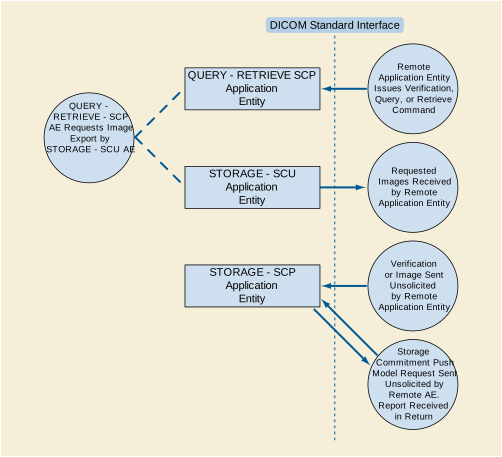
The Application Entities detailed in the Application Data Flow Diagram are all Windows NT applications.
-
The STORAGE-SCU AE can send Composite SOP Instances. It handles requests from the QUERY-RETRIEVE-SCP AE to transmit Images to a specific DICOM destination. The STORAGE-SCU AE functions as a C-STORE SCU. (Note that in this example Conformance Statement this STORAGE-SCU AE does not allow a Local User to request that images be sent to a Remote AE. If a 'real' AE does allow this then this should be mentioned here and in the other appropriate areas of the Conformance Statement).
-
The QUERY-RETRIEVE-SCP AE can handle incoming query and retrieve requests. It can handle external queries for Patient, Study, Series, and Image data, and also handle Image retrieval requests. The QUERY-RETRIEVE-SCP AE handles retrieval requests by issuing a command to the STORAGE-SCU AE to send the requested Images to the destination specified by the Remote AE. The QUERY-RETRIEVE-SCP AE functions as an SCP for C-FIND and C-MOVE requests.
-
The STORAGE-SCP AE can receive incoming DICOM images and add them to the EXAMPLE-QUERY-RETRIEVE-SERVER database. It can respond to external Storage and Verification Requests as a Service Class Provider (SCP) for C-STORE and C-ECHO requests. The STORAGE-SCP AE can also handle Storage Commitment Push Model Requests. It can thus be used to query whether the EXAMPLE-QUERY-RETRIEVE-SERVER will confirm ownership and responsibility for specific Composite SOP Instances. The STORAGE-SCP AE currently only supports image type Composite SOP Instances.
The STORAGE-SCU AE can be invoked by the QUERY-RETRIEVE-SCP AE to trigger the transfer of specific images to a remote destination AE. The STORAGE-SCU AE must be correctly configured with the host and port number of any external DICOM AEs that are to be C-MOVE retrieval destinations. The Presentation Contexts to use are determined from the headers of the DICOM files to be transferred. Some conversion of the DICOM image objects is possible if the original Presentation Context is not supported by the remote destination AE or if compression is preferred.
The QUERY-RETRIEVE-SCP AE waits for another application to connect at the presentation address configured for its Application Entity Title. When another application connects, QUERY-RETRIEVE-SCP AE expects it to be a DICOM application. QUERY-RETRIEVE-SCP AE will accept Associations with Presentation Contexts for SOP Classes of the DICOM Query-Retrieve Service Class, and Verification Service Class. It will handle query and retrieve requests on these Presentation Contexts and respond with data objects with values corresponding to the contents of the EXAMPLE-QUERY-RETRIEVE-SERVER database. For C-MOVE requests the destination for the image objects is determined from the Destination AE Title contained in the C-MOVE request. When a retrieval request is received, the QUERY-RETRIEVE-SCP AE issues a command to the STORAGE-SCU AE to send the specified images to the C-MOVE Destination AE.
The STORAGE-SCP AE waits for another application to connect at the presentation address configured for its Application Entity Title. When another application connects, the STORAGE-SCP AE expects it to be a DICOM application. The STORAGE-SCP AE will accept Associations with Presentation Contexts for SOP Classes of the Verification, Storage, and Storage Commitment Service Classes. Any images received on such Presentation Contexts will be added to the EXAMPLE-QUERY-RETRIEVE-SERVER database. If a Storage Commitment Push Model N-ACTION Request is received then the STORAGE-COMMITMENT-SCP AE will immediately check if the referenced Composite SOP Instances are in the EXAMPLE-QUERY-RETRIEVE-SERVER database and return an N-EVENT-REPORT Notification. It will never 'cache' Storage Commitment Push Model Requests and wait for Composite SOP Instances to be received at a later time.
The only sequencing constraint that exists across all the EXAMPLE-QUERY-RETRIEVE-SERVER Application Entities is the fact that a Composite SOP Instance must be received by the STORAGE-SCP AE before Storage Commitment Push Model or Query-Retrieve Requests related to this SOP Instance can be successfully handled:
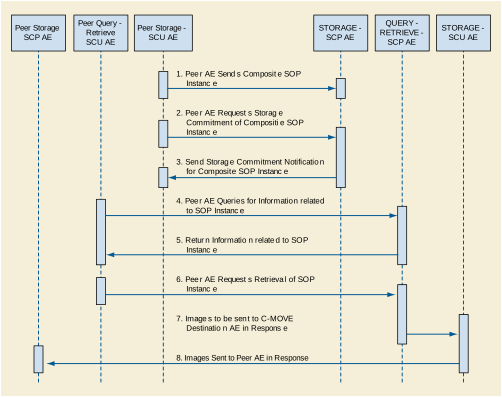
Note that the only constraint is for the Composite SOP Instance to be received prior to the other events. For example, it is not necessary for the Storage Commitment Push Model Request to be received prior to receiving Query or Retrieval Requests related to the SOP Instance.
The STORAGE-SCU AE provides Standard Conformance to the following DICOM SOP Classes:
STORAGE-SCU AE can be configured to use the retired US Image objects (US Image Storage, 1.2.840.10008.5.1.4.1.1.6, and US Multi-frame Storage, 1.2.840.10008.5.1.4.1.1.3) rather than the current US SOP Classes for ultrasound images or vice-versa, making any necessary changes to make the transformed image objects conformant to the corresponding SOP Class. This is only done if the external Storage SCP AE does not support the SOP Instance's original SOP Class.
By altering the configuration it is possible to support additional or fewer SOP Classes.
The STORAGE-SCU AE can only form Associations when requested to do so by the QUERY-RETRIEVE-SCP AE. The STORAGE-SCU AE can only request the opening of an Association. It cannot accept requests to open Associations from external Application Entities.
The DICOM standard Application Context Name for DICOM is always proposed:
The maximum number of simultaneous Associations is configurable, but is usually limited to a maximum of 10. This configuration largely depends on whether relatively quick response to multiple simultaneous C-MOVE Destination AEs is required or maximum throughput performance is required. If the latter is the case, then no simultaneous Associations are permitted, in order to reduce disk thrashing and thus maximize throughput. The STORAGE-SCU AE can initiate simultaneous Associations to a given external C-MOVE Destination AE up to the maximum number configured. There is no separate limit on the maximum number permitted to the same C-MOVE Destination AE.
If the first attempt to open an Association fails then the STORAGE-SCU AE will reschedule the task to attempt it again after a configurable time delay. The number of times to reattempt Association establishment is configurable, with the default being zero.
The STORAGE-SCU AE does not support asynchronous communication (multiple outstanding transactions over a single Association). All Association requests must be completed and acknowledged before a new operation can be initiated.
Note that the STORAGE-SCU AE and QUERY-RETRIEVE-SCP AE use the same Implementation Class UID. All EXAMPLE-QUERY-RETRIEVE-SERVER AEs use the same Implementation Version Name. This Version Name is updated with each new release of the product software, as the different AE versions are never released independently.
The STORAGE-SCU AE will initiate a new Association when the QUERY-RETRIEVE-SCP AE invokes the STORAGE-SCU AE to transmit images. The QUERY-RETRIEVE-SCP AE will issue such a command whenever it receives a valid C-MOVE Request. An Association Request is sent to the specified C-MOVE Destination AE and upon successful negotiation of the required Presentation Context the image transfer is started. In all cases an attempt will be made to transmit all the indicated images in a single Association, but this may not always be possible. The Association will be released when all the images have been sent. If an error occurs during transmission over an open Association then the image transfer is halted. The STORAGE-SCU AE will not attempt to independently retry the image export.
Note that the STORAGE-SCU AE does not support the unsolicited sending of SOP Instances using the DICOM Storage Service Class. It will only send SOP Instances in response to a C-MOVE Request from a peer AE.
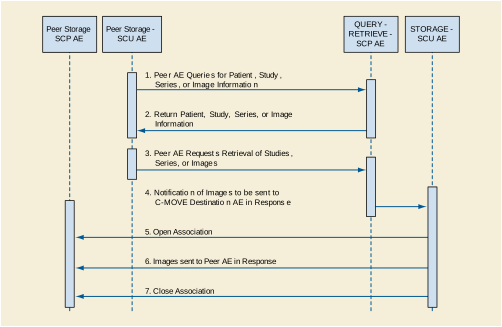
The following sequencing constraints illustrated in Figure F.4.2-1 apply to the STORAGE-SCU AE:
-
Peer AE requests retrieval of Study, Series, or Images from QUERY-RETRIEVE-SCP AE (C-MOVE-RQ).
-
QUERY-RETRIEVE-SCP AE signals STORAGE-SCU AE to send the image Composite SOP Instances indicated in the C-MOVE-RQ to the C-MOVE Destination AE.
-
STORAGE-SCU AE opens a new Association with the indicated C-MOVE Destination AE.
-
The Verification Service is only supported as a utility function for Service staff. It is used only as a diagnostic tool.
STORAGE-SCU AE will propose Presentation Contexts as shown in the following table:
Note
The SOP Classes and Transfer Syntaxes that the STORAGE-SCU AE proposes, as listed above, represent the default behavior. The STORAGE-SCU AE can be configured to propose a subset of these contexts or additional Presentation Contexts. Also, the default Behavior is to propose just a single Transfer Syntax per Presentation Context. However, this can be altered so that every proposed Presentation Context has a unique SOP Class and one or more Transfer Syntaxes. That is, the default behavior is to determine the Transfer Syntaxes the SCP can accept as opposed to which it prefers.
Standard conformance is provided to the DICOM Verification Service Class as an SCU. The Verification Service as an SCU is actually only supported as a diagnostic service tool for network communication issues.
Composite DICOM SOP Instances are maintained as DICOM Part 10 compliant files in the EXAMPLE-QUERY-RETRIEVE-SERVER database. The entire set of tags received with the image will be saved in EXAMPLE-QUERY-RETRIEVE-SERVER; this includes all Private and SOP Extended Elements. When a SOP Instance is selected for export from EXAMPLE-QUERY-RETRIEVE-SERVER, its content will be exported as it was originally received except for a few possible exceptions. Some of the Patient demographic and Study information Elements whose values can have been altered due to changes administered on EXAMPLE-QUERY-RETRIEVE-SERVER or changes to the state of the image data due to compression can be altered when the SOP Instance is exported.
The Patient demographic and Study information can be entered or altered by several means: manually, or from HL7 messaging,. The replacement behavior depends on which specific DICOM and HL7 services are supported. Also, this behavior is configurable. Values can be altered without changing the SOP Instance UID unless otherwise noted. Refer to the Annex for the specific details of which Elements can have their values altered at time of export.
The EXAMPLE-QUERY-RETRIEVE-SERVER creates files called Service Logs that can be used to monitor their status and diagnose any problems that may arise. If any error occurs during DICOM communication then appropriate messages are always output to these Service Logs. In addition, error messages may be output as alerts to the User Interface in certain cases.
The STORAGE-SCU AE will exhibit the following Behavior according to the Status Code value returned in a C-STORE Response from a destination C-STORE SCP:
Table F.4.2-7. STORAGE-SCU AE C-STORE Response Status Handling Behavior
All Status Codes indicating an error or refusal are treated as a permanent failure. The STORAGE-SCU AE never automatically resends images when an error Status Code is returned in a C-STORE Response. For specific behavior regarding Status Code values returned in C-MOVE Responses, refer to the Services Supported as an SCP by the QUERY-RETRIEVE-SCP AE.
Table F.4.2-8. STORAGE-SCU AE Communication Failure Behavior
The QUERY-RETRIEVE-SCP AE provides Standard Conformance to the following DICOM SOP Classes:
The QUERY-RETRIEVE-SCP AE will never initiate Associations; it only accepts Association Requests from external DICOM AEs. The QUERY-RETRIEVE-SCP AE will accept Associations for Verification, C-FIND, and C-MOVE requests. In the case of a C-MOVE request, the QUERY-RETRIEVE-SCP AE will issue a command to the STORAGE-SCU AE to initiate an Association with the Destination DICOM AE to send images as specified by the originator of the C-MOVE Request.
The DICOM standard Application Context Name for DICOM is always accepted:
The QUERY-RETRIEVE-SCP AE can support multiple simultaneous Associations. Each time the QUERY-RETRIEVE-SCP AE receives an Association, a child process will be spawned to process the Verification, Query, or Retrieval request. The maximum number of child processes, and thus the maximum number of simultaneous Associations that can be processed, is set by configuration. The default maximum is 10 in total. The maximum number of simultaneous Associations can be either an absolute number or a maximum number for each requesting external Application Entity. The latter flexibility can be useful if communication with one external AE is unreliable and one does not wish 'hung' connections with this AE to prevent Associations with other client AEs.
The QUERY-RETRIEVE-SCP AE does not support asynchronous communication (multiple outstanding transactions over a single Association). All Association requests must be completed and acknowledged before a new operation can be initiated.
The implementation information for the Application Entity is:
Note that the STORAGE-SCU AE, and QUERY-RETRIEVE-SCP AE use the same Implementation Class UID. All EXAMPLE-QUERY-RETRIEVE-SERVER AEs use the same Implementation Version Name. This Version Name is updated with each new release of the product software, as the different AE versions are never released independently.
The QUERY-RETRIEVE-SCP AE accepts Associations only if they have valid Presentation Contexts. If none of the requested Presentation Contexts are accepted then the Association Request itself is rejected. It can be configured to only accept Associations with certain hosts (using TCP/IP address) and/or Application Entity Titles.
If QUERY-RETRIEVE-SCP AE receives a query (C-FIND) request then the response(s) will be sent over the same Association used to send the C-FIND-Request.
If QUERY-RETRIEVE-SCP AE receives a retrieval (C-MOVE) request then the responses will be sent over the same Association used to send the C-MOVE-Request. The QUERY-RETRIEVE-SCP AE will notify the STORAGE-SCU to send the requested SOP Instances to the C-MOVE Destination. The STORAGE-SCU AE notifies the QUERY-RETRIEVE-SCP AE of the success or failure of each attempt to send a Composite SOP Instance to the peer C-MOVE Destination AE. The QUERY-RETRIEVE-SCP AE then sends a C-MOVE Response indicating this status after each attempt. Once the STORAGE-SCU AE has finished attempting to transfer all the requested SOP Instances, the QUERY-RETRIEVE-SCP AE sends a final C-MOVE Response indicating the overall status of the attempted retrieval.
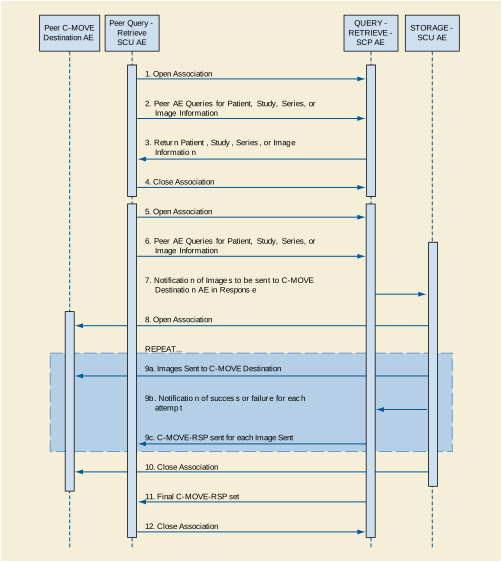
The following sequencing constraints illustrated in Figure F.4.2-2 apply to the QUERY-RETRIEVE-SCP AE for handling queries (C-FIND-Requests) :
-
Peer AE opens an Association with the QUERY-RETRIEVE-SCP AE.
-
QUERY-RETRIEVE-SCP AE returns a C-FIND-RSP Message to the peer AE with matching information. A C-FIND-RSP is sent for each entity matching the identifier specified in the C-FIND-RQ. A final C-FIND-RSP is sent indicating that the matching is complete.
-
Peer AE closes the Association. Note that the peer AE does not have to close the Association immediately. Further C-FIND or C-MOVE Requests can be sent over the Association before it is closed.
The following sequencing constraints illustrated in Figure F.4.2-2 apply to the QUERY-RETRIEVE-SCP AE for handling retrievals (C-MOVE-Requests) :
-
Peer AE opens an Association with the QUERY-RETRIEVE-SCP AE.
-
QUERY-RETRIEVE-SCP AE notifies the STORAGE-SCU AE to send the Composite SOP Instances to the peer C-MOVE Destination AE as indicated in the C-MOVE-RQ.
-
After attempting to send a SOP Instance, the STORAGE-SCU AE indicates to the QUERY-RETRIEVE-SCP AE whether the transfer succeeded or failed. The QUERY-RETRIEVE-SCP AE then returns a C-MOVE-RSP indicating this success or failure.
-
Once the STORAGE-SCU AE has completed all attempts to transfer the SOP Instances to the C-MOVE Destination AE, or the first failure occurred, the QUERY-RETRIEVE-SCP AE sends a final C-MOVE-RSP indicating the overall success or failure of the retrieval.
-
Peer AE closes the Association. Note that the peer AE does not have to close the Association immediately. Further C-FIND or C-MOVE Requests can be sent over the Association before it is closed.
The QUERY-RETRIEVE-SCP AE may reject Association attempts as shown in the table below. The Result, Source and Reason/Diag columns represent the values returned in the corresponding fields of an ASSOCIATE-RJ PDU (see Section 9.3.4 “A-ASSOCIATE-RJ PDU Structure” in PS3.8 ). The following abbreviations are used in the Source column:
Table F.4.2-14. Association Rejection Reasons
QUERY-RETRIEVE-SCP AE will accept Presentation Contexts as shown in the following table:
The QUERY-RETRIEVE-SCP AE supports hierarchical queries and not relational queries. There are no attributes always returned by default. Only those attributes requested in the query identifier are returned. Query responses always return values from the EXAMPLE-QUERY-RETRIEVE-SERVER database. Exported SOP Instances are always updated with the latest values in the database prior to export. Thus, a change in Patient demographic information will be contained in both the C-FIND Responses and any Composite SOP Instances exported to a C-MOVE Destination AE.
Patient Root Information Model
All required search keys on each of the four levels (Patient, Study, Series, and Image) are supported. However, the Patient ID (0010,0020) key must have at least a partial value if the Patient's Name (0010,0010) is not present in a Patient Level query.
All the required search keys on each of the three levels (Study, Series, and Image) are supported. If no partial values are specified for Study attributes then either the Patient ID (0010,0020) key or the Patient's Name (0010,0010) must have at least a partial value specified.
The tables should be read as follows:
Attribute Name: Attributes supported for returned C-FIND Responses.
Tag: Appropriate DICOM tag for this attribute.
VR: Appropriate DICOM VR for this attribute.
Types of Matching: The types of Matching supported by the C-FIND SCP. A "S" indicates the identifier attribute can specify Single Value Matching, a "R" will indicate Range Matching, a "*" will denote wild card matching, an 'U' will indicate universal matching, and 'L' will indicate that UID lists are supported for matching. "NONE" indicates that no matching is supported, but that values for this Element in the database can be returned.
Table F.4.2-19. QUERY-RETRIEVE-SCP AE C-FIND Response Status Return Behavior
The QUERY-RETRIEVE-SCP AE will convey to the STORAGE-SCU AE that an Association with a DICOM Application Entity named by the external C-MOVE SCU (through a MOVE Destination AE Title) should be established. It will also convey to the STORAGE-SCU AE to perform C-STORE operations on specific images requested by the external C-MOVE SCU. One or more of the Image Storage Presentation Contexts listed in Table F.4.2-6 will be negotiated.
The QUERY-RETRIEVE-SCP AE can support lists of UIDs in the C-MOVE Request at the Study, Series, and Image Levels. The list of UIDs must be at the Level of the C-MOVE Request however. For example, if the C-MOVE Request is for Series Level retrieval but the identifier contains a list of Study UIDs then the C-MOVE Request will be rejected, and the A900 Failed Status Code will be returned in the C-MOVE Response.
An initial C-MOVE Response is always sent after confirming that the C-MOVE Request itself can be processed. After this, the QUERY-RETRIEVE-SCP AE will return a response to the C-MOVE SCU after the STORAGE-SCU AE has attempted to send each image. This response reports the number of remaining SOP Instances to transfer, and the number transferred having a successful, failed, or warning status. If the Composite SOP Instances must be retrieved from long-term archive prior to export there may be quite a long delay between the first C-MOVE Response and the next one after the attempt to export the first image. The maximum length of time for this delay will depend on the particular type of archive used but typically varies between 3 and 10 minutes.
Table F.4.2-20. QUERY-RETRIEVE-SCP AE C-MOVE Response Status Return Behavior
Note that the Warning Status, B000 (Sub-operations complete - One or more Failures) is never returned. If a failure occurs during export to the C-MOVE Destination AE by the STORAGE-SCU AE then the entire task is aborted. Thus any remaining matches are not exported.
Table F.4.2-21. QUERY-RETRIEVE-SCP AE Communication Failure Behavior
The STORAGE-SCP AE provides Standard Conformance to the following DICOM SOP Classes:
These are the default SOP Classes supported. By altering the configuration it is possible to support additional or fewer SOP Classes.
The STORAGE-SCP AE can both accept and propose Association Requests. The STORAGE-SCP AE will accept Association Requests for the Verification, Storage, and Storage Commitment Push Model Services. It will propose Associations only for the Storage Commitment Push Model Service.
The DICOM standard Application Context Name for DICOM is always accepted and proposed:
The STORAGE-SCP AE can support multiple simultaneous Associations requested by peer AEs. Each time the STORAGE-SCP AE receives an Association, a child process will be spawned to process the Verification, Storage, or Storage Commitment Push Model Service requests. The maximum number of child processes, and thus the maximum number of simultaneous Associations that can be processed, is set by configuration. The default maximum number is 10 in total. This maximum number of simultaneous Associations can be either an absolute number or a maximum number for each requesting external Application Entity. The latter flexibility can be useful if communication with one external AE is unreliable and one does not wish 'hung' connections with this AE to prevent Associations with other client AEs.
The STORAGE-SCP AE initiates one Association at a time for sending Storage Commitment Push Model N-EVENT-REPORTs to peer AEs.
The STORAGE-SCP AE does not support asynchronous communication (multiple outstanding transactions over a single Association). The STORAGE-SCP AE does permit an SCU to send multiple Storage Commitment Push Model Requests before it has sent back any N-EVENT-REPORT Notifications. However, the STORAGE-SCP AE must send an N-ACTION Response before permitting another N-ACTION Request to be received so the DICOM communication itself is not truly asynchronous.
There is no limit on the number of outstanding Storage Commitment Push Model Requests that can be received and acknowledged before the STORAGE-SCP AE has responded with the corresponding N-EVENT-REPORT Notifications.
The implementation information for this Application Entity is:
Note that the STORAGE-SCP AE specifies a different Implementation Class UID than that used by the other Application Entities. All EXAMPLE-QUERY-RETRIEVE-SERVER AEs use the same Implementation Version Name. This Version Name is updated with each new release of the product software, as the different AE versions are never released independently.
The STORAGE-SCP AE will initiate a new Association if a Storage Commitment Push Model Notification (N-EVENT-REPORT) cannot be sent back over the original Association used to send the corresponding request. A new Association will always be requested by the STORAGE-SCP AE in such cases even if the peer AE requests another Association after the original has been closed (i.e., A peer AE opens an Association and sends some Storage requests and a Storage Commitment Push Model request. Before the STORAGE-SCP AE can send the Storage Commitment Push Model N-EVEN-REPORT the Association is closed. The peer AE then opens another Association and begins to send Storage requests. In such a case the STORAGE-SCP AE will always initiate a new Association to send the N-EVENT-REPORT even though it could send the N-EVENT-REPORT over the new Association opened by the peer AE).
An Association Request is sent to the peer AE that sent the Storage Commitment Push Model request and upon successful negotiation of the required Presentation Context the outstanding N-EVENT-REPORT is sent. If there are multiple outstanding N-EVENT-REPORTs to be sent to a single peer AE then the STORAGE-SCP AE will attempt to send them all over a single Association rather than requesting a new Association for each one. The Association will be released when all the N-EVENT-REPORTs for the peer AE have been sent. If any type of error occurs during transmission (either a communication failure or indicated by a Status Code returned by the peer AE) over an open Association then the transfer of N-EVENT-REPORTs is halted. A new Association will be opened to retry sending outstanding N-EVENT-REPORTs. The maximum number of times the STORAGE-SCP AE will attempt to resend an N-EVENT-REPORT is configurable, along with the amount of time to wait between attempts to resend.
If the STORAGE-SCP AE sends a Notification request (N-EVENT-REPORT-RQ) over the original Association opened by the peer AE but receives a request to close the Association rather than a response to the Notification (N-EVENT-REPORT-RSP) then this is handled in the same way as if the request to close the Association had been received before trying to send the Notification request. Thus, the STORAGE-SCP AE will then open a new Association to resend the Notification request.
The STORAGE-SCP AE can be configured to always open a new Association before sending a Storage Commitment Push Model Notifications (N-EVENT-REPORT), in which case the sequencing illustrated in Figure F.4.2-3 will always be followed.
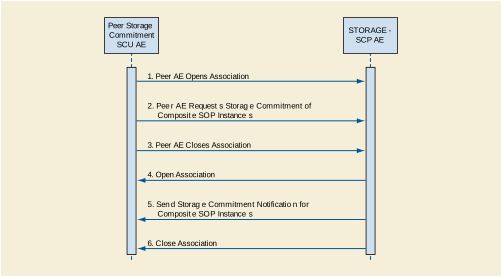
The following sequencing constraints illustrated in Figure F.4.2-3 apply to the STORAGE-SCP AE for handling Storage Commitment Push Model Requests using a new Association:
-
Peer AE requests Storage Commitment of Composite SOP Instance(s) (peer sends N-ACTION-RQ and STORAGE-SCP AE responds with N-ACTION-RSP to indicate that it received the request).
-
Peer AE closes the Association before the STORAGE-SCP AE can successfully send the Storage Commitment Push Model Notification (N-EVENT-REPORT-RQ).
-
STORAGE-SCP AE sends Storage Commitment Push Model Notification (N-EVENT-REPORT). More than one can be sent over a single Association if multiple Notifications are outstanding.
The Verification Service as an SCU is only supported as a utility function for Service staff. It is used only as a diagnostic tool when the STORAGE-SCP AE is failing to open new Associations to send N-EVENT-REPORTs to peer AEs.
STORAGE-SCP AE will propose Presentation Contexts as shown in the following table:
The associated Activity with the Storage Commitment Push Model service is the communication by the STORAGE-SCP AE to peer AEs that it has committed to permanently store Composite SOP Instances that have been sent to it. It thus allows peer AEs to determine whether the EXAMPLE-QUERY-RETRIEVE-SERVER has taken responsibility for the archiving of specific SOP Instances so that they can be flushed from the peer AE system.
The STORAGE-SCP AE will initiate a new Association to a peer AE that sent a Storage Commitment Push Model request if the original Association over which this was sent is no longer open. For a detailed explanation of the SOP specific Behavior of the STORAGE-SCP AE in this case please refer to 4.2.4.4.1.3.3, Storage Commitment Push Model as an SCP.
Standard conformance is provided to the DICOM Verification Service Class as an SCU. The Verification Service as an SCU is actually only supported as a diagnostic service tool for network communication issues. It can be used to test whether Associations can actually be opened with a peer AE that is issuing Storage Commitment Push Model requests (i.e., to test whether the indicated TCP/IP port and AE Title for sending N-EVENT-REPORT Requests to the peer AE are truly functional).
The STORAGE-SCP AE accepts Associations only if they have valid Presentation Contexts. If none of the requested Presentation Contexts are accepted then the Association Request itself is rejected. It can be configured to only accept Associations with certain hosts (using TCP/IP address) and/or Application Entity Titles.
The default behavior of the STORAGE-SCP AE is to always attempt to send a Storage Commitment Push Model Notification (N-EVENT-REPORT) over the same Association opened by the peer AE to send the request (N-ACTION). If the STORAGE-SCP AE receives a request to close the Association either before sending the Notification or before receiving the corresponding N-EVENT-REPORT-RSP then it will open a new Association to send the Notification. Refer to Section F.4.2.3.4.1.5 for the details.
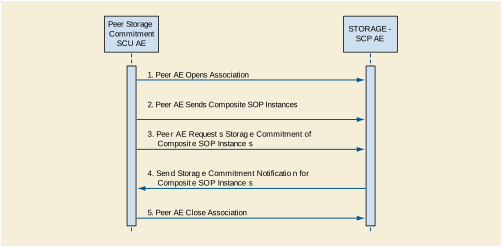
The following sequencing constraints illustrated in Figure F.4.2-4 apply to the STORAGE-SCP AE for handling Storage Commitment Push Model Requests over the original Association:
-
Peer AE requests Storage Commitment of Composite SOP Instance(s) (peer sends N-ACTION-RQ and STORAGE-SCP AE responds with N-ACTION-RSP to indicate that it received the request).
-
STORAGE-SCP AE sends Storage Commitment Push Model Notification request (N-EVENT-REPORT-RQ) and successfully receives Notification response (N-EVENT-REPORT-RSP) from peer AE.
If the STORAGE-SCP AE receives a request to close the Association from the peer AE before sending the Notification request (N-EVENT-REPORT-RQ) or when expecting to receive a Notification response (N-EVENT-REPORT-RSP) then it will open a new Association to send (or resend) the Notification. Refer to 0 for the details. The STORAGE-SCP AE has a configurable timeout value for the maximum amount of time that it will wait on an open Association for a new request from a peer AE. A peer AE can reset this timer by sending a Verification request (C-ECHO-RQ). This can act as a useful mechanism for a peer AE to maintain an active Association if the length of time between sending Storage or Storage Commitment requests can be long (such as when using a single Association to send images as they are acquired during an ultrasound exam).
The STORAGE-SCP AE may reject Association attempts as shown in the Table below. The Result, Source and Reason/Diag columns represent the values returned in the corresponding fields of an ASSOCIATE-RJ PDU (see Section 9.3.4 “A-ASSOCIATE-RJ PDU Structure” in PS3.8 ). The following abbreviations are used in the Source column:
Table F.4.2-29. Association Rejection Reasons
The default Behavior of the STORAGE-SCP AE supports the Implicit VR Little Endian and Explicit VR Little Endian Transfer Syntaxes for all Associations. In addition, explicit JPEG (baseline lossy) compression syntax is supported for the following SOP Classes: US Image, US Multi-frame Image, US Image (retired), US Multi-frame Image (retired), VL Image, VL Multi-frame and Secondary Capture Image Storage.
The STORAGE-SCP AE can be configured to accept a subset of these Transfer Syntaxes, with the inclusion of Implicit VR Little Endian being mandatory.
If multiple Transfer Syntaxes are proposed per Presentation Context then only the most preferable Transfer Syntax is accepted. The order of Transfer Syntax preference for the STORAGE-SCP AE is configurable. The default preference order if multiple Transfer Syntaxes are proposed in a single Presentation Context is: JPEG Baseline1, Little Endian Explicit, Little Endian Implicit (if all these are proposed for a single Presentation Context). This means that if the Implicit VR Little Endian and Explicit VR Little Endian Transfer Syntaxes are proposed in a single Presentation Context then the accepted Transfer Syntax will be Explicit VR Little Endian. This order of preference is configurable.
Any of the Presentation Contexts shown in the following table are acceptable to the STORAGE-SCP AE for receiving images.
The associated Activity with the Storage service is the storage of medical image data received over the network on a designated hard disk. The STORAGE-SCP AE will return a failure status if it is unable to store the images on to the hard disk.
The STORAGE-SCP AE does not have any dependencies on the number of Associations used to send images to it. Images belonging to more than one Study or Series can be sent over a single or multiple Associations. Images belonging to a single Study or Series can also be sent over different Associations. There is no limit on either the number of SOP Instances or the maximum amount of total SOP Instance data that can be transferred over a single Association.
The STORAGE-SCP AE is configured to retain the original DICOM data in DICOM Part 10 compliant file format. The STORAGE-SCP AE is Level 2 (Full) conformant as a Storage SCP. In addition, all Private and SOP Class Extended Elements are maintained in the DICOM format files. In addition to saving all Elements in files, a subset of the Elements are stored in the EXAMPLE-QUERY-RETRIEVE-SERVER database to support query and retrieval requests and also allow updating of Patient, Study, and Series information by user input, or demographic and Study related messages. Refer to the Annex for the list of Elements that are checked and/or processed upon receiving a Composite SOP Instance.
The Behavior for handling duplicate SOP Instances is configurable. The default Behavior is to assign a new SOP Instance UID to a received SOP Instance if it conflicts with an existing SOP Instance UID. An alternative configuration is possible that causes the original object with the conflicting SOP Instance UID to be replaced by the new SOP Instance. This Behavior is most commonly enabled if a Storage SCU re-sends entire Studies or Series if a single failure occurs when sending a group of SOP Instances.
For the purposes of image display the system supports the following photometric interpretations: MONOCHROME1, MONOCHROME2, RGB, PALETTE COLOR, YBR FULL 422, and YBR FULL.
It is expected that optimal Window Center and Width values are specified in the DICOM Image Objects if they have greater than 8 bits of image data stored per sample. If optimal Window Center and Width values are not provided, then the EXAMPLE-QUERY-RETRIEVE-SERVER is capable of estimating values using histogram analysis.
For multi-frame image SOP Instances sent using JPEG compression Transfer Syntax, sending a fully specified offset table increases performance, because the entire file does not have to be parsed to find the individual frame offsets. However, the inclusion of an offset table is not required for archiving or viewing of such SOP Instances.
Display of information conveyed using the DICOM Curve Module is not supported. Graphic overlay data sent either embedded in the unused image pixel data bits or in the separate Overlay Data Element is supported for display. Region of Interest overlays are not yet supported.
If an image SOP Instance specifies an aspect ratio that is not one-to-one then the image data will be automatically resized when displayed on the system monitor so that they are always displayed in a one-to-one aspect ratio.
The average throughput performance has been determined to be between 2 and 6 Mega Bytes per second on a 100 Megabit Ethernet network. Actual performance will depend greatly on the performance of the C-STORE SCU, the number of simultaneous active Associations, and the underlying network performance.
Table F.4.2-31. STORAGE-SCP AE C-STORE Response Status Return Reasons
Note
If a failure condition does occur when handling an Association then all images previously received successfully over the Association are maintained in the EXAMPLE-QUERY-RETRIEVE-SERVER database. No previously successfully received images are discarded. Even if an image is successfully received but an error occurs transmitting the C-STORE Response then this final image is maintained rather than discarded. If the loss of an Association is detected then the Association is closed.
The Behavior of STORAGE-SCP AE during communication failure is summarized in the following table:
Table F.4.2-32. STORAGE-SCP AE Storage Service Communication Failure Reasons
The associated Activity with the Storage Commitment Push Model service is the communication by the STORAGE-SCP AE to peer AEs that it has committed to permanently store Composite SOP Instances that have been sent to it. It thus allows peer AEs to determine whether the EXAMPLE-QUERY-RETRIEVE-SERVER has taken responsibility for the archiving of specific SOP Instances so that they can be flushed from the peer AE system.
The STORAGE-SCP AE takes the list of Composite SOP Instance UIDs specified in a Storage Commitment Push Model N-ACTION Request and checks if they are present in the EXAMPLE-QUERY-RETRIEVE-SERVER database. As long as the Composite SOP Instance UIDs are present in the database, the STORAGE-SCP AE will consider those Composite SOP Instance UIDs to be successfully archived. The STORAGE-SCP AE does not require the Composite SOP Instances to actually be successfully written to archive media in order to commit to responsibility for maintaining these SOP Instances.
Once the STORAGE-SCP AE has checked for the existence of the specified Composite SOP Instances, it will then attempt to send the Notification request (N-EVENT-REPORT-RQ). The default behavior is to attempt to send this Notification over the same Association that was used by the peer AE to send the original N-ACTION Request. If the Association has already been released or Message transfer fails for some reason then the STORAGE-SCP AE will attempt to send the N-EVENT-REPORT-RQ over a new Association. The STORAGE-SCP AE will request a new Association with the peer AE that made the original N-ACTION Request. The STORAGE-SCP AE can be configured to always open a new Association in order to send the Notification request.
The STORAGE-SCP AE will not cache Storage Commitment Push Model N-ACTION Requests that specify Composite SOP Instances that have not yet been transferred to the EXAMPLE-QUERY-RETRIEVE-SERVER. If a peer AE sends a Storage Commitment Push Model N-ACTION Request before the specified Composite SOP Instances are later sent over the same Association, the STORAGE-SCP AE will not commit to responsibility for such SOP Instances.
The STORAGE-SCP AE does not support the optional Storage Media File-Set ID & UID attributes in the N-ACTION.
The EXAMPLE-QUERY-RETRIEVE-SERVER never automatically deletes Composite SOP Instances from the archive. The absolute persistence of SOP Instances and the maximum archiving capacity for such SOP Instances is dependent on the archiving media and capacity used by the EXAMPLE-QUERY-RETRIEVE-SERVER and is dependent on the actual specifications of the purchased system. It is necessary to check the actual system specifications to determine these characteristics.
The STORAGE-SCP AE will support Storage Commitment Push Model requests for SOP Instances of any of the Storage SOP Classes that are also supported by the STORAGE-SCP AE:
The STORAGE-SCP AE will return the following Status Code values in N-ACTION Responses:
Table F.4.2-34. STORAGE-SCP AE Storage Commitment Push Model N-ACTION Response Status Return Behavior
The STORAGE-SCP AE will exhibit the following Behavior according to the Status Code value returned in an N-EVENT-REPORT Response from a destination Storage Commitment Push Model SCU:
Table F.4.2-35. STORAGE-SCP AE N-EVENT-REPORT Response Status Handling Behavior
All Status Codes indicating an error or refusal are treated as a permanent failure. The STORAGE-SCP AE can be configured to automatically reattempt the sending of Storage Commitment Push Model N-EVENT-REPORT Requests if an error Status Code is returned or a communication failure occurs. The maximum number of times to attempt sending as well as the time to wait between attempts is configurable.
Table F.4.2-36. STORAGE-SCP AE Storage Commitment Push Model Communication Failure Behavior
The EXAMPLE-QUERY-RETRIEVE-SERVER supports a single network interface. One of the following physical network interfaces will be available depending on installed hardware options:
EXAMPLE-QUERY-RETRIEVE-SERVER conforms to the System Management Profiles listed in Table F.4.3-2. All requested transactions for the listed profiles and actors are supported. It does not support any optional transactions.
DHCP can be used to obtain TCP/IP network configuration information. The network parameters obtainable via DHCP are shown in Table F.4.3-3. The Default Value column of the table shows the default used if the DHCP server does not provide a value. Values for network parameters set in the Service/Installation tool take precedence over values obtained from the DHCP server. Support for DHCP can be configured via the Service/Installation Tool. The Service/Installation tool can be used to configure the machine name. If DHCP is not in use, TCP/IP network configuration information can be manually configured via the Service/Installation Tool.
If the DHCP server refuses to renew a lease on the assigned IP address all active DICOM Associations will be aborted.
DNS can be used for address resolution. If DHCP is not in use or the DHCP server does not return any DNS server addresses, the identity of a DNS server can be configured via the Service/Installation Tool. If a DNS server is not in use, local mapping between hostname and IP address can be manually configured via the Service/Installation Tool.
The mapping from AE Title to TCP/IP addresses and ports is configurable and set at the time of installation by Installation Personnel.
The STORAGE-SCU and QUERY-RETRIEVE-SCP Application Entities can be configured to have the same AE Title. The STORAGE-SCP Application Entity must not have the same AE Title as the other two.
The mapping of external AE Titles to TCP/IP addresses and ports is configurable and set at the time of installation by Installation Personnel. This mapping is necessary for resolving the IP address and port of C-MOVE Destination Application Entities and must be correctly configured for the QUERY-RETRIEVE-SCP AE to correctly function as a C-MOVE SCP.
Table F.4.4-2. Configuration Parameters
All EXAMPLE-QUERY-RETRIEVE-SERVER DICOM applications support the following:
ISO_IR 100 (ISO 8859-1:1987 Latin Alphabet No. 1 supplementary set)
As well as supporting this Extended Character Set for DICOM messaging, the Query-Server system database and user interface can support the expected display of this character set.
The EXAMPLE-QUERY-RETRIEVE-SERVER conforms to the bit preserving Digital Signatures Security Profile, if the STORAGE SCP AE receives a SOP Instance in an Explicit Transfer Syntax and the STORAGE SCU AE can export such SOP Instances using an Explicit Transfer Syntax.
The QUERY-RETRIEVE-SCP AE and the STORAGE-SCP AE can both be configured to check the following DICOM values when determining whether to accept Association Open Requests:
Each SCP AE can be configured to accept Association Requests from only a limited list of Calling AE Titles. They SCP AEs can have different lists. Each SCP AE can be configured to check that the Association requestor specifies the correct Called AE Title for the SCP.
In addition the IP address of the requestor can be checked. The SCP AEs can be constrained to only accept Association Requests from a configured list of IP addresses. The SCP AEs can have different lists.
The following Elements of Composite SOP Instances received by the STORAGE-SCP AE are either stored to the permanent EXAMPLE-QUERY-RETRIEVE-SERVER database or of particular importance in the received images.
SOP Instances conforming to the following Composite Image SOP Classes are fully supported for display on the system workstations.
Table F.8.1-2. Significant Elements in Received Composite SOP Instances
The following table contains a list of all Elements that can have a value modified by the STORAGE-SCU at the time of export using the Storage Service depending on the capabilities of the receiver:
Table F.8.1-3. Significant Elements in Exported Composite SOP Instances
This document is an example DICOM Conformance Statement for a fictional image display device for DICOM images and Hanging Protocol objects obtained over the network.
As stated in the annex title, this document is truly informative, and not normative. A conformance statement of an actual product might implement additional services and options as appropriate for its specific purpose. In addition, an actual product might implement the services described in a different manner and, for example, with different characteristics and/or sequencing of activities. In other words, this conformance statement example does not intend to standardize a particular manner that a product might implement DICOM functionality.
Company Name: EXAMPLE-ViewingPRODUCTS.
Product Name: SAMPLE ImageViewer with Hanging Protocol Support
The application supports accepting Images and Presentation States from remote systems, and querying a remote system for Hanging Protocol Instances that may then be retrieved to the local system. It also supports sending locally loaded images and created Presentation State and Hanging Protocol Instances across the network to remote systems.
See example text in Section A.3.
This document is a sample DICOM Conformance Statement created for DICOM PS3.2. It is to be used solely as an example to illustrate how to create a DICOM Conformance Statement for a workstation supporting a variety of types of DICOM images and DICOM Hanging Protocol objects. The subject of the document, SAMPLE IMAGE VIEWER, is a fictional product.
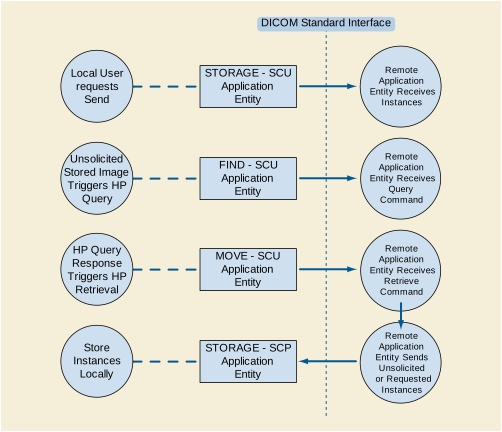
The application provides both a user interface, internal database and network listener that spawns additional threads as necessary to handle incoming connections.
Conceptually the network services may be modeled as the following separate AEs, though in fact all the AEs share a single (configurable) AE Title:
STORAGE-SCP waits in the background for connections, will accept associations with Presentation Contexts for SOP Classes of the Storage Service Class and Hanging Protocol Storage Service Class, and will store the received instances to the local database where they may subsequently be listed and viewed through the user interface.
STORAGE-SCU is activated through the user interface when a user selects instances from the local database, or the currently displayed instance, and requests that they be sent to a remote AE (selected from a pre-configured list).
All SCP activities are performed asynchronously in the background and not dependent on any sequencing.
Storage SCU activities are sequentially initiated in the user interface, and another activity may not be initiated until the prior activity has completed. Find and Move SCU activities are performed asynchronously in the background, where Move activities are triggered by the results of Find activities.
STORAGE-SCP provide Standard Conformance to the following SOP Class(es) :
STORAGE-SCP accepts but never initiates associations.
When STORAGE-SCP accepts an association, it will respond to storage requests. If the Called AE Title does not match the pre-configured AE Title shared by all the SCPs of the application, the association will be rejected.
As instances are received they are copied to the local file system and a record inserted into the local database. If the received instance is a duplicate of a previously received instance, the old file and database record will be overwritten with the new one.
Table G.4.2-5. Accepted Presentation Contexts for STORAGE-SCP and Receive Storage Request
|
See Table G.4.2-1 |
See Table G.4.2-1 |
||||
STORAGE-SCP provides standard conformance to the Storage Service Class.
When displaying an image in the viewing application, if a Hanging Protocol Instance is not being applied or the instance being applied does not contain presentation intent attributes, the newest Grayscale Softcopy Presentation State containing references to the image will be automatically applied, and the GSPS Presentation Label and Presentation Description will be displayed. The user has the option to select any other Presentation States that also reference the image. If no Presentation State references the image then no Presentation State will be applied by default. If a Hanging Protocol Instance is being applied, the presentation intent attributes, if present, are used to select the closest matching GSPS instance to apply. If there is no GSPS instance, then the Hanging Protocol Instance presentation intent attributes are applied, if present.
All of the Image Storage SOP Classes listed in Table G.4.2-1 are supported as references from instances of the Grayscale Softcopy Presentation State Storage SOP Class.
STORAGE-SCP provides standard conformance to the Hanging Protocol Storage Service Class.
If Partial Data Display Handling (0072,0208) is zero length, then MAINTAIN_LAYOUT behavior is applied. If the value is ADAPT_LAYOUT, then Image Boxes are proportionally resized to occupy all available display space.
If the display environment of a Hanging Protocol Instance differs from the display environment of the ImageViewer, then the layout is maintained.
The Hanging Protocol SOP instances are stored to a local database until explicitly deleted. When a study is selected for display, the application automatically applies a Hanging Protocol Instance to the study.
STORAGE-SCP will always accept any Presentation Context for the supported SOP Classes with the supported Transfer Syntaxes. More than one proposed Presentation Context will be accepted for the same Abstract Syntax if the Transfer Syntax is supported, whether or not it is the same as another Presentation Context.
STORAGE-SCP prefers explicit Transfer Syntaxes. If offered a choice of Transfer Syntaxes in a Presentation Context, it will apply the following priority to the choice of Transfer Syntax:
STORAGE-SCP will accept duplicate Presentation Contexts, that is, if it is offered multiple Presentation Contexts, each of which offers acceptable Transfer Syntaxes, it will accept all Presentation Contexts, applying the same priority for selecting a Transfer Syntax for each.
STORAGE-SCU provides Standard Conformance to the following SOP Class(es) :
STORAGE-SCU initiates but never accepts associations.
STORAGE-SCU attempts to initiate a new association for each instance it attempts to transfer.
For each Image, Presentation State, or Hanging Protocol Instance selected from the user interface to be transferred, a single attempt will be made to transmit it to the selected remote AE. If the send fails, for whatever reason, no retry will be performed, and an attempt will be made to send the next instance.
Table G.4.2-11. Proposed Presentation Contexts for STORAGE-SCU and Receive Storage Request
|
See Table G.4.2-7 |
See Table G.4.2-7 |
||||
STORAGE-SCU will propose Presentation Contexts only for the SOP Class of the instance that is to be transferred.
For that SOP Class, STORAGE-SCU will propose multiple Presentation Contexts, one for each of the supported Transfer Syntaxes, and an additional Presentation Context with all of the supported Transfer Syntaxes, in order to determine which Transfer Syntaxes the remote SCP supports, and which it prefers.
STORAGE-SCU provides standard conformance to the Hanging Protocol Storage Service Class.
In Hanging Protocol Instances created on the Viewer, no Private Attributes are used as the value of Selector Attribute (0072,0026) in any of the Sequence Attributes to which it applies.
STORAGE-SCU prefers explicit Transfer Syntaxes. If offered a choice of Transfer Syntaxes in the accepted Presentation Contexts, it will apply the following priority to the choice of Presentation Context to use for the C-STORE operation:
FIND-SCU provide Standard Conformance to the following SOP Class(es) :
FIND-SCU attempts to initiate a new association when a study is received for which an appropriate Hanging Protocol Instance is not already stored in the local database.
A single attempt will be made to query the remote AE. If the query fails, for whatever reason, no retry will be performed.
Table G.4.2-17. Proposed Presentation Contexts for FIND-SCU and Query Remote AE
|
See Table G.4.2-13 |
See Table G.4.2-13 |
||||
FIND-SCU will propose multiple Presentation Contexts, one for each of the supported Transfer Syntaxes, and an additional Presentation Context with all of the supported Transfer Syntaxes, in order to determine which Transfer Syntaxes the remote SCP supports, and which it prefers.
FIND-SCU provides standard conformance to the supported C-FIND SOP Class.
The following applies to Hanging Protocol Information Model C-FIND.
If present in the response, Specific Character Set will be used to identify character sets other than the default character set for matching between Hanging Protocol and Image Instances.
Table G.4.2.3.3.1.3.1-1. Hanging Protocol Information Model C-FIND SOP Specific Conformance
|
From CID 4 “Anatomic Region” or zero length |
||
FIND-SCU prefers explicit Transfer Syntaxes. If offered a choice of Transfer Syntaxes in the accepted Presentation Contexts, it will apply the following priority to the choice of Presentation Context to use for the C-FIND operation:
FIND-SCU will behave as described in Table G.4.2-19 in response to the status returned in the C-FIND response command message(s).
Table G.4.2-19. Response Status for FIND-SCU and Query Remote AE Request
MOVE-SCU provide Standard Conformance to the following SOP Class(es) :
MOVE-SCU attempts to initiate a new association when the results of the FIND-SCU indicate matching Hanging Protocol Instances to retrieve.
A single attempt will be made to retrieve Hanging Protocol Instances from the remote AE. If the retrieve fails, for whatever reason, no retry will be performed.
Table G.4.2-24. Proposed Presentation Contexts for MOVE-SCU and Retrieve From Remote AE
|
See Table G.4.2-20 |
See Table G.4.2-20 |
||||
MOVE-SCU will propose multiple Presentation Contexts, one for each of the supported Transfer Syntaxes, and an additional Presentation Context with all of the supported Transfer Syntaxes, in order to determine which Transfer Syntaxes the remote SCP supports, and which it prefers.
MOVE-SCU provides standard conformance to the supported C-MOVE SOP Class.
No CANCEL requests are ever issued.
The retrieval is performed from the AE that was specified in the Retrieve AE attribute returned from the query performed by FIND-SCU. The instances are retrieved to the current application's local database by specifying the destination as the AE Title of the STORE-SCP AE of the local application. This implies that the remote C-MOVE SCP must be preconfigured to determine the presentation address corresponding to the STORE-SCP AE. The STORE-SCP AE will accept storage requests addressed to it from anywhere, so no pre-configuration of the local application to accept from the remote AE is necessary (except in so far as it was necessary to configure FIND-SCU).
MOVE-SCU prefers explicit Transfer Syntaxes. If offered a choice of Transfer Syntaxes in the accepted Presentation Contexts, it will apply the following priority to the choice of Presentation Context to use for the C-MOVE operation:
MOVE-SCU will behave as described in the Table below in response to the status returned in the C-MOVE response command message(s).
Table G.4.2-26. Response Status for MOVE-SCU and Retrieve From Remote AE Request
Since the C-MOVE operation is dependent on completion of C-STORE sub-operations that are occurring on a separate association, the question of failure of operations on the other association(s) must be considered.
MOVE-SCU completely ignores whatever activities are taking place in relation to the STORAGE-SCP AE that is receiving the retrieved instances. Once the C-MOVE has been initiated it runs to completion (or failure) as described in the C-MOVE response command message(s). There is no attempt by MOVE-SCU to confirm that instances have actually been successfully received or locally stored.
Whether or not completely or partially successfully retrievals are made available in the local database to the user is purely dependent on the success or failure of the C-STORE sub-operations, not on any explicit action by MOVE-SCU.
Whether or not the remote AE attempts to retry any failed C-STORE sub-operations is beyond the control of MOVE-SCU.
If the association on which the C-MOVE was issued is aborted for any reason, whether or not the C-STORE sub-operations continue is dependent on the remote AE; the local STORAGE-SCP will continue to accept associations and storage operations regardless.
This product supports both IPv4 and IPv6. It does not utilize any of the optional configuration identification or security features of IPv6.
All configuration is performed through the use of Java properties file(s) stored in pre-defined locations that are specific to the underlying operating system. Refer to the Release Notes for specific details.
The Calling AE Titles of the local application are configurable in the preferences file. The mapping of the logical name by which remote AEs are described in the user interface to Called AE Titles as well as presentation address (hostname or IP address and port number) is configurable in the preferences file.
Table G.4.4-1. Configuration Parameters Table
Support extends to correctly decoding and displaying the correct symbol in the supported character sets for all names and strings received over the network, and in the local database.
No specific support for sorting of strings other than in the default character set is provided in the browsers.
In addition to the default character repertoire, the Defined Terms for Specific Character Set in Table G.6.2-1 are supported:
Table G.8.1-1 specifies the attributes of a Hanging Protocol Instance transmitted by the ImageViewer application.
The following tables use a number of abbreviations. The abbreviations used in the "Presence of …" column are:
VNAP Value Not Always Present (attribute sent zero length if no value is present)
ANAP Attribute Not Always Present
EMPTY Attribute is sent without a value
The abbreviations used in the "Source" column:
USER the attribute value source is from User input
AUTO the attribute value is generated automatically
CONFIG the attribute value source is a configurable parameter
Note
All dates and times are encoded in the local configured calendar and time. Date, Time and Time zone are configured using the Service/Installation Tool.
Table G.8.1-3. Hanging Protocol Definition Module of Created SOP Instances
|
Defined CID 4 “Anatomic Region” |
|||||
|
Relevant Sequence Attribute Tags from DICOM Data Dictionary, if Selector Attribute is nested in a Sequence. |
|||||
|
>>The attribute from the Hanging Protocol Selector Attribute Value Macro that is required by the value of Selector Attribute VR. |
|||||
Table G.8.1-4. Hanging Protocol Environment Module of Created SOP Instances
Table G.8.1-5. Hanging Protocol Display Module of Created SOP Instances
The value for Code Meaning will be displayed for all code sequences. No local lexicon is provided to look up alternative code meanings.
This document is an example DICOM Conformance Statement for a fictional device called EXAMPLE-MEDICATION-SYSTEM-GATEWAY, which is a networked computer system used to provide radiology systems with access to a pharmacy system and a medication administration record system.
As stated in the annex title, this document is truly informative, and not normative. A conformance statement of an actual product might implement additional services and options as appropriate for its specific purpose. In addition, an actual product might implement the services described in a different manner and, for example, with different characteristics and/or sequencing of activities. In other words, this conformance statement example does not intend to standardize a particular manner that a product might implement DICOM functionality.
Company Name: EXAMPLE-GATEWAY-PRODUCTS.
Product Name: EXAMPLE-MEDICATION-SYSTEM-GATEWAY
The EXAMPLE-MEDICATION-SYSTEM-GATEWAY is a networked computer system used to provide radiology systems with access to a pharmacy system and a medication administration record system. It allows imaging modalities systems and departmental information systems to retrieve information about drugs and contrast agents, to verify that administration of a drug or contrast agent to a particular patient is allowed, and to record the administration of a drug or contrast agent to a patient.
See example text in Section A.3.
The EXAMPLE-MEDICATION-SYSTEM-GATEWAY relies on the associated, but independent, Pharmacy and Medication Administration Record Systems to fulfill the medical application functions implicit in the DICOM services supported. In particular, these functions are part of a critical patient safety workflow. However, those patient safety functions are not specified by DICOM, and they are not fully described by this Conformance Statement. Please see the product specifications of the Pharmacy and Medication Administration Record Systems for full details on the clinical decision support and records management features of those systems.
This document is a sample DICOM Conformance Statement created for DICOM PS3.2. It is to be used solely as an example to illustrate how to create a DICOM Conformance Statement for a server supporting the DICOM Substance Administration Information Services. The subject of the document, EXAMPLE-MEDICATION-SYSTEM-GATEWAY, is a fictional product.
The division of EXAMPLE-MEDICATION-SYSTEM-GATEWAY into the separate DICOM Application Entities represents their independent logical functionality.
By default all of the defined Application Entities have different AE Titles. However, EXAMPLE-MEDICATION-SYSTEM-GATEWAY can be configured so that the PHARMACY-SCP AE and MAR-SCP AE share the same Application Entity Title.
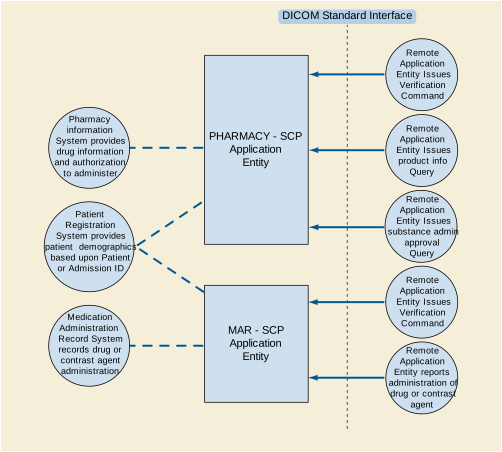
The PHARMACY-SCP AE handles incoming external queries for pharmacy (drug and contrast agent) product data, and also handles requests for approval of administration of pharmacy product. The PHARMACY-SCP AE handles queries by translating the standard DICOM queries to the non-standard interface of the Pharmacy Information System and the Patient Registration System.
The PHARMACY-SCP AE waits for another application to connect at the presentation address configured for its Application Entity Title. PHARMACY-SCP AE will accept Associations with Presentation Contexts for SOP Classes of the DICOM Substance Administration Information Service Class, and Verification Service Class. It will handle query requests on these Presentation Contexts and respond with values corresponding to the information provided by the Pharmacy Information System.
The MAR-SCP AE receives incoming DICOM notifications of drug or contrast agent administration, and adds them to the Medication Administration Record System database.
The MAR-SCP AE waits for another application to connect at the presentation address configured for its Application Entity Title. The MAR-SCP AE will accept Associations with Presentation Contexts for SOP Classes of the Substance Administration Logging and Verification SOP Classes. Any drug or contrast agent administration images notifications received on such Presentation Contexts will be added to the Medication Administration Record System database.
The PHARMACY-SCP AE provides Standard Conformance to the following DICOM SOP Classes:
The PHARMACY-SCP AE will never initiate Associations; it only accepts Association Requests from external DICOM AEs. The PHARMACY-SCP AE will accept Associations for Verification (C-ECHO) and Query (C-FIND) requests.
The DICOM standard Application Context Name for DICOM is always accepted:
The PHARMACY-SCP AE can support multiple simultaneous Associations. Each time the PHARMACY-SCP AE receives an Association, a child process will be spawned to process the Verification or Query request. The maximum number of child processes, and thus the maximum number of simultaneous Associations that can be processed, is set by configuration. The default maximum is 10 in total.
The PHARMACY-SCP AE does not support asynchronous communication (multiple outstanding transactions over a single Association). All Association requests must be completed and acknowledged before a new operation can be initiated.
The implementation information for the Application Entity is:
Note that all EXAMPLE-MEDICATION-SYSTEM-GATEWAY AEs use the same Implementation Class UID and Implementation Version Name. This Version Name is updated with each new release of the product software, as the different AE versions are never released independently.
The PHARMACY-SCP AE accepts Associations only if they have valid Presentation Contexts. If none of the requested Presentation Contexts are accepted then the Association Request itself is rejected. It can be configured to only accept Associations with certain hosts (using TCP/IP address) and/or Application Entity Titles.
The following sequencing applies to the PHARMACY-SCP AE for handling queries (C-FIND-Requests) :
-
If the query is for a Substance Administration Approval, PHARMACY-SCP AE requests basic patient demographic data (e.g., name, sex) from the Patient Registration System
-
PHARMACY-SCP AE translates the query into a request for the Pharmacy Information System (for either Product Information or for Substance Administration Approval), which responds with the requested data (or an indication of no matching data for the query).
-
If matching information is provided, PHARMACY-SCP AE returns a C-FIND-RSP Message to the peer AE with the matching information.
-
A final C-FIND-RSP is sent indicating that the matching is complete.
-
Peer AE closes the Association. Note that the peer AE does not have to close the Association immediately. Further C-FIND Requests can be sent over the Association before it is closed.
The PHARMACY-SCP AE may reject Association attempts as shown in the table below. The Result, Source and Reason/Diag columns represent the values returned in the corresponding fields of an ASSOCIATE-RJ PDU (see Section 9.3.4 “A-ASSOCIATE-RJ PDU Structure” in PS3.8 ). The following abbreviations are used in the Source column:
Table H.4.2-6. Association Rejection Reasons
The PHARMACY-SCP AE will close the Association under the exceptional circumstances listed in Table H.4.2-7.
Table H.4.2-7. PHARMACY-SCP AE Communication Failure Behavior
The PHARMACY-SCP AE will accept Presentation Contexts as shown in Table H.4.2-8.
The PHARMACY-SCP AE supports the Return Key Attributes shown in Tables H.4.2-9 and H.4.2-10. Only those attributes requested in the query identifier are returned. Note that queries about devices are not supported.
Table H.4.2-9. Return Key Attributes Supported for Product Characteristics Query
|
See Table H.4.2-10 for parameters supported |
||
Only the ASCII (DICOM Default) character set is supported by the Pharmacy Information System; Specific Character Set (0008,0005) is not used.
The PHARMACY-SCP AE supports the Matching Key Attributes shown in Table H.4.2-11. It can be configured to match on Patient ID, or on Admission ID, or on a combination of Patient ID and Issuer of Patient ID, or on a combination of Admission ID and Issuer of Admission ID. As required by the SOP Class, one of Patient ID or Admission ID must be present in the query, as must Product Package Identifier and Administration Route Code Sequence. Note, however, that the Pharmacy Information System does not support verification of administration route. Also note that queries about devices are not supported.
The PHARMACY-SCP AE supports the Return Key Attributes shown in Table H.4.2-12. Only those attributes requested in the query identifier are returned.
Table H.4.2-12. Return Key Attributes Supported for Substance Approval Query
Specific Character Set (0008,0005) is returned with value ISO_IR 192 if the Patient Registration System provides non-ASCII Unicode characters in Patient Name.
The PHARMACY-SCP AE supports the C-FIND Response Status return values and behavior shown in Table H.4.2-13.
Table H.4.2-13. PHARMACY-SCP AE C-FIND Response Status Return Behavior
The MAR-SCP AE provides Standard Conformance to the following DICOM SOP Classes:
The MAR-SCP AE will never initiate Associations; it only accepts Association Requests from external DICOM AEs. The MAR-SCP AE will accept Associations for Verification (C-ECHO) and Substance Administration Logging (N-ACTION) requests.
The DICOM standard Application Context Name for DICOM is always accepted and proposed:
The MAR-SCP AE can support multiple simultaneous Associations. Each time the MAR-SCP AE receives an Association, a child process will be spawned to process the Verification or Substance Administration Logging request. The maximum number of child processes, and thus the maximum number of simultaneous Associations that can be processed, is set by configuration. The default maximum number is 10 in total.
The MAR-SCP AE does not support asynchronous communication (multiple outstanding transactions over a single Association). All Association requests must be completed and acknowledged before a new operation can be initiated.
The implementation information for this Application Entity is:
Note that all EXAMPLE-MEDICATION-SYSTEM-GATEWAY AEs use the same Implementation Class UID and Implementation Version Name. This Version Name is updated with each new release of the product software, as the different AE versions are never released independently.
The MAR-SCP AE accepts Associations only if they have valid Presentation Contexts. If none of the requested Presentation Contexts are accepted then the Association Request itself is rejected. It can be configured to only accept Associations with certain hosts (using TCP/IP address) and/or Application Entity Titles.
The following sequencing applies to the MAR-SCP AE for handling Substance Administration Logging Requests (N-ACTION) :
-
Peer AE sends N-ACTION-RQ to request logging of a substance administration event.
-
If the request does not include the Patient ID, MAR-SCP AE requests the Patient ID corresponding to the Admission ID from the Patient Registration System
-
MAR-SCP AE translates the logging request into a database operation on the Medication Administration Record System database.
-
MAR-SCP AE responds with N-ACTION-RSP to indicate that it received and processed the request.
-
Peer AE closes the Association. Note that the peer AE does not have to close the Association immediately. Further N-ACTION Requests can be sent over the Association before it is closed.
The MAR-SCP AE may reject Association attempts as shown in the Table below. The Result, Source and Reason/Diag columns represent the values returned in the corresponding fields of an ASSOCIATE-RJ PDU (see Section 9.3.4 “A-ASSOCIATE-RJ PDU Structure” in PS3.8 ). The following abbreviations are used in the Source column:
Table H.4.2-19. Association Rejection Reasons
The MAR-SCP AE will close the Association under the exceptional circumstances listed in Table H.4.2-20.
Table H.4.2-20. PHARMACY-SCP AE Communication Failure Behavior
The MAR-SCP AE will accept Presentation Contexts as shown in Table H.4.2-21.
As required by the SOP Class, one of Patient ID or Admission ID must be present in the Substance Administration Logging request. If the request does not include the Patient ID, the MAR-SCP AE requests the Patient ID corresponding to the Admission ID from the Patient Registration System.
The MAR-SCP AE SCP translates the attributes shown in Table H.4.2-22 into database fields of the Medication Administration Record System. All other provided attributes are converted to text strings and placed in the ClinicalNotes field of the database.
The MAR-SCP AE supports the N-ACTION Response Status return values and behavior shown in Table H.4.2-23.
Table H.4.2-23. MAR-SCP AE N-ACTION Response Status Return Reasons
The EXAMPLE-MEDICATION-SYSTEM-GATEWAY supports a single network interface. One of the following physical network interfaces will be available depending on installed hardware options:
EXAMPLE-MEDICATION-SYSTEM-GATEWAY conforms to the System Management Profiles listed in Table F.4.3-2. All requested transactions for the listed profiles and actors are supported. It does not support any optional transactions.
DHCP can be used to obtain TCP/IP network configuration information. The network parameters obtainable via DHCP are shown in Table F.4.3-3. The Default Value column of the table shows the default used if the DHCP server does not provide a value. Values for network parameters set in the Service/Installation tool take precedence over values obtained from the DHCP server. Support for DHCP can be configured via the Service/Installation Tool. The Service/Installation tool can be used to configure the machine name. If DHCP is not in use, TCP/IP network configuration information can be manually configured via the Service/Installation Tool.
If the DHCP server refuses to renew a lease on the assigned IP address all active DICOM Associations will be aborted.
DNS can be used for address resolution. If DHCP is not in use or the DHCP server does not return any DNS server addresses, the identity of a DNS server can be configured via the Service/Installation Tool. If a DNS server is not in use, local mapping between hostname and IP address can be manually configured via the Service/Installation Tool.
The mapping from AE Title to TCP/IP addresses and ports is configurable and set at the time of installation by Installation Personnel.
The PHARMACY-SCP and MAR-SCP Application Entities can be configured to have the same AE Title.
The mapping of external AE Titles to TCP/IP addresses and ports is configurable and set at the time of installation by Installation Personnel. This mapping is necessary for resolving the IP address and port of C-MOVE Destination Application Entities and must be correctly configured for the PHARMACY-SCP AE to correctly function as a C-MOVE SCP.
Table H.4.4-2. Configuration Parameters
The EXAMPLE-MEDICATION-SYSTEM-GATEWAY is configurable to support the Kerberos Identity Negotiation Association Profile.
The PHARMACY-SCP AE and the MAR-SCP AE can both be configured to accept Association Requests from only a limited list of Calling AE Titles. The SCP AEs can have different lists. Each SCP AE can be configured to check that the Association requestor specifies the correct Called AE Title for the SCP.
In addition the IP address of the requestor can be checked. The SCP AEs can be constrained to only accept Association Requests from a configured list of IP addresses. The SCP AEs can have different lists.
This document is an example DICOM Conformance Statement for a fictional application service called EXAMPLE-WADO-SERVICE produced by a fictional vendor called EXAMPLE-PACS-PRODUCTS.
As stated in the annex title, this document is truly informative, and not normative. A conformance statement of an actual product might implement additional services and options as appropriate for its specific purpose. In addition, an actual product might implement the services described in a different manner and, for example, with different characteristics and/or sequencing of activities. In other words, this conformance statement example does not intend to standardize a particular manner that a product might implement DICOM functionality.
Company Name: EXAMPLE-PACS-PRODUCTS.
Product Name: EXAMPLE-WADO-SERVICE
This fictional product EXAMPLE-WADO-SERVICE implements the WADO-URI services and the WADO RS services for access to DICOM SOP Instances that are stored on an EXAMPLE-PACS-ARCHIVE. The EXAMPLE-WADO-SERVICE is only available as a plug in option for the EXAMPLE-PACS-ARCHIVE. All of the networking, database, and other services are provided by the EXAMPLE-PACS-ARCHIVE. This conformance claim refers to the conformance claim for the EXAMPLE-PACS-ARCHIVE for all such services.
Table I.1-1 provides an overview of the network services supported by EXAMPLE-WADO-SERVICE.
See example text in Section A.3.
This document is a sample DICOM Conformance Statement created for DICOM PS3.2. It is to be used solely as an example to illustrate how to create a DICOM Conformance Statement for an acquisition modality. The subject of the document, EXAMPLE-WADO-SERVICE, is a fictional product.
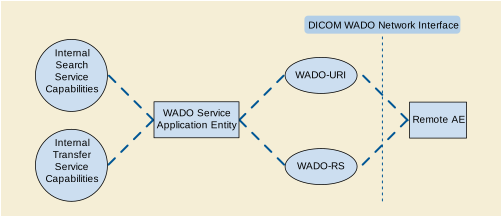
The WADO Service Application receives WADO requests from a remote AE. These requests may be either over the URI, WS or RS interfaces. It is associated with the local real-world activity "Retrieve Images". It converts these requests into internal lookup functions to find the matching SOP Instances. It then obtains these matching SOP Instances and composes a response back to the requesting remote AE.
The reception of a WADO request will activate the AE. An internal request is sent to the search capabilities of the EXAMPLE-WADO-SERVICE. This request is based upon the request parameters or the URL resource end point from the WADO request. The response is a list of all SOP instances stored on the EXAMPLE-PACS-ARCHIVE that match the request parameters. If there are no matching instances, the AE will indicate this in the WADO response. For all matching instances, the AE will utilize the internal image transfer request to obtain a copy of each instance. If the request was for retrieval of instances, these instances will be returned. If the request was for retrieval of rendered instances, then the AE will render each instance and return the rendered results.
This AE complies with Chapter 6 in PS3.18 , specifications for RS and URI access.
DICOM has retired the WADO-WS Service. See PS3.2-2017b. This product still supports this service as described here.
Table I.4.2-1. WADO-WS Retrieve Imaging Document Set Specification
Table I.4.2-3. WADO-WS Retrieve Rendered Imaging Documents Specification
Table I.4.2-5. WADO-URI Retrieve Imaging Documents Specification
If the URI Retrieve specifies no transfer syntax that is supported by the archive, the SOP Instance will be returned using the Implicit VR Little Endian Transfer Syntax.
Table I.4.2-6. WADO-URI Retrieve Rendered Imaging Documents Specification
Table I.4.2.3-1. WADO-RS Retrieve Study
Table I.4.2.3-2. WADO-RS Retrieve Series
Table I.4.2.3-3. WADO-RS Retrieve Instance
Table I.4.2.3-4. WADO-RS Retrieve Frames
|
Any Transfer Syntax supported by the hosting EXAMPLE-PACS-ARCHIVE |
|
|
Restricted to Multi-Frame Image Objects as defined in PS3.3. |
|
|
Restricted to size supported by the hosting EXAMPLE-PACS-ARCHIVE |
Table I.4.2.3-5. WADO-RS Retrieve Bulk Data
Table I.4.2.3-6. WADO-RS Retrieve Metadata
EXAMPLE-WADO-SERVICE uses the network interface from the hosting EXAMPLE-PACS-ARCHIVE. See its conformance claim for details.
The EXAMPLE-WADO-SERVICE can be configured to respond on two ports, one for unprotected HTTP traffic and one for TLS protected traffic. The TLS port will refuse any connection from a system that is not recognized as authenticated by a known authority.
DICOM has retired the WADO-WS Service. See PS3.2-2017b. This product still supports this service as described here.
The EXAMPLE-WADO-SERVICE can be configured to respond on either one or two service endpoints. Each endpoint offers both of the services.
The WSDL file to be used by clients is made available at the location http://<servername>/EXAMPLE-WADO-SERVICE?WSDL.
All EXAMPLE-WADO-SERVICEs support Unicode UTF-8 for all Web Services transactions. The EXAMPLE-WADO-SERVICE does not convert character sets when returning SOP Instances using DICOM encoding. The original DICOM encoded character sets are preserved. When a PDF encoding is returned, character set conversion is performed and the PDF is returned with a UTF-8 encoding. JPEG renderings, will also utilize UTF-8 encoding for internal labels.
See conformance claim for EXAMPLE-PACS-ARCHIVE for character sets used within the DICOM instances.
EXAMPLE-WADO-SERVICE supports transport level security measures for all Web Services.
The EXAMPLE-WADO-SERVICE supports the following transport level security measures:
The transport level security measures are the support for bi-directional authentication using TLS connections. The EXAMPLE-WADO-SERVICE can provide it's certificate information, and can be configured with either a direct comparison (self-signed) certificate or a chain of trust certificate.
The EXAMPLE-WADO-SERVICE will refuse a connection over TLS from a source that does not have a recognized authentication. For example, a certificate authenticated by "Big Bank Corp." will not be accepted unless the EXAMPLE-WADO-SERVICE has been configured to accept authentications from "Big Bank Corp." The list of acceptable certificates for EXAMPLE-WADO-SERVICE is not shared with certificates used by other system applications and must be maintained independently.
The EXAMPLE-WADO-SERVICE can optionally be configured to support the following session authentication mechanisms:
This document is an example DICOM Conformance Statement for a fictional application service called EXAMPLE-STOW-SERVICE produced by a fictional vendor called EXAMPLE-PACS-PRODUCTS.
As stated in the annex title, this document is truly informative, and not normative. A conformance statement of an actual product might implement additional services and options as appropriate for its specific purpose. In addition, an actual product might implement the services described in a different manner and, for example, with different characteristics and/or sequencing of activities. In other words, this conformance statement example does not intend to standardize a particular manner that a product might implement DICOM functionality.
Company Name: EXAMPLE-PACS-PRODUCTS-VENDOR
Product Name: EXAMPLE-STOW-SERVICE
This fictional product EXAMPLE-STOW-SERVICE implements the STOW-RS services for storing DICOM SOP Instances into an EXAMPLE-PACS-ARCHIVE. The EXAMPLE-STOW-SERVICE is only available as a plug in option for the EXAMPLE-PACS-ARCHIVE. All of the networking, database, and other services are provided by the EXAMPLE-PACS-ARCHIVE. This conformance claim refers to the conformance claim for the EXAMPLE-PACS-ARCHIVE for all such services.
Table J.1-1 provides an overview of the network services supported by EXAMPLE-STOW-SERVICE.
See example text in Section A.3.
This document is a sample DICOM Conformance Statement created for DICOM PS3.2. It is to be used solely as an example to illustrate how to create a DICOM Conformance Statement for a DICOM Service Class Provider (SCP). The subject of the document, EXAMPLE-STOW-SERVICE, is a fictional product.
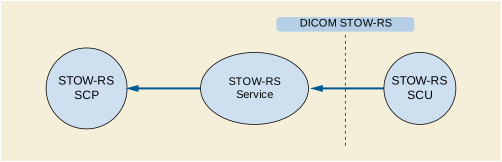
The STOW-RS Service Application receives STOW requests from a remote AE. These requests are HTTP POST requests. It is associated with the local real-world activity "Store Instances". It converts these requests into internal functions to store the given SOP Instances. It returns a summary HTTP status line, including a status code and an associated textual phase, followed by an XML message indicating success, warning, or failure for each instance to the requesting remote AE.
The reception of a STOW-RS POST request will activate the STOW-RS Service. The storage request is based upon the accept headers in the STOW-RS POST request. The response includes an HTTP status line, including a status-code and its associated textual phrase, followed by an XML message indicating success, warning, or failure for each instance stored by the STOW-RS service.
This AE complies with ????, specification for STOW-RS storage.
Table J.4.2-1. STOW-RS Store Instances Specification
EXAMPLE-STOW-SERVICE limits the number of simultaneous RS requests. Additional requests will be queued after the HTTP connection is accepted. When an earlier request completes, a pending request will proceed.
The EXAMPLE-STOW-SERVICE response message header contains status codes indicating success, warning, or failure as shown in the "HTTP Standard Response Codes" below. No additional status codes are used.
Table J.4.2.2.4.4-1. HTTP Standard Response Codes
The EXAMPLE-STOW-SERVICE response message body (PS3.18 XML Store Instances Response Module) contains the DICOM status codes for individual SOP Instances indicating success, warning, or failure as defined below. No additional status codes are used.
For the following semantics the associated value are used for the Warning Reason (0008,1196):
- B000
-
The STOW-RS Service modified one or more data elements during storage of the instance.
- B006
-
The STOW-RS Service discarded some data elements during storage of the instance.
- B007
-
Data Set does not match SOP Class
The STOW-RS Service stored the instance despite the Data Set not matching the constraints of the SOP Class.
Additional codes may be used for the Warning Reason (0008,1196) to address the semantics of other issues.
In the event that multiple codes may apply, the single most appropriate code is used.
For the following semantics the associated value are used for the Failure Reason (0008,1197).
- A700
-
The STOW-RS Service did not store the instance because it was out of memory.
- A710
-
The STOW-RS Service did not store the instance because it was out of storage space.
- A900
-
Error: Data Set does not match SOP Class
The STOW-RS Service did not store the instance because the SOP Class of an element in the Referenced SOP Instance Sequence did not correspond to the SOP class registered for this SOP Instance at the STOW-RS Service.
- C000
-
The STOW-RS Service did not store the instance because it cannot understand certain Data Elements.
- C122
-
Referenced Transfer Syntax not supported
The STOW-RS Service did not store the instance because it does not support the requested Transfer Syntax for the instance.
- 0110
-
The STOW-RS Service did not store the instance because of a general failure in processing the operation.
- 0122
-
Referenced SOP Class not supported
The STOW-RS Service did not store the instance because it does not support the requested SOP Class.
Additional codes may be used for the Failure Reason (0008,1197) to address the semantics of other errors.
In the event that multiple codes may apply, the single most appropriate code shall be used.
All EXAMPLE-STOW-SERVICEs support Unicode UTF-8 for all RS transactions.
The EXAMPLE-STOW-SERVICE does not convert character sets when storing PS3.10 binary Instances. The original DICOM encoded character sets are preserved.
The EXAMPLE-STOW-SERVICE supports the following transport level security measures:
The transport level security measures support bi-directional authentication using TLS connections. The EXAMPLE-STOW-SERVICE can provide its certificate information, and can be configured with either a direct comparison (self-signed) certificate or a chain of trust certificates.
The EXAMPLE-STOW-SERVICE will refuse a connection over TLS from a source that does not have a recognized authentication. For example, a certificate authenticated by "Big Hospital Provider" will not be accepted unless the EXAMPLE-STOW-SERVICE has been configured to accept authentications from "Big Hospital Provider". The list of acceptable certificates for EXAMPLE-STOW-SERVICE is not shared with certificates used by other system applications and must be maintained independently.
The EXAMPLE-STOW-SERVICE can optionally be configured to use the following session authentication mechanisms:
This document is an example DICOM Conformance Statement for a fictional application service called EXAMPLE-QIDO-SERVICE produced by a fictional vendor called EXAMPLE-PACS-PRODUCTS.
As stated in the annex title, this document is truly informative, and not normative. A conformance statement of an actual product might implement additional services and options as appropriate for its specific purpose. In addition, an actual product might implement the services described in a different manner and, for example, with different characteristics and/or sequencing of activities. In other words, this conformance statement example does not intend to standardize a particular manner that a product might implement DICOM functionality.
Company Name: EXAMPLE-PACS-PRODUCTS
Product Name: EXAMPLE-QIDO-SERVICE
This fictional product EXAMPLE-QIDO-SERVICE implements QIDO-RS, which allow the client to search for studies, series or SOP instances stored in an EXAMPLE-PACS-ARCHIVE. The EXAMPLE- QIDO-SERVICE is only available as a plug in option for the EXAMPLE-PACS-ARCHIVE. All of the networking, database, and other services are provided by the EXAMPLE-PACS-ARCHIVE. This conformance claim refers to the conformance claim for the EXAMPLE-PACS-ARCHIVE for all such services.
Table K.1-1 provides an overview of the network services supported by EXAMPLE-QIDO-SERVICE.
See example text in Section A.3.
This document is a sample DICOM Conformance Statement created for DICOM PS3.2. It is to be used solely as an example to illustrate how to create a DICOM Conformance Statement for a DICOM Service Class Provider (SCP). The subject of the document, EXAMPLE-QIDO-SERVICE, is a fictional product.
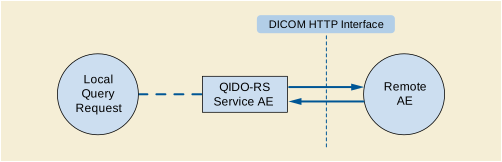
The QIDO-RS Provider Application receives QIDO requests from a remote AE. These requests are HTTP GET requests. It is associated with the local real-world activity "Query Remote Device". It uses the request to select matching Studies, Series or Instances. It then returns a set of matching Studies, Series or Instances or a response code indicating warning or failure back to the requesting device.
The reception of a QIDO-RS GET request will activate the QIDO-RS Provider. An internal query request is sent to the search capabilities of the associated PACS or Vendor Neutral Archive (VNA). The search result is based upon the URL of the QIDO-RS GET request. The response is a status code indicating the success, warning, or failure of the search along with any matching results stored in the Remote PACS or VNA.
This AE complies with ????, specification for QIDO-RS.
Table K.4.2-1. QIDO-RS Search for Studies Specification
|
Restricted to "multipart/related; type=application/dicom+xml" or "application/dicom+json" |
|
|
See Table K.4.2-1a |
|
|
See Table K.4.2-1a |
|
|
Literal, case insensitive. Section Section K.4.2.2 “Extended Negotiation”. |
Types of Matching (see Section C.2.2.2 “Attribute Matching” in PS3.4 ) :
"S" indicates the identifier attribute uses Single Value Matching
"L" indicates UID List Matching
"U" indicates Universal Matching.
Note
If only Universal Matching is supported for an attribute then that attribute can only be passed as an "includefield" query key
"*" indicates wild card matching
"SEQUENCE" indicates Sequence Matching
"NONE" indicates that no matching is supported, but that values for this Element requested will be returned with all requests
"UNIQUE" indicates that this is the Unique Key for that query level, in which case Universal Matching or Single Value Matching is used depending on the query level (see Section C.2.2.1.1 “Unique Keys” in PS3.4 ).
Table K.4.2-2. QIDO-RS Search for Series Specification
|
Restricted to "multipart/related; type=application/dicom+xml" or "application/dicom+json" |
|
|
See Table K.4.2-2a |
|
|
See Table K.4.2-2a |
|
Types of matching: Section Section K.4.2.1.1 “QIDO-RS Search for Studies”.
Table K.4.2-3. QIDO-RS Search for Instances Specification
|
Restricted to "multipart/related; type=application/dicom+xml" or "application/dicom+json" |
|
|
See Table K.4.2-3a |
|
|
See Table K.4.2-3a |
|
Types of matching: Section Section K.4.2.1.1 “QIDO-RS Search for Studies”.
EXAMPLE-QIDO-SERVICE limits the number of simultaneous RS requests. Additional requests will be queued after the HTTP connection is accepted. When an earlier request completes, a pending request will proceed.
The EXAMPLE-QIDO-SERVICE shall provide a response message header containing the appropriate status code indicating success, warning, or failure as shown in Table K.4.2-5.
Table K.4.2-5. HTTP Standard Response Codes
EXAMPLE-QIDO-SERVICE supports Unicode UTF-8 for all RS transactions.
See conformance claim for EXAMPLE-PACS-ARCHIVE for character sets used within the DICOM instances.
The EXAMPLE-QIDO-SERVICE supports the following transport level security measures:
The transport level security measures support bi-directional authentication using TLS connections. The EXAMPLE-QIDO-SERVICE can provide its certificate information, and can be configured with either a direct comparison (self-signed) certificate or a chain of trust certificate.
The EXAMPLE-QIDO-SERVICE will refuse a connection over TLS from a source that does not have a recognized authentication. For example, a certificate authenticated by "Big Hospital Provider." will not be accepted unless the EXAMPLE-QIDO-SERVICE has been configured to accept authentications from "Big Hospital Provider." The list of acceptable certificates for EXAMPLE-QIDO-SERVICE is not shared with certificates used by other system applications and must be maintained independently.
The EXAMPLE-QIDO-SERVICE can optionally be configured to use the following session authentication mechanisms:
This document is an example DICOM Conformance Statement for a fictional application service called EXAMPLE-RTV-SERVICE produced by a fictional vendor called EXAMPLE-IMAGING-PRODUCTS.
As stated in the annex title, this document is truly informative, and not normative. A conformance statement of an actual product might implement additional services and options as appropriate for its specific purpose. In addition, an actual product might implement the services described in a different manner and, for example, with different characteristics and/or sequencing of activities. In other words, this conformance statement example does not intend to standardize a particular manner that a product might implement DICOM-RTV functionality.
Company Name: EXAMPLE-IMAGING-PRODUCTS
Product Name: EXAMPLE-RTV-SERVICE
This fictional product EXAMPLE-RTV-SERVICE implements the DICOM-RTV services for sending video and associated metadata, to be consumed in real-time by other compliant devices. The EXAMPLE-RTV-SERVICE is only available as a plug in option for the EXAMPLE-INTEGRATED-MODALITY. All of the networking, database, and other services are provided by the EXAMPLE-INTEGRATED-MODALITY. This conformance claim refers to the conformance claim for the EXAMPLE-INTEGRATED-MODALITY for all such services.
Table L.1-1 provides an overview of the network services supported by EXAMPLE-RTV-SERVICE.
See example text in Section A.3.
This document is a sample DICOM Conformance Statement created for DICOM PS3.2. It is to be used solely as an example to illustrate how to create a DICOM Conformance Statement for a DICOM-RTV Service Provider. The subject of the document, EXAMPLE-RTV-SERVICE, is a fictional product.

This AE complies with Section 6.2 “Transport” in PS3.22 , specification for DICOM-RTV.
EXAMPLE-RTV-SERVICE provides Standard Conformance to the following SOP Classes:
Some restrictions applies on the Real-Time Communications:
The resolution is defined by the equipment configuration, and is reflected in the SDP object.
This document is an example DICOM Conformance Statement for a fictional application service called EXAMPLE-RTV-DISPLAY produced by a fictional vendor called EXAMPLE-Viewing ÂPRODUCTS.
As stated in the annex title, this document is truly informative, and not normative. A conformance statement of an actual product might implement additional services and options as appropriate for its specific purpose. In addition, an actual product might implement the services described in a different manner and, for example, with different characteristics and/or sequencing of activities. In other words, this conformance statement example does not intend to standardize a particular manner that a product might implement DICOM-RTV functionality.
Company Name: EXAMPLE-Viewing ÂPRODUCTS
Product Name: EXAMPLE-RTV-DISPLAY
This fictional product EXAMPLE-RTV-DISPLAY implements the DICOM-RTV services for consuming video, audio and associated metadata, provided by another compliant device, and displaying the information in a window on the screen. The EXAMPLE-RTV-DISPLAY is only available as a plug in option for the EXAMPLE-INTEGRATED-MODALITY. All of the networking, database, and other services are provided by the "SAMPLE DICOM Image Viewer". This conformance claim refers to the conformance claim for the "SAMPLE DICOM Image Viewer" for all such services.
Table M.1-1 provides an overview of the network services supported by EXAMPLE-RTV-DISPLAY.
See example text in Section A.3.
This document is a sample DICOM Conformance Statement created for DICOM PS3.2. It is to be used solely as an example to illustrate how to create a DICOM Conformance Statement for a DICOM-RTV Service Provider. The subject of the document, EXAMPLE-RTV-SERVICE, is a fictional product.

This AE complies with Section 6.2 “Transport” in PS3.22 , specification for DICOM-RTV.
EXAMPLE-RTV-SERVICE provides Standard Conformance to the following SOP Classes:
Some restrictions applies on the Real-Time Communications:
The resolution is automatically determined based on the one provided by the sent video.