The STORAGE-SCU AE provides Standard Conformance to the following DICOM V3.0 SOP Classes:
Table F.4.2-1. SOP Classes for STORAGE-SCU AE
|
SOP Class Name |
SOP Class UID |
SCU |
SCP |
|---|---|---|---|
|
Verification |
1.2.840.10008.1.1 |
Yes |
No |
|
US Image Storage (Retired) |
1.2.840.10008.5.1.4.1.1.6 |
Yes |
No |
|
US Image Storage |
1.2.840.10008.5.1.4.1.1.6.1 |
Yes |
No |
|
US Multi-frame Storage (Retired) |
1.2.840.10008.5.1.4.1.1.3 |
Yes |
No |
|
US Multi-frame Storage |
1.2.840.10008.5.1.4.1.1.3.1 |
Yes |
No |
|
Computed Radiography Image Storage |
1.2.840.10008.5.1.4.1.1.1 |
Yes |
No |
|
CT Image Storage |
1.2.840.10008.5.1.4.1.1.2 |
Yes |
No |
|
MR Image Storage |
1.2.840.10008.5.1.4.1.1.4 |
Yes |
No |
|
Secondary Capture Image Storage |
1.2.840.10008.5.1.4.1.1.7 |
Yes |
No |
STORAGE-SCU AE can be configured to use the retired US Image objects (US Image Storage, 1.2.840.10008.5.1.4.1.1.6, and US Multi-frame Storage, 1.2.840.10008.5.1.4.1.1.3) rather than the current US SOP Classes for ultrasound images or vice-versa, making any necessary changes to make the transformed image objects conformant to the corresponding SOP Class. This is only done if the external Storage SCP AE does not support the SOP Instance's original SOP Class.
By altering the configuration it is possible to support additional or fewer SOP Classes.
The STORAGE-SCU AE can only form Associations when requested to do so by the QUERY-RETRIEVE-SCP AE. The STORAGE-SCU AE can only request the opening of an Association. It cannot accept requests to open Associations from external Application Entities.
The DICOM standard Application Context Name for DICOM is always proposed:
Table F.4.2-2. DICOM Application Context for STORAGE-SCU AE
|
Application Context Name |
1.2.840.10008.3.1.1.1 |
The maximum number of simultaneous Associations is configurable, but is usually limited to a maximum of 10. This configuration largely depends on whether relatively quick response to multiple simultaneous C-MOVE Destination AEs is required or maximum throughput performance is required. If the latter is the case, then no simultaneous Associations are permitted, in order to reduce disk thrashing and thus maximize throughput. The STORAGE-SCU AE can initiate simultaneous Associations to a given external C-MOVE Destination AE up to the maximum number configured. There is no separate limit on the maximum number permitted to the same C-MOVE Destination AE.
If the first attempt to open an Association fails then the STORAGE-SCU AE will reschedule the task to attempt it again after a configurable time delay. The number of times to reattempt Association establishment is configurable, with the default being zero.
Table F.4.2-3. Number of Associations as a SCU for STORAGE-SCU AE
|
Maximum number of simultaneous Associations |
10 (Configurable) |
The STORAGE-SCU AE does not support asynchronous communication (multiple outstanding transactions over a single Association). All Association requests must be completed and acknowledged before a new operation can be initiated.
Table F.4.2-4. Asynchronous Nature as a SCU for STORAGE-SCU AE
|
Maximum number of outstanding asynchronous transactions |
1 (Not Configurable) |
Table F.4.2-5. DICOM Implementation Class and Version for STORAGE-SCU AE
|
Implementation Class UID |
1.840.xxxxxxx.yyy.etc… |
|
Implementation Version Name |
EX_VERS_01 |
Note that the STORAGE-SCU AE and QUERY-RETRIEVE-SCP AE use the same Implementation Class UID. All EXAMPLE-QUERY-RETRIEVE-SERVER AEs use the same Implementation Version Name. This Version Name is updated with each new release of the product software, as the different AE versions are never released independently.
The STORAGE-SCU AE will initiate a new Association when the QUERY-RETRIEVE-SCP AE invokes the STORAGE-SCU AE to transmit images. The QUERY-RETRIEVE-SCP AE will issue such a command whenever it receives a valid C-MOVE Request. An Association Request is sent to the specified C-MOVE Destination AE and upon successful negotiation of the required Presentation Context the image transfer is started. In all cases an attempt will be made to transmit all the indicated images in a single Association, but this may not always be possible. The Association will be released when all the images have been sent. If an error occurs during transmission over an open Association then the image transfer is halted. The STORAGE-SCU AE will not attempt to independently retry the image export.
Note that the STORAGE-SCU AE does not support the unsolicited sending of SOP Instances using the DICOM Storage Service Class. It will only send SOP Instances in response to a C-MOVE Request from a peer AE.
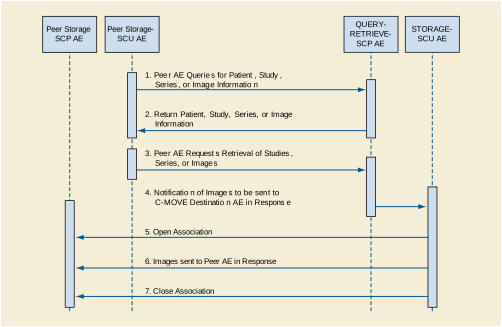
The following sequencing constraints illustrated in Figure F.4.2-1 apply to the STORAGE-SCU AE:
-
Peer AE requests retrieval of Study, Series, or Images from QUERY-RETRIEVE-SCP AE (C-MOVE-RQ).
-
QUERY-RETRIEVE-SCP AE signals STORAGE-SCU AE to send the image Composite SOP Instances indicated in the C-MOVE-RQ to the C-MOVE Destination AE.
-
STORAGE-SCU AE opens a new Association with the indicated C-MOVE Destination AE.
-
STORAGE-SCU AE sends the indicated Composite SOP Instances.
-
STORAGE-SCU AE closes the Association.
-
The Verification Service is only supported as a utility function for Service staff. It is used only as a diagnostic tool.
STORAGE-SCU AE will propose Presentation Contexts as shown in the following table:
Table F.4.2-6. Proposed Presentation Contexts By the STORAGE-SCU AE
|
Presentation Context Table |
|||||
|---|---|---|---|---|---|
|
Abstract Syntax |
Transfer Syntax |
Role |
Ext. Neg. |
||
|
Name |
UID |
Name |
UID |
||
|
Verification |
1.2.840.10008.1.1 |
DICOM Implicit VR Little Endian |
1.2.840.10008.1.2 |
SCU |
None |
|
US Image Storage (Retired) |
1.2.840.10008.5.1.4.1.1.6 |
DICOM Implicit VR Little Endian |
1.2.840.10008.1.2 |
SCU |
None |
|
US Image Storage (Retired) |
1.2.840.10008.5.1.4.1.1.6 |
DICOM Explicit VR Little Endian |
1.2.840.10008.1.2.1 |
SCU |
None |
|
US Image Storage (Retired) |
1.2.840.10008.5.1.4.1.1.6 |
DICOM Explicit JPEG baseline lossy compression |
1.2.840.10008.1.2.4.50 |
SCU |
None |
|
US Image Storage |
1.2.840.10008.5.1.4.1.1.6.1 |
DICOM Implicit VR Little Endian |
1.2.840.10008.1.2 |
SCU |
None |
|
US Image Storage |
1.2.840.10008.5.1.4.1.1.6.1 |
DICOM Explicit VR Little Endian |
1.2.840.10008.1.2.1 |
SCU |
None |
|
US Image Storage |
1.2.840.10008.5.1.4.1.1.6.1 |
DICOM Explicit JPEG baseline lossy compression |
1.2.840.10008.1.2.4.50 |
SCU |
None |
|
US Multi-frame Storage (Retired) |
1.2.840.10008.5.1.4.1.1.3 |
DICOM Implicit VR Little Endian |
1.2.840.10008.1.2 |
SCU |
None |
|
US Multi-frame Storage (Retired) |
1.2.840.10008.5.1.4.1.1.3 |
DICOM Explicit VR Little Endian |
1.2.840.10008.1.2.1 |
SCU |
None |
|
US Multi-frame Storage (Retired) |
1.2.840.10008.5.1.4.1.1.3 |
DICOM Explicit JPEG baseline lossy compression |
1.2.840.10008.1.2.4.50 |
SCU |
None |
|
US Multi-frame Storage |
1.2.840.10008.5.1.4.1.1.3.1 |
DICOM Implicit VR Little Endian |
1.2.840.10008.1.2 |
SCU |
None |
|
US Multi-frame Storage |
1.2.840.10008.5.1.4.1.1.3.1 |
DICOM Explicit VR Little Endian |
1.2.840.10008.1.2.1 |
SCU |
None |
|
US Multi-frame Storage |
1.2.840.10008.5.1.4.1.1.3.1 |
DICOM Explicit JPEG baseline lossy compression |
1.2.840.10008.1.2.4.50 |
SCU |
None |
|
Computer Radiography Image Storage |
1.2.840.10008.5.1.4.1.1.1 |
DICOM Implicit VR Little Endian |
1.2.840.10008.1.2 |
SCU |
None |
|
Computer Radiography Image Storage |
1.2.840.10008.5.1.4.1.1.1 |
DICOM Explicit VR Little Endian |
1.2.840.10008.1.2.1 |
SCU |
None |
|
CT Image Storage |
1.2.840.10008.5.1.4.1.1.2 |
DICOM Implicit VR Little Endian |
1.2.840.10008.1.2 |
SCU |
None |
|
CT Image Storage |
1.2.840.10008.5.1.4.1.1.2 |
DICOM Explicit VR Little Endian |
1.2.840.10008.1.2.1 |
SCU |
None |
|
MR Image Storage |
1.2.840.10008.5.1.4.1.1.4 |
DICOM Implicit VR Little Endian |
1.2.840.10008.1.2 |
SCU |
None |
|
MR Image Storage |
1.2.840.10008.5.1.4.1.1.4 |
DICOM Explicit VR Little Endian |
1.2.840.10008.1.2.1 |
SCU |
None |
|
Secondary Capture Image Storage |
1.2.840.10008.5.1.4.1.1.7 |
DICOM Implicit VR Little Endian |
1.2.840.10008.1.2 |
SCU |
None |
|
Secondary Capture Image Storage |
1.2.840.10008.5.1.4.1.1.7 |
DICOM Explicit VR Little Endian |
1.2.840.10008.1.2.1 |
SCU |
None |
|
Secondary Capture Image Storage |
1.2.840.10008.5.1.4.1.1.7 |
DICOM Explicit JPEG baseline lossy compression |
1.2.840.10008.1.2.4.50 |
SCU |
None |
Note
The SOP Classes and Transfer Syntaxes that the STORAGE-SCU AE proposes, as listed above, represent the default behavior. The STORAGE-SCU AE can be configured to propose a subset of these contexts or additional Presentation Contexts. Also, the default Behavior is to propose just a single Transfer Syntax per Presentation Context. However, this can be altered so that every proposed Presentation Context has a unique SOP Class and one or more Transfer Syntaxes. That is, the default behavior is to determine the Transfer Syntaxes the SCP can accept as opposed to which it prefers.
Standard conformance is provided to the DICOM Verification Service Class as an SCU. The Verification Service as an SCU is actually only supported as a diagnostic service tool for network communication issues.
Composite DICOM SOP Instances are maintained as DICOM Part 10 compliant files in the EXAMPLE-QUERY-RETRIEVE-SERVER database. The entire set of tags received with the image will be saved in EXAMPLE-QUERY-RETRIEVE-SERVER; this includes all Private and SOP Extended Elements. When a SOP Instance is selected for export from EXAMPLE-QUERY-RETRIEVE-SERVER, its content will be exported as it was originally received except for a few possible exceptions. Some of the Patient demographic and Study information Elements whose values can have been altered due to changes administered on EXAMPLE-QUERY-RETRIEVE-SERVER or changes to the state of the image data due to compression can be altered when the SOP Instance is exported.
The Patient demographic and Study information can be entered or altered by several means: manually, or from HL7 messaging,. The replacement behavior depends on which specific DICOM and HL7 services are supported. Also, this behavior is configurable. Values can be altered without changing the SOP Instance UID unless otherwise noted. Refer to the Annex for the specific details of which Elements can have their values altered at time of export.
The EXAMPLE-QUERY-RETRIEVE-SERVER creates files called Service Logs that can be used to monitor their status and diagnose any problems that may arise. If any error occurs during DICOM communication then appropriate messages are always output to these Service Logs. In addition, error messages may be output as alerts to the User Interface in certain cases.
The STORAGE-SCU AE will exhibit the following Behavior according to the Status Code value returned in a C-STORE Response from a destination C-STORE SCP:
Table F.4.2-7. STORAGE-SCU AE C-STORE Response Status Handling Behavior
|
Service Status |
Further Meaning |
Error Code |
Behavior |
|---|---|---|---|
|
Success |
Success |
0000 |
The SCP has successfully stored the exported SOP Instance. A message is sent to the QUERY-RETRIEVE-SCP AE indicating successful export. The QUERY-RETRIEVE-SCP AE will send the appropriate PENDING or SUCCESS Status in the C-MOVE Response. Success indication message is output to the Service Logs. No message is posted to the User Interface. |
|
Refused |
Out of Resources |
A700 -A7FF |
This is treated as a permanent Failure. A message is sent to the QUERY-RETRIEVE-SCP AE indicating an export failure and the Association is released. The QUERY-RETRIEVE-SCP AE will send an appropriate Status in the C-MOVE Response. Error indication message is output to the Service Logs. No message is posted to the User Interface. |
|
Error |
Data Set does not match SOP Class |
A900 -A9FF |
This is treated as a permanent Failure. A message is sent to the QUERY-RETRIEVE-SCP AE indicating an export failure and the Association is released. The QUERY-RETRIEVE-SCP AE will send an appropriate Status in the C-MOVE Response. Error indication message is output to the Service Logs. No message is posted to the User Interface. |
|
Error |
Cannot Understand |
C000 -CFFF |
This is treated as a permanent Failure. A message is sent to the QUERY-RETRIEVE-SCP AE indicating an export failure and the Association is released. The QUERY-RETRIEVE-SCP AE will send an appropriate Status in the C-MOVE Response. Error indication message is output to the Service Logs. No message is posted to the User Interface. |
|
Warning |
Coercion of Data Elements |
B000 |
Image transmission is considered successful. A message is sent to the QUERY-RETRIEVE-SCP AE indicating successful export. The QUERY-RETRIEVE-SCP AE will send the appropriate PENDING or SUCCESS Status in the C-MOVE Response. Warning indication message is output to the Service Logs. No message is posted to the User Interface. |
|
Warning |
Data Set does not match SOP Class |
B007 |
Image transmission is considered successful. A message is sent to the QUERY-RETRIEVE-SCP AE indicating successful export. The QUERY-RETRIEVE-SCP AE will send the appropriate PENDING or SUCCESS Status in the C-MOVE Response. Warning indication message is output to the Service Logs. No message is posted to the User Interface. |
|
Warning |
Elements Discarded |
B006 |
Image transmission is considered successful. A message is sent to the QUERY-RETRIEVE-SCP AE indicating successful export. The QUERY-RETRIEVE-SCP AE will send the appropriate PENDING or SUCCESS Status in the C-MOVE Response. Warning indication message is output to the Service Logs. No message is posted to the User Interface. |
|
Warning |
Attribute List Error |
0107 |
Image transmission is considered successful. A message is sent to the QUERY-RETRIEVE-SCP AE indicating successful export. The QUERY-RETRIEVE-SCP AE will send the appropriate PENDING or SUCCESS Status in the C-MOVE Response. Warning indication message is output to the Service Logs. No message is posted to the User Interface. |
|
Warning |
Attribute Value Out of Range |
0116 |
Image transmission is considered successful. A message is sent to the QUERY-RETRIEVE-SCP AE indicating successful export. The QUERY-RETRIEVE-SCP AE will send the appropriate PENDING or SUCCESS Status in the C-MOVE Response. Warning indication message is output to the Service Logs. No message is posted to the User Interface. |
|
* |
* |
Any other status code. |
This is treated as a permanent Failure. A message is sent to the QUERY-RETRIEVE-SCP AE indicating an export failure and the Association is released. The QUERY-RETRIEVE-SCP AE will send an appropriate Status in the C-MOVE Response. Error indication message is output to the Service Logs. No message is posted to the User Interface. |
All Status Codes indicating an error or refusal are treated as a permanent failure. The STORAGE-SCU AE never automatically resends images when an error Status Code is returned in a C-STORE Response. For specific behavior regarding Status Code values returned in C-MOVE Responses, refer to the Services Supported as an SCP by the QUERY-RETRIEVE-SCP AE.
Table F.4.2-8. STORAGE-SCU AE Communication Failure Behavior
|
Exception |
Behavior |
|---|---|
|
Timeout expiry for an expected DICOM Message Response (DIMSE level timeout). |
The Association is aborted using a DICOM A-ABORT and a message is sent to the QUERY-RETRIEVE-SCP AE indicating an export failure. The QUERY-RETRIEVE-SCP AE will send an appropriate Status in the C-MOVE Response. Error indication message is output to the Service Logs. No message is posted to the User Interface. |
|
Timeout expiry for an expected DICOM PDU or TCP/IP packet (Low-level timeout). |
The Association is aborted using a DICOM A-ABORT and a message is sent to the QUERY-RETRIEVE-SCP AE indicating an export failure. The QUERY-RETRIEVE-SCP AE will send an appropriate Status in the C-MOVE Response. Error indication message is output to the Service Logs. No message is posted to the User Interface. |
|
Association A-ABORTed by the SCP or the network layers indicate communication loss (i.e., low-level TCP/IP socket closure) |
A message is sent to the QUERY-RETRIEVE-SCP AE indicating an export failure. The QUERY-RETRIEVE-SCP AE will send an appropriate Status in the C-MOVE Response. Error indication message is output to the Service Logs. No message is posted to the User Interface. |