This implementation model uses the DICOM Basic Print Management Meta SOP Class to receive studies for the Medical Imager. Multiple associations to Print SCUs are supported.
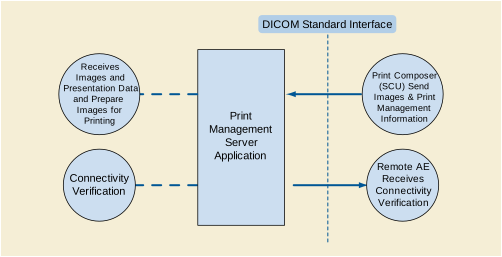
The Print Server is receiving the Images with the Presentation and Annotation information, it Apply it on the images and creates a print-job within the print queue, containing one or more film pages composed from images selected by the client Print SCU. Furthermore, it also manages the Printer Status and Configuration.
The Print Server System acquires the images with the demographics and presentation information from the connected Print Composer (SCU) that is Grouped with a Workstation or an Archive device. Studies are temporarily stored on disk. The images are then processed and formatted and finally queued as a print job on the Printer queue. If the Printer is operating normally, then the film sheets described in the print-job will be printed. Changes in the Printer operation status will be detected (e.g., film Magazine empty) and reported back to the Print SCU. If the Printer is not operating normally, then the print-job will be set to an error state and can be restarted by the user via the job control interface.
The Print Server Management includes:
-
DICOM Association and Negotiation Management
-
Image Buffering
-
Image Processing (Windowing level, P-LUT, GSDF, Annotation, etc)
-
Image Formatting (Film sheet format)
-
Printing
-
Print Job Status Tracking
-
Print Status Tracking
-
Printer Configuration Tracking
The Printer Status and Configuration can be requested at any time by the Print SCU, while the Print Server will update the Print SCU asynchronously whenever the Printer status get changed. Furthermore, the Print Server provides in addition a Service operation of checking the networking connectivity to it's Print SCU using the Verification SOP Class.
Note
-
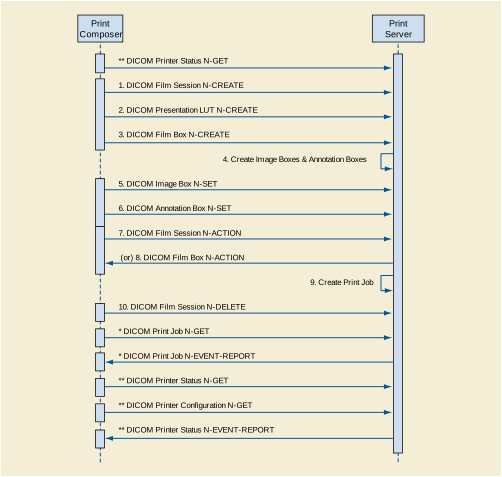
The Print Job N-GET and N-EVENT-REPORT are Asynchronous messages that may occur at any time after the Print Job was created.
-
The Printer Status & Configuration N-GET and the N-EVENT-REPORT are Asynchronous messages that may occur at any time it is needed during the Print sequence.
The Print Server Management workflow activities in the sequence order as described in Figure E.4.1-2 apply:
-
DICOM Film Session N-CREATE
-
DICOM Presentation LUT N-CREATE
-
DICOM Film Box N-CREATE
-
Create Image Boxes & Annotation Boxes
-
DICOM Image Box N-SET
-
DICOM Annotation Box N-SET
-
DICOM Film Session N-ACTION, A print job is created for each Film Session N-action.
-
DICOM Film Box N-ACTION, A print job is created for each Film Box N-action.
-
Create Print Job
-
DICOM Film Session N-DELETE.
The following additional activities are asynchronous mode and they can be send any time the Print Server is up and running:
* DICOM Print Job N-GET, request the execution status of a Print Job.
* DICOM Print Job N-EVENT-REPORT, report an update on the execution status of a Print Job.
** DICOM Printer Status N-GET - Request a Printer Status, anytime the Printer is ON.
** DICOM Printer Configuration N-GET - Request the Printer configuration, anytime the Printer is ON.
** DICOM Printer Status N-EVENT-REPORT - Report the Printer Status Changed.
The EXAMPLE-PRINT-SERVER-MANAGEMENT provides Standard Conformance to the following SOP Classes:
Table E.4.2-1. SOP Classes for AE Print Server (SCP)
|
SOP Class Name |
SOP Class UID |
SCU |
SCP |
|---|---|---|---|
|
Basic Grayscale Print Management Meta SOP Class |
1.2.840.10008.5.1.1.9 |
No |
Yes |
|
Presentation LUT SOP Class |
1.2.840.10008.5.1.1.23 |
No |
Yes |
|
Printer Configuration |
1.2.840.10008.5.1.1.16.376 |
No |
Yes |
|
Print Job |
1.2.840.10008.5.1.1.14 |
No |
Yes |
|
Basic Annotation Box SOP Class |
1.2.840.10008.5.1.1.15 |
No |
Yes |
|
Verification SOP Class |
1.2.840.10008.1.1 |
Yes |
Yes |
The Print Server Management System will accept associations while configured as an Print SCP and while a valid local Printer destination exists.
The DICOM standard application context name for DICOM 3.0 is always accepted
Table E.4.2-2. DICOM Application Context for AE Print SCP
|
Application Context Name |
1.2.840.10008.3.1.1.1 |
The EXAMPLE-PRINT-SERVER-MANAGEMENT will accept Up to 8 simultaneous delivery Associations. If an attempt is made to open more than 8 simultaneous Associations, the Print Server System will reject the additional Associations (A-ASSOCIATE-RJ).
Table E.4.2-3. Number of Associations Accepted for AE Print Server Management (SCP)
|
Maximum number of simultaneous Associations |
8 (Configurable) |
EXAMPLE-PRINT-SERVER-MANAGEMENT will also initiate one Association at a time for each destination to which a connectivity verification request is being processed. Only one connectivity verification job will be active at a time, the other remains pending until the active job is completed or failed.
Table E.4.2-4. Number of Associations Initiated for Connectivity
|
Maximum number of simultaneous Associations |
1 |
The EXAMPLE-PRINT-SERVER-MANAGEMENT does not support asynchronous communication. Multiple outstanding transactions are not supported. It allows up to one invoked and one performed operation on an Association (it is synchronous).
Table E.4.2-5. Asynchronous Nature as a SCP for AE Print Server (SCP)
|
Maximum number of outstanding asynchronous transactions |
1 |
The EXAMPLE-PRINT-SERVER-MANAGEMENT initiates Associations only for the purpose of verifying a DICOM connection.
The EXAMPLE-PRINT-SERVER-MANAGEMENT is capable of proposing the Presentation Contexts as shown in the following table:
Table E.4.2-7. Proposed Presentation Context for Connectivity Verification
|
Presentation Context Table |
|||||
|---|---|---|---|---|---|
|
Abstract Syntax |
Transfer Syntax |
Role |
Extended Negotiation |
||
|
Name |
UID |
Name List |
UID List |
||
|
Verification |
1.2.840.10008.1.1 |
Implicit VR Little Endian |
1.2.840.10008.1.2 |
SCU |
None |
|
Explicit VR Little Endian |
1.2.840.10008.1.2.1 |
||||
A remote peer DICOM Application Entity, acting as an Print SCU, establishes an association with the EXAMPLE-PRINT-SERVER-MANAGEMENT that accepts these Associations for the purpose of receiving images and image presentation related data for image processing and printing on a hard copy medium.
When an association has been established the Sequencing of Real-World Activities is as described in Section E.4.1.3.
The Print Server (SCP) AE may reject association attempts as shown in Table E.4.2-9. The Result, Source and Reason/Diag columns represent the values returned in the appropriate fields of an ASSOCIATE-RJ PDU (see Section 9.3.4 “A-ASSOCIATE-RJ PDU Structure” in PS3.8 ). The contents of the Source column is abbreviated to save space and the meaning of the abbreviations are:
-
1 - DICOM UL service-user
-
2 - DICOM UL service-provider (ASCE related function)
-
3 - DICOM UL service-provider (Presentation related function)
Table E.4.2-9. Association Rejection Reasons
|
Result |
Source |
Reason/Diag |
Explanation |
|---|---|---|---|
|
2 - rejected-transient |
c |
2 - local-limit-exceeded |
The (configurable) maximum number of simultaneous associations has been reached. An association request with the same parameters may succeed at a later time. |
|
2 - rejected-transient |
c |
1 - temporary-congestion |
No associations can be accepted at this time due to the real-time requirements of higher priority activities (e.g., during image acquisition no associations will be accepted) or because insufficient resources are available (e.g., memory, processes, threads). An association request with the same parameters may succeed at a later time. |
|
1 - rejected-permanent |
a |
2 - application-context-name-not-supported |
The association request contained an unsupported Application Context Name. An association request with the same parameters will not succeed at a later time. |
|
1 - rejected-permanent |
a |
7 - called-AE-title-not-recognized |
The association request contained an unrecognized Called AE Title. An association request with the same parameters will not succeed at a later time unless configuration changes are made. This rejection reason normally occurs when the association initiator is incorrectly configured and attempts to address the association acceptor using the wrong AE Title. |
|
1 - rejected-permanent |
a |
3 - calling-AE-title-not-recognized |
The association request contained an unrecognized Calling AE Title. An association request with the same parameters will not succeed at a later time unless configuration changes are made. This rejection reason normally occurs when the association acceptor has not been configured to recognize the AE Title of the association initiator. |
|
1 - rejected-permanent |
b |
1 - no-reason-given |
The association request could not be parsed. An association request with the same format will not succeed at a later time. |
EXAMPLE-PRINT-SERVER-MANAGEMENT will accept Presentation Contexts as shown in the following table:
Table E.4.2-10. Accepted Presentation Contexts for Print Server Management Activity
|
Presentation Context Table |
|||||
|---|---|---|---|---|---|
|
Abstract Syntax |
Transfer Syntax |
Role |
Extended Negotiation |
||
|
Name |
UID |
Name List |
UID List |
||
|
Verification |
1.2.840.10008.1.1 |
Implicit VR Little Endian Explicit VR Little Endian |
1.2.840.10008.1.2 1.2.840.10008.1.2.1 |
SCP |
None |
|
Basic Grayscale Print Management Meta SOP |
1.2.840.10008.5.1.1.9 |
Implicit VR Little Endian Explicit VR Little Endian |
1.2.840.10008.1.2 1.2.840.10008.1.2.1 |
SCP |
None |
|
Basic Annotation Box |
1.2.840.10008.5.1.1.15 |
Implicit VR Little Endian Explicit VR Little Endian |
1.2.840.10008.1.2 1.2.840.10008.1.2.1 |
SCP |
None |
|
Print Job |
1.2.840.10008.5.1.1.14 |
Implicit VR Little Endian Explicit VR Little Endian |
1.2.840.10008.1.2 1.2.840.10008.1.2.1 |
SCP |
None |
|
Presentation LUT |
1.2.840.10008.5.1.1.23 |
Implicit VR Little Endian Explicit VR Little Endian |
1.2.840.10008.1.2 1.2.840.10008.1.2.1 |
SCP |
None |
|
Printer Configuration |
1.2.840.10008.5.1.1.16.376 |
Implicit VR Little Endian Explicit VR Little Endian |
1.2.840.10008.1.2 1.2.840.10008.1.2.1 |
SCP |
None |
The Print Server Management AE will prefer to accept the Explicit VR Little Endian Transfer Syntax if multiple transfer syntaxes are offered. Furthermore, At the time of association establishment, the Print Server Management confirms, returning a list of presentation contexts that were proposed by the Print SCU and that will be supported by the Print Server Management.
The EXAMPLE-PRINT-SERVER-MANAGEMENT provides standard conformance to the DICOM Verification Service Class as a SCP. The status code for the C-ECHO is in the following table:
Table E.4.2-11. C-ECHO Response Status Handling Reasons
|
Code |
Status |
Reason |
|---|---|---|
|
0000 |
Success |
The C-ECHO request is accepted. |
The EXAMPLE-PRINT-SERVER-MANAGEMENT supports the following mandatory SOP classes as defined by the Basic Grayscale Print Management Meta SOP Class:
Table E.4.2-12. SOP Classes for Basic Grayscale Print Management Meta SOP Class
|
SOP Class Name |
SOP Class UID |
SCU |
SCP |
|---|---|---|---|
|
Basic Film Session |
1.2.840.10008.5.1.1.1 |
No |
Yes |
|
Basic Film Box |
1.2.840.10008.5.1.1.2 |
No |
Yes |
|
Basic Grayscale Image Box |
1.2.840.10008.5.1.1.4 |
No |
Yes |
|
Printer |
1.2.840.10008.5.1.1.16 |
No |
Yes |
The Common SOP Specific Conformance for all Print SOP Classes, including the general behavior of Print Server Management AE during communication failure is summarized in the following table:
Table E.4.2-13. Print Server SCP Communication Failure Reasons
|
Exception |
Behavior |
|---|---|
|
Timeout |
The Association is aborted using A-ABORT and the print-job is marked as failed. The reason is logged and the job failure is reported to the user via the job control application. |
|
Association aborted by the SCP or network layers |
The print-job is marked as failed. The reason is logged and the job failure is reported to the user via the job control application. |
The specific SOP Conformance statement for each of the Basic Grayscale Print Management Meta SOP Class components is described in the subsequent sections.
The EXAMPLE-PRINT-SERVER-MANAGEMENT provides support for the following DIMSE Services:
-
N-CREATE
-
N-SET
-
N-ACTION
-
N-DELETE
The EXAMPLE-PRINT-SERVER-MANAGEMENT provides the following support for the Film Session attributes sent by the N-CREATE DIMSE service::
Table E.4.2-14. Basic Film Session SOP Class N-CREATE Request Attributes
|
Attribute |
Tag |
Valid Range |
Default Value if not sent by SCU or invalid value received |
Response to Invalid Value |
|---|---|---|---|---|
|
Number of Copies |
(2000,0010) |
1 - 99 |
1 |
Warning (0x116) |
|
Print Priority |
(2000,0020) |
LOW MED HIGH |
LOW |
Warning (0x116) |
|
Medium Type |
(2000,0030) |
CLEAR FILM BLUE FILM PAPER CURRENT (See Section E.8.5.1) |
CLEAR FILM |
Warning (0x116) |
|
Film Destination |
(2000,0040) |
MAGAZINE PROCESSOR CURRENT (See Section E.8.5.1) |
MAGAZINE |
Warning (0x116) |
|
Film Session Label |
(2000,0050) |
Up to 64 characters |
No default. |
Warning (0x116) |
The Print Server Management behavior and specific status codes sent for the N-CREATE of a specific Film Session is described in the following table:
Table E.4.2-15. Film Session SOP Class N-CREATE Response Status Handling Reasons
|
Service Status |
Further Meaning |
Error Code |
Reason |
|---|---|---|---|
|
Success |
Success |
0000 |
The SCP has completed the operation successfully. |
|
Warning |
Attribute Value Out of Range |
0116 |
The N-CREATE operation is considered successful but the status meaning is logged. Additional information in the Response identifying the attributes out of range will be logged (i.e., Elements in the Modification List/Attribute List) |
|
Warning |
Memory allocation not supported |
B600 |
A data set is returned with valid attributes/values. |
|
Warning |
Attribute List Error |
0107 |
The N-CREATE operation is considered successful but the status meaning is logged. Additional information in the Response identifying the attributes will be logged (i.e., Elements in the Attribute Identifier List) |
|
Failure |
Invalid attribute value |
0106 |
A data set is returned of all invalid attributes/values |
|
Failure |
Processing failure |
0110 |
Cannot decode the DIMSE attribute. |
|
Failure |
Invalid object instance |
0117 |
Instance UID given had incorrect syntax |
|
Failure |
Resource limitation |
0213 |
Film Session cannot be opened. |
The EXAMPLE-PRINT-SERVER-MANAGEMENT provides the support for the Film Session attributes sent by the N-SET DIMSE service identically as it is described for the Film Session with N-CREATE, Table E.4.2-15.
The Print Server Management behavior and specific status codes sent for the N-SET of a specific Film Session is described in the following table:
Table E.4.2-16. Film Session SOP Class N-SET Response Status Handling Reasons
|
Service Status |
Further Meaning |
Error Code |
Reason |
|---|---|---|---|
|
Success |
Success |
0000 |
The SCP has completed the operation successfully. Some attributes may have different values than what was requested. The actual values of attributes are returned. |
|
Warning |
Attribute Value Out of Range |
0116 |
The attribute in question are returned in the responses data set. |
|
Warning |
Attribute List Error |
0107 |
The N-CREATE operation is considered successful but the status meaning is logged. Additional information in the Response identifying the attributes will be logged (i.e., Elements in the Attribute Identifier List) |
|
Warning |
Memory allocation not supported |
B600 |
.A data set is returned with valid attributes/values. |
|
Failure |
Invalid attribute value |
0106 |
A data set is returned of all invalid attributes/values |
|
Failure |
Processing failure |
0110 |
Cannot decode the DIMSE attribute. |
|
Failure |
Invalid object instance |
0112 |
No such object instance: the instance UID given does not exist. |
The Print Server Management behavior and specific status codes sent for the N-DELETE of a specific Film Session is described in the following table:
Table E.4.2-17. Film Session SOP Class N-DELETE Response Status Handling Reasons
|
Service Status |
Further Meaning |
Error Code |
Reason |
|---|---|---|---|
|
Success |
Success |
0000 |
The SCP has completed the operation successfully. Film session has been successfully deleted. |
|
Failure |
Unknown UID |
0112 |
No such object instance: the instance UID given does not exist. The Association is aborted using A-ABORT and the print-job is marked as failed. The status meaning is logged and reported to the user. |
The receipt of the N-ACTION will result in submitting a print job to print all the films of the film session in the order that they were received. The Film Session N-ACTION arguments are defined in the DICOM Standard Table H.4-3 “N-ACTION Arguments” in PS3.4 . The number of films that can be stored for print is limited by the size of the Printer's installed disk space and the number of images sent by the connected Print SCU simultaneously.
The Print Server Management behavior and specific status codes sent for the N-ACTION of a specific Film Session is described in the following table:
Table E.4.2-18. Film Session SOP Class N-ACTION Response Status Handling Reasons
|
Service Status |
Further Meaning |
Error Code |
Reason |
|---|---|---|---|
|
Success |
Success |
0000 |
Films in the film session are accepted for printing. Print Job SOP instance is created and the instance UID is returned. |
|
Warning |
Empty film page |
B602 |
Film Session SOP instance hierarchy does not contain Image Box SOP instances (empty page). Empty page will not be printed. |
|
Warning |
Image larger then Image Box |
B604 |
Image size is larger then Image Box size. Image has been de-magnified |
|
Warning |
Image larger then Image Box |
B609 |
Image size is larger then Image Box size. Image has been clipped to fit it |
|
Warning |
Image larger then Image Box |
B60A |
Image size is larger then Image Box size. Image has been decimated to fit it. |
|
Failure |
Invalid object |
0112 |
No such object instance: the instance UID given does not exist. |
|
Failure |
Invalid operation |
0211 |
The action ID type is not supported (i.e., not PRINT). |
|
Failure |
Processing failure |
C600 |
Film Session SOP instance hierarchy does not contain Film Box SOP instances. |
|
Failure |
OUT of Resources |
C601 |
Unable to create Print Job SOP instance; print queue is full.. |
|
Failure |
Wrong Image size |
C603 |
Image size is larger then Image Box size. The image will not be printed. |
|
Failure |
Wrong Print Image size |
C613 |
Print Image size is greater then the Image Box size. The image will not be printed. |
The EXAMPLE-PRINT-SERVER-MANAGEMENT provides support for the following DIMSE Services:
-
N-CREATE
-
N-SET
-
N-ACTION
-
N-DELETE
The EXAMPLE-PRINT-SERVER-MANAGEMENT provides the following support for the Film Box attributes sent by the N-CREATE DIMSE service
Table E.4.2-19. Basic Film Box SOP Class N-CREATE Request Attributes
|
Attribute |
Tag |
Valid Range |
Default Value if not sent by SCU or invalid value received |
Response to Invalid Value |
|---|---|---|---|---|
|
Image Display Format |
(2010,0010) |
STANDARD\C,R ROW\R1,R2,R3 COL\C1,C2,C3 |
Configurable |
Failure (0x0106) |
|
Referenced Film Session Sequence |
(2010,0500) |
N/A |
N/A |
N/A |
|
> Referenced SOP Class UID |
(0008,1150) |
SOP Class UID |
Mandatory, no default |
Failure (0x0106) |
|
> Referenced SOP Instance UID |
(0008,1155) |
SOP Instance UID |
Mandatory, no default |
Failure (0x0106) |
|
Referenced Image Box Sequence |
(2010,0510) |
N/A |
N/A |
N/A |
|
> Referenced SOP Class UID |
(0008,1150) |
SOP Class UID |
Mandatory, no default |
Failure (0x0106) |
|
> Referenced SOP Instance UID |
(0008,1155) |
SOP Instance UID |
Mandatory, no default |
Failure (0x0106) |
|
Film Orientation |
(2010,0040) |
PORTRAIT LANDSCAPE |
PORTRAIT |
Warning (0x116) |
|
Film Size Id (See Note 1) |
(2010,0050) |
8INX10IN 11INX14IN 14INX17IN CURRENT |
14INX17IN |
Warning (0x116) |
|
Magnification Type |
(2010,0060) |
REPLICATE BILINEAR CUBIC NONE |
Configurable |
Warning (0x116) |
|
Max Density |
(2010,0130) |
170-350 |
320 |
Warning (0x116) |
|
Annotation Display Format Id see note 2 |
(2010,0030) |
LABEL BOTTOM COMBINED NONE |
NONE |
Warning (0x116) |
|
Smoothing Type See note 3 |
(2010,0080) |
0-15, the value is laser specific. |
Configurable |
Warning (0x116) |
|
Border Density See note 4 |
(2010,0100) |
WHITE BLACK |
BLACK |
Warning (0x116) |
|
Trim See note 5 |
(2010,0140) |
YES NO |
NO |
Warning (0x116) |
|
Reference Presentation LUT Sequence |
(2050,0500) |
N/A |
N/A |
N/A |
|
>Referenced SOP Class UID |
(0008,1150) |
SOP Class UID |
Mandatory if sequence is present, no default |
Failure (0x0106) |
|
>Referenced SOP Instance UID |
(0008,1155) |
SOP Instance UID |
Mandatory if sequence is present, no default |
Failure (0x0106) |
|
Illumination |
(2010,015E) |
Any valid value in the unit of cd/m^2 |
2000, Mandatory if Presentation LUT is supported |
Warning (0x116) |
|
Reflective Ambient Light |
(2010,0160) |
Any valid value in the unit of cd/m^2 |
10, Mandatory if Presentation LUT is supported |
Warning (0x116) |
Note
-
See the addition value "CURRENT" in Section E.8.5.1
-
Annotation Display Format Id1 - instructs the Print Server Management System to create annotation boxes and set the format of the annotation boxes. The currently loaded machine resident font will be used. See table below.
-
Smoothing Type - If Magnification Type is CUBIC, this attribute allows the SCU to specify the various smoothing effects provided by the interpolation algorithm in the Laser Imager. 0 specifies replicate, and 1 through 15 specifies various levels of smoothing.
-
Border Density - allows the density of the areas surrounding and between images on the film to be either dark or white.
-
Trim - specifies whether a trim box be printed around each image on film. The trim density is the opposite of the border density.
The following table describes the annotation formats are supported:
Table E.4.2-20. Annotation Display Formats
|
Annotation Display Format Id |
Format |
|---|---|
|
LABEL |
Prints a text string at the top of the film as a label. One Annotation Box is created. The Annotation Position for this box must be 0. |
|
BOTTOM |
Prints a text string at the bottom of each image. The number of Annotation Boxes created will be equal to the number of images supported by the Image Display Format. The Annotation Position for each annotation string should be the same as the corresponding Image Position. |
|
COMBINED |
Combines the above two annotation formats: Prints a text string at the bottom of each image (with Annotation Position matching the corresponding Image Position), and a label at the top of the film (its Annotation Position = 0). The number of Annotation Boxes created will be one greater than the number of images supported by the Image Display Format. |
|
NONE |
No text string is printed at the top of the film or at the bottom of each image. |
The Print Server Management behavior and specific status codes sent for the N-CREATE of a specific Film Box is described in the following table:
Table E.4.2-21. Film Box SOP Class N-CREATE Response Status Handling Behavior
|
Service Status |
Further Meaning |
Error Code |
Behavior |
|---|---|---|---|
|
Success |
Success |
0000 |
Film box is successfully created. Some attributes may have different values than what was requested. The actual values of attributes are returned. Note that any existing film box will become inaccessible when a new film box is successfully created. Failure will be returned to the SCU if the SCU attempts to access (set image, erase image, delete, print) the previous film box |
|
Warning |
Attribute Value Out of Range |
0116 |
With the exception of the referenced Film Session sequence, the referenced Image Box sequence and the possible referenced Annotation Box sequence, the attribute in question will be the only attribute returned in the responses data set. |
|
Warning |
Min/Max Density out-range |
B605 |
Requested Min Density or Max Density outside of printer's operating range. The printer will use its respective minimum or maximum density value instead. |
|
Failure |
Invalid attribute value |
0106 |
A data set is returned with all invalid attributes/values |
|
Failure |
Processing failure |
0110 |
Cannot decode the DIMSE attribute |
|
Failure |
Duplicate SOP instance |
0111 |
The given Instance UID is already in use. |
|
Failure |
Invalid object instance |
0117 |
The given Instance UID had incorrect syntax. |
|
Failure |
Missing attribute |
0120 |
Mandatory attributes are missing. A list of missing mandatory attribute tags is returned in the Attribute Identifier List (0000,1005). |
|
Failure |
Missing attribute value |
0121 |
A mandatory attribute was given, but had no value. A data set is returned of all attributes/values missing. |
|
Failure |
Resource limitation |
0213 |
Film Session cannot be opened. |
|
Failure |
Out of Print Job Sequence |
C616 |
There is an existing Film Box that has not been printed and the Film Session N-ACTION, is not supported. A new Film Box will not be created when a previous Film Box has not been printed. |
The EXAMPLE-PRINT-SERVER-MANAGEMENT provides the support for the following Film Box attributes sent by the N-SET DIMSE service:
Table E.4.2-22. Basic Film Box SOP Class N-SET Request Attributes
|
Attribute |
Tag |
Valid Range |
Default Value if not sent by SCU or invalid value received |
Response to Invalid Value |
|---|---|---|---|---|
|
Magnification Type |
(2010,0060) |
REPLICATE BILINEAR CUBIC NONE |
Configurable |
Warning (0x116) |
|
Max Density |
(2010,0130) |
170-350 |
320 |
Warning (0x116) |
|
Smoothing Types (See Note 1) |
(2010,0080) |
0-15, the value is laser specific. |
Configurable |
Warning (0x116) |
|
Border Density (See Note 2) |
(2010,0100) |
WHITE BLACK |
BLACK |
Warning (0x116) |
|
Trim (See Note 3) |
(2010,0140) |
YES NO |
NO |
Warning (0x116) |
|
Reference Presentation LUT Sequence |
(2050,0500) |
N/A |
N/A |
N/A |
|
>Referenced SOP Class UID |
(0008,1150) |
SOP Class UID |
Mandatory if sequence is present, no default |
Failure (0x0106) |
|
>Referenced SOP Instance UID |
(0008,1155) |
SOP Instance UID |
Mandatory if sequence is present, no default |
Failure (0x0106) |
|
Illumination |
(2010,015E) |
Any valid value in the unit of cd/m^2 |
2000, Mandatory if Presentation LUT is supported |
Warning (0x116) |
|
Configuration Information |
(2010,0150) |
LUT = m,n m = a character string or 0, n = 0-15, the value is laser specific. CSxxx 000 ≤ xxx ≤ 015 |
m = a character string or 0, n is configurable. |
Warning (0x116) |
|
Reflective Ambient Light |
(2010,0160) |
Any valid value in the unit of cd/m^2 |
10, Mandatory if Presentation LUT is supported |
Warning (0x116) |
Note
-
Smoothing Type 2- If Magnification Type is CUBIC, this attribute allows the SCU to specify the various smoothing effects provided by the interpolation algorithm in the Laser Imager. 0 specifies replicate, and 1 through 15 specifies various levels of smoothing.
-
Border Density 3- allows the density of the areas surrounding and between images on the film to be either dark or white.
-
Trim4 - specifies whether a trim box be printed around each image on film. The trim density is the opposite of the border density.
The Print Server Management behavior and specific status codes sent for the N-SET of a specific Film Box is described in the following table:
Table E.4.2-23. Film Box SOP Class N-SET Response Status Handling Behavior
|
Service Status |
Further Meaning |
Error Code |
Behavior |
|---|---|---|---|
|
Success |
Success |
0000 |
Some attributes may have different values than what was requested. The actual values of attributes are returned. |
|
Warning |
Illegal Attribute |
0107 |
Attributes not recognized within the context of this SOP class. For example, an N-Set on the Image Display format attribute was attempted. A list of offending attribute tags is returned in Attribute List (0000,1005). A data set is still returned with valid attributes/values. |
|
Warning |
Attribute out of range |
0116 |
The attribute in question is the only attribute returned in the responses data set. |
|
Failure |
Invalid attribute value |
0106 |
A data set is returned with all invalid attributes/values |
|
Failure |
Processing failure |
0110 |
Cannot decode the DIMSE attribute |
|
Failure |
No object instance |
0112 |
The given instance UID does not exist. |
|
Failure |
Missing attribute value |
0121 |
A mandatory attribute was given, but had no value. A data set is returned of all attributes/values missing. |
The EXAMPLE-PRINT-SERVER-MANAGEMENT provides the support for deleting the last created Film Box.
The specific behavior and status codes sent for the N-DELETE of the last created Film Box is described in the following table:
Table E.4.2-24. Film Box SOP Class N-DELETE Response Status Handling Behavior
|
Service Status |
Further Meaning |
Error Code |
Behavior |
|---|---|---|---|
|
Success |
Success |
0000 |
Film box has been successfully deleted. |
|
Failure |
Illegal UID |
0112 |
No such object instance: the instance UID given does not exist. |
The EXAMPLE-PRINT-SERVER-MANAGEMENT provides the support for submitting the print job for printing the specific Film Box. The Film BOX N-ACTION arguments are defined in the DICOM Standard Table H.4-8 “N-ACTION Arguments” in PS3.4 .
The specific behavior and status codes sent for the N-ACTION of the specific Film Box is described in the following table:
Table E.4.2-25. Film Box SOP Class N-ACTION Response Status Handling Behavior
|
Service Status |
Further Meaning |
Error Code |
Behavior |
|---|---|---|---|
|
Success |
Success |
0000 |
Film accepted for printing. Print Job SOP instance is created, and the instance UID is returned |
|
Warning |
Empty Film Page |
B603 |
Film Box SOP instance hierarchy does not contain Image Box SOP instances (empty page). Empty page will not be printed. |
|
Warning |
Image larger then Image Box |
B604 |
Image size is larger then Image Box size. Image has been de-magnified |
|
Warning |
Image larger then Image Box |
B609 |
Image size is larger then Image Box size. Image has been clipped to fit it |
|
Warning |
Image larger then Image Box |
B60A |
Image size is larger then Image Box size. Image has been decimated to fit it. |
|
Failure |
Out of Resources |
C602 |
Unable to create Print Job SOP instance; print queue is full. |
|
Failure |
Wrong Image size |
C603 |
Image size is larger then Image Box size. The image will not be printed. |
|
Failure |
Wrong Print Image size |
C613 |
Print Image size is greater then the Image Box size. The image will not be printed. |
The EXAMPLE-PRINT-SERVER-MANAGEMENT provides the following support for the attributes contained in the N-SET DIMSE Service of the Basic Grayscale Image Box SOP Class:
Table E.4.2-26. Image Box SOP Class N-SET Request Attributes
|
Attribute |
Tag |
Valid Range |
Default Value if not sent by SCU or invalid value received |
Response to Invalid Value |
|---|---|---|---|---|
|
Image Position |
(2020,0010) |
1 - Max number of images for Display Format |
Mandatory, no default. |
Failure (0x0106) |
|
Basic Grayscale Image Sequence |
(2020,0110) |
N/A |
N/A |
N/A |
|
>Samples Per Pixel |
(0028,0002) |
1 |
Mandatory, no default. |
Failure (0x0106) |
|
>Photometric Interpretation |
(0028,0004) |
MONOCHROME1 MONOCHROME2 |
Mandatory, no default. |
Failure (0x0106) |
|
>Rows (See Note 1) |
(0028,0010) |
1 - Maximum rows for film size |
Mandatory, no default. |
Failure (0x0106) or (0xC603) |
|
>Columns (See Note 1) |
(0028,0011) |
1 - Maximum columns for film size. |
Mandatory, no default. |
Failure (0x0106) or (0xC603) |
|
>Pixel Aspect Ratio |
(0028,0034) |
Any pair of valid positive integers (1 to 215-1) |
1:1 |
Warning (0x116) |
|
>Bits Allocated |
(0028,0100) |
8 or 16 |
Mandatory, no default. |
Failure (0x0106) |
|
>Bits Stored (See Note 4) |
(0028,0101) |
8 - 16 |
Mandatory, no default. |
Failure (0x0106) |
|
>High Bit |
(0028,0102) |
7-15 |
Mandatory, no default. |
Failure (0x0106) |
|
>Pixel Representation |
(0028,0103) |
0 = unsigned 1 = 2's Complement |
Mandatory, no default. |
Failure (0x0106) |
|
Polarity |
(2020,0020) |
NORMAL REVERSE |
NORMAL |
Failure (0x0106) |
|
Magnification Type (See Note 2) |
(2010,0060) |
REPLICATE BILINEAR CUBIC NONE |
Configurable |
Warning (0x116) |
|
Smoothing Type (See Note 3) |
(2010,0080) |
0-15, the value is laser specific. |
Configurable |
Warning (0x116) |
|
Requested Image Size |
(2020,0030) |
Up to the maximum row size for film size. |
Not set |
Warning (0x116) |
|
Image Tone Adjustment |
(2001,1170) |
0 - None 1 - General 2 - CR Tone 3 - DR Tone |
0 |
Failure (0x0106) |
|
Reference Presentation LUT Sequence |
(2050,0500) |
N/A |
N/A |
N/A |
|
>Referenced SOP Class UID |
(0008,1150) |
SOP Class UID |
Mandatory if sequence is present, no default |
Failure (0x0106) |
|
>Referenced SOP Instance UID |
(0008,1155) |
SOP Instance UID |
Mandatory if sequence is present, no default |
Failure (0x0106) |
Note
-
Max Rows and Columns - The Maximum number of printable pixel matrix per supported Media size
-
Magnification Type - Same as the attribute Magnification Type in Film Box, but used here for image based setting. If not specified, the value of this attribute inherits from Magnification Type in Film Box.
-
Smoothing Type - If Magnification Type was cubic, this attribute allows the Laser Imager interpolation algorithm to be further defined.
-
See the addition value in Section E.8.5.1
The Print Server Management behavior and specific status codes sent for the N-SET of a specific Image Box is described in the following table:
Table E.4.2-27. Image Box SOP Class N-SET Response Status Handling Behavior
|
Service Status |
Further Meaning |
Error Code |
Behavior |
|---|---|---|---|
|
Success |
Success |
0000 |
Some attributes may have different values than what was requested. The actual values of attributes are returned. |
|
Warning |
Attribute out of range |
0116 |
The attribute in question is the only attribute returned in the responses data set. |
|
Warning |
Image larger then Image Box |
B604 |
Image size is larger then Image Box size. Image has been de-magnified |
|
Warning |
Image larger then Image Box |
B609 |
Image size is larger then Image Box size. Image has been clipped to fit it |
|
Warning |
Image larger then Image Box |
B60A |
Image size is larger then Image Box size. Image has been decimated to fit it. |
|
Failure |
No object instance |
0112 |
The given instance UID does not exist. |
|
Failure |
Missing attributes |
0120 |
Mandatory attributes are missing. A list of missing mandatory attribute tags is returned. |
|
Failure |
Missing attribute value |
0121 |
A mandatory attribute was given, but had no value. A data set is returned of all attributes/values missing. |
|
Failure |
Image size doesn't match |
C603 |
Image size exceeds Image Box dimensions. |
|
Failure |
Out of Resources |
C605 |
Insufficient memory or disk space to store the image. |
The EXAMPLE-PRINT-SERVER-MANAGEMENT supports the following DIMSE operations and notifications for the Printer SOP Class:
-
N-GET
-
N-EVENT-REPORT
Details of the supported attributes and status-handling behavior are described in the following subsections.
The Print SCU uses the Printer SOP Class N-GET operation to obtain information about the current Printer status. The attributes obtained via N-GET are listed in the table below.
The following tables (listing attributes are sent by the SCP) use a number of abbreviations. The abbreviations used in the "Presence of Value" column are:
VNAP: Value Not Always Present (attribute sent zero length if no value is present)
ANAP: Attribute Not Always Present
ALWAYS: Always Present
EMPTY: Attribute is sent without a value
NS: Not supported - attribute is not being sent
Table E.4.2-28. Printer SOP Class N-GET Request Attributes
|
Attribute Name |
Tag |
VR |
Value |
Presence of Value |
Source |
|---|---|---|---|---|---|
|
Printer Status |
(2110,0010) |
CS |
NORMALWARNINGFAILURE |
ALWAYS |
Printer |
|
Printer Status Info |
(2110,0020) |
CS |
for NORMAL conditions:
for WARNING conditions:
for FAILURE conditions
|
ALWAYS |
Printer |
|
Printer Name |
(2110,0030) |
LO |
Any value up to 16 characters in length. Chosen by user at time of installation |
ANAP |
Printer |
|
Manufacturer |
(0008,0070) |
LO |
Any value up to 16 characters in length. Chosen by user at time of installation |
ANAP |
Printer |
|
Manufacturer Model Name |
(0008,1090) |
LO |
Any value up to 16 characters in length. Chosen by user at time of installation |
ANAP |
Printer |
|
Device Serial Number |
(0018,1000) |
LO |
number up to 8 ASCII characters |
ANAP |
Printer |
|
Software Version |
(0018,1020) |
LO |
ID up to 6 ASCII characters |
ANAP |
Printer |
|
Date Last Calibration |
(0018,1200) |
DA |
Provided by Printer |
NS |
Printer |
|
Last Calibration |
(0008,1090) |
TM |
Provided by Printer |
NS |
Printer |
The Printer Status information is evaluated as follows:
-
If Printer status (2110,0010) is NORMAL, the print-job continues to be printed.
-
If Printer status (2110,0010) is FAILURE, the print-job is marked as failed. The contents of Printer Status Info (2110,0020) is logged
-
If Printer status (2110,0010) is WARNING, the print-job continues to be printed. The content of Printer Status Info (2110,0020) is logged.
The following status codes may be returned in response to Printer N-GET:
Table E.4.2-29. Printer SOP Class N-GET Response Status Handling Behavior
|
Service Status |
Further Meaning |
Error Code |
Behavior |
|---|---|---|---|
|
Success |
Success |
0000 |
The request to get printer status information was success. |
|
Warning |
Warning |
0107 |
Attributes not recognized within the context of this SOP class. For example, unsupported attributes were requested. A list of offending attribute tags is returned in Attribute List (0000,1005). A data set is still returned with valid attributes/values. |
|
Error |
Failure |
Any other status code. |
The Association is aborted using A-ABORT and the print-job is marked as failed. The status meaning is logged and reported to the user. |
EXAMPLE-PRINT-SERVER-MANAGEMENT can be configured to send the Printer status information using the N-EVENT-REPORT DIMSE Service, asynchronously to all associated SCU that support the Printer SOP class. When the printer status is NORMAL, no attribute is sent. When the printer status is either WARNING or FAILURE, the following attributes are sent:
Table E.4.2-30. Printer SOP Class N-EVENT-REPORT Attributes
|
Attribute Name |
Tag |
VR |
Value |
Presence of Value |
Source |
|---|---|---|---|---|---|
|
Printer Name |
(2110,0030) |
LO |
Any value up to 16 characters in length. Chosen by user at time of installation |
ANAP |
Printer |
|
Printer Status |
(2110,0010) |
CS |
NORMALWARNINGFAILURE |
ALWAYS |
Printer |
|
Printer Status Info |
(2110,0020) |
CS |
If FAILURE:
If WARNING**:
|
ALWAYS |
Printer |
The EXAMPLE-PRINT-SERVER-MANAGEMENT behavior when sending the N-EVENT-REPORT is summarized in the following table:
Table E.4.2-31. Printer SOP Class N-EVENT-REPORT Behavior
|
Event Type Name |
Event Type ID |
Behavior |
|---|---|---|
|
Normal |
1 |
The print-job continues to be printed. |
|
Warning |
2 |
The print-job continues to be printed. The contents of Printer Status Info (2110,0020) is logged and reported to the user via the job-control application. |
|
Failure |
3 |
The print-job is marked as failed. The contents of Printer Status Info (2110,0020) is logged and reported to the user via the job-control application. |
|
* |
* |
An invalid Event Type ID will cause a status code of 0113H to be returned in a N-EVENT-REPORT response. |
The EXAMPLE-PRINT-SERVER-MANAGEMENT creates the Basic Annotation Box SOP instance at the time the Basic Film Box SOP instance is created, based on the value of the attribute Annotation Display Format ID (2010,0030) of the Basic Film Box.
The created Basic Annotation Box SOP instance can be updated with the N-SET DIMSE service. The following table describes the attributes that can be updated:
Table E.4.2-32. Basic Annotation Box SOP Class N-SET Request Attributes
|
Attribute |
Tag |
Valid Range |
Default Value if not sent by SCU or invalid value received |
Response to Invalid Value |
|---|---|---|---|---|
|
Annotation Position |
(2030,0010) |
0 - Max number of annotation strings defined for Annotation Format |
Mandatory, no default. |
Failure (0x0106) |
|
Text String |
(2030,0020) |
1-64 characters |
Null string |
Warning (0x116) |
The Print Server Management behavior and specific status codes sent for the N-SET of a specific Annotation Box is described in the following table:
Table E.4.2-33. Basic Annotation Box SOP Class N-SET Response Status Handling Behavior
|
Service Status |
Further Meaning |
Error Code |
Behavior |
|---|---|---|---|
|
Success |
Success |
0000 |
Some attributes may have different values than what was requested. The actual values of attributes are returned. |
|
Warning |
Attribute out of range |
0116 |
The attribute in question is the only attribute returned in the responses data set. |
|
Failure |
Invalid attribute value |
0106 |
A data set is returned with all the invalid attributes/values. |
|
Failure |
Processing failure |
0110 |
Can not decode the DIMSE attribute. |
|
Failure |
No object instance |
0112 |
The given instance UID does not exist. |
|
Failure |
Missing attributes |
0120 |
Mandatory attributes are missing. A list of missing mandatory attribute tags is returned. |
|
Failure |
Missing attribute value |
0121 |
A mandatory attribute was given, but had no value. A data set is returned of all attributes/values missing. |
The EXAMPLE-PRINT-SERVER-MANAGEMENT supports the following DIMSE operations and notifications for the Print Job SOP Class:
-
N-GET
-
N-EVENT-REPORT
Details of the supported attributes and status-handling behavior are described in the following subsections.
The EXAMPLE-PRINT-SERVER-MANAGEMENT can be configured to report the status of the Print job using the N-EVENT-REPORT DIMSE Service, asynchronously to the associated SCU that created the job and establishes the association to support the Print Job SOP Class. The Print Job N-EVENT-REPORT will provide the following information:
Table E.4.2-34. Print Job SOP Class N-EVENT-REPORT Attributes
|
Attribute Name |
Tag |
VR |
Value |
Presence of Value |
Source |
|---|---|---|---|---|---|
|
Printer Name |
(2110,0030) |
LO |
Any value up to 16 characters in length. Chosen by user at time of installation |
ANAP |
Printer |
|
Film Session Label |
(2000,0050) |
LO |
Up to 64 characters |
ALWAYS |
Printer |
|
Execution Status Info |
(2100,0030) |
CS |
If PRINTING or DONE:
If PENDING:
If FAILURE:
|
ALWAYS |
Printer |
For each status type: PENDING, PRINTING, DONE and FAILURE, the following print job attributes are returned to the SCU:
Table E.4.2-35. Print Job SOP Class N-EVENT-REPORT Notification Events Information
|
Event Type Name |
Event Type ID |
Attribute Name |
Tag |
|---|---|---|---|
|
Pending |
1 |
Execution Status Info |
(2100,0030) |
|
Print Job ID |
(2100,0010) |
||
|
Film Session Label |
(2000,0050) |
||
|
Printer Name |
(2110,0030) |
||
|
Printing |
2 |
Execution Status Info |
(2100,0030) |
|
Print Job ID |
(2100,0010) |
||
|
Film Session Label |
(2000,0050) |
||
|
Printer Name |
(2110,0030) |
||
|
Done |
3 |
Execution Status Info |
(2100,0030) |
|
Print Job ID |
(2100,0010) |
||
|
Film Session Label |
(2000,0050) |
||
|
Printer Name |
(2110,0030) |
||
|
Failure |
4 |
Execution Status Info |
(2100,0030) |
|
Print Job ID |
(2100,0010) |
||
|
Film Session Label |
(2000,0050) |
||
|
Printer Name |
(2110,0030) |
If the Event Type is Failure or Pending then the error/pending condition is sent to the SCU through the Execution Status Info element (2100,0030), as described in Table E.4.2-35.
When the Event Type is Done or Printing the Print Server is deleting the Print Job SOP Instance after receiving a confirmation from the Print SCU.
The EXAMPLE-PRINT-SERVER-MANAGEMENT support the Print Job N-GET requests. When a Print SCU needs to monitor the status of a print job, it can either maintain its association until the Print Server Management System notifies the SCU that the print job has completed, or it may open a new association with the Print Server Management System to track the print job using the Print Job SOP Class N-GET status.
The following table describes the Print Server Management System responds to a N-GET Print Job DIMSE Service request and returns the following attributes in support of Print Job SOP Class.
Table E.4.2-36. Print Job SOP Class N-GET Request Attributes
|
Attribute Name |
Tag |
VR |
Value |
Presence of Value |
Source |
|---|---|---|---|---|---|
|
Execution Status |
(2100,0020) |
CS |
PENDING PRINTING DONE FAILURE |
ALWAYS |
Printer |
|
Print Priority |
(2000,0020) |
CS |
HIGH MED LOW |
ANAP |
Printer |
|
Printer Name |
(2110,0030) |
LO |
Any value up to 16 characters in length. Chosen by user at time of installation |
ANAP |
Printer |
|
Originator |
(2100,0070) |
AE |
16 bytes string for the SCU AE title that issued the print operation |
ANAP |
Printer |
|
Creation Date |
(2100,0040) |
DA |
8 bytes Date format string: YYYYMMDD for the Date of print job creation |
ANAP |
Printer |
|
Creation Time |
(2100,0050) |
TM |
Up to 16 bytes Time string format: hhmmss.fraction for Time of print job creation |
ANAP |
Printer |
|
Execution Status Info |
(2100,0030) |
LO |
If PRINTING or DONE:
If PENDING:
If FAILURE:
|
ALWAYS |
Printer |
The following table describes the status codes and behavior of the Print Server reply in response to Print Job N-GET requested by the Print SCU:
Table E.4.2-37. Print Job SOP Class N-GET Response Status Handling Behavior
|
Service Status |
Further Meaning |
Error Code |
Behavior |
|---|---|---|---|
|
Success |
Success |
0000 |
The request is successful; printer information is returned. |
|
Warning |
Attributes not recognized |
0107 |
Attributes not recognized within the context of this SOP class. A list of offending attribute tags is returned in Attribute List (0000,1005). A data set is still returned with valid attributes/values. |
|
Failure |
No such object instance |
0112 |
The instance UID given does not exist. |
The Print Server Management System supports the Presentation LUT SOP class as SCP. Print SCU may negotiate this support and create a Presentation LUT instance prior to the creation of Film Boxes or Image Boxes. Multiple Presentation LUT instances are supported in an association, but only one instance will be supported for each image.
The SCU shall send either Presentation LUT Sequence or the Presentation LUT Shape. These values are mutually exclusive and the action will result in an error if neither or both are present. The presence of the Presentation LUT instance overrides any data set in the Configuration Information attribute (2010,0150) of the Film Box or Image Box.
The Print Server Management System provides support for the following DIMSE Services:
-
N-CREATE
-
N-DELETE
The Print Server Management System supports the following attributes of the
N-CREATE DIMSE Service of the Presentation LUT SOP Class:
Table E.4.2-38. Presentation LUT SOP Class N-CREATE Request Attributes
|
Attribute & Usage |
Tag |
Supported Values |
Default Values if not sent by SCU or invalid value received |
Response to Invalid Value |
|---|---|---|---|---|
|
Presentation LUT Sequence |
(2050,0010) |
None. |
||
|
>LUT Descriptor |
(0028,3002) |
The first value is the number of entries in the lookup table The second value represents the first mapped value of the LUT. The third value shall be 10-16 (which represents the bit depth of each LUT entries. |
First value should be the number of LUT entries. Second value should be 0 The third value default is 12. |
Failure (0x0106) |
|
>LUT Explanation |
(0028,3003) |
None. |
NA |
|
|
>LUT Data |
(0028,3006) |
None. |
||
|
Presentation LUT Shape |
(2050,0020) |
Enumerated values: IDENTITY or LIN OD. |
None. |
Failure (0x0107) |
The Print Server Management behavior and specific status codes sent for the N-CREATE of a specific Presentation LUT is described in the following table:
Table E.4.2-39. Presentation LUT SOP Class N-CREATE Response Status Handling Behavior
|
Service Status |
Further Meaning |
Error Code |
Behavior |
|---|---|---|---|
|
Success |
Success |
0000 |
The SCP has completed successfully the creation of the Presentation LUT. |
|
Warning |
Requested Min Density or Max Density outside of printer's operating range |
B605H |
The N-CREATE operation is considered successful but the status meaning is logged. |
|
Failure |
Invalid LUT Descriptor values |
0106 |
Reject the Presentation LUT |
|
Failure |
Invalid Presentation LUT Shape value |
0107 |
Reject the Presentation LUT Shape |
|
Failure |
Send both Presentation LUT and Presentation LUT Shape |
0108 |
Reject both the Presentation LUT and Presentation LUT Shape. |
When a N-DELETE DIMSE service is requested with a specific Presentation LUT SOP instance, the Print Server Management System will not delete the specified Presentation LUT SOP instance as long as there are outstanding references to it. Otherwise, it deletes the specified Presentation LUT SOP instance.
The EXAMPLE-PRINT-SERVER-MANAGEMENT supports the DICOM standard (PS3.14) Grayscale Standard Display Function (GSDF) for Consistent Presentation of Displayed and Printed Images. The Image Consistency is achieved through the support of the Presentation LUT (transforming the image pixels value in to the Standard Presentation P-values) and then Transforming the Image pixel values from the standard Presentation (P-value) space to the Optical Density space. Calibrating the Imager Printer Device to adjust the Printer Imager characteristic curve to fit the GSDF curve. The EXAMPLE-PRINT-SERVER-MANAGEMENT Service Manual describes in details the Imager Printer calibration to the DICOM GSDF curve.
The EXAMPLE-PRINT-SERVER-MANAGEMENT is supporting the Printer Configuration N-GET requested by the Print SCU. The following table describes the Printer Configuration attributes:
Table E.4.2-40. Printer Configuration SOP Class N-GET Response Attributes
|
Attribute Name |
Tag |
VR |
Value |
Presence of Value |
Source |
|---|---|---|---|---|---|
|
Printer Configuration Sequence |
(2000,001E) |
SQ |
Sequence of the configuration attributes |
ALWAYS |
Printer |
|
>SOP Classes Supported |
(0008,115A) |
UI |
SOP Class supported UID. |
ANAP |
Printer |
|
>Maximum Memory Allocation |
(2000,0061) |
IS |
See Film (page) sizes |
ANAP |
Printer |
|
>Memory Bit Depth |
(2000,00A0) |
US |
8 through 16 |
ANAP |
Printer |
|
>Printing Bit Depth |
(2000,00A1) |
US |
8 or 12 |
ANAP |
Printer |
|
>Media Installed Sequence |
(2000,00A2) |
SQ |
ANAP |
Printer |
|
|
>>Item Number |
(0020,0019) |
IS |
ANAP |
Printer |
|
|
>>Medium Type (See Note 1) |
(2000,0030) |
CS |
BLUE FILM, CLEAR FILM, PAPER CURRENT |
ANAP |
Printer |
|
>>Film Size ID (See Note 1) |
(2010,0050) |
CS |
8INX10IN 11INX14IN 14INX17IN CURRENT |
ANAP |
Printer |
|
>>Min Density |
(2010,0120) |
US |
0..50 |
ANAP |
Printer |
|
>>Max Density |
(2010,0130) |
US |
0..400 |
ANAP |
Printer |
|
>Supported Image Display Formats Sequence |
(2000,00A8) |
SQ |
ANAP |
Printer |
|
|
>>Rows |
(0028,0010) |
US |
1 to Max Film rows |
ANAP |
Printer |
|
>>Columns |
(0028,0011) |
US |
1 to max Film columns |
ANAP |
Printer |
|
>>Image Display Format |
(2010,0010) |
ST |
STANDARD\C,R ROW\R1,R2,R3 COL\C1,C2,C3 |
ANAP |
Printer |
|
>>Film Orientation |
(2010,0040) |
CS |
PORTRAIT LANDSCAPE |
ANAP |
Printer |
|
>>Film Size ID (See Note 1) |
(2010,0050) |
CS |
8INX10IN 11INX14IN 14INX17IN CURRENT |
ANAP |
Printer |
|
>>Printer Resolution ID |
(2010,0052) |
CS |
STANDARD HIGH |
ANAP |
Printer |
|
>>Printer Pixel Spacing |
(2010,0376) |
DS |
Pair of decimal numbers |
ANAP |
Printer |
|
>>Requested Image Size Flag |
(2020,00A0) |
CS |
YES NO |
ANAP |
Printer |
|
>Default Printer Resolution ID |
(2010,0054) |
CS |
STANDARD HIGH |
ANAP |
Printer |
|
>Default Magnification Type |
(2010,00A6) |
CS |
REPLICATE BILINEAR CUBIC NONE |
ANAP |
Printer |
|
>Default Smoothing Type |
(2010,00A8) |
CS |
0-15, the value is laser specific. |
ANAP |
Printer |
|
>Maximum Collated Films |
(2010,0154) |
IS |
1..100 |
ANAP |
Printer |
|
>Decimate/Crop Result |
(2020,00A2) |
CS |
DECIMATE CROP FAIL |
ANAP |
Printer |
|
>Manufacturer |
(0008,0070) |
LO |
Any value up to 16 characters in length. Chosen by user at time of installation |
ANAP |
Printer |
|
>Manufacturer Model Name |
(0008,1090) |
LO |
Any value up to 16 characters in length. Chosen by user at time of installation |
ANAP |
Printer |
|
>Printer Name |
(2110,0030) |
LO |
Any value up to 16 characters in length. Chosen by user at time of installation |
ANAP |
Printer |
Note
See the addition value "CURRENT" in Section E.8.5.1