-
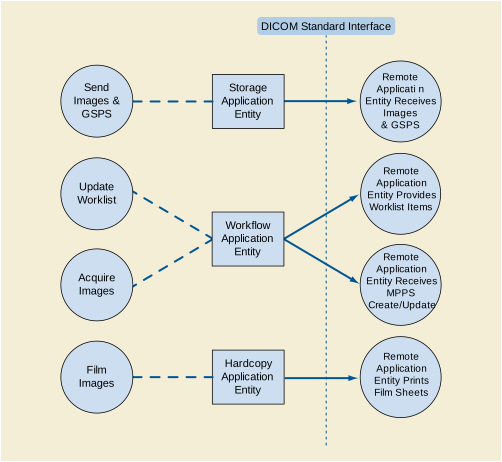
The Storage Application Entity sends images and Presentation States to a remote AE. It is associated with the local real-world activity "Send Images & GSPS". "Send Images & GSPS" is performed upon user request for each study completed or for specific images selected. When activated by user's settings (auto-send), each marked set of images and associated Presentation States can be immediately stored to a preferred destination whenever a Patient/Study is closed by the user. If the remote AE is configured as an archive device the Storage AE will request Storage Commitment and if a commitment is successfully obtained will record this information in the local database.
-
The Workflow Application Entity receives Worklist information from and sends MPPS information to a remote AE. It is associated with the local real-world activities "Update Worklist" and "Acquire Images". When the "Update Worklist" local real-world activity is performed the Workflow Application Entity queries a remote AE for worklist items and provides the set of worklist items matching the query request. "Update Worklist" is performed as a result of an operator request or can be performed automatically at specific time intervals. When the "Acquire Images" local real-world activity is performed the Workflow Application Entity creates and updates Modality Performed Procedure Step instances managed by a remote AE. Acquisition of images will result in automated creation of an MPPS Instance. Completion of the MPPS is performed as the result of an operator action.
-
The Hardcopy Application Entity prints images on a remote AE (Printer). It is associated with the local real-world activity "Film Images". "Film Images" creates a print-job within the print queue containing one or more virtual film sheets composed from images selected by the user.
The existence of a send-job queue entry with associated network destination will activate the Storage AE. An association request is sent to the destination AE and upon successful negotiation of a Presentation Context the image transfer is started. If the association cannot be opened, the related send-job is set to an error state and can be restarted by the user via job control interface. By default, the Storage AE will not try to initiate another association for this send-job automatically. However, an automatic retry (retry-timer, retrycount) can be configured by a CSE.
Worklist Update attempts to download a Worklist from a remote node. If the Workflow AE establishes an Association to a remote AE, it will transfer all worklist items via the open Association. During receiving the worklist response items are counted and the query processing is canceled if the configurable limit of items is reached. The results will be displayed in a separate list, which will be cleared with the next Worklist Update.
The Workflow AE performs the creation of a MPPS Instance automatically whenever images are acquired. Further updates on the MPPS data can be performed interactively from the related MPPS user interface. The MPPS "Complete" or "Discontinued" states can only be set from the user interface.
The existence of a print-job in the print queue will activate the Hardcopy AE. An association is established with the printer and the printer's status determined. If the printer is operating normally, the film sheets described within the print-job will be printed. Changes in printer status will be detected (e.g., out of film) and reported to the user. If the printer is not operating normally, the print-job will set to an error state and can be restarted by the user via the job control interface.
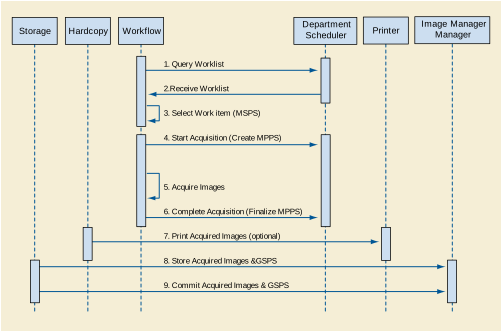
Under normal scheduled workflow conditions the sequencing constraints illustrated in Figure B.4.1-2 apply:
-
Query Worklist
-
Receive Worklist of Modality Scheduled Procedure Steps (MSPS)
-
Select Workitem (MSPS) from Worklist
-
Start acquisition and create MPPS
-
Acquire Images
-
Complete acquisition and finalize MPPS
-
Print acquired images (optional step)
-
Store acquired images and any associated Grayscale Softcopy Presentation State (GSPS) instances.
-
If the Image Manager is configured as an archive device the Storage AE will request Storage Commitment for the images and associated GSPS instances.
Other workflow situations (e.g., unscheduled procedure steps) will have other sequencing constraints. Printing could equally take place after the acquired images have been stored. Printing could be omitted completely if no printer is connected or hard copies are not required.
EXAMPLE-INTEGRATED-MODALITY provides Standard Conformance to the following SOP Classes:
Table B.4.2-1. SOP Classes for AE Storage
|
SOP Class Name |
SOP Class UID |
SCU |
SCP |
|---|---|---|---|
|
X-Ray Radiofluoroscopic Image Storage |
1.2.840.10008.5.1.4.1.1.12.2 |
Yes |
No |
|
Grayscale Softcopy Presentation State Storage |
1.2.840.10008.5.1.4.1.1.11.1 |
Yes |
No |
|
Storage Commitment Push Model |
1.2.840.10008.1.20.1 |
Yes |
No |
|
Verification |
1.2.840.10008.1.1 |
No |
Yes |
The DICOM standard application context name for DICOM 3.0 is always proposed:
Table B.4.2-2. DICOM Application Context for AE Storage
|
Application Context Name |
1.2.840.10008.3.1.1.1 |
EXAMPLE-INTEGRATED-MODALITY initiates one Association at a time for each destination to which a transfer request is being processed in the active job queue list. Only one job will be active at a time, the other remains pending until the active job is completed or failed.
Table B.4.2-3. Number of Associations Initiated for AE Storage
|
Maximum number of simultaneous Associations |
1 (configurable) |
EXAMPLE-INTEGRATED-MODALITY accepts Associations to receive N-EVENT-REPORT notifications for the Storage Commitment Push Model SOP Class.
Table B.4.2-4. Number of Associations Accepted for AE Storage
|
Maximum number of simultaneous Associations |
5 (configurable) |
A user can select images and presentation states and request them to be sent to multiple destinations (up to 3). Each request is forwarded to the job queue and processed individually. When the "Auto-send" option is active, each marked instance or marked set of instances stored in database will be forwarded to the network job queue for a pre-configured auto-send target destination. Which instances will be automatically marked and the destination where the instances are automatically sent to can be configured. The "Auto-send" is triggered by the Close Patient user application.
The Storage AE is invoked by the job control interface that is responsible for processing network archival tasks. The job consists of data describing the instances marked for storage and the destination. An internal daemon process triggered by a job for a specific network destination initiates a C-STORE request to store images. If the process successfully establishes an Association to a remote Application Entity, it will transfer each marked instance one after another via the open Association. Status of the transfer is reported through the job control interface. Only one job will be active at a time. If the C-STORE Response from the remote Application contains a status other than Success or Warning, the Association is aborted and the related Job is switched to a failed state. It can be restarted any time by user interaction or, if configured, by automated retry.
The Storage AE attempts to initiate a new Association in order to issue a C-STORE request. If the job contains multiple images then multiple C-STORE requests will be issued over the same Association.
If the Remote AE is configured as an archive device the Storage AE will, after all images and presentation states have been sent, transmit a single Storage Commitment request (N-ACTION) over the same Association. Upon receiving the N-ACTION response the Storage AE will delay releasing the Association for a configurable amount of time. If no N-EVENT-REPORT is received within this time period the Association will be immediately released (i.e., notification of Storage Commitment success or failure will be received over a separate association). However, the Storage AE is capable of receiving an N-EVENT-REPORT request at any time during an association provided a Presentation Context for the Storage Commitment Push Model has been successfully negotiated (i.e., the N-ACTION is sent at the end of one association and the N-EVENT-REPORT is received during an association initiated for a subsequent send job or during an association initiated by the Remote AE for the specific purpose of sending the N-EVENT-REPORT).
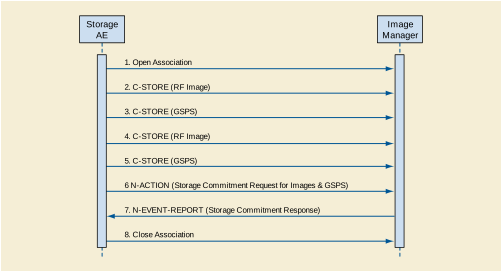
A possible sequence of interactions between the Storage AE and an Image Manager (e.g., a storage or archive device supporting the Storage and Storage Commitment SOP Classes as an SCP) is illustrated in Figure B.4.2-1:
-
The Storage AE opens an association with the Image Manager
-
An acquired RF image is transmitted to the Image Manager using a C-STORE request and the Image Manager replies with a C-STORE response (status success).
-
A GSPS instance is transmitted to the Image Manager using a C-STORE request and the Image Manager replies with a C-STORE response (status success).
-
Another acquired RF image is transmitted to the Image Manager using a C-STORE request and the Image Manager replies with a C-STORE response (status success).
-
Another GSPS instance is transmitted to the Image Manager using a C-STORE request and the Image Manager replies with a C-STORE response (status success).
-
An N-ACTION request is transmitted to the Image Manager to obtain storage commitment of previously transmitted RF images and GSPS instances. The Image Manager replies with a N-ACTION response indicating the request has been received and is being processed.
-
The Image Manager immediately transmits an N-EVENT-REPORT request notifying the Storage AE of the status of the Storage Commitment Request (sent in step 6 using the N-ACTION message). The Storage AE replies with a N-EVENT-REPORT response confirming receipt. The Image Manager could send this message at any time or omit it entirely in favor of transmitting the N-EVENT-REPORT over a separate dedicated association (see note).
-
The Storage AE closes the association with the Image Manager.
Note
Many other message sequences are possible depending on the number of images and GSPS instances to be stored, support for Storage Commitment and when the SCP sends the N-EVENT-REPORT. The N-EVENT-REPORT can also be sent over a separate association initiated by the Image Manager (see Section B.4.2.1.4.1 on Activity - Receive Storage Commitment Response).
EXAMPLE-INTEGRATED-MODALITY is capable of proposing the Presentation Contexts shown in the following table:
Table B.4.2-7. Proposed Presentation Contexts for Activity Send Images
|
Presentation Context Table |
|||||
|---|---|---|---|---|---|
|
Abstract Syntax |
Transfer Syntax |
Role |
Extended Negotiation |
||
|
Name |
UID |
Name List |
UID List |
||
|
X-Ray Radio Fluoroscopic Image Storage |
1.2.840.10008.5.1.4.1.1.12.2 |
Implicit VR Little Endian Explicit VR Little Endian |
1.2.840.10008.1.2 1.2.840.10008.1.2.1 |
SCU |
None |
|
Grayscale Softcopy Presentation State Storage |
1.2.840.10008.5.1.4.1.1.11.1 |
Implicit VR Little Endian Explicit VR Little Endian |
1.2.840.10008.1.2 1.2.840.10008.1.2.1 |
SCU |
None |
|
Storage Commitment Push Model |
1.2.840.10008.1.20.1 |
Implicit VR Little Endian Explicit VR Little Endian |
1.2.840.10008.1.2 1.2.840.10008.1.2.1 |
SCU |
None |
Presentation Contexts for X-Ray Radio Fluoroscopic Image Storage or Grayscale Softcopy Presentation State Storage will only be proposed if the Send Job contains instances for these SOP Classes.
A Presentation Context for the Storage Commitment Push Model will only be proposed if the Remote AE is configured as an archive device.
All Image & Presentation State Storage SOP Classes supported by the Storage AE exhibit the same behavior, except where stated, and are described together in this section.
If X-Ray Radio Fluoroscopic Image Storage SOP Instances are included in the Send Job and a corresponding Presentation Context is not accepted then the Association is aborted using AP-ABORT and the send job is marked as failed. The job failure is logged and reported to the user via the job control application.
If Grayscale Softcopy Presentation State Storage SOP Instances are included in the Send Job and a corresponding Presentation Context cannot be negotiated then Grayscale Softcopy Presentation State Storage SOP Instances will not be sent and a warning is logged. Any remaining Image Storage SOP Instances included in the Send Job will be transmitted. Failure to negotiate a Presentation Context for Grayscale Softcopy Presentation State Storage does not in itself cause the Send Job to be marked as failed. The behavior of Storage AE when encountering status codes in a C-STORE response is summarized in the Table below:
Table B.4.2-8. Storage C-STORE Response Status Handling Behavior
|
Service Status |
Further Meaning |
Error Code |
Behavior |
|---|---|---|---|
|
Success |
Success |
0000 |
The SCP has successfully stored the SOP Instance. If all SOP Instances in a send job have status success then the job is marked as complete. |
|
Refused |
Out of Resources |
A700-A7FF |
The Association is aborted using A-ABORT and the send job is marked as failed. The status meaning is logged and the job failure is reported to the user via the job control application. This is a transient failure. |
|
Error |
Data Set does not match SOP Class |
A900-A9FF |
The Association is aborted using A-ABORT and the send job is marked as failed. The status meaning is logged and the job failure is reported to the user via the job control application. |
|
Error |
Cannot Understand |
C000-CFFF |
The Association is aborted using A-ABORT and the send job is marked as failed. The status meaning is logged and the job failure is reported to the user via the job control application. |
|
Warning |
Coercion of Data Elements |
B000 |
Image transmission is considered successful but the status meaning is logged. |
|
Warning |
Data Set does not match SOP Class |
B007 |
Image transmission is considered successful but the status meaning is logged. |
|
Warning |
Elements Discarded |
B006 |
Image transmission is considered successful but the status meaning is logged. |
|
* |
* |
Any other status code. |
The Association is aborted using A-ABORT and the send job is marked as failed. The status code is logged and the job failure is reported to the user via the job control application. |
The behavior of Storage AE during communication failure is summarized in the Table below:
Table B.4.2-9. Storage Communication Failure Behavior
|
Exception |
Behavior |
|---|---|
|
Timeout |
The Association is aborted using A-ABORT and the send job is marked as failed. The reason is logged and the job failure is reported to the user via the job control application. |
|
Association aborted by the SCP or network layers |
The send job is marked as failed. The reason is logged and the job failure is reported to the user via the job control application. |
A failed send job can be restarted by user interaction. The system can be configured to automatically resend failed jobs if a transient status code is received. The delay between resending failed jobs and the number of retries is also configurable.
The contents of X-Ray Radio Fluoroscopic Image Storage SOP Instances created by EXAMPLE-INTEGRATED-MODALITY conform to the DICOM X-Ray Radio Fluoroscopic Image IOD definition and are described in Section B.8.1.
The contents of Grayscale Softcopy Presentation State Storage SOP Instances created by EXAMPLE-INTEGRATED-MODALITY conform to the DICOM Grayscale Softcopy Presentation State IOD and are described in Section B.8.1.
Grayscale Softcopy Presentation State Storage SOP Instances are created upon user request (e.g., explicitly via "Save" or implicitly via "Close Patient") in order to save the most recent visual appearance of an image (e.g., window center/width, shutters, graphic annotations). When saving the visual appearance, a default Presentation Label will be supplied, which the user can change. The user also has the possibility to enter a detailed Presentation Description. If multiple images from the same study are being displayed the request to save the visual appearance will create one or more Presentation States referencing all displayed images. If images from multiple studies are being displayed at least a separate Presentation State will be created for each study.
When displaying an existing image the most recently saved Grayscale Softcopy Presentation State containing references to the image will be automatically applied. The user has the option to select other Presentation States that also reference the image.
Grayscale Softcopy Presentation State Storage SOP Instances created by EXAMPLE-INTEGRATED-MODALITY will only reference instances of X-Ray Radio Fluoroscopic Image Storage SOP Instances.
Graphical annotations and shutters are only stored in Grayscale Softcopy Presentation State objects. Remote AEs that do not support the Grayscale Softcopy Presentation State Storage SOP Class will not have access to graphical annotations or shutters created by EXAMPLE-INTEGRATED-MODALITY.
The Storage AE will request storage commitment for instances of the X-Ray Radio Fluoroscopic Image Storage SOP Class and Grayscale Softcopy Presentation State Storage SOP Class if the Remote AE is configured as an archive device and a presentation context for the Storage Commitment Push Model has been accepted.
The Storage AE will consider Storage Commitment failed if no N-EVENT-REPORT is received for a Transaction UID within a configurable time period after receiving a successful N-ACTION response (duration of applicability for a Transaction UID).
The Storage AE does not send the optional Storage Media FileSet ID & UID Attributes or the Referenced Study Component Sequence Attribute in the N-ACTION
The behavior of Storage AE when encountering status codes in a N-ACTION response is summarized in the Table below:
Table B.4.2-10. Storage Commitment N-ACTION Response Status Handling Behavior
|
Service Status |
Further Meaning |
Error Code |
Behavior |
|---|---|---|---|
|
Success |
Success |
0000 |
The request for storage comment is considered successfully sent. A timer is started that will expire if no N-EVENT-REPORT for the Transaction UID is received within a configurable timeout period. |
|
* |
* |
Any other status code. |
The Association is aborted using A-ABORT and the request for storage comment is marked as failed. The status meaning is logged and reported to the user. |
The behavior of Storage AE during communication failure is summarized in the Table below:
Table B.4.2-11. Storage Commitment Communication Failure Behavior
|
Exception |
Behavior |
|---|---|
|
Timeout |
The Association is aborted using A-ABORT and the send job is marked as failed. The reason is logged and the job failure is reported to the user via the job control application. |
|
Association aborted by the SCP or network layers |
The send job is marked as failed. The reason is logged and the job failure is reported to the user via the job control application. |
The Storage AE is capable of receiving an N-EVENT-REPORT notification if it has successfully negotiated a Presentation Context for the Storage Commitment Push Model (i.e., only associations established with archive devices).
Upon receipt of a N-EVENT-REPORT the timer associated with the Transaction UID will be canceled.
The behavior of Storage AE when receiving Event Types within the N-EVENT-REPORT is summarized in the Table below.
Table B.4.2-12. Storage Commitment N-EVENT-REPORT Behavior
|
Event Type Name |
Event Type ID |
Behavior |
|---|---|---|
|
Storage Commitment Request Successful |
1 |
The Referenced SOP Instances under Referenced SOP Sequence (0008,1199) are marked within the database as "Stored & Committed (SC) " to the value of Retrieve AE Title (0008,0054). Successfully committed SOP Instances are candidates for automatic deletion from the local database if local resources become scarce. The conditions under which automatic deletion is initiated and the amount of space freed are site configurable. SOP Instances will not be deleted if they are marked with a lock flag. The least recently accessed SOP Instances are deleted first. |
|
Storage Commitment Request Complete - Failures Exist |
2 |
The Referenced SOP Instances under Referenced SOP Sequence (0008,1199) are treated in the same way as in the success case (Event Type 1). The Referenced SOP Instances under Failed SOP Sequence (0008,1198) are marked within the database as "Store & Commit Failed (Sf) ". The Failure Reasons are logged and the job failure is reported to the user via the job control application. A send job that failed storage commitment will not be automatically restarted but can be restarted by user interaction. |
The reasons for returning specific status codes in a N-EVENT-REPORT response are summarized in the Table below.
Table B.4.2-13. Storage Commitment N-EVENT-REPORT Response Status Reasons
|
Service Status |
Further Meaning |
Error Code |
Reasons |
|---|---|---|---|
|
Success |
Success |
0000 |
The storage commitment result has been successfully received. |
|
Failure |
Unrecognized Operation |
0211H |
The Transaction UID in the N-EVENT-REPORT request is not recognized (was never issued within an N-ACTION request). |
|
Failure |
Resource Limitation |
0213H |
The Transaction UID in the N-EVENT-REPORT request has expired (no N-EVENT-REPORT was received within a configurable time limit). |
|
Failure |
No Such Event Type |
0113H |
An invalid Event Type ID was supplied in the N-EVENT-REPORT request. |
|
Failure |
Processing Failure |
0110H |
An internal error occurred during processing of the N-EVENT-REPORT. A short description of the error will be returned in Error Comment (0000,0902). |
|
Failure |
Invalid Argument Value |
0115H |
One or more SOP Instance UIDs with the Referenced SOP Sequence (0008,1199) or Failed SOP Sequence (0008,1198) was not included in the Storage Commitment Request associated with this Transaction UID. The unrecognized SOP Instance UIDs will be returned within the Event Information of the N-EVENT-REPORT response. |
The Storage AE will accept associations in order to receive responses to a Storage Commitment Request.
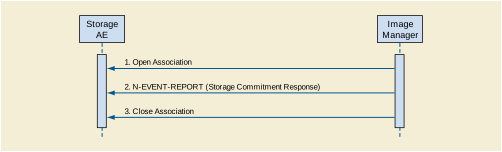
A possible sequence of interactions between the Storage AE and an Image Manager (e.g., a storage or archive device supporting Storage Commitment SOP Classes as an SCP) is illustrated in the Figure above:
-
The Image Manager opens a new association with the Storage AE.
-
The Image Manager sends an N-EVENT-REPORT request notifying the Storage AE of the status of a previous Storage Commitment Request. The Storage AE replies with a N-EVENT-REPORT response confirming receipt.
-
The Image Manager closes the association with the Storage AE.
The Storage AE may reject association attempts as shown in the Table below. The Result, Source and Reason/Diag columns represent the values returned in the appropriate fields of an ASSOCIATE-RJ PDU (see Section 9.3.4 in PS3.8 ). The contents of the Source column is abbreviated to save space and the meaning of the abbreviations are:
-
1 - DICOM UL service-user
-
2 - DICOM UL service-provider (ASCE related function)
-
3 - DICOM UL service-provider (Presentation related function)
Table B.4.2-14. Association Rejection Reasons
|
Result |
Source |
Reason/Diag |
Explanation |
|---|---|---|---|
|
2 - rejected-transient |
c |
2 - local-limit-exceeded |
The (configurable) maximum number of simultaneous associations has been reached. An association request with the same parameters may succeed at a later time. |
|
2 - rejected-transient |
c |
1 - temporary-congestion |
No associations can be accepted at this time due to the real-time requirements of higher priority activities (e.g., during image acquisition no associations will be accepted) or because insufficient resources are available (e.g., memory, processes, threads). An association request with the same parameters may succeed at a later time. |
|
1 - rejected-permanent |
a |
2 - application-context-name-not-supported |
The association request contained an unsupported Application Context Name. An association request with the same parameters will not succeed at a later time. |
|
1 - rejected-permanent |
a |
7 - called-AE-title-not-recognized |
The association request contained an unrecognized Called AE Title. An association request with the same parameters will not succeed at a later time unless configuration changes are made. This rejection reason normally occurs when the association initiator is incorrectly configured and attempts to address the association acceptor using the wrong AE Title. |
|
1 - rejected-permanent |
a |
3 - calling-AE-title-not-recognized |
The association request contained an unrecognized Calling AE Title. An association request with the same parameters will not succeed at a later time unless configuration changes are made. This rejection reason normally occurs when the association acceptor has not been configured to recognize the AE Title of the association initiator. |
|
1 - rejected-permanent |
b |
1 - no-reason-given |
The association request could not be parsed. An association request with the same format will not succeed at a later time. |
The Storage AE will accept Presentation Contexts as shown in the Table below.
Table B.4.2-15. Acceptable Presentation Contexts for Activity Receive Storage Commitment Response
|
Presentation Context Table |
|||||
|---|---|---|---|---|---|
|
Abstract Syntax |
Transfer Syntax |
Role |
Extended Negotiation |
||
|
Name |
UID |
Name List |
UID List |
||
|
Storage Commitment Push Model |
1.2.840.10008.1.20.1 |
Implicit VR Little Endian Explicit VR Little Endian |
1.2.840.10008.1.2 1.2.840.10008.1.2.1 |
SCU |
None |
|
Verification |
1.2.840.10008.1.1 |
Implicit VR Little Endian Explicit VR Little Endian |
1.2.840.10008.1.2 1.2.840.10008.1.2.1 |
SCP |
None |
The Storage AE will prefer to select the Explicit VR Little Endian Transfer Syntax if multiple transfer syntaxes are offered. The Storage AE will only accept the SCU role (which must be proposed via SCP/SCU Role Selection Negotiation) within a Presentation Context for the Storage Commitment Push Model SOP Class.
Upon receipt of a N-EVENT-REPORT the timer associated with the Transaction UID will be canceled.
The behavior of Storage AE when receiving Event Types within the N-EVENT-REPORT is summarized in Table B.4.2-12.
The reasons for returning specific status codes in a N-EVENT-REPORT response are summarized in Table B.4.2-13.
The Storage AE provides standard conformance to the Verification SOP Class as an SCP. If the C-ECHO request was successfully received, a 0000 (Success) status code will be returned in the C-ECHO response. Otherwise, a C000 (Error - Cannot Understand) status code will be returned in the C-ECHO response.
EXAMPLE-INTEGRATED-MODALITY provides Standard Conformance to the following SOP Classes:
Table B.4.2-16. SOP Classes for AE Workflow
|
SOP Class Name |
SOP Class UID |
SCU |
SCP |
|---|---|---|---|
|
Modality Worklist Information Model - FIND |
1.2.840.10008.5.1.4.31 |
Yes |
No |
|
Modality Performed Procedure Step |
1.2.840.10008.3.1.2.3.3 |
Yes |
No |
The DICOM standard application context name for DICOM 3.0 is always proposed:
Table B.4.2-17. DICOM Application Context for AE Workflow
|
Application Context Name |
1.2.840.10008.3.1.1.1 |
EXAMPLE-INTEGRATED-MODALITY initiates one Association at a time for a Worklist request.
Table B.4.2-18. Number of Associations Initiated for AE Workflow
|
Maximum number of simultaneous Associations |
1 |
The request for a Worklist Update is initiated by user interaction, i.e., pressing the buttons "Worklist Update"/"Patient Worklist Query" or automatically at specific time intervals, configurable by the user. With "Worklist Update" the automated query mechanism is performed immediately on request, while with "Patient Worklist Query" a dialog to enter search criteria is opened and an interactive query can be performed.
The interactive Patient Worklist Query will display a dialog for entering data as search criteria. When the Query is started on user request, only the data from the dialog will be inserted as matching keys into the query.
With automated worklist queries (including "Worklist Update") the EXAMPLE-INTEGRATED-MODALITY always requests all items for a Scheduled Procedure Step Start Date (actual date), Modality (RF) and Scheduled Station AE Title. Query for the Scheduled Station AE Title is configurable by a Service Engineer.
Upon initiation of the request, the EXAMPLE-INTEGRATED-MODALITY will build an Identifier for the C-FIND request, will initiate an Association to send the request and will wait for Worklist responses. After retrieval of all responses, EXAMPLE-INTEGRATED-MODALITY will access the local database to add or update patient demographic data. To protect the system from overflow, the EXAMPLE-INTEGRATED-MODALITY will limit the number of processed worklist responses to a configurable maximum. During receiving the worklist response items are counted and the query processing is canceled by issuing a C-FIND-CANCEL if the configurable limit of items is reached. The results will be displayed in a separate list, which will be cleared with the next worklist update.
EXAMPLE-INTEGRATED-MODALITY will initiate an Association in order to issue a C-FIND request according to the Modality Worklist Information Model.
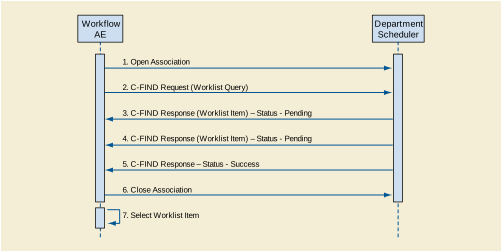
A possible sequence of interactions between the Workflow AE and a Departmental Scheduler (e.g., a device such as a RIS or HIS that supports the Modality Worklist SOP Class as an SCP) is illustrated in the Figure above:
-
The Worklist AE opens an association with the Departmental Scheduler
-
The Worklist AE sends a C-FIND request to the Departmental Scheduler containing the Worklist Query attributes.
-
The Departmental Scheduler returns a C-FIND response containing the requested attributes of the first matching Worklist Item.
-
The Departmental Scheduler returns another C-FIND response containing the requested attributes of the second matching Worklist Item.
-
The Departmental Scheduler returns another C-FIND response with status Success indicating that no further matching Worklist Items exist. This example assumes that only 2 Worklist items match the Worklist Query.
-
The Worklist AE closes the association with the Departmental Scheduler.
-
The user selects a Worklist Item from the Worklist and prepares to acquire new images.
EXAMPLE-INTEGRATED-MODALITY will propose Presentation Contexts as shown in the following table:
Table B.4.2-21. Proposed Presentation Contexts for Activity Worklist Update
|
Presentation Context Table |
|||||
|---|---|---|---|---|---|
|
Abstract Syntax |
Transfer Syntax |
Role |
Extended Negotiation |
||
|
Name |
UID |
Name List |
UID List |
||
|
Modality Worklist Information Model - FIND |
1.2.840.10008.5.1.4.31 |
Implicit VR Little Endian |
1.2.840.10008.1.2 |
SCU |
None |
|
Explicit VR Little Endian |
1.2.840.10008.1.2.1 |
||||
The behavior of EXAMPLE-INTEGRATED-MODALITY when encountering status codes in a Modality Worklist C-FIND response is summarized in the Table below. If any other SCP response status than "Success" or "Pending" is received by EXAMPLEINTEGRATED-MODALITY, a message "query failed" will appear on the user interface.
Table B.4.2-22. Modality Worklist C-FIND Response Status Handling Behavior
|
Service Status |
Further Meaning |
Error Code |
Behavior |
|---|---|---|---|
|
Success |
Matching is complete |
0000 |
The SCP has completed the matches. Worklist items are available for display or further processing. |
|
Refused |
Out of Resources |
A700 |
The Association is aborted using A-ABORT and the worklist query is marked as failed. The status meaning is logged and reported to the user if an interactive query. Any additional error information in the Response will be logged. |
|
Failed |
Identifier does not match SOP Class |
A900 |
The Association is aborted using A-ABORT and the worklist query is marked as failed. The status meaning is logged and reported to the user if an interactive query. Any additional error information in the Response will be logged. |
|
Failed |
Unable to Process |
C000 - CFFF |
The Association is aborted using A-ABORT and the worklist query is marked as failed. The status meaning is logged and reported to the user if an interactive query. Any additional error information in the Response will be logged. |
|
Cancel |
Matching terminated due to Cancel request |
FE00 |
If the query was canceled due to too may worklist items then the SCP has completed the matches. Worklist items are available for display or further processing. Otherwise, the Association is aborted using A-ABORT and the worklist query is marked as failed. The status meaning is logged and reported to the user if an interactive query. |
|
Pending |
Matches are continuing |
FF00 |
The worklist item contained in the Identifier is collected for later display or further processing. |
|
Pending |
Matches are continuing - Warning that one or more Optional Keys were not supported |
FF01 |
The worklist item contained in the Identifier is collected for later display or further processing. The status meaning is logged only once for each C-FIND operation. |
|
* |
* |
Any other status code. |
The Association is aborted using A-ABORT and the worklist is marked as failed. The status meaning is logged and reported to the user if an interactive query. Any additional error information in the Response will be logged. |
The behavior of EXAMPLE-INTEGRATED-MODALITY during communication failure is summarized in the Table below.
Table B.4.2-23. Modality Worklist Communication Failure Behavior
|
Exception |
Behavior |
|---|---|
|
Timeout |
The Association is aborted using A-ABORT and the worklist query marked as failed. The reason is logged and reported to the user if an interactive query. |
|
Association aborted by the SCP or network layers |
The worklist query is marked as failed. The reason is logged and reported to the user if an interactive query. |
Acquired images will always use the Study Instance UID specified for the Scheduled Procedure Step (if available). If an acquisition is unscheduled, a Study Instance UID will be generated locally.
The Table below provides a description of the EXAMPLEINTEGRATED-MODALITY Worklist Request Identifier and specifies the attributes that are copied into the images. Unexpected attributes returned in a C-FIND response are ignored.
Requested return attributes not supported by the SCP are set to have no value. Non-matching responses returned by the SCP due to unsupported optional matching keys are ignored. No attempt is made it filter out possible duplicate entries.
Table B.4.2-24. Worklist Request Identifier
|
Module Name Attribute Name |
Tag |
VR |
M |
R |
Q |
D |
IOD |
|---|---|---|---|---|---|---|---|
|
SOP Common |
|||||||
|
Specific Character Set |
(0008,0005) |
CS |
x |
||||
|
Scheduled Procedure Step |
|||||||
|
Scheduled Procedure Step Sequence |
(0040,0100) |
||||||
|
>Scheduled Station AET |
(0040,0001) |
AE |
(S) |
x |
|||
|
>Scheduled Procedure Step Start Date |
(0040,0002) |
DA |
S |
x |
|||
|
>Scheduled Procedure Step Start Time |
(0040,0003) |
TM |
x |
x |
|||
|
>Modality |
(0008,0060) |
CS |
S |
x |
|||
|
>Scheduled Performing Physician's Name |
(0040,0006) |
PN |
x |
x |
x |
x |
|
|
>Scheduled Procedure Step Description |
(0040,0007) |
LO |
x |
x |
x |
||
|
>Scheduled Station Name |
(0040,0010) |
SH |
x |
||||
|
>Scheduled Procedure Step Location |
(0040,0011) |
SH |
x |
||||
|
>Scheduled Protocol Code Sequence |
(0040,0008) |
SQ |
x |
x |
|||
|
>Pre-Medication |
(0040,0012) |
LO |
x |
x |
|||
|
>Scheduled Procedure Step ID |
(0040,0009) |
SH |
x |
x |
x |
||
|
>Requested Contrast Agent |
(0032,1070) |
LO |
x |
x |
|||
|
Requested Procedure |
|||||||
|
Requested Procedure ID |
(0040,1001) |
SH |
x |
x |
x |
x |
|
|
Requested Procedure Description |
(0032,1060) |
LO |
x |
x |
x |
||
|
Study Instance UID |
(0020,000D) |
UI |
x |
x |
|||
|
Requested Procedure Priority |
(0040,1003) |
SH |
x |
||||
|
Patient Transport Arrangements |
(0040,1004) |
LO |
x |
||||
|
Referenced Study Sequence |
(0008,1110) |
SQ |
x |
x |
|||
|
Requested Procedure Code Sequence |
(0032,1064) |
SQ |
x |
x |
|||
|
Imaging Service Request |
|||||||
|
Accession Number |
(0008,0050) |
SH |
x |
x |
x |
x |
|
|
Requesting Physician |
(0032,1032) |
PN |
x |
x |
x |
||
|
Referring Physician's Name |
(0008,0090) |
PN |
x |
x |
x |
x |
|
|
Visit Identification |
|||||||
|
Admission ID |
(0038,0010) |
LO |
x |
||||
|
Visit Status |
|||||||
|
Current Patient Location |
(0038,0300) |
LO |
x |
x |
|||
|
Visit Admission |
|||||||
|
Admitting Diagnosis Description |
(0008,1080) |
LO |
x |
x |
|||
|
Patient Identification |
|||||||
|
Patient Name |
(0010,0010) |
PN |
x |
x |
x |
x |
|
|
Patient ID |
(0010,0020) |
LO |
x |
x |
x |
x |
|
|
Patient Demographic |
|||||||
|
Patient's Birth Date |
(0010,0030) |
DA |
x |
x |
x |
x |
|
|
Patient's Sex |
(0010,0040) |
CS |
x |
x |
x |
x |
|
|
Patient's Weight |
(0010,1030) |
DS |
x |
x |
x |
||
|
Confidentiality constraint on patient data |
(0040,3001) |
LO |
x |
x |
|||
|
Patient Medical |
|||||||
|
Patient State |
(0038,0500) |
LO |
x |
x |
|||
|
Pregnancy Status |
(0010,21C0) |
US |
x |
x |
|||
|
Medical Alerts |
(0010,2000) |
LO |
x |
x |
|||
|
Allergies |
(0010,2110) |
LO |
x |
x |
|||
|
Special Needs |
(0038,0050) |
LO |
x |
x |
|||
The above table should be read as follows:
- Module Name
-
The name of the associated module for supported worklist attributes.
- Attribute Name
-
Attributes supported to build an EXAMPLEINTEGRATED-MODALITY Worklist Request Identifier.
- Tag
-
DICOM tag for this attribute.
- VR
-
DICOM VR for this attribute.
- M
-
Matching keys for (automatic) Worklist Update. A "S" will indicate that EXAMPLE-INTEGRATED-MODALITY will supply an attribute value for Single Value Matching, a "R" will indicate Range Matching and a "*" will denote wild card matching. It can be configured if "Scheduled Station AE Title" is additionally supplied "(S) " and if Modality is set to RF or SC.
- R
-
Return keys. An "x" will indicate that EXAMPLE-INTEGRATED-MODALITY will supply this attribute as Return Key with zero length for Universal Matching. The EXAMPLE-INTEGRATED-MODALITY will support retired date format (yyyy.mm.dd) for "Patient's Birth Date" and "Scheduled Procedure Step Start Date" in the response identifiers. For "Scheduled Procedure Step Start Time" also retired time format as well as unspecified time components are supported.
- Q
-
Interactive Query Key. An "x" " will indicate that EXAMPLE-INTEGRATED-MODALITY will supply this attribute as matching key, if entered in the Query Patient Worklist dialog. For example, the Patient Name can be entered thereby restricting Worklist responses to Procedure Steps scheduled for the patient.
- D
-
Displayed keys. An "x" indicates that this worklist attribute is displayed to the user during a patient registration dialog. For example, Patient Name will be displayed when registering the patient prior to an examination.
- IOD
-
An "x" indicates that this Worklist attribute is included into all Object Instances created during performance of the related Procedure Step.
The default Query Configuration is set to "Modality" (RF) and "Date" (date of today). Optionally, additional matching for the own AET is configurable.
After Patient registration, the EXAMPLE-INTEGRATED-MODALITY is awaiting the 1st application of X-Ray Dose to the patient. The trigger to create a MPPS SOP Instance is derived from this event. An Association to the configured MPPS SCP system is established immediately and the related MPPS SOP Instance will be created.
A manual update can be performed with the MPPS user interface where is it possible to set the final state of the MPPS to "COMPLETED" or "DISCONTINUED". In the "Discontinued" case the user can also select the discontinuation reason from a list corresponding to CID 9300 “Procedure Discontinuation Reasons”. A MPPS Instance that has been sent with a state of "COMPLETED" or "DISCONTINUED" can no longer be updated.
The EXAMPLE-INTEGRATED-MODALITY will support creation of "unscheduled cases" by allowing MPPS Instances to be communicated for locally registered Patients.
The EXAMPLE-INTEGRATED-MODALITY only supports a 0-to-1 relationship between Scheduled and Performed Procedure Steps.
EXAMPLE-INTEGRATED-MODALITY will initiate an Association to issue an:
-
N-CREATE request according to the CREATE Modality Performed Procedure Step SOP Instance operation or a
-
N-SET request to update the contents and state of the MPPS according to the SET Modality Performed Procedure Step Information operation.

A possible sequence of interactions between the Workflow AE and a Departmental Scheduler (e.g., a device such as a RIS or HIS that supports the MPPS SOP Class as an SCP) is illustrated in Figure B.4.2-4:
-
The Worklist AE opens an association with the Departmental Scheduler
-
The Worklist AE sends an N-CREATE request to the Departmental Scheduler to create an MPPS instance with status of "IN PROGRESS" and create all necessary attributes. The Departmental Scheduler acknowledges the MPPS creation with an N-CREATE response (status success).
-
The Worklist AE closes the association with the Departmental Scheduler.
-
All images are acquired and stored in the local database.
-
The Worklist AE opens an association with the Departmental Scheduler.
-
The Worklist AE sends an N-SET request to the Departmental Scheduler to update the MPPS instance with status of "COMPLETED" and set all necessary attributes. The Departmental Scheduler acknowledges the MPPS update with an N-SET response (status success).
-
The Worklist AE closes the association with the Departmental Scheduler.
EXAMPLE-INTEGRATED-MODALITY will propose Presentation Contexts as shown in the following table:
Table B.4.2-25. Proposed Presentation Contexts for Real-World Activity Acquire Images
|
Presentation Context Table |
|||||
|---|---|---|---|---|---|
|
Abstract Syntax |
Transfer Syntax |
Role |
Extended Negotiation |
||
|
Name |
UID |
Name List |
UID List |
||
|
Modality Performed Procedure Step |
1.2.840.10008.3.1.2.3.3 |
Implicit VR Little Endian |
1.2.840.10008.1.2 |
SCU |
None |
|
Explicit VR Little Endian |
1.2.840.10008.1.2.1 |
||||
The behavior of EXAMPLE-INTEGRATED-MODALITY when encountering status codes in an MPPS N-CREATE or N-SET response is summarized in Table B.4.2-26. If any other SCP response status than "Success" or "Warning" is received by EXAMPLEINTEGRATED-MODALITY, a message "MPPS update failed" will appear on the user interface.
Table B.4.2-26. MPPS N-CREATE / N-SET Response Status Handling Behavior
|
Service Status |
Further Meaning |
Error Code |
Behavior |
|---|---|---|---|
|
Success |
Success |
0000 |
The SCP has completed the operation successfully. |
|
Failure |
Processing Failure - Performed Procedure Step Object may no longer be updated |
0110 |
The Association is aborted using A-ABORT and the MPPS is marked as failed. The status meaning is logged and reported to the user. Additional information in the Response will be logged (i.e., Error Comment and Error ID). |
|
Warning |
Attribute Value Out of Range |
0116H |
The MPPS operation is considered successful but the status meaning is logged. Additional information in the Response identifying the attributes out of range will be logged (i.e., Elements in the Modification List/Attribute List) |
|
* |
* |
Any other status code. |
The Association is aborted using A-ABORT and the MPPS is marked as failed. The status meaning is logged and reported to the user. |
The behavior of EXAMPLE-INTEGRATED-MODALITY during communication failure is summarized in the Table below:
Table B.4.2-27. MPPS Communication Failure Behavior
|
Exception |
Behavior |
|---|---|
|
Timeout |
The Association is aborted using A-ABORT and MPPS marked as failed. The reason is logged and reported to the user. |
|
Association aborted by the SCP or network layers |
The MPPS is marked as failed. The reason is logged and reported to the user. |
Table B.4.2-28 provides a description of the MPPS N-CREATE and N-SET request identifiers sent by EXAMPLE-INTEGRATED-MODALITY. Empty cells in the N-CREATE and N-SET columns indicate that the attribute is not sent. An "x" indicates that an appropriate value will be sent. A "Zero length" attribute will be sent with zero length.
Table B.4.2-28. MPPS N-CREATE / N-SET Request Identifier
|
Attribute Name |
Tag |
VR |
N-CREATE |
N-SET |
|---|---|---|---|---|
|
Specific Character Set |
(0008,0005) |
CS |
"ISO_IR 100" or "ISO_IR 144" |
|
|
Modality |
(0008,0060) |
CS |
RF |
|
|
Referenced Patient Sequence |
(0008,1120) |
SQ |
Zero length |
|
|
Patient's Name |
(0010,0010) |
PN |
From Modality Worklist or user input (all 5 components). The user can modify values provided via Modality Worklist. |
|
|
Patient ID |
(0010,0020) |
LO |
From Modality Worklist or user input. The user can modify values provided via Modality Worklist. |
|
|
Patient's Birth Date |
(0010,0030) |
DA |
From Modality Worklist or user input. The user can modify values provided via Modality Worklist. |
|
|
Patient's Sex |
(0010,0040) |
CS |
From Modality Worklist or user input. The user can modify values provided via Modality Worklist. |
|
|
Distance Source to Detector (SID) |
(0018,1110) |
DS |
Zero length |
x |
|
Image Area Dose Product |
(0018,115E) |
DS |
Zero length |
x |
|
Study ID |
(0020,0010) |
SH |
From Modality Worklist or user input. The user can modify values provided via Modality Worklist. |
|
|
Performed Station AE Title |
(0040,0241) |
AE |
MPPS AE Title |
|
|
Performed Station Name |
(0040,0242) |
SH |
From configuration |
|
|
Performed Location |
(0040,0243) |
SH |
From configuration |
|
|
Performed Procedure Step Start Date |
(0040,0244) |
DA |
Actual start date |
|
|
Performed Procedure Step Start Time |
(0040,0245) |
TM |
Actual start time |
|
|
Performed Procedure Step End Date |
(0040,0250) |
DA |
Zero length |
Actual end date |
|
Performed Procedure Step End Time |
(0040,0251) |
TM |
Zero length |
Actual end time |
|
Performed Procedure Step Status |
(0040,0252) |
CS |
IN PROGRESS |
DISCONTINUED or COMPLETED |
|
Performed Procedure Step Discontinuation Reason Code Sequence |
(0040,0281) |
SQ |
Zero length |
If Performed Procedure Step Status (0040,0252) is "DISCONTINUED" then a single item will be present containing a user-selected entry drawn from CID 9300 “Procedure Discontinuation Reasons”. |
|
Performed Procedure Step ID |
(0040,0253) |
SH |
Automatically created but can be modified by the user. |
|
|
Performed Procedure Step Description |
(0040,0254) |
LO |
From Modality Worklist or user input. The user can modify the description provided via Modality Worklist. |
|
|
Performed Procedure Type Description |
(0040,0255) |
LO |
Zero length |
|
|
Performed Protocol Code Sequence |
(0040,0260) |
SQ |
Zero length |
Zero or more items |
|
Scheduled Step Attributes Sequence |
(0040,0270) |
SQ |
If 1st dose applied results in an Instance |
|
|
> Accession Number |
(0008,0050) |
SH |
From Modality Worklist or user input. The user can modify values provided via Modality Worklist. |
|
|
> Referenced Study Sequence |
(0008,1110) |
SQ |
From Modality Worklist |
|
|
>> Referenced SOP Class UID |
(0008,1150) |
UI |
From Modality Worklist |
|
|
>> Referenced SOP Instance UID |
(0008,1155) |
UI |
From Modality Worklist |
|
|
> Study Instance UID |
(0020,000D) |
UI |
From Modality Worklist |
|
|
> Requested Procedure Description |
(0032,1060) |
LO |
From Modality Worklist |
|
|
> Scheduled Procedure Step Description |
(0040,0007) |
LO |
From Modality Worklist |
|
|
> Scheduled Protocol Code Sequence |
(0040,0008) |
SQ |
From Modality Worklist |
|
|
> Scheduled Procedure Step ID |
(0040,0009) |
SH |
From Modality Worklist |
|
|
> Requested Procedure ID |
(0040,1001) |
SH |
From Modality Worklist |
|
|
Performed Series Sequence |
(0040,0340) |
SQ |
if 1st dose applied results in an instance |
One or more items |
|
> Retrieve AE Title |
(0008,0054) |
AE |
x |
x |
|
> Series Description |
(0008,103E) |
LO |
x |
x |
|
> Performing Physician's Name |
(0008,1050) |
PN |
x |
x |
|
> Operator's Name |
(0008,1070) |
PN |
x |
x |
|
> Referenced Image Sequence |
(0008,1140) |
SQ |
One or more items |
One or more items |
|
>> Referenced SOP Class UID |
(0008,1150) |
UI |
x |
x |
|
>> Referenced SOP Instance UID |
(0008,1155) |
UI |
x |
x |
|
> Protocol Name |
(0018,1030) |
LO |
x |
x |
|
> Series Instance UID |
(0020,000E) |
UI |
x |
x |
|
> Referenced Standalone SOP Instance Seq. |
(0040,0220) |
SQ |
Zero length (SOP classes not supported) |
Zero length (SOP classes not supported) |
|
Total Time of Fluoroscopy |
(0040,0300) |
US |
Zero length |
Total time |
|
Total Number of Exposures |
(0040,0301) |
US |
Zero length |
Number of exposures |
|
Entrance Dose |
(0040,0302) |
US |
Zero length |
Entrance dose |
|
Exposed Area |
(0040,0303) |
US |
Zero length |
Exposed area |
|
Film Consumption Sequence |
(0040,0321) |
SQ |
Zero length |
Zero or more items |
|
> Medium Type |
(2000,0030) |
CS |
x |
|
|
> Film Size ID |
(2010,0050) |
CS |
x |
|
|
> Number of Films |
(2100,0170) |
IS |
x |
EXAMPLE-INTEGRATED-MODALITY provides Standard Conformance to the following SOP Classes:
Table B.4.2-29. SOP Classes for AE Hardcopy
|
SOP Class Name |
SOP Class UID |
SCU |
SCP |
|---|---|---|---|
|
Basic Grayscale Print Management Meta |
1.2.840.10008.5.1.1.9 |
Yes |
No |
|
Presentation LUT |
1.2.840.10008.5.1.1.23 |
Yes |
No |
The DICOM standard application context name for DICOM 3.0 is always proposed:
Table B.4.2-30. DICOM Application Context for AE Hardcopy
|
Application Context Name |
1.2.840.10008.3.1.1.1 |
EXAMPLE-INTEGRATED-MODALITY initiates one Association at a time for each configured hardcopy device. Multiple hardcopy devices can be configured.
Table B.4.2-31. Number of Associations Initiated for AE Hardcopy
|
Maximum number of simultaneous Associations |
(number of configured hardcopy devices) |
A user composes images onto film sheets and requests them to be sent to a specific hardcopy device. The user can select the desired film format and number of copies. Each print-job is forwarded to the job queue and processed individually.
The Hardcopy AE is invoked by the job control interface that is responsible for processing network tasks. The job consists of data describing the images and graphics to be printed as well as the requested layout and other parameters. The film sheet is internally processed, converted to a STANDARD/1,1 page and then the page image is sent. If no association to the printer can be established, the print-job is switched to a failed state and the user informed.

A typical sequence of DIMSE messages sent over an association between Hardcopy AE and a Printer is illustrated in Figure B.4.2-5:
-
Hardcopy AE opens an association with the Printer
-
N-GET on the Printer SOP Class is used to obtain current printer status information. If the Printer reports a status of FAILURE, the print-job is switched to a failed state and the user informed.
-
N-CREATE on the Film Session SOP Class creates a Film Session.
-
N-CREATE on the Presentation LUT SOP Class creates a Presentation LUT (if supported by the printer).
-
N-CREATE on the Film Box SOP Class creates a Film Box linked to the Film Session. A single Image Box will be created as the result of this operation (Hardcopy AE only uses the format STANDARD\1,1)
-
N-SET on the Image Box SOP Class transfers the contents of the film sheet to the printer. If the printer does not support the Presentation LUT SOP Class, the image data will be passed through a printer-specific correction LUT before being sent.
-
N-ACTION on the Film Box SOP Class instructs the printer to print the Film Box
-
The printer prints the requested number of film sheets
-
The Printer asynchronously reports its status via N-EVENT-REPORT notification (Printer SOP Class). The printer can send this message at any time. Hardcopy AE does not require the N-EVENT-REPORT to be sent. Hardcopy AE is capable of receiving an N-EVENT-REPORT notification at any time during an association. If the Printer reports a status of FAILURE, the print-job is switched to a failed state and the user informed.
-
N-DELETE on the Film Session SOP Class deletes the complete Film Session SOP Instance hierarchy.
-
Hardcopy AE closes the association with the Printer
Status of the print-job is reported through the job control interface. Only one job will be active at a time for each separate hardcopy device. If any Response from the remote Application contains a status other than Success or Warning, the Association is aborted and the related Job is switched to a failed state. It can be restarted any time by user interaction or, if configured, by automated retry.
EXAMPLE-INTEGRATED-MODALITY is capable of proposing the Presentation Contexts shown in the Table below:
Table B.4.2-34. Proposed Presentation Contexts for Activity Film Images
|
Presentation Context Table |
|||||
|---|---|---|---|---|---|
|
Abstract Syntax |
Transfer Syntax |
Role |
Extended Negotiation |
||
|
Name |
UID |
Name List |
UID List |
||
|
Basic Grayscale Print Management Meta |
1.2.840.10008.5.1.1.9 |
Implicit VR Little Endian Explicit VR Little Endian |
1.2.840.10008.1.2 1.2.840.10008.1.2.1 |
SCU |
None |
|
Presentation LUT |
1.2.840.10008.5.1.1.23 |
Implicit VR Little Endian Explicit VR Little Endian |
1.2.840.10008.1.2 1.2.840.10008.1.2.1 |
SCU |
None |
The general behavior of Hardcopy AE during communication failure is summarized in the Table below. This behavior is common for all SOP Classes supported by Hardcopy AE.
Table B.4.2-35. Hardcopy Communication Failure Behavior
|
Exception |
Behavior |
|---|---|
|
Timeout |
The Association is aborted using A-ABORT and the print-job is marked as failed. The reason is logged and the job failure is reported to the user via the job control application. |
|
Association aborted by the SCP or network layers |
The print-job is marked as failed. The reason is logged and the job failure is reported to the user via the job control application. |
Hardcopy AE supports the following DIMSE operations and notifications for the Printer SOP Class:
-
N-GET
-
N-EVENT-REPORT
Details of the supported attributes and status handling behavior are described in the following subsections.
Hardcopy AE uses the Printer SOP Class N-GET operation to obtain information about the current printer status. The attributes obtained via N-GET are listed in the Table below:
Table B.4.2-36. Printer SOP Class N-GET Request Attributes
|
Attribute Name |
Tag |
VR |
Value |
Presence of Value |
Source |
|---|---|---|---|---|---|
|
Printer Status |
(2110,0010) |
CS |
Provided by Printer |
ALWAYS |
Printer |
|
Printer Status Info |
(2110,0020) |
CS |
Provided by Printer |
ALWAYS |
Printer |
The Printer Status information is evaluated as follows:
-
If Printer status (2110,0010) is NORMAL, the print-job continues to be printed.
-
If Printer status (2110,0010) is FAILURE, the print-job is marked as failed. The contents of Printer Status Info (2110,0020) is logged and reported to the user via the job control application.
-
If Printer status (2110,0010) is WARNING, the print-job continues to be printed. The contents of Printer Status Info (2110,0020) is logged and reported to the user via the job control application.
The behavior of Hardcopy AE when encountering status codes in a N-GET response is summarized in the Table below:
Table B.4.2-37. Printer SOP Class N-GET Response Status Handling Behavior
|
Service Status |
Further Meaning |
Error Code |
Behavior |
|---|---|---|---|
|
Success |
Success |
0000 |
The request to get printer status information was success. |
|
* |
* |
Any other status code. |
The Association is aborted using A-ABORT and the print-job is marked as failed. The status meaning is logged and reported to the user. |
Hardcopy AE is capable of receiving an N-EVENT-REPORT request at any time during an association.
The behavior of Hardcopy AE when receiving Event Types within the N-EVENT-REPORT is summarized in the Table below:
Table B.4.2-38. Printer SOP Class N-EVENT-REPORT Behavior
|
Event Type Name |
Event Type ID |
Behavior |
|---|---|---|
|
Normal |
1 |
The print-job continues to be printed. |
|
Warning |
2 |
The print-job continues to be printed. The contents of Printer Status Info (2110,0020) is logged and reported to the user via the job-control application. |
|
Failure |
3 |
The print-job is marked as failed. The contents of Printer Status Info (2110,0020) is logged and reported to the user via the job-control application. |
|
* |
* |
An invalid Event Type ID will cause a status code of 0113H to be returned in a N-EVENT-REPORT response. |
The reasons for returning specific status codes in a N-EVENT-REPORT response are summarized in the Table below:
Table B.4.2-39. Printer SOP Class N-EVENT-REPORT Response Status Reasons
|
Service Status |
Further Meaning |
Error Code |
Reasons |
|---|---|---|---|
|
Success |
Success |
0000 |
The notification event has been successfully received. |
|
Failure |
No Such Event Type |
0113H |
An invalid Event Type ID was supplied in the N-EVENT-REPORT request. |
|
Failure |
Processing Failure |
0110H |
An internal error occurred during processing of the N-EVENT-REPORT. A short description of the error will be returned in Error Comment (0000,0902). |
Hardcopy AE supports the following DIMSE operations for the Film Session SOP Class:
-
N-CREATE
-
N-DELETE
Details of the supported attributes and status handling behavior are described in the following subsections.
The attributes supplied in an N-CREATE Request are listed in the Table below:
Table B.4.2-40. Film Session SOP Class N-CREATE Request Attributes
|
Attribute Name |
Tag |
VR |
Value |
Presence of Value |
Source |
|---|---|---|---|---|---|
|
Number of Copies |
(2000,0010) |
IS |
1 .. 10 |
ALWAYS |
User |
|
Medium Type |
(2000,0030) |
CS |
BLUE FILM, CLEAR FILM or PAPER |
ALWAYS |
User |
|
Film Destination |
(2000,0040) |
CS |
MAGAZINE or PROCESSOR |
ALWAYS |
User |
The behavior of Hardcopy AE when encountering status codes in a N-CREATE response is summarized in the Table below:
Table B.4.2-41. Film Session SOP Class N-CREATE Response Status Handling Behavior
|
Service Status |
Further Meaning |
Error Code |
Behavior |
|---|---|---|---|
|
Success |
Success |
0000 |
The SCP has completed the operation successfully. |
|
Warning |
Attribute Value Out of Range |
0116H |
The N-CREATE operation is considered successful but the status meaning is logged. Additional information in the Response identifying the attributes out of range will be logged (i.e., Elements in the Modification List/Attribute List) |
|
Warning |
Attribute List Error |
0107H |
The N-CREATE operation is considered successful but the status meaning is logged. Additional information in the Response identifying the attributes will be logged (i.e., Elements in the Attribute Identifier List) |
|
* |
* |
Any other status code. |
The Association is aborted using A-ABORT and the print-job is marked as failed. The status meaning is logged and reported to the user. |
The behavior of Hardcopy AE when encountering status codes in a N-DELETE response is summarized in the Table below:
Table B.4.2-42. Printer SOP Class N-DELETE Response Status Handling Behavior
|
Service Status |
Further Meaning |
Error Code |
Behavior |
|---|---|---|---|
|
Success |
Success |
0000 |
The SCP has completed the operation successfully. |
|
* |
* |
Any other status code. |
The Association is aborted using A-ABORT and the print-job is marked as failed. The status meaning is logged and reported to the user. |
Hardcopy AE supports the following DIMSE operations for the Presentation LUT SOP Class:
-
N-CREATE
Details of the supported attributes and status handling behavior are described in the following subsections.
The attributes supplied in an N-CREATE Request are listed in the Table below:
Table B.4.2-43. Presentation LUT SOP Class N-CREATE Request Attributes
|
Attribute Name |
Tag |
VR |
Value |
Presence of Value |
Source |
|---|---|---|---|---|---|
|
Presentation LUT Shape |
(2050,0020) |
CS |
IDENTITY |
ALWAYS |
Auto |
The behavior of Hardcopy AE when encountering status codes in a N-CREATE response is summarized in the Table below:
Table B.4.2-44. Presentation LUT SOP Class N-CREATE Response Status Handling Behavior
|
Service Status |
Further Meaning |
Error Code |
Behavior |
|---|---|---|---|
|
Success |
Success |
0000 |
The SCP has completed the operation successfully. |
|
Warning |
Requested Min Density or Max Density outside of printer's operating range |
B605H |
The N-CREATE operation is considered successful but the status meaning is logged. |
|
* |
* |
Any other status code. |
The Association is aborted using A-ABORT and the print-job is marked as failed. The status meaning is logged and reported to the user. |
|
Service Status |
Further Meaning |
Error Code |
Behavior |
|
Success |
Success |
0000 |
The SCP has completed the operation successfully. |
Hardcopy AE supports the following DIMSE operations for the Presentation LUT SOP Class:
-
N-CREATE
-
N-ACTION
Details of the supported attributes and status handling behavior are described in the following subsections.
The attributes supplied in an N-CREATE Request are listed in the Table below:
Table B.4.2-45. Film Box SOP Class N-CREATE Request Attributes
|
Attribute Name |
Tag |
VR |
Value |
Presence of Value |
Source |
|---|---|---|---|---|---|
|
Image Display Format |
(2010,0010) |
CS |
STANDARD\1,1 |
ALWAYS |
Auto |
|
Referenced Film Session Sequence |
(2010,0500) |
SQ |
ALWAYS |
Auto |
|
|
>Referenced SOP Class UID |
(0008,1150) |
UI |
1.2.840.10008.5.1.1.1 |
ALWAYS |
Auto |
|
>Referenced SOP Instance UID |
(0008,1155) |
UI |
From created Film Session SOP Instance |
ALWAYS |
Auto |
|
Film Orientation |
(2010,0040) |
CS |
PORTRAIT or LANDSCAPE |
ALWAYS |
User |
|
Film Size ID |
(2010,0050) |
CS |
14INX17IN, 14INX14IN, 11INX14IN, 11INX11IN, 85INX11IN, 8INX10IN |
ALWAYS |
User |
|
Magnification Type |
(2010,0060) |
CS |
REPLICATE, BILINEAR, CUBIC or NONE |
ALWAYS |
User |
|
Border Density |
(2010,0100) |
CS |
BLACK or WHITE |
ALWAYS |
User |
|
Max Density |
(2010,0130) |
US |
0 .. 310 |
ALWAYS |
Auto |
|
Min Density |
(2010,0120) |
US |
0 .. 50 |
ALWAYS |
Auto |
|
Illumination |
(2010,015E) |
US |
0 .. 5000 |
ALWAYS |
User |
|
Reflective Ambient Light |
(2010,0160) |
US |
0 .. 100 |
ALWAYS |
User |
|
Referenced Presentation LUT Sequence |
(2050,0500) |
SQ |
Only sent if Presentation LUT SOP Class has been negotiated. |
ANAP |
Auto |
|
>Referenced SOP Class UID |
(0008,1150) |
UI |
1.2.840.10008.5.1.1.23 |
ALWAYS |
Auto |
|
>Referenced SOP Instance UID |
(0008,1155) |
UI |
From created Presentation LUT SOP Instance |
ALWAYS |
Auto |
The behavior of Hardcopy AE when encountering status codes in a N-CREATE response is summarized in the Table below:
Table B.4.2-46. Film Box SOP Class N-CREATE Response Status Handling Behavior
|
Service Status |
Further Meaning |
Error Code |
Behavior |
|---|---|---|---|
|
Success |
Success |
0000 |
The SCP has completed the operation successfully. |
|
Warning |
Requested Min Density or Max Density outside of printer's operating range |
B605H |
The N-CREATE operation is considered successful but the status meaning is logged. |
|
* |
* |
Any other status code. |
The Association is aborted using A-ABORT and the print-job is marked as failed. The status meaning is logged and reported to the user. |
An N-ACTION Request is issued to instruct the Print SCP to print the contents of the Film Box. The Action Reply argument in an N-ACTION response is not evaluated.
The behavior of Hardcopy AE when encountering status codes in a N-ACTION response is summarized in the Table below:
Table B.4.2-47. Film Box SOP Class N-ACTION Response Status Handling Behavior
|
Service Status |
Further Meaning |
Error Code |
Behavior |
|---|---|---|---|
|
Success |
Success |
0000 |
The SCP has completed the operation successfully. The film has been accepted for printing. |
|
Warning |
Film Box SOP Instance hierarchy does not contain Image Box SOP Instances (empty page) |
B603H |
The Association is aborted using A-ABORT and the print-job is marked as failed. The status meaning is logged and reported to the user. |
|
Warning |
Image size is larger than Image Box size. The image has been demagnified. |
B604H |
The N-ACTION operation is considered successful but the status meaning is logged. |
|
Warning |
Image size is larger than Image Box size. The image has been cropped to fit. |
B609H |
The N-ACTION operation is considered successful but the status meaning is logged. |
|
Warning |
Image size or Combined Print Image Size is larger than Image Box size. The image or combined Print Image has been decimated to fit. |
B60AH |
The N-ACTION operation is considered successful but the status meaning is logged. |
|
Failure |
Unable to create Print Job SOP Instance; print queue is full. |
C602 |
The Association is aborted using A-ABORT and the print-job is marked as failed. The status meaning is logged and reported to the user. |
|
Failure |
Image size is larger than Image Box size. |
C603 |
The Association is aborted using A-ABORT and the print-job is marked as failed. The status meaning is logged and reported to the user. |
|
Failure |
Combined Print Image Size is larger than Image Box size. |
C613 |
The Association is aborted using A-ABORT and the print-job is marked as failed. The status meaning is logged and reported to the user. |
|
* |
* |
Any other status code. |
The Association is aborted using A-ABORT and the print-job is marked as failed. The status meaning is logged and reported to the user. |
Hardcopy AE supports the following DIMSE operations for the Image Box SOP Class:
-
N-SET
Details of the supported attributes and status handling behavior are described in the following subsections.
The attributes supplied in an N-SET Request are listed in the Table below:
Table B.4.2-48. Image Box SOP Class N-SET Request Attributes
|
Attribute Name |
Tag |
VR |
Value |
Presence of Value |
Source |
|---|---|---|---|---|---|
|
Image Position |
(2020,0010) |
US |
1 |
ALWAYS |
Auto |
|
Basic Grayscale Image Sequence |
(2020,0110) |
SQ |
ALWAYS |
Auto |
|
|
>Samples Per Pixel |
(0028,0002) |
US |
1 |
ALWAYS |
Auto |
|
>Photometric Interpretation |
(0028,0004) |
CS |
MONOCHROME2 |
ALWAYS |
Auto |
|
>Rows |
(0028,0010) |
US |
Depends on film size |
ALWAYS |
Auto |
|
>Columns |
(0028,0011) |
US |
Depends on film size |
ALWAYS |
Auto |
|
>Pixel Aspect Ratio |
(0028,0034) |
IS |
1\1 |
ALWAYS |
Auto |
|
>Bits Allocated |
(0028,0100) |
US |
8 |
ALWAYS |
Auto |
|
>Bits Stored |
(0028,0101) |
US |
8 |
ALWAYS |
Auto |
|
>High Bit |
(0028,0102) |
US |
7 |
ALWAYS |
Auto |
|
>Pixel Representation |
(0028,0103) |
US |
0 |
ALWAYS |
Auto |
|
>Pixel Data |
(7FE0,0010) |
OB |
Pixels of rendered film sheet |
ALWAYS |
Auto |
The behavior of Hardcopy AE when encountering status codes in a N-SET response is summarized in the Table below:
Table B.4.2-49. Image Box SOP Class N-SET Response Status Handling Behavior
|
Service Status |
Further Meaning |
Error Code |
Behavior |
|---|---|---|---|
|
Success |
Success |
0000 |
The SCP has completed the operation successfully. Image successfully stored in Image Box. |
|
Warning |
Image size is larger than Image Box size. The image has been demagnified. |
B604H |
The N-SET operation is considered successful but the status meaning is logged. |
|
Warning |
Requested Min Density or Max Density outside of printer's operating range. |
B605H |
The N-SET operation is considered successful but the status meaning is logged. |
|
Warning |
Image size is larger than Image Box size. The image has been cropped to fit. |
B609H |
The N-SET operation is considered successful but the status meaning is logged. |
|
Warning |
Image size or Combined Print Image Size is larger than Image Box size. The image or combined Print Image has been decimated to fit. |
B60AH |
The N-SET operation is considered successful but the status meaning is logged. |
|
Failure |
Image size is larger than Image Box size. |
C603 |
The Association is aborted using A-ABORT and the print-job is marked as failed. The status meaning is logged and reported to the user. |
|
Failure |
Insufficient memory in printer to store the image. |
C605 |
The Association is aborted using A-ABORT and the print-job is marked as failed. The status meaning is logged and reported to the user. |
|
Failure |
Combined Print Image Size is larger than Image Box size. |
C613 |
The Association is aborted using A-ABORT and the print-job is marked as failed. The status meaning is logged and reported to the user. |
|
* |
* |
Any other status code. |
The Association is aborted using A-ABORT and the print-job is marked as failed. The status meaning is logged and reported to the user. |
EXAMPLE-INTEGRATED-MODALITY supports a single network interface. One of the following physical network interfaces will be available depending on installed hardware options:
EXAMPLE-INTEGRATED-MODLALITY conforms to the System Management Profiles listed in the Table below. All requested transactions for the listed profiles and actors are supported. Support for optional transactions are listed in the Table below:
Table B.4.3-2. Supported System Management Profiles
|
Profile Name |
Actor |
Protocols Used |
Optional Transactions |
Security Support |
|---|---|---|---|---|
|
Network Address Management |
DHCP Client |
DHCP |
N/A |
|
|
DNS Client |
DNS |
N/A |
||
|
Time Synchronization |
NTP Client |
NTP |
Find NTP Server |
|
|
DHCP Client |
DHCP |
N/A |
||
|
DICOM Application Configuration Management |
LDAP Client |
LDAP |
Client Update LDAP Server |
See Section B.7 |
DHCP can be used to obtain TCP/IP network configuration information. The network parameters obtainable via DHCP are shown in the Table below. The Default Value column of the table shows the default used if the DHCP server does not provide a value. Values for network parameters set in the Service/Installation tool take precedence over values obtained from the DHCP server. Support for DHCP can be configured via the Service/Installation Tool. The Service/Installation tool can be used to configure the machine name. If DHCP is not in use, TCP/IP network configuration information can be manually configured via the Service/Installation Tool.
Table B.4.3-3. Supported DHCP Parameters
|
DHCP Parameter |
Default Value |
|
IP Address |
None |
|
Hostname |
Requested machine name |
|
List of NTP servers |
Empty list |
|
List of DNS servers |
Empty list |
|
Routers |
Empty list |
|
Static routes |
None |
|
Domain name |
None |
|
Subnet mask |
Derived from IP Address (see service manual) |
|
Broadcast address |
Derived from IP Address (see service manual) |
|
Default router |
None |
|
Time offset |
Site configurable (from Timezone) |
|
MTU |
Network Hardware Dependent |
|
Auto-IP permission |
No permission |
If the DHCP server refuses to renew a lease on the assigned IP address all active DICOM Associations will be aborted.
DNS can be used for address resolution. If DHCP is not in use or the DHCP server does not return any DNS server addresses, the identity of a DNS server can be configured via the Service/Installation Tool. If a DNS server is not in use, local mapping between hostname and IP address can be manually configured via the Service/Installation Tool.
The NTP client implements the optional Find NTP Server Transaction. The NTP client will issue an NTP broadcast to identify any local NTP servers. If no local servers can found via NTP broadcast, the NTP Servers identified by DHCP will be used as time references. Additionally, one or more NTP Servers can be configured via the Service/Installation Tool. If no NTP Servers are identified then the local clock will be used as a time reference and a warning written to the system log files.
LDAP can be used to obtain information about network Application Entities. The identity of an LDAP server can be obtained using the Find LDAP Server Transaction of the DICOM Application Configuration Management Profile (i.e., a DNS SRV RR query for the LDAP service) and the first LDAP server returned will be used. The Service/Installation Tool can also be used to manually configure the identity of an LDAP server (a manually entered value takes precedence).
LDAP Basic Authentication can be configured via the Service/Installation Tool by specifying a bind DN and password. If LDAP Basic Authentication is not configured the LDAP client will bind anonymously.
The supported LDAP Security Profiles are:
-
Basic
-
Basic-Manual
-
Anonymous
-
Anonymous-Manual
The use of LDAP to publish and obtain device configuration information is described in Section B.4.4.
All local applications use the AE Titles and TCP/IP Ports configured via the Service/Installation Tool. The Field Service Engineer can configure the TCP Port via the Service/Installation Tool. No Default AE Titles are provided. The AE Titles must be configured during installation. The local AE Title used by each individual application can be configured independently of the AE Title used by other local applications. If so configured, all local AEs are capable of using the same AE Title.
Table B.4.4-1. AE Title Configuration Table
|
Application Entity |
Default AE Title |
Default TCP/IP Port |
|---|---|---|
|
Storage |
No Default |
104 |
|
Workflow |
No Default |
Not Applicable |
|
Hardcopy |
No Default |
Not Applicable |
The Service/Installation Tool can be used to specify that an LDAP Server be the master of local configuration information. The Query LDAP Server transaction of the Network Configuration Profile is used to obtain configuration information. The LDAP
Server will be queried for updated information at boot time but the query can also be manually invoked from the Service/Installation Tool. A search is performed for an LDAP entity within the DICOM configuration sub-tree having an identical device name (as entered in the Service/Installation Tool). The local configuration will be updated to match the central configuration (i.e., AE Titles, TCP Port Numbers, Peer AEs, Private Data, etc). The central configuration information will be checked for consistency before the local configuration is updated.
The configuration parameters that can be updated by the central LDAP server and can affect the local configuration for the device are listed in the Table below:
Table B.4.4-2. Device Configuration Parameters Obtained From LDAP Server
|
LDAP object class |
LDAP attribute |
Local Meaning |
|---|---|---|
|
dicomDevice |
dicomDescription |
Displayed in the Service/Installation Tool |
|
dicomDevice |
dicomVendorData |
Private device configuration parameters (e.g., examination protocol codes and parameters) |
|
dicomDevice |
dicomDeviceType |
Displayed in the Service/Installation Tool |
The Application Entities described by the LDAP server are matched to the supported local application entities (Storage, Workflow or Hardcopy) by inspecting the private information within the dicomVendorData attribute for each dicomNetworkAE.
The configuration parameters that can be updated by the central LDAP server and affect the local configuration for each supported local AE are listed in the Table below:
Table B.4.4-3. AE Configuration Parameters Obtained From LDAP Server
|
LDAP object class |
LDAP attribute |
Local Meaning |
|---|---|---|
|
dicomNetworkAE |
dicomAETitle |
Local AE Title(s) |
|
dicomNetworkAE |
dicomDescription |
Displayed in the Service/Installation Tool |
|
dicomNetworkAE |
dicomNetworkConnectionReference |
Associated network connection parameters |
|
dicomNetworkAE |
dicomPeerAETitle |
Default collection of Peer AE |
|
dicomNetworkAE |
dicomVendorData |
Private AE configuration parameters (e.g., timeouts, max PDU lengths, maximum number of simultaneous associations). |
|
dicomNetworkAE |
dicomApplicationCluster |
Displayed in the Service/Installation Tool |
The configuration parameters that can be updated by the central LDAP server and affect the local configuration for the network connection are listed in the Table below:
Table B.4.4-4. Network Connection Configuration Parameters Obtained From LDAP Server
|
LDAP object class |
LDAP attribute |
Local Meaning |
|---|---|---|
|
dicomNetworkConnection |
dicomHostname |
Hostname |
|
dicomNetworkConnection |
dicomPort |
TCP Port |
The Service/Installation Tool can be used to publish local configuration information to the LDAP Server.
The LDAP client will bind to the server using LDAP Basic Authentication (or anonymously if LDAP Basic Authentication is not configured). The LDAP Client expects that the necessary DICOM Root objects exist in the LDAP DIT and performed searches to identify the following information:
-
The DN of the dicomConfigurationRoot identifying the root if all DICOM Configuration information.
-
The DN of the dicomDevicesRoot under which new devices can be inserted
-
The DN of the dicomUniqueAETitlesRegistryRoot under which unique AE Titles can be registered
-
The DN of any existing dicomDevice object that represents the device hosting the LDAP client (dicomDeviceName identical to locally configured device name).
Modifications can be made to existing LDAP entries for the device or new entries will be created if necessary. It is possible to manually assign AE Titles for each local Application Entity or to automatically generate random AE Titles. In both cases, the LDAP server is queried to determine that the AE Titles are currently unused.
Two different methods (Manual and Automatic) are supported to update the LDAP server and an appropriate method must be selected depending on the security policies enforced by the LDAP server.
Manual Update
-
An LDIF file (RFC 2489) will be created containing all new or updated LDAP objects and attributes. The objects will be appropriately located in the server's LDAP tree. The LDIF file will be written to the local file system or to exchangeable media (e.g., floppy). The file can be transferred to the LDAP server and imported using server specific tools.
Automatic Update
-
The LDAP client will attempt to register unique AE Titles. If the manually chosen AE Titles are manually already in use the update will be aborted and new AE Titles must be chosen. If AE Titles were randomly selected the LDAP client will use the random AE Title allocation technique described by the "Update LDAP Server" transaction of the DICOM Application Configuration Management Profile.
-
The LDAP client will create new LDAP objects or update existing objects as necessary at appropriate locations in the server's LDAP tree.
-
If the server refuses any object creation or update operation the Automatic Update will be aborted. In case of failure, the LDAP server may contain partial configuration information that must be corrected by the LDAP server administrator.
The same set of LDAP objects and attributes will be entered into the LDAP DIT for both the Manual and Automatic Update methods. Values for all configurable attributes can be entered using Service/Installation Tool. Table B.4.4-5 lists the attributes and default values created for the installed device.
Table B.4.4-5. Device Configuration Parameters Updated On LDAP Server
|
LDAP object class |
LDAP attribute |
Configurable (Yes/No) |
Default Value |
|---|---|---|---|
|
dicomDevice |
dicomDeviceName |
Yes |
|
|
dicomDescription |
Yes |
Radio-Fluoroscopic Image Acquisition Modality |
|
|
dicomManufacturer |
No |
EXAMPLE-IMAGING-PRODUCTS |
|
|
dicomManufacturerModelName |
No |
Example-Integrated-Modality |
|
|
dicomVersion |
No |
1 |
|
|
dicomPrimaryDeviceType |
No |
RF |
|
|
dicomVendorData |
Yes |
Table B.4.4-6 lists the attributes and default values used to describe the network configuration:
Table B.4.4-6. Network Connection Configuration Parameters Updated On LDAP Server
|
LDAP object class |
LDAP attribute |
Configurable (Yes/No) |
Default Value |
|---|---|---|---|
|
dicomNetworkConnection |
dicomHostname |
Yes |
|
|
dicomPort |
Yes |
104 |
The Table below lists the attributes and default values used to describe the Storage AE:
Table B.4.4-7. Storage AE Configuration Parameters Updated On LDAP Server
|
LDAP object class |
LDAP attribute |
Configurable (Yes/No) |
Default Value |
|---|---|---|---|
|
dicomNetworkAE |
dicomAETitle |
Yes |
|
|
dicomDescription |
Yes |
Storage Application |
|
|
dicomPeerAETitle |
Yes |
||
|
dicomVendorData |
Yes |
||
|
dicomApplicationCluster |
Yes |
||
|
dicomAssociationInitiator |
No |
TRUE |
|
|
dicomAssociationAcceptor |
No |
TRUE |
|
|
dicomTransferCapability |
dicomSOPClass |
No |
X-Ray Radiofluoroscopic Image Storage Grayscale Softcopy Presentation State Storage Storage Commitment Push Model |
|
dicomTransferRole |
No |
SCU |
|
|
dicomTransferSyntax |
Yes |
Explicit VR Little Endian Implicit VR Little Endian |
The Table below lists the attributes and default values used to describe the Workflow AE:
Table B.4.4-8. Workflow AE Configuration Parameters Updated On LDAP Server
|
LDAP object class |
LDAP attribute |
Configurable (Yes/No) |
Default Value |
|---|---|---|---|
|
dicomNetworkAE |
dicomAETitle |
Yes |
|
|
dicomDescription |
Yes |
Workflow Application |
|
|
dicomPeerAETitle |
Yes |
||
|
dicomVendorData |
Yes |
||
|
dicomApplicationCluster |
Yes |
||
|
dicomAssociationInitiator |
No |
TRUE |
|
|
dicomAssociationAcceptor |
No |
FALSE |
|
|
dicomTransferCapability |
dicomSOPClass |
No |
Modality Worklist Information Model - FIND Modality Performed Procedure Step |
|
dicomTransferRole |
No |
SCU |
|
|
dicomTransferSyntax |
Yes |
Explicit VR Little Endian Implicit VR Little Endian |
The Table below lists the attributes and default values used to describe the Hardcopy AE:
Table B.4.4-9. Hardcopy AE Configuration Parameters Updated On LDAP Server
|
LDAP object class |
LDAP attribute |
Configurable (Yes/No) |
Default Value |
|---|---|---|---|
|
dicomNetworkAE |
dicomAETitle |
Yes |
|
|
dicomDescription |
Yes |
Hardcopy Application |
|
|
dicomNetworkConnectionReference |
n/a |
||
|
dicomPeerAETitle |
Yes |
||
|
dicomVendorData |
Yes |
||
|
dicomApplicationCluster |
Yes |
||
|
dicomAssociationInitiator |
No |
TRUE |
|
|
dicomAssociationAcceptor |
No |
FALSE |
|
|
dicomTransferCapability |
dicomSOPClass |
No |
Basic Grayscale Print Management Meta Presentation LUT |
|
dicomTransferRole |
No |
SCU |
|
|
dicomTransferSyntax |
Yes |
Explicit VR Little Endian Implicit VR Little Endian |
The AE Title, host names and port numbers of remote applications are configured using the EXAMPLE-INTEGRATED-MODALITY Service/Installation Tool.
The EXAMPLE-INTEGRATED-MODALITY Service/Installation Tool must be used to set the AE Titles, port-numbers, host-names and capabilities for the remote Storage SCPs. Associations will only be accepted from known AE Titles and associations from unknown AE Titles will be rejected (an AE Title is known if it can be selected within the Service/Installation Tool). Multiple remote Storage SCPs can be defined. Any Storage SCP can be configured to be an "Archive" device causing storage commitment to be requested for images or presentation states transmitted to the device.
If an LDAP server is available, the Service/Installation Tool will search for suitable remote Storage SCPs and present these for selection. If the LDAP object for the Storage AE contains one or more dicomPeerAETitle attributes then only these Peer AEs will be available for selection. Otherwise, remote AEs will only be available for selection if they support compatible SOP Classes as an SCP. If a remote AE is attached to a device containing a dicomDeviceType attribute with value "ARCHIVE" it will be automatically configured as an "Archive" device provided the AE also supports Storage Commitment as an SCP.
These LDAP-assisted selection policies can be overridden and a search performed for a specific device or AE Title.
The EXAMPLE-INTEGRATED-MODALITY Service/Installation Tool must be used to set the AE Title, port-number, host-name and capabilities of the remote Modality Worklist SCP. Only a single remote Modality Worklist SCP can be defined.
If an LDAP server is available, the Service/Installation Tool will search for suitable remote Modality Worklist SCPs and present these for selection. Remote AEs will only be available for selection if they support the Modality Worklist SOP Class as an SCP. If a remote AE is attached to a device containing a dicomDeviceType attribute with value "DSS" (Department System Scheduler) it will be presented as the preferred selection.
The EXAMPLE-INTEGRATED-MODALITY Service/Installation Tool must be used to set the AE Title, port-number, host-name and capabilities of the remote MPPS SCP. Only a single remote MPPS SCP can be defined.
If an LDAP server is available, the Service/Installation Tool will search for suitable remote MPPS SCPs and present these for selection. Remote AEs will only be available for selection if they support the MPPS SOP Class as an SCP. If a remote AE is attached to a device containing a dicomDeviceType attribute with value "DSS" (Department System Scheduler) it will be presented as the preferred selection.
The EXAMPLE-INTEGRATED-MODALITY Service/Installation Tool must be used to set the AEs' AE Titles, port-numbers, host-names, IPaddresses and capabilities for the remote Print SCPs.
Multiple remote Print SCPs can be defined.
If an LDAP server is available, the Service/Installation Tool will search for suitable remote Print SCPs and present these for selection. Remote AEs will only be available for selection if they support the Basic Grayscale Print Management Meta SOP Class as an SCP. If a remote AE is attached to a device containing a dicomDeviceType attribute with value "PRINT" (Hard Copy Print Server) it will be presented as the preferred selection.
A large number of parameters related to acquisition and general operation can be configured using the Service/Installation Tool. The Table below only shows those configuration parameters relevant to DICOM communication. See the EXAMPLEINTEGRATED-MODALITY Service Manual for details on general configuration capabilities.
Table B.4.4-10. Configuration Parameters Table
|
Parameter |
Configurable (Yes/No) |
Default Value |
|---|---|---|
|
General Parameters |
||
|
Max PDU Receive Size |
Yes |
65536 Bytes(64 kB) |
|
Max PDU Send Size(larger PDUs will never be sent, even if the receiver supports a larger Max PDU Receive Size. If the receiver supports a smaller Max PDU Receive Size then the Max PDU Send Size will be reduced accordingly for the duration of the Association. Max PDU Receive Size information is exchanged during DICOM Association Negotiation in the Maximum Length Sub-Item of the A-ASSOCIATION-RQ and A-ASSOCIATE-AC) |
No |
65536 Bytes(64 kB) |
|
Time-out waiting for a acceptance or rejection response to an Association Request (Application Level Timeout) |
Yes |
15 s |
|
Time-out waiting for a response to an Association release request (Application Level Timeout) |
Yes |
30 s |
|
Time-out waiting for completion of a TCP/IP connect request (Low-level timeout) |
Yes |
15 s |
|
Time-out awaiting a Response to a DIMSE Request (Low-Level Timeout) |
Yes |
360 s |
|
Time-out for waiting for data between TCP/IP-packets (Low Level Timeout) |
Yes |
30 s |
|
Storage Parameters |
||
|
Storage SCU time-out waiting for a response to a C-STORE-RQ |
Yes |
120 s |
|
Number of times a failed send job may be retried |
Yes |
0 (Failed send jobs are not retried) |
|
Delay between retrying failed send jobs |
Yes |
60 s |
|
Maximum number of simultaneously initiated Associations by the Storage AE |
Yes |
1 |
|
Supported Transfer Syntaxes (separately configurable for each remote AE) |
Yes |
Implicit VR Little Endian Explicit VR Little Endian |
|
Storage Commitment Parameters |
||
|
Timeout waiting for a Storage Commitment Notification (maximum duration of applicability for a Storage Commitment Transaction UID). |
Yes |
24 hours |
|
Maximum number of simultaneously accepted Associations by the Storage AE |
Yes |
5 |
|
Delay association release after sending a Storage Commitment Request (wait for a Storage Commitment Notification over the same association). |
Yes |
120 s |
|
Modality Worklist Parameters |
||
|
Modality Worklist SCU time-out waiting for the final response to a C-FIND-RQ |
Yes |
600 s |
|
Maximum number of Worklist Items |
Yes |
100 |
|
Supported Transfer Syntaxes for Modality Worklist |
Yes |
Implicit VR Little Endian Explicit VR Little Endian |
|
Delay between automatic Worklist Updates |
Yes |
10 mins |
|
Query Worklist for specific Scheduled Station AE Title |
Yes |
EXINTMOD_WFL |
|
Query Worklist for specific Modality Value |
Yes |
RF |
|
MPPS Parameters |
||
|
MPPS SCU time-out waiting for a response to a N-CREATE-RQ |
Yes |
60 s |
|
MPPS SCU time-out waiting for a response to a N-SET-RQ |
Yes |
30 s |
|
Supported Transfer Syntaxes for MPPS |
Yes |
Implicit VR Little Endian Explicit VR Little Endian |
|
Print Parameters |
||
|
Print SCU time-out waiting for a response to a N-CREATE-RQ |
Yes |
60 s |
|
Print SCU time-out waiting for a response to a N-SET-RQ |
Yes |
30 s |
|
Print SCU time-out waiting for a response to a N-ACTION-RQ |
Yes |
360s |
|
Supported Transfer Syntaxes (separately configurable for each remote printer) |
Yes |
Implicit VR Little Endian Explicit VR Little Endian |
|
Number of times a failed print-job may be retried |
Yes |
0 (Failed send jobs are not retried) |
|
Delay between retrying failed print-jobs |
Yes |
60 s |
|
Printer correction LUT (separately configurable for each remote printer) |
Yes |
Identity LUT |