Table of Contents
- Notice and Disclaimer
- Foreword
- 1. Scope
- 2. Conformance
- 3. Normative References
- 4. Terms and Definitions
- 5. Symbols and Abbreviated Terms
- 6. Data Communication Requirements
- 6.1. Interaction
- 6.2. WADO-URI Request
- 6.3. WADO-URI Response
- 6.4. WADO-WS Request/Response
- 6.5. WADO-RS Request/Response
- 6.5.1. WADO-RS - RetrieveStudy
- 6.5.2. WADO-RS - RetrieveSeries
- 6.5.3. WADO-RS - RetrieveInstance
- 6.5.4. WADO-RS - RetrieveFrames
- 6.5.5. WADO-RS - RetrieveBulkdata
- 6.5.6. WADO-RS - RetrieveMetadata
- 6.5.7. Error Codes
- 6.5.8. WADO-RS - Retrieve Rendered Transaction
- 6.6. STOW-RS Request/Response
- 6.7. QIDO-RS Request/Response
- 6.8. RS Capabilities Service
- 6.9. UPS-RS Worklist Service
- 7. Object Types
- 8. Parameters of the Request
- 8.1. Parameters Available for all DICOM Objects
- 8.2. Parameters for DICOM Images
- 8.2.1. Annotation On The Object
- 8.2.2. Number of Pixel Rows
- 8.2.3. Number of Pixel Columns
- 8.2.4. Region of the Image
- 8.2.5. Window Center of the Image
- 8.2.6. Window Width of the Image
- 8.2.7. Frame Number
- 8.2.8. Image Quality
- 8.2.9. Unique Identifier of the Presentation Object
- 8.2.10. Unique Identifier of the Series Containing the Presentation Object
- 8.2.11. Transfer Syntax UID
- A. URI Query Component Syntax (Normative)
- B. Examples (Informative)
- C. Applications (Informative)
- D. IANA Character Set Mapping
- E. WADO WS Schemas and Examples
- F. DICOM JSON Model
- G. WADL JSON Representation
List of Figures
List of Tables
- 6.1.1-1. Resource Categories
- 6.1.1-2. Definition of Media Type Requirement
- 6.1.1-3. Rendered Media Types by Resource Category
- 6.1.1-4. <accept> Query Parameter Name by Service
- 6.1.2-1. <character-set> Query Parameter Name by Service
- 6.4-1. Error Codes
- 6.5-1. Media Type Mapping to Transfer Syntax
- 6.5-2. Error Codes
- 6.5.8-1. Resources, Templates and Description
- 6.5.8-2. Retrieve Rendered Query Parameters
- 6.5.8-3. Common Status Codes
- 6.6.1-1. HTTP Standard Response Code
- 6.6.1-2. Store Instances Response Module Attributes
- 6.6.1-3. Store Instances Response Warning Reason Values
- 6.6.1-4. Store Instances Response Failure Reason Values
- 6.7.1-1. QIDO-RS STUDY Search Query Keys
- 6.7.1-1a. QIDO-RS SERIES Search Query Keys
- 6.7.1-1b. QIDO-RS INSTANCE Search Query Keys
- 6.7.1-2. QIDO-RS STUDY Returned Attributes
- 6.7.1-2a. QIDO-RS SERIES Returned Attributes
- 6.7.1-2b. QIDO-RS Instance Returned Attributes
- 6.7-1. QIDO-RS HTTP Status Codes
- 6.8-1. Resources and Methods
- 6.8-2. Server Options HTTP Status Codes
- 6.9-1. UPS Interface Mapping
- 6.9.1-1. Status Codes
- 6.9.2-1. Status Codes
- 6.9.3-1. Status Codes
- 6.9.4-1. Status Codes
- 6.9.5-1. Status Codes
- 6.9.6-1. Status Codes
- 6.9.7-2. Status Codes
- 6.9.8-1. Status Codes
- 6.9.7-1. Status Codes
- 6.9.10-1. Status Codes
- D-1. IANA Character Set Mapping
- F.2.3-1. DICOM VR to JSON Data Type Mapping
- F.3.1-1. XML to JSON Mapping
The information in this publication was considered technically sound by the consensus of persons engaged in the development and approval of the document at the time it was developed. Consensus does not necessarily mean that there is unanimous agreement among every person participating in the development of this document.
NEMA standards and guideline publications, of which the document contained herein is one, are developed through a voluntary consensus standards development process. This process brings together volunteers and/or seeks out the views of persons who have an interest in the topic covered by this publication. While NEMA administers the process and establishes rules to promote fairness in the development of consensus, it does not write the document and it does not independently test, evaluate, or verify the accuracy or completeness of any information or the soundness of any judgments contained in its standards and guideline publications.
NEMA disclaims liability for any personal injury, property, or other damages of any nature whatsoever, whether special, indirect, consequential, or compensatory, directly or indirectly resulting from the publication, use of, application, or reliance on this document. NEMA disclaims and makes no guaranty or warranty, expressed or implied, as to the accuracy or completeness of any information published herein, and disclaims and makes no warranty that the information in this document will fulfill any of your particular purposes or needs. NEMA does not undertake to guarantee the performance of any individual manufacturer or seller's products or services by virtue of this standard or guide.
In publishing and making this document available, NEMA is not undertaking to render professional or other services for or on behalf of any person or entity, nor is NEMA undertaking to perform any duty owed by any person or entity to someone else. Anyone using this document should rely on his or her own independent judgment or, as appropriate, seek the advice of a competent professional in determining the exercise of reasonable care in any given circumstances. Information and other standards on the topic covered by this publication may be available from other sources, which the user may wish to consult for additional views or information not covered by this publication.
NEMA has no power, nor does it undertake to police or enforce compliance with the contents of this document. NEMA does not certify, test, or inspect products, designs, or installations for safety or health purposes. Any certification or other statement of compliance with any health or safety-related information in this document shall not be attributable to NEMA and is solely the responsibility of the certifier or maker of the statement.
This DICOM Standard was developed according to the procedures of the DICOM Standards Committee.
The DICOM Standard is structured as a multi-part document using the guidelines established in [ISO/IEC Directives, Part 2].
PS3.1 should be used as the base reference for the current parts of this standard.
DICOM® is the registered trademark of the National Electrical Manufacturers Association for its standards publications relating to digital communications of medical information, all rights reserved.
HL7® and CDA® are the registered trademarks of Health Level Seven International, all rights reserved.
SNOMED®, SNOMED Clinical Terms®, SNOMED CT® are the registered trademarks of the International Health Terminology Standards Development Organisation (IHTSDO), all rights reserved.
LOINC® is the registered trademark of Regenstrief Institute, Inc, all rights reserved.
This standard specifies a web-based service for accessing and presenting DICOM (Digital Imaging and Communications in Medicine) objects (e.g., images, medical imaging reports). This is intended for distribution of results and images to healthcare professionals. It provides a simple mechanism for accessing a DICOM object, through HTTP/HTTPS protocol, using DICOM UIDs (Unique Identifiers). Data may be retrieved either in a presentation-ready form as specified by the requester (e.g., JPEG or GIF) or in a native DICOM format. It does not support facilities for web searching of DICOM images. This standard relates only to DICOM Objects (not to non-DICOM objects). Access control beyond the security mechanisms generally available to web applications is outside the scope of this standard.
Systems claiming conformance to this standard shall function in accordance with all its mandatory sections.
The following normative documents contain provisions that, through reference in this text, constitute provisions of this part of DICOM. For dated references, subsequent amendments to, or revisions of, any of these publications do not apply. However, parties to agreements based on this part of DICOM are encouraged to investigate the possibility of applying the most recent editions of the normative documents indicated below. For undated references, the latest edition of the normative document referred to applies. Members of ISO and IEC maintain registers of currently valid International Standards.
3.1 International Organization for Standardization (ISO) and International Electrotechnical Commission (IEC)
[ISO/IEC Directives, Part 2] 2011/04. 6.0. Rules for the structure and drafting of International Standards. http://www.iec.ch/members_experts/refdocs/iec/isoiec-dir2%7Bed6.0%7Den.pdf .
[ISO/IEC 10918-1] 1994. JPEG Standard for digital compression and encoding of continuous-tone still images. Part 1 - Requirements and implementation guidelines.
[ISO/IEC 10646] 2003. Information Technology - Universal Multiple-Octet Coded Character Set (UCS). ISO/IEC 10646-2003 is the same as Unicode Version 4.0, available at http://unicode.org .
3.2 Internet Engineering Task Force (IETF)
[RFC822] August 1982. Standard for ARPA Internet Text Messages. http://tools.ietf.org/html/rfc822 .
[RFC1945] May 1996. Hypertext Transfer Protocol Version 1.0 (HTTP/1.0) . http://tools.ietf.org/html/rfc1945 .
[RFC2045] November 1996. Multipurpose Internet Mail Extensions (MIME) Part One: Format of Internet Message Bodies. http://tools.ietf.org/html/rfc2045 .
[RFC2046] November 1996. Multipurpose Internet Mail Extensions (MIME) Part Two: Media Types. http://tools.ietf.org/html/rfc2046 .
[RFC2387] August 1998. The MIME Multipart/Related Content-type. http://tools.ietf.org/html/rfc2387 .
[RFC2818] May 2000. HTTP Over TLS. http://tools.ietf.org/html/rfc2818 .
[RFC2978] October 2000. IANA Charset Registration Procedures. http://tools.ietf.org/html/rfc2978 .
[RFC3240] February 2002. Digital Imaging and Communications in Medicine (DICOM) - Application/dicom MIME Sub-type Registration. http://tools.ietf.org/html/rfc3240 .
[RFC3986] Uniform Resource Identifiers (URI): Generic Syntax. http://tools.ietf.org/html/rfc3986 .
[RFC4627] July 2006. The application/json Media Type for JavaScript Object Notation (JSON). http://tools.ietf.org/html/rfc4627 .
[RFC5234] January 2008. Augmented BNF for Syntax Specifications: ABNF. http://tools.ietf.org/html/rfc5234 .
[RFC6365] September 2011. Terminology Used in Internationalization in the IETF. http://tools.ietf.org/html/rfc6365 .
[RFC6455] December 2011. The WebSocket Protocol. http://tools.ietf.org/html/rfc6455 .
[RFC6570] March 2012. URI Template. http://tools.ietf.org/html/rfc6570 .
[RFC6838] January 2013. Media Type Specifications and Registration Procedures. http://tools.ietf.org/html/rfc6838 .
[RFC7230] June 2014. Hypertext Transfer Protocol (HTTP/1.1): Message Syntax and Routing. http://tools.ietf.org/html/rfc7230 .
[RFC7231] June 2014. Hypertext Transfer Protocol (HTTP/1.1): Semantics and Content. http://tools.ietf.org/html/rfc7231 .
[RFC7232] June 2014. Hypertext Transfer Protocol (HTTP/1.1): Conditional Requests. http://tools.ietf.org/html/rfc7232 .
[RFC7233] June 2014. Hypertext Transfer Protocol (HTTP/1.1): Range Requests. http://tools.ietf.org/html/rfc7233 .
[RFC7234] June 2014. Hypertext Transfer Protocol (HTTP/1.1): Caching. http://tools.ietf.org/html/rfc7234 .
[RFC7235] June 2014. Hypertext Transfer Protocol (HTTP/1.1): Authentication. http://tools.ietf.org/html/rfc7235 .
[RFC7236] June 2014. Initial Hypertext Transfer Protocol (HTTP) Authentication Scheme Registrations. http://tools.ietf.org/html/rfc7236 .
[RFC7237] June 2014. Initial Hypertext Transfer Protocol (HTTP) Method Registrations. http://tools.ietf.org/html/rfc7237 .
[RFC7405] December 2014. Case-Sensitive String Support in ABNF. http://tools.ietf.org/html/rfc7405 .
[RFC7540] May 2015. Hypertext Transfer Protocol Version 2 (HTTP/2). http://tools.ietf.org/html/rfc7540 .
3.3 Health Level Seven (HL7)
[HL7 CDA R2] 2005. HL7 Version 3 Standard: Clinical Document Architecture Framework, Release 2. http://www.hl7.org/documentcenter/private/standards/cda/r2/cda_r2_normativewebedition2010.zip .
3.4 Other References
[ebRS] April 2002. 2.0. ebXML Registry Services Specification. http://www.oasis-open.org/committees/regrep/documents/2.0/specs/ebrs.pdf .
[IHE ITI TF-2x Appendix V] . . IT Infrastructure Technical Framework - Web Services for IHE Transactions. http://www.ihe.net/uploadedFiles/Documents/ITI/IHE_ITI_TF_Vol2x.pdf .
[WADL] 31 August 2009. . Member Submission - Web Application Description Language. http://www.w3.org/Submission/wadl/ .
For the purposes of this part of DICOM, the following terms and definitions apply.
- Accept Query Parameter
A query parameter that specifies one or more media types acceptable for the representation(s) contained in the response. See Section 6.1.1.5.
- Acceptable Character Sets
One or more character sets acceptable to the user agent in the response. See Section 6.1.2.1.
- Acceptable Media Types
One or more media type acceptable to the user agent in the response. See Section 6.1.1.4.
- BulkDataURI
A Uniform Resource Identifier in accordance with RFC3986 that identifies an octet-stream representing the value of a DICOM attribute.
- Charset Query Parameter
A query parameter that specifies one or more character sets for the representation(s) contained in the response. See Section 6.1.2.2.
- DICOM Object
An instance of a data object as defined by PS3.3 that has been allocated an unique identifier in the format specified for SOP Instance UID in PS3.3 and has been chosen as an object to be saved securely for some period of time. Within the DICOM Standard, a DICOM Object is referred to as a Composite Service Object Pair (SOP) Instance.
- DICOM Resource Categories
A set of categories for the content of DICOM SOP Instances. Examples include images, video, and text. See Section 6.1.1.2.
- HTTP
The term HTTP as used in this Standard means the Hypertext Transport Protocol versions 1.0, 1.1 or 2. See [RFC1945], [RFC7230] and [RFC7540].
- HTTPS
The term HTTPS as used in this Standard means the Hypertext Transport Protocol Secure versions 1.0, 1.1 or 2. See [RFC2818] and [RFC7230].
- Origin-Server
- Rendered Media Type
A non-DICOM media type into which DICOM instances may be transformed in order to display them using commonly available non-DICOM software, for example browsers. See Section 6.1.1.3.
- Selected Character Set
The character sets selected by the origin server for the response payload. See Section 6.1.2.4.
- Selected Media Type
The media type selected by the origin server for the response payload. See Section 6.1.1.7.
- User-Agent
- Web Access to DICOM Objects
A service enabling the user agent to retrieve DICOM Objects managed by an origin serven, through HTTP/HTTPS protocol.
- DICOM
- HL7
- HTML
- HTTP
- HTTPS
- IHE
- MIME
- MTOM
- QIDO-RS
- REST
- RESTful
A RESTful Web service is a Web service implemented using REST architecture and HTTP (see http://www.ics.uci.edu/~fielding/pubs/dissertation/fielding_dissertation.pdf)
- SOAP
- SOP
- sRGB
A standard RGB color space defined in [IEC 61966-2.1].
- STOW-RS
- UID
- UPS-RS
- URL/URI
- UTF-8
Unicode UTF-8 character set defined in [ISO/IEC 10646].
- WADL
- WADO-RS
- WADO-URI
- WADO-WS
- WS
- WSDL
- XML
- XOP
DICOM Web Services use the HTTP and HTTPS protocols as its transport medium. Web Services supports versions 1.0, 1.1 and 2 of the protocol. If an origin server supports version 2, it shall also support version 1.1. If an origin server supports version 1.1, it shall also support version 1.0.
It is recommended that user agents that want to use HTTP/2 first initiate an HTTP/1.1 connection to the origin server and then upgrade to HTTP/2. If the upgrade fails then the user agent can still use the HTTP/1.1 connection. [RFC7540] Section 3 explains how to initiate HTTP/2 connections.
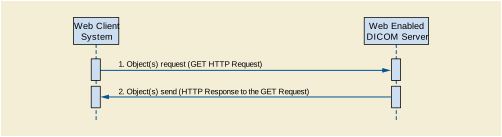
The interaction shall be as shown in Figure 6-1.
Multiple communications modes are possible:
Media types are identifiers used to define the data format of a representation. HTTP uses media types in the Content-Type and Accept header fields in order to provide open and extensible data typing and type negotiation. The syntax of media types is:
media-type = type "/" subtype *(OWS ";" OWS parameter)
    type = token
    subtype = token
    parameter = token "=" (token / quoted-string) )
The <type>/<subtype> may be followed by parameters in the form of name=value pairs.
The type, subtype, and parameter name tokens are case-insensitive, but the case sensitivity of parameter values depends on the semantics of the parameter name. The presence or absence of a parameter might be significant to the processing of a media-type, depending on its definition within the media type registry.
A parameter value can be transmitted either as a token or quoted-string. The quoted and unquoted values are equivalent.
Media types are defined in [RFC7231] Section 3.1.1.1.
IANA maintains a registry of media types at http://www.iana.org/assignments/media-types/media-types.xhtml.
Some of the services defined in this Standard support the multipart media types [RFC2387]. The syntax is:
multipart-media-type = "multipart" "/" subtype *( OWS ";" OWS parameter )
The "application/multipart-related" media type is used by the RS services. Its syntax is:
    multipart-related = "multipart/related"
                         OWS ";" OWS "type" "=" DQUOTE media-type DQUOTE
                         OWS ";" OWS "boundary" "=" boundary
                         [related-parameters]
    boundary = 0*69bchar bchar-nospace
    bchar = bchar-nospace / SP
    bchar-nospace = DIGIT / ALPHA / "'" / "(" / ") " / "+" / "_" / "," / "-"
                    / "." / "/" / ":" / "=" / "?" "/" / ":" / "=" / "?"
    related-parameters = [";" "start" "=" cid]
                         [";" "start-info" "=" cid-list]
    cid-list = cid cid-list
    cid = token / quoted-string
The "type" parameter is required. It contains the media type of the "root" body part. It always contains the special character "/" and thus requires quote marks.
The <cid> is a content identifier. It should be unique for each part of the multipart message.
Typically, the "start" and "start-info" parameters are not specified, and the "root" is the first body part.
Table 6.1.1-1 defines Resource Categories that correspond to different SOP Classes. The following sections map each Resource Category to appropriate DICOM and Rendered media types.
Table 6.1.1-1. Resource Categories
|
This category includes all resources that are instances of a multi-frame SOP Class, that are not video and that contain more than one frame. |
|
|
This category includes all resources that contain more than one frame and: |
|
|
This category includes all resources that:
|
|
|
This category includes all resources that are not included above. |
DICOM resources may be converted into non-DICOM media types in order to render them using commonly available non-DICOM software, such as browsers.
A DICOM SOP Instance containing an image could be rendered into the image/jpeg or image/png Rendered Media Types.
A DICOM SOP Instance containing a multi-frame image in a lossless transfer syntax could be rendered into a video/mpeg or video/mp4 Rendered Media Type.
A DICOM SOP Instance containing a Structured Report could be rendered into a text/html, text/plain, or application/pdf Rendered Media Type.
Table 6.1.1-2 specifies the meaning of media type requirements in Table 6.1.1-3.
Table 6.1.1-3 defines the Rendered Media Types by their Resource Category for the URI, WS, and RS modes.
When an image/jpeg media type is returned, the image shall be encoded using the JPEG baseline lossy 8 bit Huffman encoded non-hierarchical non-sequential process defined in ISO/IEC 10918-1.
The origin server may support additional rendered media types.
The term Acceptable Media Types denotes the media types that are acceptable to the user agent in the response. The Acceptable Media Types are those specified in:
All requests that expect a response with a payload, shall include the Accept header field. The response to a request without an Accept header field shall be 406 (Not Acceptable). Even if specific media types are provided in the <accept> query parameter, an Accept header field with one or more values shall be present, at a minimum */*.
The Acceptable Media Types shall be either DICOM media-types or Rendered media types, but not both. If the Acceptable Media Types contains both DICOM and Rendered Media Types, the origin server shall return 409 (Conflict).
The user agent may specify the relative degree of preference for media types, whether in the <accept> query parameter or the Accept header field, using the <weight> parameter. See [RFC7231] Section 5.3.1.
    weight = OWS ";" OWS "q=" qvalue
    qvalue = ("0" ["." 0*3DIGIT]) / ("1" ["." 0*3("0") ])
The <accept> query parameter is primarily designed for use in hyperlinks (URLs) embedded in documents, where the Accept header field is not accessible. It is similar to the Accept header field, except that it shall not have wildcards (<type>/* or */*).
The <accept> query parameter has the following syntax:
    accept = accept-name "=" 1#(media-type [weight])
    accept-name = "%s" quoted-string
Note
The "%s" that prefixes the <accept-name> specifies that it is a case sensitive token. See [RFC7405].
Its value is a comma-separated list of one or more <media-type>s, possibly including parameters. It shall be supported by the origin server. It is optional for the user agent.
The <accept-name> of the <accept> query parameter is defined by the Service. It is case-sensitive. Table 6.1.1-4 contains the <accept-name> of the <accept> query parameter for some services.
The <accept> query parameter should not be used when the user agent can specify the values in the Accept header field.
All media types present in an <accept> query parameter shall be compatible with a media range in the Accept header field, either explicitly or implicitly through wildcards.
The Accept header field is used to specify media ranges acceptable to the user agent. It has the following syntax:
Accept = 1#(media-range [weight])
    media-range = media-type
                  / type "/" "*" parameters
                  / "*/*" parameters
    parameters ; See Section 6.1.1
The Accept header field shall be present. Its value shall be a comma-separated list of one or more media ranges acceptable in the response. See [RFC7231] Section 5.3.2.
A media range is either a media-type or a wildcard. Wildcards use the asterisk ("*") to group media types into ranges, with <type>/* indicating all subtypes of that type, and */* indicating all media types from the target's Resource's Category.
For example, the media range "image/*" matches "image/jpeg", which is the default media type for the Single Frame Image Resource Category, and "text/*" matches "text/html", which is the default media type for the Text Resource Category. The "*/*" media range matches the default media type for the target's Resource Category.
If the origin server receives a request without an Accept header field, but that might have a response payload, it shall return a 406 (Not Acceptable).
The Selected Media Type is the media type selected by the origin server for the response payload. The media types in the <accept> query parameter and the media ranges in the Accept header field shall each be separately prioritized according to the rules defined in [RFC7231] Section 5.3.1.
The Selected Media Type is chosen as follows:
Select the representation with the highest priority supported media type for that category in the <accept> query parameter, which is compatible with the Accept header field.
If no media type in the <accept> query parameter is supported, select the highest priority supported media type for that category in the Accept header field, if any.
Otherwise, select the default media type for the category if the Accept header field contains a wildcard media range matching the category, if any.
For a set of media types in the <accept> query parameter (step 2 above), or for a set of media ranges in the Accept header field (step 3 above), the highest priority supported media type is determined as follows:
Assign a <qvalue> of 1 to any member of the set that does not have a one.
Assign each representation supported by the origin server the <qvalue> of the most specific media type that it matches.
Select the representation with the highest <qvalue>. If there is a tie, the origin server shall determine which is returned.
For example, consider an origin server that receives a request with the following Accept header field:
Accept: text/*; q=0.5, text/html; q=0.4, text/html; level=1, text/html; level=2; q=0.7, image/png, */*; q=0.4
Suppose that for the resource indicated in the request, the origin server supports representations for the following media types:
    text/html(regular, level 1 and level 2)
    text/rtf
    text/plain
    text/x-latex
These media types are assigned the following <qvalue>s, based on the media ranges above:
Although "image/png" has been assigned a default <qvalue> of 1.0, it is not among the supported media types for this resource, and thus is not listed.
The selected media type is "text/html; level=1" since it is the supported media type in the Text Category with the highest qvalue.
HTTP uses charset names to indicate or negotiate the character encoding of textual content in representations [RFC6365] Section 3.3.
Character sets may be identified using the value in the IANA Preferred MIME Name column in the IANA Character Set Registry http://www.iana.org/assignments/character-sets/character-sets.xhtml.
Character sets may be identified by using the DICOM Defined Terms for the character set. See Section C.12.1.1.2 “Specific Character Set” in PS3.3, and Section 6.1.2.3 “Encoding of Character Repertoires” in PS3.5.
The origin server shall support the "UTF-8" charset name for RS Retrieve Rendered, but is not required to support the DICOM Defined Term "ISO_IR 192".
charset = token / defined-term / DQUOTE defined-term DQUOTE
Some DICOM Defined Terms for character sets contain space characters; and shall be enclosed in double quotes in HTTP header fields and percent encoded in URLs.
The Conformance Statement shall document all supported character sets. The Retrieve Capabilities response for all RS Services shall also document all supported character sets.
A request without any <charset> query parameter or Accept-Charset header field implies that the user agent will accept any charset in the response.
Annex D contains a mapping of some Specific Character Set (0008,0005) Defined Terms to IANA charset tokens.
The term Acceptable Character Sets denotes the character sets that are acceptable to the user agent in the response. The Acceptable Character Sets are those specified in:
When the acceptable character sets contains a list of one or more Defined Terms they should be ordered as specified in Section C.12.1.1.2 “Specific Character Set” in PS3.3 and Section 6.1.2.3 “Encoding of Character Repertoires” in PS3.5. This is especially important for ISO 2022 character sets.
The <character-set> query parameter is primarily designed for use in hyperlinks (URLs) embedded in documents, where the Accept-Charset header field is not accessible.
The <character-set> query parameter has the following syntax:
character-set = name "=" 1#(charset [weight])
The <character-set> query parameter value is a comma-separated list of one or more <charset>s. It is similar to the Accept-Charset header field, except that it shall not have wildcards. It shall be supported by the origin server. It is optional for the user agent.
All <charset>s present in the <character-set> query parameter may have a corresponding character set in the Accept-Charset header field, either explicitly or implicitly through wildcards.
The <name> of the <character-set> query parameter is defined by the Service. Table 6.1.2-1 contains the names of the <character-set> query parameter for some services.
The Accept-Charset header field has the following syntax:
Accept-Charset = 1#(charset [weight]) / ("*" [weight])
The user agent may provide a list of Acceptable Character Sets in the Accept-Charset header field of the request. Its value is a comma-separated list of one or more <charset>s and/or the wildcard value ("*"). It shall be supported by the origin server. It is optional for the user agent.
The values of the Accept-Charset header field values are prioritized by their <weight> parameter.
If no wildcard ("*") is present, then any character sets not explicitly mentioned in the header field are considered "not acceptable" to the client.
A request without an Accept-Charset header field implies that the user agent will accept any charset in response.
If the media type defines a "charset" parameter, it should be included with the media type in the Accept header field, rather than in the Accept-Charset header field.
The origin server shall determine the Selected Character Set(s) as follows:
Select the first supported character set in the "charset" parameter(s) of the Selected Media Type.
Otherwise, select the highest priority supported <charset> in the <character-set> query parameter.
Otherwise, select the highest priority supported <charset> in the Accept-Charset header field.
Otherwise, if the Selected Media Type has a default character set that is supported, select it.
Rendered representations returned in the response shall have all contained strings returned in the Selected Character Sets.
If the character set in which the target resource is encoded is not the Selected CharacterSet:
Note
This means that some SOP Instances may be convertible and others will not be, even though they have the same Specific Character Set (0008,0005).
All origin servers shall support conversion to the UTF-8 character set for RS Rendered Retrieve.
If the user agent chooses to perform its own conversion rather than have it done by the origin server:
The HTTP Request used shall use the GET method as defined in [RFC7230].
The parameters of the <query> component of the Request-URI to be sent to the web Server through the HTTP GET method request shall be represented as defined in [RFC3986].
Specifies the Acceptable Media Types for the response payload. See Section 6.1.1.4. The name of the parameter is "contentType", which is case-sensitive. Its syntax is:
accept = %s"contentType" "=" 1#media-type
Specifies the Acceptable Character Sets for the response payload. See Section 6.1.2.1. The name of the parameter is "charset", which is case-sensitive. Its syntax is:
character-set = %s"charset" "=" 1#(token / [DQUOTE defined-term DQUOTE])
The Accept header field specifies the media type(s) acceptable to the user agent in the response. It shall be present. See Section 6.1.1.6 for details.
The Accept-Charset header field specifies the character set(s) acceptable to the user agent in the response. It is optional. See Section 6.1.2.3 for details.
The Accept-Charset header field of the GET method request shall specify the character set of the object to be retrieved. If the Accept-Charset header field of the GET method is not present, or the origin server does not support the specified character set, the character set of the response will be at the discretion of the origin server.
The response shall be an HTTP Response Message as specified in [RFC7230].
The media type shall be 'application/dicom', as specified in [RFC3240].
The body content shall be a "Part 10 File" that includes a meta-header as defined in PS3.10.
The returned DICOM object shall be encoded using one of the transfer syntaxes specified in the transfer syntax query parameter as defined in Section 8.2.11 below. By default, the transfer syntax shall be "Explicit VR Little Endian".
The media type shall be one on the media types defined in the contentType parameter, preferably the most desired by the user agent, and shall be in any case compatible with the Accept header field of the GET method.
The content shall be a single MIME part containing the object to be retrieved.
Note
Multiple objects in a response are not supported by this standard. The parameters select only a single object to retrieve. Most current user agents are able to retrieve single objects, within a "non multipart" MIME body, and are not able to support multipart/related or multipart/mixed responses.
The DICOM Web Service defines several action types. An implementation shall support at least one of these actions. The three action types are:
This action retrieves a set of DICOM instances and other objects. This action corresponds to the IHE XDS-I.b transaction RAD-69. The DICOM instances are formatted in accordance with PS3.10, and encapsulated in a Web Services response.
RetrieveRenderedImagingDocumentSet
This action retrieves a set of DICOM instances that have been rendered into the requested format. For example, if rendering into JPEG was requested, these will be the JPEG renderings of the requested set of DICOM Objects.
RetrieveImagingDocumentSetMetadata
This action retrieves a set of DICOM instances presented as an Infoset with the bulk data removed. This service can retrieve either the full metadata, or a subset selected by XPath arguments. The XML encoding for the DICOM attributes is defined in PS3.19.
The Web Services actions shall be fully compliant with the Basic Profile of WS-I as defined in IHE IT Infrastructure Technical Framework Vol 2x Annex V. All <wsa:Action> elements shall have the mustUnderstand attribute set (mustUnderstand="1").
The specific Web Services parameters to be used for the Retrieve Imaging Document Set action shall be as follows, in the order that they would appear in the WSDL definition:
The following types shall be imported (xsd:import) in the /definitions/types section:
The /definitions/message/part/@element attribute of the Retrieve Imaging Document Set Request message shall be an "iherad:RetrieveImagingDocumentSetRequest" as defined below.
The /definitions/message/part/@element attribute of the Retrieve Imaging Document Set Response message shall be an "ihe:RetrieveDocumentSetResponse" as defined below.
The /definitions/portType/operation/input/@wsaw:Action attribute for the Retrieve Imaging Document Set Request message shall be "urn:ihe:rad:2009:RetrieveImagingDocumentSet".
The /definitions/portType/operation/output/@wsaw:Action attribute for the Retrieve Imaging Document Set Response message shall be "urn:ihe:iti:2007:RetrieveDocumentSetResponse".
The /definitions/binding/operation/soap12:operation/@soapAction attribute shall be "urn:ihe:rad:2009:RetrieveImagingDocumentSet".
The <iherad:RetrieveImagingDocumentSetRequest/> element for use with the Retrieve Imaging Document Set Request Message is defined as:
One or more <iherad:StudyRequest/> elements each of which includes a "studyInstanceUID" attribute identifying the study associated with the DICOM images/ objects being retrieved. Each <iherad:StudyRequest/> element shall contain:
One or more <iherad:SeriesRequest/> elements each of which includes a "seriesInstanceUID" attribute identifying the series associated with the DICOM images/ objects being retrieved. Each <iherad:SeriesRequest/> element shall contain:
One or more <ihe:DocumentRequest/> elements, each one representing an individual document that the requestor wants to retrieve from the Web Server. Each <ihe:DocumentRequest/> element contains:
An optional <ihe:RepositoryUniqueId/> element that identifies the Web Server from which the document is to be retrieved. This value corresponds to XDSDocumentEntry.repositoryUniqueId. The RepositoryUniqueID is similar to a DICOM AETitle, but is a uniqueID assigned to the WADO-WS Web Server rather than a locally assigned string identifier. There will be a separate RepositoryUniqueID for each web service end point.
A required <ihe:DocumentUniqueId/> element that identifies the document within the source. For example, this value could be a SOP Instance UID obtained from a Key Object Selection (KOS) instance.
An optional <ihe:HomeCommunityId/> element. See the IHE Profiles for the definition and possible uses of this element.
A required <iherad:TransferSyntaxUIDList/> element that contains a list of one or more <ihe:TransferSyntaxUID> elements. Each of the <iherad:TransferSyntaxUID> elements represent one of the transfer syntax encodings that the Imaging Document Consumer is capable of processing.
A Web Server shall provide the document(s) indicated in the request. The Web Server shall return the document(s) or an error code when the document could not be returned. The pixel data shall be encoded using one of the DICOM transfer syntaxes included in the Retrieve Imaging Document Set Request Message. If the Imaging Document Source cannot encode the pixel data using any of the requested transfer syntaxes then an error status shall be returned.
The <ihe:RetrieveDocumentResponse/> element for use with the Retrieve Imaging Document Set Response Message is defined as:
A required /ihe:RetrieveDocumentSetResponse/rs:RegistryResponse element
An optional sequence of <ihe:DocumentResponse/> elements containing
An optional <ihe:HomeCommunityId/> element. The value of this element shall be the same as the value of the /RetrieveImagingDocumentSetRequest/StudyRequest/SeriesRequest/DocumentRequest/HomeCommunityId element in the Retrieve Document Set Request Message. If the <ihe:HomeCommunityId/> element is not present in the Retrieve Document Set Request Message, this value shall not be present.
An optional <ihe:RepositoryUniqueId/> that identifies the Imaging Document Source from which the document is to be retrieved. The value of this element shall be the same as the value of the /RetrieveImagingDocumentSetRequest/StudyRequest/SeriesRequest/DocumentRequest/RepositoryUniqueId element in the original Retrieve Imaging Document Set Request Message. This value corresponds to XDSDocumentEntry.repositoryUniqueId.
A required <ihe:DocumentUniqueId/> that identifies the document within the Imaging Document Source. The value of this element shall be the same as the value of the /RetrieveImagingDocumentSetRequest/StudyRequest/SeriesRequest/DocumentRequest/DocumentUniqueId element in the original Retrieve Imaging Document Set Request Message. This value corresponds to the SOP Instance UID in the Retrieve Document Request.
A conditional <wado:FrameNumber/> that identifies the frame within the source document. It shall be present if and only if <wado:FrameNumber/> was in the request
A required <ihe:Document/> element that contains the retrieved document as an XOP Infoset.
A required <ihe:mimeType/> element that indicates the media type of the retrieved document.
The /RetrieveDocumentSetResponse/rs:RegistryResponse/@status attributes provides the overall status of the request: It shall contain one of the following values:
See ITI TF-2a: 4.1.13 Error Reporting for the interpretation of these values.
For each document requested in a /RetrieveImagingDocumentSetRequest/StudyRequest/SeriesRequest/DocumentRequest element:
If the document is successfully retrieved (without warning) then no /RetrieveDocumentSetResponse/rs:RegistryResponse/rs:RegistryErrorList/ rs:RegistryError element shall be present and a /RetrieveDocumentSetResponse/DocumentResponse/Document element shall be returned containing the document as base64binary encoded data.
If a warning is reported when retrieving the document, then a /RetrieveDocumentSetResponse/rs:RegistryResponse/rs:RegistryErrorList/ rs:RegistryError element shall be returned with:
@severity is urn:oasis:names:tc:ebxml-regrep:ErrorSeverityType:Warning
@location contains the DocumentUniqueId of the document requested
The document shall be returned in an instance of /RetrieveDocumentSetResponse/DocumentResponse/Document as base64binary encoded data. The returned document and warning are correlated via the DocumentUniqueId.
If an error is reported when retrieving a document, then a /RetrieveDocumentSetResponse/rs:RegistryResponse/rs:RegistryErrorList/ rs:RegistryError element shall be returned with:
The error conditions for failures and associated error codes are given below in section 6.4.4. These errors shall be detected and the associated errorCode returned if that error occurs. Additional errors defined in the ebRS standard, in ITI TF-2: 4.1.13 "Error Reporting", and defined by the implementer may be returned.
If the user agent specifies a transfer syntax field of 1.2.840.10008.1.2.4.94 (DICOM JPIP Referenced Transfer Syntax) or 1.2.840.10008.1.2.4.95 (DICOM JPIP Referenced Deflate Transfer Syntax), and the Web Server supports the requested transfer syntax the following behavior is expected:
If the DICOM Image Object(s) already have the same JPIP transfer syntax as the one indicated in the request, the Retrieve Imaging Document Set Response shall include the DICOM Image Objects unchanged.
If the DICOM Image Object(s) have a transfer syntax that differs from that of the request, the Retrieve Imaging Document Set Response shall include the DICOM image with the transfer syntax changed to the requested transfer syntax. In addition, the pixel data Attribute (7FE0,0010 tag) will have been removed and replaced with a Pixel Data Provider URL (0028,7FE0 tag). The URL represents the JPIP request and will include the specific target information.
Upon receipt of this Retrieve Imaging Document Set Response, the Imaging Document Consumer may request the pixel data from the pixel data provider using the supplied URL. Additional parameters required by the application may be appended to the URL when accessing the pixel data provider.
For example, a JPIP request for a 200 by 200 pixel rendition of the entire image can be constructed from the Pixel Data Provider URL as follows:
The specific Web Services parameters to be used for the Retrieve Rendered Imaging Document Set action shall be as follows, in the order that they would appear in the WSDL definition:
The following types shall be imported (xsd:import) in the /definitions/types section:
The /definitions/message/part/@element attribute of the Retrieve Rendered Imaging Document Set Request message shall be a "wado:RetrieveRenderedImagingDocumentSetRequest" as defined below.
The /definitions/message/part/@element attribute of the Retrieve Rendered Imaging Document Set Response message shall be a "wado:RetrieveRenderedImagingDocumentSetResponse" as defined below.
The /definitions/portType/operation/input/@wsaw:Action attribute for the Retrieve Rendered Imaging Document Set Request message shall be "urn:dicom:ws:wado:2011:RetrieveRenderedImagingDocumentSet".
The /definitions/portType/operation/output/@wsaw:Action attribute for the Retrieve Imaging Document Set Response message shall be "urn:dicom:ws:wado:2011:RetrieveRenderedImagingDocumentSetResponse".
The /definitions/binding/operation/soap12:operation/@soapAction attribute shall be "urn:dicom:ws:wado:2011:RetrieveRenderedImagingDocumentSet".
The <wado:RetrieveRenderedImagingDocumentSetRequest/> element for use with the Retrieve Imaging Document Set Request Message is defined as:
One or more <wado:StudyRequest/> elements each of which includes a "studyInstanceUID" attribute identifying the study associated with the DICOM images/ objects being retrieved. Each <iherad:StudyRequest/> element shall contain:
One or more <wado:SeriesRequest/> elements each of which includes a "seriesInstanceUID" attribute identifying the series associated with the DICOM images/ objects being retrieved. Each <iherad:SeriesRequest/> element shall contain:
One or more <wado:RenderedDocumentRequest/> elements, each one representing an individual document that the requestor wants to retrieve from the Web Server. Each <wado:DocumentRequest/> element contains:
An optional <ihe:RepositoryUniqueId/> element that identifies the Web Server from which the document is to be retrieved. This value corresponds to XDSDocumentEntry.repositoryUniqueId. The RepositoryUniqueID is similar to a DICOM AETitle, but is a uniqueID assigned to the WADO-WS Web Server rather than a locally assigned string identifier. There will be a separate RepositoryUniqueID for each web service end point.
A required <ihe:DocumentUniqueId/> element that identifies the document within the source. This value corresponds to the SOP Instance UID referenced within the DICOM manifest.
An optional <ihe:HomeCommunityId/> element that corresponds to the home attribute of the Identifiable class in ebRIM.
A required <wado:ContentTypeList/> element that contains a list of one or more <wado:ContentType> elements.
An optional <wado:CharsetList/> element that contains a list of one or more <wado:Charset> elements.
An Web Server shall render and then provide the document(s) indicated in the request. The Web Server shall return the rendered documents or an error code when the document could not be returned. The rendered forms shall be the subset specified, and in the format requested. If the Imaging Document Source cannot render the pixel data in that manner then an error status shall be returned.
The <wado:RetrieveRenderedImagingDocumentResponse/> element for use with the Retrieve Imaging Document Set Response Message, Retrieve Rendered Imaging Document Set Response Message and Retrieve Imaging Document Set Metadata Response Message is defined as:
A required /ihe:RetrieveDocumentSetResponse/rs:RegistryResponse element
An optional sequence of <wado:RenderedDocumentResponse/> elements containing:
A <ihe:HomeCommunityId/> element. The value of this element shall be the same as the value of the StudyRequest/SeriesRequest/DocumentRequest/HomeCommunityId element in the Request Message. If the <ihe:HomeCommunityId/> element is not present in the Request Message, this value shall not be present.
A required <ihe:RepositoryUniqueId/> that identifies the Imaging Document Source from which the document was retrieved. The value of this element shall be the same as the value of the StudyRequest/SeriesRequest/DocumentRequest/RepositoryUniqueId element in the original Request Message.
A required <wado:SourceDocumentUniqueId/> that identifies the source document. The value of this element shall be the same as the value of the StudyRequest/SeriesRequest/DocumentRequest/DocumentUniqueId element in the original Request Message. This value identifies the source, and is not an ID for the resulting rendered document.
A conditional <wado:FrameNumber/> that identifies the frame within the source document. It shall be present if and only if <wado:FrameNumber/> was in the request.
A required <wado:Annotation/> element that contains the actual value used.
A required <wado:Rows/> element that contains the actual value used.
A required <wado:Columns/> element that contains the actual value used.
A required <wado:Region/> element that contains the actual value used.
A required <wado:WindowCenter/> element that contains the actual value used.
A required <wado:WindowWidth/> element that contains the actual value used.
A required <wado:ImageQuality/> element that contains the actual value used.
A required <wado:PresentationUID/> element that contains the actual value used if a PresentationUID was used.
A required <wado:PresentationSeriesUID/> element that contains the actual value used if a PresentationSeriesUID was used.
An optional <wado:Anonymize/> element that shall be present if the rendered instance was anonymized.
A required <ihe:Document/> element that contains the rendered document encoded as an XOP Infoset.
A required <ihe:mimeType/> element that indicates the media type of the retrieved document.
The /RetrieveDocumentSetResponse/rs:RegistryResponse/@status attributes provides the overall status of the request: It shall contain one of the following values:
For each document requested in a /RetrieveRenderedImagingDocumentSetRequest/StudyRequest/SeriesRequest/DocumentRequest element:
If the document is successfully rendered (without warning) then no /RetrieveRenderedImagingDocumentSetResponse/rs:RegistryResponse/rs:RegistryErrorList/ rs:RegistryError element shall be present and a /RetrieveRenderedImagingDocumentSetResponse/DocumentResponse/Document element shall be returned containing the rendered document as base64binary encoded data.
If a warning is reported when retrieving the document, then a /RetrieveRenderedImagingDocumentSetResponse/rs:RegistryResponse/rs:RegistryErrorList/ rs:RegistryError element shall be returned with:
@severity is urn:oasis:names:tc:ebxml-regrep:ErrorSeverityType:Warning
@location contains the DocumentUniqueId of the document requested
The rendered document shall be returned in an instance of /RetrieveRenderedImagingDocumentSetResponse/DocumentResponse/Document as base64binary encoded data. The returned document and warning are correlated via the DocumentUniqueId.
If an error is reported when retrieving a document, then a /RetrieveRenderedImagingDocumentSetResponse/rs:RegistryResponse/rs:RegistryErrorList/ rs:RegistryError element shall be returned with:
The error conditions for failures and associated error codes are given below in section 6.4.4. These errors shall be detected and the associated errorCode returned if that error occurs. Additional errors defined in the ebRS standard, in ITI TF-2: 4.1.13 "Error Reporting", and defined by the implementer may be returned.
The specific Web Services parameters to be used for the Retrieve Imaging Document Set Metadata action shall be as follows, in the order that they would appear in the WSDL definition:
The following types shall be imported (xsd:import) in the /definitions/types section:
The /definitions/message/part/@element attribute of the Retrieve Imaging Document Information Set Request message shall be defined an "wado:RetrieveImagingDocumentSetInformationRequest" as defined below.
The /definitions/message/part/@element attribute of the Retrieve Imaging Document Set Information Response message shall be defined an "wado:RetrieveImagingDocumentSetInformationResponse" as defined below.
The /definitions/portType/operation/input/@wsaw:Action attribute for the Retrieve Imaging Document Set Information Request message shall be "urn:wado:2011:RetrieveImagingDocumentSetInformation".
The /definitions/portType/operation/output/@wsaw:Action attribute for the Retrieve Imaging Document Set Information Response message shall be "urn:wado:2011:RetrieveImagingDocumentSetInformationResponse".
The /definitions/binding/operation/soap12:operation/@soapAction attribute shall be "urn:wado:2011:RetrieveImagingDocumentSetInformation".
The <wado:RetrieveImagingDocumentSetInformationRequest/> element for use with the Retrieve Imaging Document Set Request Message is defined as:
One or more <wado:StudyRequest/> elements each of which includes a "studyInstanceUID" attribute identifying the study associated with the DICOM images/objects being retrieved. Each <iherad:StudyRequest/> element shall contain:
One or more <wado:SeriesRequest/> elements each of which includes a "seriesInstanceUID" attribute identifying the series associated with the DICOM images/objects being retrieved. Each <iherad:SeriesRequest/> element shall contain:
One or more <wado:DocumentInformationRequest/> elements, each one representing an individual document that the requestor wants to retrieve from the Web Server. Each < wado:DocumentInformationRequest /> element contains:
· An required <ihe:RepositoryUniqueId/> element that identifies the Web Server from which the document is to be retrieved. This value corresponds to XDSDocumentEntry.repositoryUniqueId. The RepositoryUniqueID is similar to a DICOM AE Title, but is a uniqueID assigned to the WADO-WS Web Server rather than a locally assigned string identifier. There will be a separate RepositoryUniqueID for each web service end point.
A required <ihe:DocumentUniqueId/> element that identifies the document within the source. For example, this value could be a SOP Instance UID obtained from a Key Object Selection (KOS) instance.
An optional <ihe:HomeCommunityId/> element. See the IHE Profiles for the definition and possible uses of this element.
A required <wado:XPath/> that contains the text corresponding to the XPath "filter" applied to the Native DICOM Model transposition of the object, as defined in PS3.19.
A Web Server shall extract information from each document specified in a Document Set Information Request. This shall be done by the logical equivalent of:
See PS3.19 for details on conversion to XML encoded form.
The Web Server shall return the XPath results or an error code when the document could not be processed.
The <wado:RetrieveImagingDocumentSetInformationResponse/> element for use with the Retrieve Imaging Document Set Response Message is additionally defined as:
A required /wado:RetrieveImagingDocumentSetInformationResponse/rs:RegistryResponse element
An optional sequence of <wado:DocumentInformationResponse/> elements containing:
A <ihe:HomeCommunityId/> element. The value of this element shall be the same as the value of the StudyRequest/SeriesRequest/DocumentRequest/HomeCommunityId element in the Request Message. If the <ihe:HomeCommunityId/> element is not present in the Request Message, this value shall not be present.
A required <ihe:DocumentUniqueId/> that identifies the document within the Web Server. The value of this element shall be the same as the value of the StudyRequest/SeriesRequest/DocumentRequest/DocumentUniqueId element in the original Request Message. This value corresponds to the SOP Instance UID.
A conditional <wado:FrameNumber/> that identifies the frame within the source document. It shall be present if and only if <wado:FrameNumber/> was in the request.
The /RetrieveImagingDocumentSetInformationResponse/rs:RegistryResponse/@status attributes provides the overall status of the request: It shall contain one of the following values:
For each document requested in a /RetrieveImagingDocumentSetInformationRequest/StudyRequest/SeriesRequest/DocumentRequest element:
If the document is successfully retrieved (without warning) then no /RetrieveImagingDocumentSetInformationResponse/rs:RegistryResponse/rs:RegistryErrorList/ rs:RegistryError element shall be present and a /RetrieveImagingDocumentSetInformationResponse/DocumentResponse/Document element shall be returned containing the document as base64binary encoded data.
If a warning is reported when retrieving the document, then a /RetrieveImagingDocumentSetInformationResponse/rs:RegistryResponse/rs:RegistryErrorList/ rs:RegistryError element shall be returned with:
@severity is urn:oasis:names:tc:ebxml-regrep:ErrorSeverityType:Warning
@location contains the DocumentUniqueId of the document requested
The document shall be returned in an instance of /RetrieveDocumentSetResponse/DocumentResponse/Document as base64binary encoded data. The returned document and warning are correlated via the DocumentUniqueId.
If an error is reported when retrieving a document, then a /RetrieveImagingDocumentSetInformationResponse/rs:RegistryResponse/rs:RegistryErrorList/ rs:RegistryError element shall be returned with:
The error conditions for failures and associated error codes are given below in section 6.4.4. These errors shall be detected and the associated errorCode returned if that error occurs. Additional errors defined in the ebRS standard, in ITI TF-2: 4.1.13 "Error Reporting", and defined by the implementer may be returned.
The following errorCodes are defined and shall be used to report any of the associated error and warning situations. Other errorCodes may be present for other error and warning situations.
Table 6.4-1. Error Codes
|
The requested instance(s) are not immediately available, but can be made available by manual request. |
|
|
Instance is no longer available, e.g., document retention rules have caused it to be removed or relocated. |
|
|
The requested instance(s) cannot be returned because the size or count exceeds resource limits. |
|
|
Web Server does not support the requested format or transfer syntax. |
|
|
The requested instance(s) cannot be provided in the requested format or transfer syntax. |
|
|
Single image format is not available for multi-frame images. |
|
|
Identifier does not match SOP Class (see PS3.7 C-MOVE) |
|
|
Inconsistent identifiers, e.g., Study and Series are correct but Series is in a different Study (see PS3.7 C-MOVE) |
|
|
SOP Class not supported (see PS3.7 C-MOVE) |
|
|
Invalid parameter value in request (see PS3.7 C-MOVE) |
|
|
Unsupported parameter in request (see PS3.7 C-MOVE) |
|
|
Processing Failure (see PS3.7 C-MOVE) |
|
The DICOM RESTful Service defines several action types. An implementation shall support all the following six action types:
This action retrieves the set of DICOM instances associated with a given study unique identifier (UID). The response can be DICOM or bulk data depending on the "Accept" type, and is encapsulated in a multipart MIME response.
This action retrieves the set of DICOM instances associated with a given study and series UID. The response can be DICOM or bulk data depending on the "Accept" type, and is encapsulated in a multipart MIME response.
This action retrieves the DICOM instance associated with the given study, series, and SOP Instance UID. The response can be DICOM or bulk data depending on the "Accept" type, and is encapsulated in a multipart MIME response.
This action retrieves the DICOM frames for a given study, series, SOP Instance UID, and frame numbers. The response is pixel data, and encapsulated in a multipart MIME response.
This action retrieves the bulk data for a given BulkDataURI. The response is a single bulk data item.
This action retrieves the DICOM instances presented as the study, series, or instance metadata with the bulk data removed.
WADO-RS requests may contain the following query parameters:
"accept" The <accept> query parameter is specified in Section 6.1.1.5. The syntax is:
accept = "accept=" 1#media-type"charset" The <character-set> query parameter is specified in Section 6.1.2.2. The syntax is:
character-set = "charset" = 1#charset
WADO-RS requests shall include an "Accept" header field (see Section 6.1.1.6) specifying the Acceptable Media Types.
WADO-RS requests may optionally support the "Accept-Charset" header field. See Section 6.1.2.3.
DICOM Objects returned shall be PS3.10 binary objects encoded in a requested Transfer Syntax (Explicit VR Little Endian by default) with one message part per DICOM Instance.
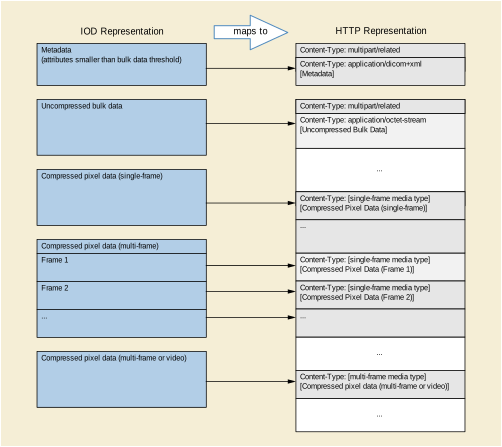
Other types of responses will be encoded in the following manner: (see Figure 6.5-1).
All XML responses shall be encoded as described in the Native DICOM Model defined in PS3.19 with one message part per XML object.
All JSON responses shall be encoded as a DICOM JSON Model Object as defined in Annex F.
Uncompressed bulk and pixel data shall be encoded in a Little Endian format using the application/octet-stream media type with one message part per bulk data item.
Compressed pixel data shall be encoded using the following Media Types. Media Types corresponding to several DICOM Transfer Syntax UIDs require a transfer-syntax parameter, as shown in Table 6.5-1, to disambiguate the request.
Note
For the media type image/dicom+jp2 Transfer Syntaxes, 1.2.840.10008.1.2.4.90 and 1.2.840.10008.1.2.4.91, the image does not include the jp2 wrapper.
HTTP Request field Accept is used in the header lines by the client in a HTTP protocol transaction to indicate the data responses that are acceptable from the server. HTTP Response fields Content-Type and parameters are used in the header lines by the server in a HTTP protocol transaction to indicate the type and encoding of data returning to the client. All lines are [RFC822] format headers. All HTTP header fields whose use is not defined by WADO-RS are presumed to have the meaning defined by the HTTP standard.
The server is required to support uncompressed bulk and pixel data (application/octet-stream) and must be able to deliver all bulk data in that form unless it is available only in a lossy-compressed format.
This action retrieves the set of DICOM instances associated with a given study unique identifier (UID). The response can be DICOM or bulk data depending on the "Accept" type, and is encapsulated in a multipart MIME response.
The specific Services resource to be used for the RetrieveStudy action shall be as follows:
Accept - A comma-separated list of representation schemes, in preference order, which will be accepted by the service in the response to this request. The types allowed for this request header are as follows:
multipart/related; type=application/dicom; [transfer-syntax={TransferSyntaxUID}]
Specifies that the response can be DICOM Instances encoded in PS3.10 format. If transfer-syntax is not specified the server can freely choose which Transfer Syntax to use for each Instance.
multipart/related; type=application/octet-stream
Specifies that the response can be Little Endian uncompressed bulk data.
multipart/related; type={MediaType}
Specifies that the response can be pixel data encoded using a {MediaType} listed in Table 6.5-1 (including parameters).
The Server shall provide the document(s) indicated in the request. In order to parse the bulk data items it is necessary to also retrieve the metadata for the Study.
The Server shall return the document(s), or an error code when the document(s) cannot be returned. If the server cannot convert all of the data to any of the requested media types/Transfer Syntaxes, then an error code shall be returned, either a "Not Acceptable" response if no data is returned or a "Partial Content" response if only some data is returned.
The client can compare the SOP Instance UIDs or BulkDataURIs in the metadata and the message response to determine which bulk data elements have been returned.
All response formats have a media type of multipart/related with a message boundary separator. The response format depends on the Accept header specified in the request.
The entire multipart response contains all bulk data for the specified Study that can be converted to one of the requested media types.
Each item in the response is one of:
an uncompressed bulk data element encoded in Little Endian binary format with the following headers:
a compressed bulk data element from a SOP Instance in the Study encoded in a single-frame compression {MediaType} with the following headers:
a compressed frame from a multi-frame SOP Instance in the Study encoded in a single-frame media type with the following headers:
a set of compressed frames from a SOP Instance in the Study encoded in a multi-frame media type with the following headers:
This action retrieves the set of DICOM instances associated with a given study and series UID. The response can be DICOM or bulk data depending on the "Accept" type, and is encapsulated in a multipart MIME response.
The specific resource to be used for the RetrieveSeries action shall be as follows:
Accept - A comma-separated list of representation schemes, in preference order, which will be accepted by the service in the response to this request. The types allowed for this request header are as follows:
multipart/related; type=application/dicom; [transfer-syntax={TransferSyntaxUID}]
Specifies that the response can be DICOM Instances encoded in PS3.10 format. If transfer-syntax is not specified the server can freely choose which Transfer Syntax to use for each Instance.
multipart/related; type=application/octet-stream;
Specifies that the response can be Little Endian uncompressed bulk data.
multipart/related; type={MediaType}
Specifies that the response can be pixel data encoded using a {MediaType} listed in Table 6.5-1 (including parameters).
The Server shall provide the document(s) indicated in the request. In order to parse the bulk data items it is necessary to also retrieve the corresponding metadata for the specified Study, Series, or Instance.
The Server shall return the document(s), or an error code when the document(s) cannot be returned. If the server cannot convert all of the data to any of the requested media types/Transfer Syntaxes, then an error code shall be returned, either a "Not Acceptable" response if no data is returned or a "Partial Content" response if only some data is returned.
The client can compare the SOP Instance UIDs or BulkDataURIs in the metadata and the message response to determine which bulk data elements have been returned.
All response formats have a media type of multipart/related with a message boundary separator. The response format depends on the Accept header specified in the request.
The entire multipart response contains all bulk data for the specified Series that can be converted to one of the requested media types.
Each item in the response is one of:
an uncompressed bulk data element encoded in Little Endian binary format with the following headers:
a compressed bulk data element from a SOP Instance in the Series encoded in a single-frame media type with the following headers:
a compressed frame from a multi-frame SOP Instance in the Series encoded in a single-frame media type with the following headers:
a set of compressed frames from a multi-frame SOP Instance in the Series encoded in a multi-frame media type with the following headers:
This action retrieves the DICOM instance associated with the given study, series, and SOP Instance UID. The response can be DICOM or bulk data depending on the "Accept" type, and is encapsulated in a multipart MIME response.
The specific resource to be used for the RetrieveInstance action shall be as follows:
{SERVICE}/studies/{StudyInstanceUID}/series/{SeriesInstanceUID}/instances/{SOPInstanceUID}, where
{SERVICE} is the base URL for the service. This may be a combination of protocol (either http or https), host, port, and application.
{StudyInstanceUID} is the study instance UID for a single study.
{SeriesInstanceUID} is the series instance UID for a single series.
{SOPInstanceUID} is the SOP Instance UID for a single SOP Instance.
Accept - A comma-separated list of representation schemes, in preference order, which will be accepted by the service in the response to this request. The types allowed for this request header are as follows:
multipart/related; type=application/dicom; [transfer-syntax={TransferSyntaxUID}]
Specifies that the response can be DICOM Instances encoded in PS3.10 format. If transfer-syntax is not specified the server can freely choose which Transfer Syntax to use for each Instance.
multipart/related; type=application/octet-stream;
Specifies that the response can be Little Endian uncompressed bulk data.
multipart/related; type={MediaType}
Specifies that the response can be pixel data encoded using a {MediaType} listed in Table 6.5-1 (including parameters).
The Server shall provide either a single DICOM PS3.10 object for the SOP Instance or one or more bulk data items. In order to parse the bulk data items it is necessary to also retrieve the corresponding metadata for the specified Study, Series, or Instance.
The Server shall return the document(s), or an error code when the document(s) cannot be returned. If the server cannot convert all of the bulk data to any of the requested media types, then an error code shall be returned, either a "Not Acceptable" response if no data is returned or a "Partial Content" response if only some data is returned.
The client can compare the BulkDataURIs in the metadata and the message response to determine which bulk data elements have been returned.
All response formats have a media type of multipart/related with a message boundary separator. The response format depends on the Accept header specified in the request.
The entire multipart response contains all bulk data for the specified Instance that can be converted to one of the requested media types.
Each item in the response is one of:
an uncompressed bulk data element encoded in Little Endian binary format with the following headers:
a compressed bulk data element from a SOP Instance encoded in a single-frame media type with the following headers:
a compressed frame from a multi-frame SOP Instance encoded in a single-frame media type with the following headers:
a set of compressed frames from a multi-frame SOP Instance encoded in a multi-frame media type with the following headers:
This action retrieves the DICOM frames for a given study, series, SOP Instance UID, and frame numbers. The response is pixel data, and is encapsulated in a multipart MIME response.
The specific Services resources to be used for the RetrieveFrames action shall be as follows:
{SERVICE}/studies/{StudyInstanceUID}/series/{SeriesInstanceUID}/instances/{SOPInstanceUID}/frames/{FrameList}, where
{SERVICE} is the base URL for the service. This may be a combination of protocol (either http or https), host, port, and application.
{StudyInstanceUID} is the study instance UID for a single study.
{SeriesInstanceUID} is the series instance UID for a single series.
{SOPInstanceUID} is the SOP Instance UID for a single SOP Instance.
{FrameList} is a comma or %2C separated list of one or more non duplicate frame numbers. These may be in any order (e.g., ../frames/1,2,4,3).
multipart/related; type=application/octet-stream
Specifies that the response can be Little Endian uncompressed pixel data
multipart/related; type={MediaType}
Specifies that the response can be pixel data encoded using a {MediaType} and {TransferSyntaxUID} listed in Table 6.5-1 (including parameters).
The Server shall provide the document(s) indicated in the request. In order to parse the bulk data items it is necessary to also retrieve the corresponding metadata for the specified Study, Series, or Instance.
The Server shall return the document(s) or an error code when the document(s) cannot be returned. If the server cannot encode the pixel data using any of the requested media types, then an error status shall be returned.
All response formats has a media type of multipart/related with a message boundary separator.
This action retrieves the bulk data for a given BulkDataURI. The response is a single bulk data item.
The specific Services resource to be used for the RetrieveBulkdata action shall be as follows:
{BulkDataURI} is the URL of a bulk data element. This may be the URI attribute of a BulkData element received in response to a WADO-RS RetrieveMetadataRequest.
The server shall always return the same bulk data for a specified BulkData URL if the data is available.
If the resource specified by the BulkData URL is not available, the server shall return:
The server determines the period of time a BulkData URL resource is available.
multipart/related; type=application/octet-stream
Specifies that the response can be Little Endian uncompressed bulk data.
multipart/related; type={MediaType}
Specifies that the response can be pixel data encoded using a {MediaType} listed in Table 6.5-1 (including parameters).
See [RFC7233] Section 3.1. If omitted in the request the server shall return the entire bulk data object.
The Server shall provide the document(s) indicated in the request. In order to parse the bulk data items it is necessary to also retrieve the corresponding metadata for the specified Study, Series, or Instance.
The Server shall return the document(s) or an error code when the document(s) cannot be returned. If the server cannot encode the pixel data using any of the requested media types, then an error status shall be returned.
All response formats have a media type of multipart/related with a message boundary separator. The response format depends on the Accept header specified in the request.
This action retrieves the DICOM instances presented as the study, series, or instance metadata with the bulk data removed. The response is metadata for the DICOM attributes.
The study, series, or instance metadata includes all attributes; however, a RESTful Service is permitted to replace the Value Field of an attribute with a BulkDataURI for attributes with Value Representations (VR) of DS, FL, FD, IS, LT, OB, OD, OF, OW, SL, SS, ST, UL, UN, US, and UT. The client can use the BulkDataURI with the RetrieveBulkData action to retrieve the original Value Field of that attribute.
Note
The server is not required to replace any attribute with a BulkDataURI; this is intended to allow the server to provide clients with metadata of a reasonably small size by leaving out large data Value Fields.
Attributes with binary Value Fields are encoded as XML Base64 binary values.
Some DICOM instances, such as SR documents, may be entirely described in the metadata.
The specific Services resources to be used for the RetrieveMetadata action shall be as follows:
{SERVICE} is the base URL for the service. This may be a combination of protocol (either http or https), host, port, and application.
{StudyInstanceUID} is the study instance UID for a single study.
{SeriesInstanceUID} is the series instance UID for a single series.
{SOPInstanceUID} is the SOP Instance UID for a single SOP Instance.
The Server shall provide the document(s) indicated in the request. The Server shall return the document(s) or an error code when the document(s) could not be returned.
The response has a media type of either:
The response must include the URL attribute for each BulkData element.
Note
The metadata is consistent with the characteristics of the bulk data on the server. If bulk data is requested using specified Transfer Syntaxes or media types, it is possible that the bulk data retrieved may be inconsistent with the metadata. For example, for a Study whose DICOM Tag (0028,2110) "LossyImageCompression" is set to "00", indicating no lossy compression, calling RetrieveStudy and requesting a lossy compression media type will provide pixel data that is inconsistent with the metadata. It is the responsibility of the client to deal with these inconsistencies appropriately.
The response is a JSON array that contains all metadata for the specified Study.
Each element in the array is the DICOM JSON encoded metadata for an Instance (see Annex F).
The following error codes are defined and shall be used to report any of the associated error and warning situations. Other error codes may be present for other error and warning situations.
Table 6.5-2. Error Codes
The Retrieve Rendered transaction retrieves DICOM instances rendered as: images, text-based documents, or other appropriate representations depending on the target resource. Its primary use case is to provide user agents with a simple interface for displaying medical images and related documents, without requiring deep knowledge of DICOM data structures and encodings. It is similar to the Retrieve DICOM service in that it uses the same method, resources, header fields and status codes. The primarily difference is the query parameters and media types supported.
The origin server shall document the Composite SOP classes that it supports for this transaction in the Conformance Statement and in the response to the Retrieve Capabilities request, and shall be able to render all valid instances for which conformance is claimed, e.g., all photometric interpretations that are defined in the IOD for the SOP class.
If the origin server supports this transaction, it shall also support the Retrieve DICOM transaction (WADO-RS).
The Retrieve Rendered service has the following request message syntax:
    GET SP /{+resource}{?parameter*} SP version CRLF
    Accept: 1#rendered-media-type CRLF
    *(header-field CRLF)
    CRLF
|
Zero or more query parameters as defined in Section 6.5.8.1.2. |
|
|
One or more Rendered Media Types See Section 6.1.1.3. |
Table 6.5.8-1 shows the resources supported by the Retrieve Rendered transaction along with their associated URI templates.
Table 6.5.8-1. Resources, Templates and Description
The query parameters defined in this section specify various rendering transformations to be applied to the images and video contained in the target resource.
The origin server shall support all of the query parameters defined in this section. An origin server may define additional parameters. If additional parameters are defined, they shall be documented in the Conformance Statement and in the Retrieve Capabilities response. The origin server shall ignore any unknown parameters.
The following rules pertain to all parameters defined in this section:
All parameters are required to be supported by the origin server.
These parameters only apply to resources that are images and video.
Instances that are not images will be rendered in an Acceptable Media Type, if one exists; otherwise, they will not be rendered.
The set of transformations specified by the parameters in this section shall be applied to the images as if they were a Presentation State, that is, in the order specified by the applicable image rendering pipeline specified in PS 3.4.
The annotation parameter specifies that the rendered images shall be annotated with patient and/or procedure information. Its value is a comma-separated list of one or more keywords. It has the following syntax:
%s"annotation=" 1#( %s"patient" / %s"technique" )
When this parameter is not present, no annotations shall be applied.
The origin server shall apply the annotations after all other parameters have been applied.
The origin server may support additional keywords, which should be included in the Conformance Statement and the Retrieve Capabilities response.
Note
The exact nature and presentation of the annotation is determined by the origin server. The annotation is burned into the rendered image pixels.
A user agent wanting more control over annotations may retrieve an image, omitting the "annotation" parameter; and separately retrieve the metadata; and create customized annotations on the image.
The "quality" parameter specifies the requested quality of the rendered images. It has the following syntax:
%s"quality=" integer
The "quality" parameter is only supported for media types that allow lossy compression.
Note
Decompression and re-compression may degrade the image quality if the original image was already irreversibly compressed. If the image has been already lossy compressed using the same format as required (e.g., jpeg), it may be sent as it is without decompressing and re-compressing it.
The specific interpretation of the meaning of this parameter is determined by the origin server.
The "viewport" parameter specifies a rectangular region of the source image(s) to be cropped, and a rectangular region corresponding to the size of the user agent's viewport to which the cropped image should be scaled.
If the target resource is a Presentation State Instance, the syntax for this parameter is:
%s"viewport=" vw "," vh
%s"viewport=" vw "," vh ["," [sx] "," [sy] "," [sw] "," [sh] ]
The source image region parameters (sx, sy, sw, and sh) shall not be present when rendering a Presentation State Instance. If they are present the origin server shall return a 409 (Conflict).
The origin server shall first crop, if specified, then scale the source images, maintaining their original aspect ratio, until either the rendered image width is the same as the viewport width or the image height is the same as the viewport height, whichever avoids truncation. In other words, viewport scaling makes the image(s) as large as possible, within the viewport, without overflowing the viewport area and without distorting the image.
If any of the optional parameter values are not present the default value shall be used. Individual values may be elided, but the commas between the values shall be present. For example:
viewport=512,512,,,512,512
The missing <sx> and <sy> parameter values shall default to 0.
If trailing values are elided, then the trailing commas shall be omitted. For example:
viewport=1024,1024
The missing <sx>, <sy>, <sw>, <sh> will have their default values, which means the image(s) will not be cropped, and the full image will be rendered.
If the viewport parameter is not present, the rendered image(s) shall not be scaled, i.e., the rendered image(s) shall contain the same sized pixel matrix as the source DICOM image.
Note
The default values for <sx> and <sy> differ from the defaults in the Specified Displayed Area in Presentation States, which uses integer values with the top left corner being (1,1). See Section C.10.4 “Displayed Area Module” in PS3.3.
The "window" parameter controls the windowing of the images as defined in Section C.8.11.3.1.5 “VOI Attributes” in PS3.3. It has the following syntax:
%s"window=" center "," width "," function
Note
These correspond to the differently capitalized and punctuated values of VOI LUT Function (0028,1056). See Section C.11.2.1.2 “Window Center and Window Width” in PS3.3.
If the target resource is a Presentation State, this parameter shall not be used. If this parameter is present when the target resource is a Presentation state, the origin server shall return a 409 (Conflict).
The target resource(s) are rendered according to the query parameters, by applying the transformations according to the appropriate rendering pipeline specified in Section N.2 “Pixel Transformation Sequence” in PS3.4.
It the target resource is not a single instance, Presentation State Instances contained in the target resource shall not be rendered.
Rendered images shall contain no more than 8 bits per channel.
If the target resource is a Presentation State Instance, that instance may contain references to one or more series, each of which may contain one or more instances, each of which may contain one or more frames. The response shall return rendered versions of all supported Instances and frames referenced by the Presentation State Instance.
For example, if the Presentation State instance references a multi-frame image, then the response will contain all frames specified by the target resource, or if the Presentation State instance references a series, then the response will contain all instances contained in that series.
If the Presentation State Instance contains a Blending Sequence, then the rendered images in the response shall correspond to the frames of the input that have a Blending Sequence Item with a Blending Position (0070,0405) value of UNDERLYING. See Section C.11.14.1.1 “Blending Sequence” in PS3.3.
The origin server shall render all of the images referenced by the Presentation State in an Acceptable Media Type using the rendering pipeline specified in PS3.4.
If there is more than one image in the response they shall be ordered according to the:
If the above does not fully specify the ordering of the frames, then the origin server shall resolve any remaining ambiguity in the ordering.
If the Presentation Size Mode is TRUE SIZE it shall be treated as SCALE TO FIT.
If the Presentation Size Mode is SCALE TO FIT, the origin server shall scale the Specified Displayed Area in the Presentation State, maintaining its original aspect ratio, until either the rendered image width is the same as the viewport width or the rendered image height is the same as the viewport height, whichever comes first. In other words, viewport scaling makes the displayed area selection as large as possible, within the viewport, without overflowing the viewport area and without distorting the image. If the viewport parameter is not present, the returned images shall have the dimensions of the Specified Displayed Area.
If the Presentation Size Mode is MAGNIFY, then the referenced images shall be scaled to the Specified Displayed Area in the Presentation State, and then they shall be cropped to the size specified by the "viewport" parameter. If the request does not contain a "viewport" parameter, then the referenced images shall not be cropped.
Any Specified Displayed Area relative annotations in the Presentation State shall be rendered relative to the Specified Displayed Area within the Presentation State, not the size of the viewport.
Though the output of the Presentation State is defined in DICOM to be in P-Values (grayscale values intended for display on a device calibrated to the DICOM Grayscale Standard Display Function PS3.14), the grayscale or color space for the rendered images is not defined by this standard.
The Retrieve Rendered service has the following response message syntax:
    version SP status-code SP reason-phrase CRLF
    Content-Type: rendered-media-type CRLF
    *(header-field CRLF)
    CRLF
    payload
|
is a Rendered Media Type; see Section 6.1.1.3. |
|
The response shall include a status code from Table 6.5.8-3, if applicable; otherwise, an appropriate status code shall be used.
Table 6.5.8-3. Common Status Codes
The origin server shall be capable of returning representations in Rendered Media Types identified as default and required in Section 6.1.1.3.
The STOW-RS Service defines one action type. An implementation shall support the following action type:
All request messages are HTTP multipart messages. The organization of SOP Instances into message parts depends on whether the SOP Instances are structured as PS3.10 binary instances, or metadata and bulk data.
PS3.10 binary instances shall be encoded with one message part per DICOM Instance.
Metadata and bulk data requests will be encoded in the following manner:(see Figure 6.5-1 Mapping between IOD and HTTP message parts):
All XML request messages shall be encoded as described in the Native DICOM Model defined in PS3.19 with one message part per XML object.
All JSON requests shall be encoded as an array of DICOM JSON Model Objects defined in Annex F.
Uncompressed bulk and pixel data shall be encoded in a Little Endian format using the application/octet-stream media type with one message part per bulk data item.
Compressed pixel data shall be encoded using the Media Types as described in Table 6.5-1 WADO-RS Media Type Mapping to Transfer Syntax UID. Media Types corresponding to several DICOM Transfer Syntax UIDs may require a transfer-syntax parameter to disambiguate the request.
HTTP Request field Content-Type is used in the header lines by the client in an HTTP transaction to indicate the type of data being sent to the Service. All lines are [RFC822] or [RFC7230] format headers. All HTTP header fields whose use is not defined by STOW-RS shall have the meaning defined by the HTTP standard.
The Service is required to support uncompressed bulk and pixel data (multipart/related; type= application/octet-stream).
This action stores one or more DICOM instances associated with one or more study instance unique identifiers (SUID). The request message can be DICOM or metadata and bulk data depending on the "Content-Type", and is encapsulated in a multipart request body.
The specific Service resource to be used for the Store Instances action shall be as follows:
{SERVICE}/studies[/{StudyInstanceUID}], where
{SERVICE} is the base URL for the service. This may be a combination of scheme (either HTTP or HTTPS), host, port, and application.
{StudyInstanceUID} (optional) is the study instance UID for a single study. If not specified, instances can be from multiple studies. If specified, all instances shall be from that study; instances not matching the StudyInstanceUID shall be rejected.
Content-Type - The representation scheme being posted to the RESTful service. The types allowed for this request header are as follows:
multipart/related; type=application/dicom; boundary={messageBoundary}
Specifies that the post is PS3.10 binary instances. All STOW-RS providers must accept this Content-Type.
multipart/related; type=application/dicom+xml; boundary={messageBoundary}
Specifies that the post is PS3.19 XML metadata and bulk data. All STOW-RS providers must accept this Content-Type.
multipart/related; type=application/json; boundary={messageBoundary}
Specifies that the post is DICOM JSON metadata and bulk data. A STOW-RS provider may optionally accept this Content-Type.
Note
It is not necessary that the study referenced by the StudyInstanceUID in the resource (and in the provided instances) exists on the server, however it is necessary that it be a valid UID. The client may have obtained an appropriate UID from elsewhere or generated it as described in Chapter 9 “Unique Identifiers (UIDs)” in PS3.5 and Annex B “Creating a Privately Defined Unique Identifier (Informative)” in PS3.5.
The XML Metadata and Bulk Data Request Message has a multipart body.
The multipart request body contains all the metadata and bulk data to be stored. If the number of bulk data parts does not correspond to the number of unique BulkDataURIs in the metadata then the entire message is invalid and will generate an error status line.
Each body part is either DICOM PS3.19 XML metadata or a bulk data item from a SOP Instance sent as part of the Store operation. The first part of the multipart message must be XML metadata.
Each bulk data item must be preceded by all metadata items that contain a reference to it.
The first part in the multipart request will contain the following HTTP headers:
Subsequent items will contain the following HTTP headers (order is not guaranteed):
Metadata and its associated bulk data shall always be sent in the same POST request.
The JSON Metadata and Bulk Data Request Message has a multipart body.
The multipart request body contains all the metadata and bulk data to be stored. If the number of bulk data parts does not correspond to the number of unique BulkDataURIs in the metadata then the entire message is invalid and will generate an error status line.
The first part in the multipart request will contain a JSON array of DICOM JSON Model Objects (defined in Annex F). Each array element is the metadata from a SOP Instance sent as part of the Store operation. This message part will have the following headers:
Subsequent items will be one of the following:
JSON Metadata and its associated bulk data shall always be sent in the same POST request.
The Service may coerce or replace values of attributes such as Patient Name, ID, Accession Number, for example, during import of media from an external institution, reconciliation against a master patient index, or reconciliation against an imaging procedure order. The Service may correct, or replace incorrect values, such as Patient Name or ID, for example, when incorrect worklist item was chosen or operator input error occurs.
If any element is coerced or corrected, the Original Attribute Sequence (0400,0561) shall be included in the DICOM Object that is stored and may be included in the PS3.18 XML Store Instances Response Module in the response.
Note
For more information on populating the Original Attribute Sequence, see Section C.12.1 “SOP Common Module” in PS3.3.
The RESTful Service shall return an HTTP status line, including a status code and associated textual phrase for the entire set of stored SOP Instances, followed by a message body containing the Store Instances Response Module as defined in Table 6.6.1-2. The message body shall be encoded as either:
If the status for all instances included in the POST request is Success, the RESTful Service shall return an "HTTP 200 - Success" response code.
If the status for all instances included in the POST request is Failure, the RESTful Service shall return an appropriate failure status line with a response code from Table 6.6.1-1. If there are instance specific errors, the response code shall be a 409 and the response payload shall contain the Store Instances Response Module, which contains additional information regarding instance errors.
In all other conditions, the RESTful Service shall return an "HTTP 202 - Accepted" response code. The response payload may contain a Store Instances Response Module, which specifies additional information regarding instance warnings or failures.
Table 6.6.1-1. HTTP Standard Response Code
Note
HTTP Status Codes for Failures and Warnings are returned in HTTP response headers. It is recommended that the text returned in the HTTP Response Warning contain a DICOM Status Code and descriptive reason as defined in Section 6.6.1.3.2.1. For example,
The message body shall provide appropriate status codes for individual SOP Instances indicating success, warning, or failure as defined below.
The message body may also include details about the processing of attributes by the service.
The message body shall also include details of failures that are not associated with a specific SOP Instance.
Table 6.6.1-2 defines the Attributes for referencing SOP Instances that are contained in a Store Instances Response Module in the response message body.
Table 6.6.1-2. Store Instances Response Module Attributes
|
The URL where the Study is available for retrieval via a WADO-RS Retrieve Study service. |
|||
|
A sequence of Items where each Item references a single SOP Instance for which storage could not be provided. |
|||
|
>Table 10-11 “SOP Instance Reference Macro Attributes” in PS3.3 |
|||
|
The reason that storage could not be provided for this SOP Instance. |
|||
|
A sequence of Items where each Item references a single SOP Instance that was successfully stored. Required if one or more SOP Instances were successfully stored. |
|||
|
>Table 10-11 “SOP Instance Reference Macro Attributes” in PS3.3 |
|||
|
The URL where the SOP Instance is available for retrieval via a WADO-RS service. |
|||
|
The reason that this SOP Instance was accepted with warnings. |
|||
|
Sequence of Items containing all attributes that were removed or replaced by other values. |
|||
|
Identification of the system that removed and/or replaced the attributes. |
|||
|
Reason for the attribute modification. Defined terms are: COERCE = Replace values of attributes such as Patient Name, ID, Accession Number, for example, during import of media from an external institution, or reconciliation against a master patient index. CORRECT = Replace incorrect values, such as Patient Name or ID, for example, when incorrect worklist item was chosen or operator input error. |
|||
|
Sequence that contains all the Attributes, with their previous values, that were modified or removed from the main data set. |
|||
|
>>Any Attribute from the main data set that was modified or removed; may include Sequence Attributes and their Items. |
|||
|
Reasons not associated with a specific SOP Instance that storage could not be provided. Each Item references a single storage failure. Required if there are one or more failures not associated with a specific SOP Instance. |
|||
|
The reason that storage could not be provided for this message item. |
|||
Table 6.6.1-3 defines the semantics for which the associated value shall be used for the Warning Reason (0008,1196):
Table 6.6.1-3. Store Instances Response Warning Reason Values
|
The STOW-RS Service modified one or more data elements during storage of the instance. See Section 6.6.1.3. |
|||
|
The STOW-RS Service discarded some data elements during storage of the instance. See Section 6.6.1.3. |
|||
|
The STOW-RS Service observed that the Data Set did not match the constraints of the SOP Class during storage of the instance. |
Additional codes may be used for the Warning Reason (0008,1196) to address the semantics of other issues.
In the event that multiple codes may apply, the single most appropriate code shall be used.
Table 6.6.1-4 defines the semantics for which the associated value shall be used for the Failure Reason (0008,1197). Implementation specific warning and error codes shall be defined in the conformance statement:
Table 6.6.1-4. Store Instances Response Failure Reason Values
Additional codes may be used for the Failure Reason (0008,1197) to address the semantics of other issues.
In the event that multiple codes may apply, the single most appropriate code shall be used.
The following is an example of a PS3.18 XML Store Instances Response Module in the response message body containing 2 failed SOP Instances, 1 successful SOP Instance, and 1 accepted SOP Instance with a warning:
<?xml version="1.0" encoding="utf-8" xml:space="preserve"?>
<NativeDicomModel xmlns="http://dicom.nema.org/PS3.19/models/NativeDICOM"
xsi:schemaLocation="http://dicom.nema.org/PS3.19/models/NativeDICOM"
xmlns:xsi="http://www.w3.org/2001/XMLSchema-instance">
  <DicomAttribute tag="00081198" vr="SQ" keyword="FailedSOPSequence">
    <Item number="1">
      <DicomAttribute tag="00081150" vr="UI" keyword="ReferencedSOPClassUID">
        <Value number="1">1.2.840.10008.3.1.2.3.1</Value>
      </DicomAttribute>
      <DicomAttribute tag="00081155" vr="UI"
      keyword="ReferencedSOPInstanceUID">
        <Value number="1">
        2.16.124.113543.6003.1011758472.49886.19426.2085542308</Value>
      </DicomAttribute>
      <DicomAttribute tag="00081197" vr="US" keyword="FailureReason">
        <Value number="1">290</Value>
      </DicomAttribute>
    </Item>
    <Item number="2">
      <DicomAttribute tag="00081150" vr="UI" keyword="ReferencedSOPClassUID">
        <Value number="1">1.2.840.10008.3.1.2.3.1</Value>
      </DicomAttribute>
      <DicomAttribute tag="00081155" vr="UI"
      keyword="ReferencedSOPInstanceUID">
        <Value number="1">
        2.16.124.113543.6003.1011758472.49886.19426.2085542309</Value>
      </DicomAttribute>
      <DicomAttribute tag="00081197" vr="US" keyword="FailureReason">
        <Value number="1">290</Value>
      </DicomAttribute>
    </Item>
  </DicomAttribute>
  <DicomAttribute tag="00081199" vr="SQ" keyword="ReferencedSOPSequence">
    <Item number="1">
      <DicomAttribute tag="00081150" vr="UI" keyword="ReferencedSOPClassUID">
        <Value number="1">1.2.840.10008.5.1.4.1.1.2</Value>
      </DicomAttribute>
      <DicomAttribute tag="00081155" vr="UI"
      keyword="ReferencedSOPInstanceUID">
        <Value number="1">
        2.16.124.113543.6003.189642796.63084.16748.2599092903</Value>
      </DicomAttribute>
      <DicomAttribute tag="00081190" vr="UR" keyword="RetrieveURL">
        <Value number="1">
        https://wadors.hospital.com/studies/2.16.124.113543.6003.1154777499.30246.19789.3503430045/
        series/2.16.124.113543.6003.2588828330.45298.17418.2723805630/
        instances/2.16.124.113543.6003.189642796.63084.16748.2599092903</Value>
      </DicomAttribute>
    </Item>
    <Item number="2">
      <DicomAttribute tag="00081150" vr="UI" keyword="ReferencedSOPClassUID">
        <Value number="1">1.2.840.10008.5.1.4.1.1.2</Value>
      </DicomAttribute>
      <DicomAttribute tag="00081155" vr="UI"
      keyword="ReferencedSOPInstanceUID">
        <Value number="1">
        2.16.124.113543.6003.189642796.63084.16748.2599092905</Value>
      </DicomAttribute>
      <DicomAttribute tag="00081196" vr="US" keyword="WarningReason">
        <Value number="1">45056</Value>
      </DicomAttribute>
      <DicomAttribute tag="00081190" vr="UR" keyword="RetrieveURL">
        <Value number="1">
        https://wadors.hospital.com/studies/2.16.124.113543.6003.1154777499.30246.19789.3503430045/
        series/2.16.124.113543.6003.2588828330.45298.17418.2723805630/
        instances/2.16.124.113543.6003.189642796.63084.16748.2599092905</Value>
      </DicomAttribute>
    </Item>
  </DicomAttribute>
  <DicomAttribute tag="00081190" vr="UR" keyword="RetrieveURL">
    <Value number="1">
    https://wadors.hospital.com/studies/2.16.124.113543.6003.1154777499.30246.19789.3503430045</Value>
  </DicomAttribute>
</NativeDicomModel>
DICOM QIDO-RS defines several action types. An implementation shall support the following action types:
This action searches for DICOM Studies that match specified search parameters and returns a list of matching studies and the requested attributes for each study.
This action searches for DICOM Series that match specified search parameters and returns a list of matching series and the requested attributes for each series.
This action searches for DICOM Instances that match specified search parameters and returns a list of matching instances and the requested attributes for each instance.
The specific resources to be used for the search actions shall be as follows:
Accept - The Media Type of the query results. The types allowed for this request header are:
multipart/related; type=application/dicom+xml (default)
Specifies that the results should be DICOM PS3.19 XML (one part per result)
Cache-control: no-cache (recommended)
If included, specifies that search results returned should be current and not cached.
Each {attributeID} must refer to one of:
Series IE attributes (SearchForSeries or SearchForInstances requests only)
Composite Instance IE attributes (SearchForInstances requests only)
Additional Query/Retrieve Attributes (Section C.3.4 in PS3.4)
See Section 6.7.1.1.1 for {attributeID} and {value} encoding rules
The “limit” parameter value is an unsigned integer, which specifies the maximum number of results the origin server should return. If the “limit” parameter is not present, its value is 50.
The “offset” parameter value is an unsigned integer, which specifies the number of results the origin server should skip before the first returned result. If the “offset” query parameter is not present, its value is 0.
Each {attributeID} query key shall be unique unless the associated DICOM Attribute allows UID List matching (see Section C.2.2.2.2 in PS3.4), in which case each {value} will be interpreted to be an element of the UID List.
The acceptable values for {value} are determined by the types of matching allowed by C-FIND for its associated {attributeID} (see Section C.2.2.2 in PS3.4). All characters in {value} that are disallowed for URIs shall be percent-encoded. See [RFC3986] for details.
If an {attributeID} is passed as the value of an "includefield" query key this is equivalent to C-FIND Universal matching for the specified attribute (see Section C.2.2.2.3 in PS3.4).
{attributeID} can be one of the following:
{dicomTag} is the eight character hexadecimal string corresponding to the Tag of a DICOM Attribute (see Chapter 6 in PS3.6).
{dicomKeyword} is the Keyword of a DICOM Attribute (see Chapter 6 in PS3.6).
Note
Note
Examples of valid QIDO-RS URLs:
http://dicomrs/studies?PatientID=11235813&StudyDate=20130509
http://dicomrs/studies?00100010=SMITH*&00101002.00100020=11235813&limit=25
http://dicomrs/studies?00100010=SMITH*&OtherPatientIDsSequence.00100020=11235813
http://dicomrs/studies?PatientID=11235813&includefield=00081048&includefield=00081049&includefield=00081060
http://dicomrs/studies?PatientID=11235813&StudyDate=20130509-20130510
http://dicomrs/studies?StudyInstanceUID=1.2.392.200036.9116.2.2.2.2162893313.1029997326.94587%2c1.2.392.200036.9116.2.2.2.2162893313.1029997326.94583
The origin server shall perform the query indicated in the request.
The search requests shall be idempotent, that is, two separate search requests with the same target resource, query parameters, and header fields shall return the same ordered list of results, if the set of matching results on the origin server has not changed.
The results returned in the response are determined as follows:
- M
- smax
is the maximum number of results the origin server allows in a single response.
- offset
is the value of the "offset" query parameter. It is the index of the first element in results.
- R
is the length of the returned results. It is equal to the minimum of:
- remaining
is the number of remaining matches. It is equal to: M-(offset+R).
The response is determined as follows:
If (R<=0) then there were no matches, and a 204 (No Content) response shall be returned with an empty payload.
Otherwise, a 200 (OK) response shall be returned with a payload containing results
If (remaining > 0) the response shall include a Warning header field (see [RFC7234] Section 5.5) containing the following:
Warning: 299 {+service}: There are <remaining> additional results that can be requested
If the set of matching results has changed due to changes in the origin server contents, then the ordered list of results may be different for subsequent transactions with identical requests, and the results of using the "limit" and "offset" parameters may be inconsistent
The response will be in an Acceptable Media Type.
The matching semantics for each attribute are determined by the types of matching allowed by C-FIND (see Section C.2.2.2 in PS3.4).
Matching results shall be generated according to the Hierarchical Search Method described in Section C.4.1.3.1.1 in PS3.4.
Combined Datetime matching shall be performed (see Section C.2.2.2.5 in PS3.4).
Note
If a QIDO-RS provider is acting as a proxy for a C-FIND SCP that does not support combined Datetime matching the QIDO-RS provider will need to perform a C-FIND request using Date only and filter results outside the time range before returning a QIDO-RS response
If the TimezoneOffsetFromUTC / 00080201 query key is included in the request, dates and times in the request are to be interpreted in the specified time zone.
If the "fuzzymatching=true" query key/value is included in the request and it is supported then additional fuzzy semantic matching of person names shall be performed in the manner specified in the DICOM Conformance Statement for the service provider.
If the "fuzzymatching=true" query key/value is included in the request and it is not supported, the response shall include the following HTTP Warning header (see [RFC7234] Section 5.5):
Warning: 299 {SERVICE}: "The fuzzymatching parameter is not supported. Only literal matching has been performed."
where {SERVICE} is the base URL for the QIDO-RS provider. This may be a combination of scheme (http or https), host, port, and application.
Note
The Warning header is separate from the Status Line and does not affect the returned Status Code.
Providers of the SearchForStudies service shall support the search query keys described in Table 6.7.1-1:
Providers of the SearchForSeries service shall support the search query keys described in Table 6.7.1-1a:
If {StudyInstanceUID} is not specified in the URL and this form of Relational Query is supported, all Study-level attributes specified in Table 6.7.1-1 shall also be supported.
Providers of the SearchForInstances service shall support the search query keys described in Table 6.7.1-1b:
If {StudyInstanceUID} is not specified in the URL and this form of Relational Query is supported, all Study-level attributes specified in Table 6.7.1-1 shall also be supported.
If {SeriesInstanceUID} is not specified in the URL and this form of Relational Query is supported, all Series-level attributes specified in Table 6.7.1-1a shall also be supported.
For each matching Study, the QIDO-RS provider shall return all attributes in accordance with Table 6.7.1-2:
Table 6.7.1-2. QIDO-RS STUDY Returned Attributes
Series Level and Instance Level attributes passed as "includefield" query values shall not be returned.
Note
The above list is consistent with those required for IHE RAD-14 (see http://www.ihe.net/Technical_Framework/upload/IHE_RAD_TF_Vol2.pdf Table 4.14-1).
For each matching Series, the QIDO-RS provider shall return all attributes listed in Table 6.7.1-2a:
Table 6.7.1-2a. QIDO-RS SERIES Returned Attributes
|
Shall be empty if the resource cannot be retrieved via WADO-RS |
||
|
All other Series Level DICOM Attributes passed as {attributeID} query keys that are supported by the service provider as matching or return attributes |
||
|
All other Study or Series Level DICOM Attributes passed as "includefield" query values that are supported by the service provider as return attributes |
||
|
All available Instance Level DICOM Attributes if the "includefield" query key is included with a value of "all" |
||
|
If {StudyInstanceUID} is not specified, all Study-level attributes specified in Table 6.7.1-2 |
||
Instance Level attributes passed as "includefield" query values shall not be returned.
Note
The above list is consistent with the attributes required for IHE RAD-14 (see http://www.ihe.net/Technical_Framework/upload/IHE_RAD_TF_Vol2.pdf Table 4.14-1).
For each matching instance, the QIDO-RS provider shall return all attributes listed in Table 6.7.1-2b:
Table 6.7.1-2b. QIDO-RS Instance Returned Attributes
|
Shall be empty if the resource cannot be retrieved via WADO-RS |
||
|
All other Instance Level DICOM Attributes passed as {attributeID} query keys that are supported by the service provider as matching or return attributes |
||
|
All other Study, Series or Instance Level DICOM Attributes passed as "includefield" query values that are supported by the service provider as return attributes |
||
|
All available Instance Level DICOM Attributes if the "includefield" query key is included with a value of "all" |
||
|
If {StudyInstanceUID} is not specified, all Study-level attributes specified in Table 6.7.1-2 |
||
|
If {SeriesInstanceUID} is not specified, all Series-level attributes specified in Table 6.7.1-2a |
||
Note
The above list is consistent with the attributes required for IHE RAD-14 (see http://www.ihe.net/Technical_Framework/upload/IHE_RAD_TF_Vol2.pdf Table 4.14-1 and Table 4.14-2).
The server shall support returning query results as:
The result format used shall depend on the Accept header of the request.
Content-Type: multipart/related; type=application/dicom+xml
The response is a multipart message body where each part is a DICOM PS3.19 XML NativeDicomModel element containing the attributes for one matching Study, Series or Instance (see Section A.1 in PS3.19).
The provider of the QIDO service may use a BulkData reference at its discretion (see Table A.1.5-2 in PS3.19 and Section 6.5.6). For example, this might be done to avoid encoding a large DICOM Value Field, such as an image thumbnail.
If there are no matching results, the message body will be empty.
Each item in the multipart response will contain the following HTTP headers:
Content-Type: application/json
The response is a DICOM JSON message containing a DICOM JSON property for each matching study, series or instance containing sub-properties describing the matching attributes for each study, series or instance (see Section F.2).
The provider of the QIDO service may use a BulkDataURI reference at its discretion (see Section F.2.6). For example, this might be done to avoid encoding a large DICOM Value Field, such as an image thumbnail.
If there are no matching results, the JSON message is empty.
Table 6.7-1 lists the HTTP status codes that shall be used to report any of the associated error and warning situations. Other error codes may be present for other error and warning situations.
Table 6.7-1. QIDO-RS HTTP Status Codes
DICOM RS Capabilities Service defines a single transaction type which shall be supported by all implementations
The Retrieve Server Options transaction can be requested for the following resources:
All responses are http single part messages. A successful response will return a Web Application Description Language (WADL) document encoded in a Media Type consistent with the Accept header of the request.
The WADL document shall contain one top-level "application" element.
The "application" element shall contain one "resources" element whose "base" attribute value is {SERVICE}, where {SERVICE} is the base URL for the service. This may be a combination of protocol (either http or https), host, port, and application.
Additionally, the WADL content shall include a "resource" element for the resource specified in the request (see 6.8.1.1) describing all methods (see 6.8.1.2.2.2 for description and examples) and child resources (see 6.8.1.2.2.1 for description and examples) for the specified resource and each of its children.
The full WADL resource tree follows directly and unambiguously from the RESTful resource endpoints defined in 6.5, 6.6, 6.7 and 6.9.
For informative purposes, the full resource tree and the methods defined for each resource are described in Table 6.8-1.
The Retrieve methods define the capabilities of a WADO-RS resource (see 6.5) or a RetrieveUPS resource (see 6.9.4).
The Retrieve methods shall contain the following attributes:
The Retrieve methods shall contain a "request" element with "param" elements documenting the following:
The Retrieve methods shall contain one or more "response" elements documenting the following:
<method name="GET" id="RetrieveStudies">
	<request>
		<param name="Accept" style="header" default="multipart/related; type=application/dicom">
			<option value="multipart/related; type=application/dicom" />
			<option value="multipart/related; type=application/dicom";
			        transfer-syntax=1.2.840.10008.1.2 />
			<option value="multipart/related; type=application/dicom";
			        transfer-syntax=1.2.840.10008.1.2.1 />
			<option value="multipart/related; type=application/octet-stream" />
			<option value="multipart/related; type=image/dicom+jpx" />
			<option value="multipart/related; type=image/dicom+jpx;
			        transfer-syntax=1.2.840.10008.1.2.4.92" />
			<option value="multipart/related; type= video/mpeg;
			        transfer-syntax=1.2.840.10008.1.2.4.100" />
		</param>
	</request>
	<response status="200,206">
		<representation mediaType="multipart/related; type=application/dicom";
		                transfer-syntax=1.2.840.10008.1.2 />
		<representation mediaType="multipart/related; type=application/dicom";
		                transfer-syntax=1.2.840.10008.1.2.1 />
		<representation mediaType="multipart/related; type=application/octet-stream" />
		<representation mediaType="multipart/related; type= image/dicom+jpx" />
		<representation mediaType="multipart/related; type= image/dicom+jpx;
		                transfer-syntax=1.2.840.10008.1.2.4.92" />
		<representation mediaType="multipart/related; type= video/mpeg;
		                transfer-syntax=1.2.840.10008.1.2.4.100" />
	</response>
	<response status="400 404 406 410 503" />
</method>
The Store methods define the capabilities of a STOW-RS resource (see 6.6) or a CreateUPS resource (see 6.9.1).
The Store methods shall contain the following attributes:
The Store methods shall contain a "request" element with "param" elements documenting the following:
The Store methods shall contain one or more "response" elements documenting the following:
<method name="GET" id="StoreInstances">
	<request>
		<param name="Accept" style="header" default="application/dicom+xml">
			<option value="application/dicom+xml" />
		</param>
		<representation mediaType="multipart/related; type=application/dicom" />
		<representation mediaType="multipart/related; type=application/dicom;
		                transfer-syntax=1.2.840.10008.1.2" />
		<representation mediaType="multipart/related; type=application/dicom;
		                transfer-syntax=1.2.840.10008.1.2.1" />
		<representation mediaType="multipart/related; type=application/dicom+xml" />
		<representation mediaType="multipart/related; type=application/dicom+xml;
		                transfer-syntax=1.2.840.10008.1.2" />
		<representation mediaType="multipart/related; type=application/dicom+xml;
						transfer-syntax=1.2.840.10008.1.2.1" />
		<representation mediaType="multipart/related; type=application/dicom+xml;
		                transfer-syntax=1.2.840.10008.1.2.4.92" />
		<representation mediaType="multipart/related; type=application/dicom+xml;
		                transfer-syntax=1.2.840.10008.1.2.4.100" />
	</request>
	<response status="200" />
	<response status="202,409">
		<representation mediaType="application/dicom+xml" />
	</response>
	<response status="400,401,403,503" />
</method>
The Search methods define the capabilities of a QIDO-RS resource (see 6.7) or a SearchForUPS resource (see 6.9.3).
The Search methods shall contain the following attributes:
The Search methods shall contain a "request" element with "param" elements documenting the following:
The Search methods shall contain one or more "response" elements documenting the following:
<method name="GET" id="SearchForStudies">
	<request>
		<param name="Accept" style="header" default="multipart/related; type=application/dicom+xml">
			<option value="multipart/related; type=application/dicom+xml" />
			<option value="application/json" />
		</param>
		<param name="Cache-control" style="header">
			<option value="no-cache" />
		</param>
		<param name="limit" style="query" />
		<param name="offset" style="query" />
		<param name="fuzzymatching" style="query" />
		<param name="StudyDate" style="query" />
		<param name="00080020" style="query" />
		<param name="StudyTime" style="query" />
		<param name="00080030" style="query" />
		…
		<param name="includefield" style="query" repeating="true" />
		<option value="all" />
		<option value="00081049" />
		<option value="PhysiciansOfRecordIdentificationSequence" />
		<option value="00081060" />
		<option value="NameOfPhysiciansReadingStudy" />
		…
	</param>
</request>
<response status="200">
	<representation mediaType="multipart/related; type=application/dicom+xml" />
	<representation mediaType="application/json" />
</response>
<response status="400 401 403 413 503" />
</method>
The Update methods define the capabilities of an UpdateUPS, a ChangeUPSState or a RequestUPSCancellation resource (see 6.9.2).
The Update methods shall contain the following attributes:
The Update methods shall contain a "request" element with "param" elements documenting the following:
The Update methods shall contain one or more "response" elements documenting the following:
<method name="POST" id="UpdateUPS">
  <request>
    <representation mediaType="application/dicom+xml" />
    <representation mediaType="application/json" />
  </request>
  <response status="200">
    <param name="Warning" style="header" fixed="299 {+SERVICE}: The UPS was created with modifications." />
    <param name="Warning" style="header" fixed="299 {+SERVICE}: Requested optional Attributes are not supported." />
  </response>
  <response status="409">
    <param name="Warning" style="header" fixed="299 {+SERVICE}: The Transaction UID is missing." />
    <param name="Warning" style="header" fixed="299 {+SERVICE}: The Transaction UID is incorrect." />
    <param name="Warning" style="header" fixed="299 {+SERVICE}: The submitted request is inconsistent
                                                                with the current state of the UPS Instance." />
  </response>
  <response status="400 401 403 404 503" />
</method>
The Subscribe methods define the capabilities of a CreateSubscription, a SuspendGlobalSubscription or a DeleteSubscription resource (see 6.9.7, 6.9.8 and 6.9.9).
The Subscribe methods shall contain the following attributes:
The Subscribe methods shall contain a "request" element with "param" elements documenting the following:
The Subscribe methods shall contain one or more "response" elements documenting the following:
<method name="POST" id="CreateSubscription">
  <request>
    <param name="deletionlock" style="query" default="false">
      <option value="true" />
      <option value="false" />
    </param>
  </request>
  <response status="201">
    <param name="Warning" style="header" fixed="299 {+SERVICE}: Deletion Lock not granted." />
   </response>
  <response status="403">
    <param name="Warning" style="header" fixed="299 {+SERVICE}: The Origin-Server does not support
                                                                Global Subscription Filtering." />
  </response>
  <response status="400 401 404 409 503" />
</method>
Table 6.8-2 lists the HTTP status codes that shall be used to report any of the associated error and warning situations. Other error codes may be present for other error and warning situations.
Table 6.8-2. Server Options HTTP Status Codes
This DICOM Web Service defines a RESTful interface to the UPS SOP Classes (see PS3.3 and PS3.4). It consists of the following action types:
This action requests the creation of a UPS Instance on the Origin-Server. It corresponds to the UPS DIMSE N-CREATE operation.
This action sets the attributes of a UPS Instance managed by the Origin-Server. It corresponds to the UPS DIMSE N-SET operation.
This action searches for UPS Instances known to the Origin-Server. It corresponds to the UPS DIMSE C-FIND operation.
This action retrieves a UPS Instances. It corresponds to the UPS DIMSE N-GET operation.
This action sets the state of a UPS Instance managed by the Origin-Server. It corresponds to the UPS DIMSE N-ACTION operation "Change UPS State".
This action requests the cancellation of a UPS Instance managed by the Origin-Server. It corresponds to the UPS DIMSE N-ACTION operation "Request UPS Cancel".
This action subscribes to a UPS Instance or the Global Worklist managed by the Origin-Server. It corresponds to the UPS DIMSE N-ACTION operation "Subscribe to Receive UPS Event Reports".
This action suspends an existing subscription to the Global Worklist managed by the Origin-Server. It corresponds to the UPS DIMSE N-ACTION operation "Suspend Global Subscription".
This action cancels an existing subscription to a UPS Instance or the Global Worklist managed by the Origin-Server. It corresponds to the UPS DIMSE N-ACTION operation "Unsubscribe from Receiving UPS Event Reports".
This action initiates a WebSocket connection to allow the User-Agent to start receiving Event Report messages.
This action sends an Event Report using an open WebSocket connection. It corresponds to the UPS DIMSE N-EVENT-REPORT operation.
An Origin-Server shall support all of the above action types.
The requirements for a UPS-RS Origin-Server that is also a Unified Worklist and Procedure Step SCP are described in Section CC.1 in PS3.4
Table 6.9-1. UPS Interface Mapping
The Origin-Server shall comply with all requirements placed on the SCP for the corresponding services in Annex CC “Unified Procedure Step Service and SOP Classes (Normative)” in PS3.4.
This resource allows a User-Agent to instruct an Origin-Server to create a UPS instance.
The request message shall be formed as follows:
Content-Type - The representation scheme being posted to the RESTful service. The types allowed for this request header are as follows:
Specifies that the post is DICOM PS3.19 XML metadata. See Section 6.9.1.1.1.
Specifies that the post is DICOM PS3.18 JSON metadata. See Section 6.9.1.1.1.
The request body shall convey a single Unified Procedure Step Instance. The instance shall comply with all requirements in the Req. Type N-CREATE column of Table CC.2.5-3 in PS3.4.
The Request Message has a single part body.
The request body contains all attributes to be stored in either DICOM PS3.19 XML or DICOM JSON. Any binary data contained in the message shall be inline.
The Origin-Server shall create and maintain UPS instances as instructed by CreateUPS requests and as specified by the SCP behavior in Section CC.2.5.3 in PS3.4.
The Origin-Server shall return the HTTP Status Line applicable to the associated request.
The Origin-Server shall return an HTTP response message.
If the Create request is successful, the Origin-Server shall return an HTTP "201 - Created" response code.
If the request fails, the Origin-Server shall return an appropriate failure status line with a response code from Table 6.9.1-1.
Table 6.9.1-1. Status Codes
If the request is successful, the HTTP response message shall include the following HTTP header:
Content-Location: {+WorkitemURL}
Where {+WorkitemURL} is the URL from which the created UPS Instance can be retrieved (see Section 6.9.4)
If the UPS instance was created with modifications, the response message shall include the following HTTP header:
This resource supports the modification of attribute values of an existing UPS Instance.
The request message shall be formed as follows:
{+SERVICE}/workitems/{UPSInstanceUID}{?transaction}
{+SERVICE} is the base URL for the service. This may be a combination of protocol (either HTTP or HTTPS), authority and path.
{UPSInstanceUID} is the UID of the Unified Procedure Step Instance
{transaction} specifies the Transaction UID / Locking UID for the specified Unified Procedure Step Instance
If the UPS instance is currently in the SCHEDULED state, {transaction} shall not be specified.
If the UPS instance is currently in the IN PROGRESS state, {transaction} shall be specified.
Content-Type - The representation scheme being posted to the RESTful service. The types allowed for this request header are as follows:
Specifies that the post is DICOM PS3.19 XML metadata. See Section 6.9.2.1.1.
Specifies that the post is DICOM PS3.18 JSON metadata. See Section 6.9.2.1.1.
The request body describes changes to a single Unified Procedure Step Instance. It shall include all Attributes for which Attribute Values are to be set. The changes shall comply with all requirements described in Section CC.2.6.2 in PS3.4.
Because the request will be treated as atomic (indivisible) and idempotent (repeat executions have no additional effect), all changes contained in the request shall leave the UPS instance in an internally consistent state.
The Origin-Server shall support the Attribute changes to the UPS instance specified by the User-Agent in the UpdateUPS request and as specified by the SCP behavior in Section CC.2.6.3 in PS3.4.
The Origin-Server shall return the HTTP Status applicable to the associated request.
The Origin-Server shall return an HTTP response message.
If the Set request is successful, the Origin-Server shall return an HTTP "200 - OK" response code.
If the request fails, the Origin-Server shall return an appropriate failure status line with a response code from Table 6.9.2-1.
Table 6.9.2-1. Status Codes
If the UPS instance was updated but with modifications made by the Origin-Server, the response message shall include the following HTTP header:
If optional attributes were rejected, the response message shall include the following HTTP Warning header field:
If the request was rejected with an HTTP 409 status code, the response message shall include one of following messages encoded in an HTTP Warning header field describing the nature of the conflict:
This resource returns a list of UPS Instances that match specified search query parameters along with requested attributes for each Instance.
The request message shall be formed as follows:
includefield={attributeID} | all
0-n includefield / {attributeID} pairs allowed, where "all" indicates that all attributes with values should be included for each response.
Each {attributeID} shall refer to an attribute of the Unified Procedure Step IOD (see Section B.26.2 in PS3.3).
See Section 6.7.1.1 for {attributeID} and {value} encoding rules
The Origin-Server shall perform a search according the requirements for the QIDO-RS services (see Section 6.7.1.2).
An Origin-Server shall support matching against all Unified Procedure Step Instance Attributes in Table CC.2.5-3 in PS3.4 with a Match Key Type value of U, R or *.
See Section 6.7.1.2.1 for matching behavior.
The Origin-Server shall return an HTTP response message.
If the SearchForUPS request is successful, the Origin-Server shall return an HTTP "200 - OK" response code.
If the request fails, the Origin-Server shall return an appropriate failure status line with a response code from Table 6.9.3-1.
Table 6.9.3-1. Status Codes
For each matching UPS Instance, the Origin-Server shall return:
All Unified Procedure Step Instance Attributes in Table CC.2.5-3 in PS3.4 with a Return Key value of 1 and 2.
All Unified Procedure Step Instance Attributes in Table CC.2.5-3 in PS3.4 with a Return Key value of 1C for which the conditional requirements are met.
All other Unified Procedure Step Instance Attributes passed as {attributeID} query keys that are supported by the Origin-Server as matching or return attributes
All other Unified Procedure Step Instance Attributes passed as "includefield" query values that are supported by the Origin-Server as return attributes.
The response message body contains the results.
The format of the response message body shall contain one of the Media Types specified by the request Accept header field. An Origin-Server shall support all Media-Types allowed in the request.
The response is a multipart message body where each part is a DICOM PS3.19 XML DicomNativeModel element containing the attributes for one matching UPS Instance (see Section A.1 in PS3.19).
If there are no matching results, the message body shall be empty.
Each part in the multipart body includes the following HTTP headers:
The response is a DICOM JSON message containing a DICOM JSON property for each matching UPS Instance containing sub-properties describing the matching attributes for each UPS Instance (see Section F.2).
If there are no matching results, the JSON message shall be empty.
This resource supports the retrieval of a UPS Instance.
The Origin-Server shall return, via the HTTP response, the indicated Unified Procedure Step Instance to the User-Agent.
Note
The requirement for the Origin-Server to respond to GET requests for UPS Instances that have moved to the COMPLETED or CANCELED state is limited. See Section CC.2.1.3 in PS3.4.
The Origin-Server shall not return the Transaction UID (0008,1195) Attribute. This is necessary to preserve this Attribute's role as an access lock.
The Origin-Server shall return the HTTP Response Status Code applicable to the associated request. A Failure Code shall indicate that the Origin-Server has not returned the SOP Instance.
The Origin-Server shall return an HTTP response message.
If the Retrieve request is successful, the Origin-Server shall return an HTTP "200 - OK" response code.
If the request fails, the Origin-Server shall return an appropriate failure status line with a response code from Table 6.9.4-1.
Table 6.9.4-1. Status Codes
The response message body contains the results.
The format of the response message body shall contain one of the Media Types specified by the request Accept header field. An Origin-Server shall support all Media-Types allowed in the request.
The response contains a DICOM PS3.19 XML DicomNativeModel element containing the attributes for the requested UPS Instance (see Section A.1 in PS3.19).
The response is a DICOM JSON array containing a DICOM JSON representation of the requested UPS Instance (see Section F.2).
This resource supports the modification of the state of an existing UPS Instance.
The request message shall be formed as follows:
Content-Type - The representation scheme being posted to the RESTful service. The types allowed for this request header are as follows:
Specifies that the post is DICOM PS3.19 XML metadata. See Section 6.9.5.1.1.
Specifies that the post is DICOM PS3.18 JSON metadata. See Section 6.9.5.1.1.
The request body describes a state change to a single Unified Procedure Step Instance. It shall include all Attributes required for an SCU in Table CC.2.1-1 in PS3.4.
The Origin-Server shall support the state changes to the UPS instance specified in the request as described by the SCP behavior in Section CC.2.1.3 in PS3.4.
After completing the ChangeUPSState request, the Origin-Server shall return the HTTP Response Line applicable to the associated request.
The Origin-Server shall return an HTTP response message.
If the State Change was successful, the Service shall return an HTTP "200 - OK" response code.
If the State Change fails, the Service shall return an appropriate failure status line with a response code from Table 6.9.5-1.
Table 6.9.5-1. Status Codes
If the User-Agent specifies a Procedure Step State (0074,1000) attribute with a value of "CANCELED" and the UPS Instance is already in that state, the response message shall include the following HTTP Warning header field:
If the User-Agent specifies a Procedure Step State (0074,1000) attribute with a value of "COMPLETED" and the UPS Instance is already in that state, the response message shall include the following HTTP Warning header field:
If the request was rejected with an HTTP 409 status code, the response message shall include one of following messages in the HTTP Warning header field describing the nature of the conflict:
This resource records a request that the specified UPS Instance be canceled.
Content-Type - The representation scheme being posted to the RESTful service. The types allowed for this request header are as follows:
Specifies that the post is DICOM PS3.19 XML metadata. See Section 6.9.5.1.1.
Specifies that the post is DICOM PS3.18 JSON metadata. See Section 6.9.5.1.1.
The request body describes a request to cancel a single Unified Procedure Step Instance. The request body shall comply with all attribute requirements described in Table CC.2.2-1 in PS3.4.
RequestUPSCancellation is used to request to the Origin-Server that the state of a UPS Instance be changed to CANCELED as shown in Figure CC.1.1-1 in PS3.4. The Origin-Server shall process the request as described by the SCP behavior in Section CC.2.2.3 in PS3.4.
The request may include a Reason For Cancellation and/or a proposed Procedure Step Discontinuation Reason Code Sequence.
The request may also include a Contact Display Name and/or a Contact URI for the person with whom the cancel request may be discussed.
Note
An HTTP Status Code indicating success means that the Request was accepted, not that the UPS has been canceled. The system performing the UPS is not obliged to honor the request to cancel and in some scenarios, may not even receive notification of the request. See Section CC.2.4 in PS3.4.
To cancel an IN PROGRESS UPS that the User-Agent is itself performing, the User-Agent shall instead use the ChangeUPSState action as described in Section 6.9.5.
The Origin-Server shall return an HTTP response message.
If the cancel request was accepted, the Service shall return an HTTP "202 - Accepted" response code.
If the cancel request was rejected, the Service shall return an appropriate failure status line with a response code from Table 6.9.6-1.
Table 6.9.6-1. Status Codes
This resource records subscribers to whom future events associated with the specified UPS Instances will be reported.
The request message shall be formed as follows:
{+SERVICE}/workitems/{UPSInstanceUID}/subscribers/{AETitle}}{?deletionlock}
{+SERVICE}/workitems/1.2.840.10008.5.1.4.34.5/subscribers/{AETitle}{?deletionlock}
{+SERVICE}/workitems/1.2.840.10008.5.1.4.34.5.1/subscribers/{AETitle}{?deletionlock,query*}
{+SERVICE} is the base URL for the service. This may be a combination of protocol (either HTTP or HTTPS), authority and path.
{UPSInstanceUID} is the UID of the Unified Procedure Step Instance or a well-known UID
{AETitle} is an Application Entity Title that conforms to the "AE" Value Representation (see Table 6.2-1 in PS3.5) and identifies the Application Entity to be subscribed
{deletionlock}, if present, shall have a value of either "true" or "false", indicating whether or not the User-Agent is requesting a Deletion Lock
{query} specifies the query key/value pairs describing the filter parameters
0-n / {attributeID}={value} pairs allowed
Each {attributeID} shall refer to an attribute of the Unified Procedure Step IOD (see Section B.26.2 in PS3.3).
See Section 6.7.1.1 for {attributeID} and {value} encoding rules.
The Origin-Server shall support the management of UPS instance subscriptions as specified by the SCP behavior in Section CC.2.3.3 in PS3.4.
Upon receipt of the CreateSubscription, SuspendGlobalSubscription or DeleteSubscription request, the Origin-Server shall attempt to update the Global Subscription State, Filtered Global Subscription and/or UPS Subscription State of the specified Application Entity with respect to the specified SOP Instance UID as described in Table CC.2.3-2 in PS3.4 and then return the appropriate HTTP response.
The Service shall return an HTTP status line, including a status code and associated reason phrase.
If the CreateSubscription request was successful, the Service shall return an "HTTP 201 - Created" response code. The response shall contain a "Content-Location" header of the following format:
If the subscription fails, the Service shall return an appropriate failure status line with a response code from Table 6.9.7-2.
Table 6.9.7-2. Status Codes
If the CreateSubscriptionrequest was accepted but the deletion lock was not, the response message shall include the following HTTP Warning header field:
If the request was rejected with an HTTP 403 status code because Filtered Global Subscription is not supported, the response message shall include the following HTTP Warning header field:
This resource suspends an existing Global Subscription or Filtered Global Subscription. The Origin-Server will no longer automatically subscribe the User-Agent to newly-created UPS Instances. This does not delete any existing subscriptions to specific UPS Instances.
The SuspendGlobalSubscription Origin-Server shall behave as described in Section 6.9.7.2.
The Service shall return an HTTP status line, including a status code and associated reason phrase.
If the SuspendGlobalSubscriptionrequest was successful, the Service shall return an HTTP "200 - OK" response code.
If the subscription change fails, the Service shall return an appropriate failure status line with a response code from Table 6.9.8-1.
Table 6.9.8-1. Status Codes
This resource removes existing subscriptions from the specified UPS Instances.
The DeleteSubscription Origin-Server shall behave as described in Section 6.9.7.2.
The Service shall return an HTTP status line, including a status code and associated reason phrase.
If the DeleteSubscriptionrequest was successful, the Service shall return an HTTP "200 - OK" response code.
If the subscription fails, the Service shall return an appropriate failure status line with a response code from Table 6.9.7-1.
Table 6.9.7-1. Status Codes
This resource opens a WebSocket channel that will be used to send Event Reports to the client.
See [RFC6455] for details on the WebSocket protocol.
The Origin-Server maintains the active WebSocket connection and uses it to send Event Report messages for UPS Instances which have subscriptions association with {AETitle} (see Section 6.9.7.2).
If the WebSocket connection is lost at any point the User-Agent can re-establish it by repeating the request.
The state of a WebSocket connection does not affect subscriptions and an Origin-Server is not required to queue messages when the connection is down.
The Service shall return an HTTP status line, including a status code and associated reason phrase.
If the request was successful, the Service shall return an HTTP "101 - Switching Protocols" response code.
If the request fails, the Service shall return an appropriate failure status line with a response code from Table 6.9.10-1.
Table 6.9.10-1. Status Codes
The response message body shall be empty.
The connection remains open and may be used by the server to send Event messages (see Section 6.9.11).
This operation sends an Event Report over an established WebSocket connection.
The request message shall be formed as follows:
The Event Report shall contain all mandatory attributes described indescribed in Table CC.2.4-1 in PS3.4 and Table 10.3-1 in PS3.7 for the event type.
WebSocket Events are encoded as WebSocket data frames with an opcode of "%x1" (text).
The frame payload data shall be a DICOM JSON dataset containing the attributes of the Event Report.
Note
{ "00000002": { "vr" : "UI", [ "1.2.840.10008.5.1.4.34.6.4" ] }, "00000100": { "vr" : "US", [ 256 ] }, "00000110": { "vr" : "US", [ 23 ] }, "00000800": { "vr" : "US", [ 0 ] }, "00001000": { "vr" : "UI", [ "1.2.840.10008.5.1.4.34.6.4.2.3.44.22231" ] }, "00001001": { "vr" : "US", [ 1 ] }, "00741238": { "vr" : "CS", [ "SCHEDULED" ] }, "00744041": { "vr" : "CS", [ "READY" ] } }The WebSocket protocol does not allow content negotiation so it is not possible to support both XML and JSON encoding of Event Report messages without extending the protocol.
Section CC.2.4.3 in PS3.4 describes the scenarios in which an Origin-Server sends Event Reports to a subscriber and the content of the Event Report messages.
Retired. See Section 6.1.1.
Parameters specified in this section are applicable to all supported DICOM SOP Classes.
Note
To identify a DICOM Object, only one UID is required, because any UID is globally unique. However, the standard requires that the UID of the higher levels in the DICOM Information Model are specified (i.e., series and study), in order to support the use of DICOM devices that support only the baseline hierarchical (rather than extended relational) Query/Retrieve model, which requires the Study Instance UID and Series Instance UID to be defined when retrieving an SOP Instance, as defined in PS3.4.
Type of request performed. This parameter is REQUIRED for URI based mode.
Study Instance UID as defined in PS3.3. This parameter is REQUIRED.
The parameter name shall be "studyUID" for URI based mode, and "StudyRequest" that contains a required "studyInstanceUID" attribute for the WS mode.
The value shall be encoded as a Unique Identifier (UID) string, as specified in PS3.5, except that it shall not be padded to an even length with a NULL character.
Series Instance UID as defined in PS3.3. This parameter is REQUIRED.
The parameter name shall be "seriesUID" for URI based mode, and, for the WS mode, one or multiple "SeriesRequest" that is included into the above described "StudyRequest" and that contains a required "seriesInstanceUID" attribute.
The value shall be encoded as a Unique Identifier (UID) string, as specified in PS3.5, except that it shall not be padded to an even length with a NULL character.
SOP Instance UID as defined in PS3.3. This parameter is REQUIRED.
The parameter name shall be "objectUID" for URI based mode, and for the WS mode one or multiple "DocumentRequest" that is included into the above described "SeriesRequest" and that include each one:
The value shall be encoded as a unique identifier (UID) string, as specified in PS3.5, except that it shall not be padded to an even length with a NULL character.
This parameter contains one or more Acceptable Media Types as defined in Section 6.1.1.4. This parameter is OPTIONAL for URI mode. It shall be present for the WS mode "Rendered Requester" action, and shall not be present in the other WS mode transactions.
In URI mode the parameter name shall be "contentType", and its value shall contain one or more media types.
In WS mode the parameter name shall be "ContentTypeList", which shall contain one or more "ContentType" elements, each containing a media type.
See Section 6.1.1 for details.
Character set with which the returned objects are to be encoded, as defined in the [RFC7230]. This parameter is OPTIONAL for URI based mode, and for the WS mode "Rendered Requester" and shall not be present in the other WS mode transactions.
The parameter name shall be "charset" for URI mode, and "CharsetList" containing one or more "Charset" elements for WS mode.
See Section 6.1.2 for details.
Removal of all patient identification information from within the DICOM Objects, if not already done, as defined in PS3.15. This parameter is OPTIONAL. In the URI based mode, it shall only be present if contentType is application/dicom.
The parameter name shall be "anonymize" for URI based mode, and "Anonymize" for the WS mode.
The Server may return an error if it either cannot or refuses to anonymize these objects.
In WS mode, the metadata describing the objects or information extracted from them in the response shall be anonymized if requested.
The Server shall return a new SOP Instance UID if the content of the object has not already been anonymized.
Note
This standard does not introduce any security-related requirements. It is likely that the information contained within DICOM Objects identifies the patient. The protocol used (that is HTTP) can be replaced by HTTPs, which is its secure extension, to protect the information in transit. The underlying DICOM implementation decides whether or not to grant access to a particular DICOM object based on whatever security policy or mechanism it has in place. A server is unlikely to fulfill a request from an unknown user (e.g., accessed via the HTTP protocol) unless it is certain that the data requested has no patient identifying information within it and has been approved for public viewing.
The Anonymize object enables, for example, teaching files systems or clinical trial applications to offer an access to original images stored in a PACS, without disclosing the patients identity, and requiring storage of a (de-identified) copy of the original image. Anonymization is the responsibility of the Server. In order to preserve patient confidentiality, the Server likely will refuse to deliver an anonymized SOP instance to an unknown or unauthorized person unless the Server is certain that the SOP instance holds no patient identifying information. This would include "blanking out" any annotation area(s) containing nominative information burned into the pixels or in the overlays.
Retrieval of additional information from the DICOM Objects, using a filtering mechanism based on the XML mapping of DICOM IODs, as described in the Native DICOM Model defined in PS3.19. This parameter is defined only for the WS mode "Information Requester" transaction.
These parameters shall only be included when a request is made for a Single Frame Image Objects or Multi-Frame Image or video Objects as defined in Section 6.1.1.2.
Annotation of objects retrieved and displayed as an image. This parameter is OPTIONAL for the URI based mode and the WS mode "Rendered Requester" transaction. It shall not be present if contentType is application/dicom, or is a non-image media type (e.g., text/*). When it is not present for image objects, no additional annotation may be burnt in.
When used in conjunction with a presentation state object, it shall be applied after the presentation on the images. When used in conjunction with the region parameter, it shall be applied after the selection of the region.
The parameter name shall be "annotation" for URI based mode, and "Annotation" for the WS mode. Its value is a non-empty list of one or more of the following items, separated by a "," character:
Note
The exact nature and presentation of the annotation is determined by the Server. The annotation is burned into the returned image pixels.
The parameter name shall be "rows" for URI based mode, and "Rows" for the WS mode.
The value shall be expressed as an integer, representing the image height to be returned. It is OPTIONAL for the URI based mode and the WS mode "Rendered Requester" transaction. It shall not be present for other WS mode transactions. It shall not be present if contentType is application/dicom.
If both "rows" and "columns" are specified, then each shall be interpreted as a maximum, and a size will be chosen for the images within these constraints, maintaining the correct aspect ratio. If the number of rows is absent and the number of columns is present, the number of rows shall be chosen in order to maintain the correct aspect ratio. If both are absent, the images (or selected region) are sent in their original size (or the size of the presentation state applied on the images), resulting as one pixel of screen image for each value in the images data matrix.
The value shall be encoded as an integer string (IS), as specified in PS3.5.
The parameter name shall be "columns" for URI based mode, and "Columns" for the WS mode.
The value shall be expressed as an integer, representing the image width to be returned. It is OPTIONAL for the URI based mode and the WS mode "Rendered Requester" transaction. It shall not be present if contentType is application/dicom.
If both "rows" and "columns" are specified, then each shall be interpreted as a maximum, and a size will be chosen for the images within these constraints, maintaining the correct aspect ratio. If the number of columns is absent and the number of rows is present, the number of columns shall be chosen in order to maintain the correct aspect ratio. If both are absent, the images (or selected region) is sent in its original size (or the size of the presentation state applied on the images), resulting as one pixel of screen for one pixel of the images.
The value shall be encoded as an integer string (IS), as specified in PS3.5.
This parameter allows selection of a rectangular region of an image matrix to be retrieved. The purpose of this parameter is to allow a user to view a selected area of the image matrix, for example at higher magnification.
The parameter is OPTIONAL for the URI based mode and the WS mode "Rendered Requester" transaction. It shall not be present for other WS mode transactions.
The parameter name shall be "region" for URI based mode, and "Region" for the WS mode.
It shall only be present if the Acceptable Media Types are Rendered Media Types. See Section 6.1.1.3.
It shall not be present if the Unique Identifier of the Presentation Object parameter is present.
The value shall be expressed as a list of four positive decimal strings, separated by the ',' character, representing the region of the source images to be returned. These decimal values shall be values in a normalized coordinate system relative to the size of the original image matrix measured in rows and columns, with values ranging from 0.0 to 1.0, and representing in the following order:
the x position of the top left hand corner of the region to be retrieved, 0.0 corresponding to the first column of the image matrix. In the WS mode, this value is encoded into an XML element "XMin".
the y position of the top left hand corner of the region to be retrieved, 0.0 corresponding to the top row of the image matrix. In the WS mode, this value is encoded into an XML element "YMin".
the x position of the bottom right hand extent of the region, 1.0 corresponding to the last column of the image matrix, 0.0 being forbidden. In the WS mode, this value is encoded into an XML element "XMax".
the y position of the bottom right hand extent of the region, 1.0 corresponding to the last row of the image matrix, 0.0 being forbidden. In the WS mode, this value is encoded into an XML element "YMax".
If this parameter is supported, an image matrix corresponding to the specified region shall be returned with size corresponding to the specified normalized coordinate values otherwise the complete image matrix shall be returned. If the presentationUID parameter is present, the region shall be selected after the corresponding presentation state has been applied on the images.
The parameter name shall be "windowCenter" for URI based mode, and "WindowCenter" for the WS mode.
Controls the window center of the images as defined in PS3.3. This parameter is OPTIONAL for the URI based mode and the WS mode "Rendered Requester" transaction. It shall not be present for other WS mode transactions. This parameter is REQUIRED if "windowWidth" or "WindowWidth" is present. This parameter shall not be present if there is a presentationUID parameter. It shall not be present if contentType is application/dicom.
The value shall be encoded as a decimal string (DS), as specified in PS3.5.
The parameter name shall be "windowWidth" for URI based mode, and "WindowWidth" for the WS mode.
Controls the window width of the images as defined in PS3.3. This parameter is OPTIONAL for the URI based mode and the WS mode "Rendered Requester" transaction. It shall not be present for other WS mode transactions. It is REQUIRED if "windowCenter" or "WindowCenter" is present. This parameter shall not be present if there is a presentationUID parameter. It shall not be present if contentType is application/dicom.
The value shall be encoded as a decimal string (DS), as specified in PS3.5.
The parameter name shall be "frameNumber" for URI based mode, and "FrameNumber" for the WS mode.
Specifies that the single frame with that number within a multi-frame image object, as defined in PS3.3 that shall be returned. It is OPTIONAL and shall be ignored in the case of all objects other than multi-frame objects. It shall not be present if contentType is application/dicom.
The value shall be encoded as an integer string (IS), as specified in PS3.5.
The parameter name shall be "imageQuality" for URI based mode, and "ImageQuality" for the WS mode. It is OPTIONAL for the URI based mode and the WS mode "DICOM requester" and "Rendered Requester" transactions. It shall not be present if contentType is application/dicom, except if the transferSyntax parameter is present and corresponds to a lossy compression.
If the requested media type is for a lossy compressed image (e.g., image/jpeg), this parameter indicates the required quality of the image to be returned within the range 1 to 100, 100 being the best quality.
Note
Decompression and re-compression may degrade the image quality if the original image was already irreversibly compressed. In case the image has been already lossy compressed using the same format as required (e.g., jpeg), it may be sent as it is without decompressing and re-compressing it.
The value shall be encoded as an integer string (IS), as specified in PS3.5.
The parameter name shall be "presentationUID" for URI based mode, and "PresentationUID" for the WS mode.
SOP Instance UID of the presentation state storage object to be applied to the images. This parameter is OPTIONAL for the URI based mode and the WS mode "Rendered Requester" transaction. It shall only be present if the Acceptable Media Types are Rendered Media Types. See Section 6.1.1.3.
The value shall be encoded as a unique identifier (UID) string, as specified in PS3.5, except that it shall not be padded to an even length with a NULL character.
If this parameter is present, then the Region of the Image parameter shall not be present. See Section 8.2.4.
If the Presentation Size Mode in the presentation state is SCALE TO FIT or TRUE SIZE, then the displayed area specified in the presentation shall be scaled to fit the size specified by the rows and columns parameters if present, otherwise the displayed area selected in the presentation state will be returned without scaling.
Note
The intent of the TRUE SIZE mode in the presentation state cannot be satisfied, since the physical size of the pixels displayed by the web browser is unlikely to be known. If the Presentation Size Mode in the presentation state is MAGNIFY, then the displayed area specified in the presentation shall be magnified (scaled) as specified in the presentation state. It will then be cropped to fit the size specified by the rows and columns parameters, if present.
Any Displayed Area relative annotations specified in the presentation state are rendered relative to the Specified Displayed Area within the presentation state, not the size of the returned image.
Though the output of the presentation state is defined in DICOM to be in P-Values (grayscale values intended for display on a device calibrated to the DICOM Grayscale Standard Display Function PS3.14), the grayscale or color space for the images returned by the request is not defined by this standard.
The parameter name shall be "presentationSeriesUID" for URI based mode, and "PresentationSeriesUID" for the WS mode.
Series Instance UID of the series containing the presentation state storage object to be applied on the images. This parameter is REQUIRED and shall only be present if "presentationUID" is present.
If this parameter is present, then the Region of the Image parameter shall not be present. See Section 8.2.4.
The value shall be encoded as a unique identifier (UID) string, as specified in PS3.5, except that it shall not be padded to an even length with a NULL character.
The parameter name shall be "transferSyntax" for URI based mode, and "TransferSyntaxUIDList" containing one or more "TransferSyntaxUID" elements for the WS mode.
The Transfer Syntax to be used within the DICOM image objects, as specified in PS3.6. This parameter is OPTIONAL for the URI based mode and the WS mode "DICOM Requester" transaction. It shall not be present if contentType is other than application/dicom.
By default the DICOM object(s) returned shall be encoded in Explicit VR Little Endian. Neither Implicit VR, nor Big Endian shall be used. The response shall be the Transfer Syntax requested if possible. If it is not possible for the response to be sent using the requested transfer syntax then the Explicit VR Little Endian Uncompressed Transfer Syntax shall be used.
Note
The transfer syntax can be chosen as one of the values of TransferSyntaxUID corresponding to JPIP, in case of which the returned objects will contain the URL of the JPIP session to launch for retrieving the corresponding image.
The value shall be encoded as an unique identifier (UID) string, as specified in PS3.5, except that it shall not be padded to an even length with a NULL character.
This Standard uses the URI syntax as defined in [RFC3986] Uniform Resource Identifier (URI): Generic Syntax and extends it by specifying the syntax of the query component of DICOM URIs. The grammar for the query component is defined using [RFC5234] Augmented BNF for Syntax Specifications: ABNF.
DICOM URIs may use the query component of the URI to specify request parameters. The following grammar defines the general syntax of parameters contained in the query component of the URI. Specific HTTP transactions defined elsewhere in this standard may further refine the legal <name> and/or <value> rules.
    query-component = parameter [ *("&" parameter) ]
    parameter       = name "="" value
    name            = *qchar
    value           = *qchar
    qchar           = unreserved / pct-encoded / qspecial
    qspecial        = "/" / "?" / ":" / "@" / "!" / "$" / "'"
                    / "(" / ")" / "*" / "+" / "," / ";"
The following rules are defined in [RFC3986] (Normative). They are reproduced here for convenience.
    unreserved     = ALPHA / DIGIT / "-" / "." / "_" / "~"
    pct-encoded    = "%" HEXDIG HEXDIG
Note
This grammar allows the query component to contain any of the legal characters as defined by [RFC3986].
No whitespace is permitted in URIs. Whitespace around line breaks and the line breaks themselves should be stripped before parsing the URI (See [RFC3986] Appendix C).
[RFC3986] does not permit an empty query component, i.e. if the "?" appears in the URI then there must be some legal query parameters in the URI.
The <qchar> rule defined above is the <pchar> rule of [RFC3986], which defines the legal character for the query component, minus the characters "="" and "&".
http://www.hospital-stmarco/radiology/wado.php?requestType=WADO
  &studyUID=1.2.250.1.59.40211.12345678.678910
  &seriesUID=1.2.250.1.59.40211.789001276.14556172.67789
  &objectUID=1.2.250.1.59.40211.2678810.87991027.899772.2
http://server234/script678.asp?requestType=WADO
  &studyUID=1.2.250.1.59.40211.12345678.678910
  &seriesUID=1.2.250.1.59.40211.789001276.14556172.67789
  &objectUID=1.2.250.1.59.40211.2678810.87991027.899772.2
  &charset=UTF-8
Retrieving a region of a DICOM image, converted if possible in JPEG2000, with annotations burned into the image containing the patient name and technical information, and mapped into a defined image size:
https://aspradio/imageaccess.js?requestType=WADO &studyUID=1.2.250.1.59.40211.12345678.678910 &seriesUID=1.2.250.1.59.40211.789001276.14556172.67789 &objectUID=1.2.250.1.59.40211.2678810.87991027.899772.2 &contentType=image%2Fjp2;level=1,image%2Fjpeg;q=0.5 &annotation=patient,technique &columns=400 &rows=300 ®ion=0.3,0.4,0.5,0.5 &windowCenter=-1000 &windowWidth=2500
Retrieving a DICOM image object using the baseline 8-bit lossy JPEG transfer syntax, and de-identified:
http://www.medical-webservice.st/RetrieveDocument?requestType=WADO
  &studyUID=1.2.250.1.59.40211.12345678.678910
  &seriesUID=1.2.250.1.59.40211.789001276.14556172.67789
  &objectUID=1.2.250.1.59.40211.2678810.87991027.899772.2
  &contentType=application%2Fdicom
  &anonymize=yes
  &transferSyntax=1.2.840.10008.1.2.4.50
There are multiple applications, in which DICOM and "web-based" environments are interacting. "Web-based" means information and communication systems that are using Internet related technologies (Web, e-mail…). The basic feature supported by this standard is a mechanism for the "Web-based" system to retrieve a DICOM object from the "DICOM-based" system.
Referencing an image or a report from an electronic patient record (EPR)
Providing access by outside referring doctors to a hospital web server that contains references to reports, images and waveforms
Providing access to anonymized DICOM reports, images and waveforms via a web server, for teaching purposes and for clinical trials.
To retrieve DICOM Objects using "WADO", the "web-based" system must "know" the UIDs (Study, Series, SOP Instance) of the objects it needs to retrieve. These may be obtained through different methods (reception of a standardized message containing a document containing the reference to the DICOM Objects, query of other systems…) that are beyond the scope of this standard.
Table D-1 provides a mapping of some IANA Character Set Registry Preferred MIME Names to DICOM Specific Character Set Defined Terms.
The following XSD schema can be used for the WADO WS implementation:
<?xml version="1.0" encoding="utf-8"?>
<xs:schema xmlns="urn:ihe:rad:xdsi-b:2009"
xmlns:xs="http://www.w3.org/2001/XMLSchema"
targetNamespace="urn:ihe:rad:xdsi-b:2009" elementFormDefault="qualified"
attributeFormDefault="unqualified"
xmlns:tns="urn:oasis:names:tc:ebxml-regrep:xsd:rs:3.0">
  <xs:import namespace="urn:oasis:names:tc:ebxml-regrep:xsd:rs:3.0" />
  <xs:import namespace="urn:ihe:iti:xds-b:2007" />
  <xs:simpleType name="LongName">
    <xs:restriction base="xs:string">
      <xs:maxLength value="256" />
    </xs:restriction>
  </xs:simpleType>
  <xs:complexType name="RetrieveDocumentSetRequestType">
    <xs:sequence>
      <xs:element name="DocumentRequest" maxOccurs="unbounded">
        <xs:complexType>
          <xs:sequence>
            <xs:element name="HomeCommunityId" type="LongName" minOccurs="0">
              <xs:annotation>
                <xs:documentation>This corresponds to the home attribute of the
                Identifiable class in regrep RIM (regrep-rim-3.0-os.pdf, page
                20)</xs:documentation>
              </xs:annotation>
            </xs:element>
            <xs:element name="RepositoryUniqueId" type="LongName"
            minOccurs="0">
              <xs:annotation>
                <xs:documentation>This is the
                XDSDocumentEntry.repositoryUniqueId attribute in the XDS
                metadata</xs:documentation>
              </xs:annotation>
            </xs:element>
            <xs:element name="DocumentUniqueId" type="LongName">
              <xs:annotation>
                <xs:documentation>This is the XDSDocumentEntry.uniqueId
                attribute in the XDS metadata</xs:documentation>
              </xs:annotation>
            </xs:element>
          </xs:sequence>
        </xs:complexType>
      </xs:element>
    </xs:sequence>
  </xs:complexType>
  <xs:complexType name="RegistryErrorType">
    <xs:simpleContent>
      <xs:extension base="xs:string">
        <xs:attribute name="codeContext" type="xs:string" use="required" />
        <xs:attribute name="errorCode" type="xs:string" use="required" />
        <xs:attribute default="urn:oasis:names:tc:ebxml-regrep:ErrorSeverityType:Error"
        name="severity" type="xs:anyURI" />
        <xs:attribute name="location" type="xs:string" use="optional" />
      </xs:extension>
    </xs:simpleContent>
  </xs:complexType>
  <xs:complexType name="RegistryErrorListType">
    <xs:annotation>
      <xs:documentation xml:lang="en">The RegistryErrorList is derived from the
      ErrorList element from the ebXML Message Service
      Specification</xs:documentation>
    </xs:annotation>
    <xs:sequence>
      <xs:element maxOccurs="unbounded" name="RegistryError"
      type="RegistryErrorType" />
    </xs:sequence>
    <xs:attribute name="highestSeverity" type="xs:anyURI" use="optional" />
  </xs:complexType>
  <xs:complexType name="RegistryResponseType">
    <xs:annotation>
      <xs:documentation xml:lang="en">Base type for all ebXML Registry
      responses</xs:documentation>
    </xs:annotation>
    <xs:sequence>
      <!-- every response may be extended using Slots. -->
      <xs:element minOccurs="0" type="RegistryErrorListType"
      name="RegistryErrorList" />
    </xs:sequence>
    <xs:attribute name="status" type="xs:anyURI" use="required" />
    <!-- id is the request if for the request for which this is a response -->
    <xs:attribute name="requestId" type="xs:anyURI" use="optional" />
  </xs:complexType>
  <xs:element name="RetrieveDocumentSetRequest"
  type="RetrieveDocumentSetRequestType" />
  <xs:complexType name="RetrieveDocumentSetResponseType">
    <xs:sequence>
      <xs:element name="RegistryResponse" type="RegistryResponseType" />
      <xs:sequence minOccurs="0">
        <xs:element maxOccurs="unbounded" name="DocumentResponse">
          <xs:complexType>
            <xs:sequence>
              <xs:element minOccurs="0" name="HomeCommunityId" type="LongName">
                <xs:annotation>
                  <xs:documentation>This corresponds to the home attribute of
                  the Identifiable class in regrep RIM (regrep-rim-3.0-os.pdf,
                  page 20)</xs:documentation>
                </xs:annotation>
              </xs:element>
              <xs:element name="RepositoryUniqueId" type="LongName">
                <xs:annotation>
                  <xs:documentation>This is the
                  XDSDocumentEntry.repositoryUniqueId attribute in the XDS
                  metadata</xs:documentation>
                </xs:annotation>
              </xs:element>
              <xs:element name="DocumentUniqueId" type="LongName">
                <xs:annotation>
                  <xs:documentation>This is the XDSDocumentEntry.uniqueId
                  attribute in the XDS metadata</xs:documentation>
                </xs:annotation>
              </xs:element>
              <xs:element minOccurs="0" name="Document"
              type="xs:base64Binary" />
            </xs:sequence>
          </xs:complexType>
        </xs:element>
      </xs:sequence>
    </xs:sequence>
  </xs:complexType>
  <xs:element name="RetrieveDocumentSetResponse"
  type="RetrieveDocumentSetResponseType" />
  <xs:complexType name="RetrieveRenderedImagingDocumentSetRequestType">
    <xs:sequence>
      <xs:element maxOccurs="unbounded" name="StudyRequest">
        <xs:complexType>
          <xs:sequence>
            <xs:element maxOccurs="unbounded" name="SeriesRequest">
              <xs:complexType>
                <xs:sequence>
                  <xs:element maxOccurs="unbounded"
                  name="RenderedDocumentRequest">
                    <xs:complexType>
                      <xs:sequence>
                        <xs:element name="HomeCommunityId" type="LongName"
                        minOccurs="0">
                          <xs:annotation>
                            <xs:documentation>This corresponds to the home
                            attribute of the Identifiable class in regrep RIM
                            (regrep-rim-3.0-os.pdf, page 20)</xs:documentation>
                          </xs:annotation>
                        </xs:element>
                        <xs:element name="RepositoryUniqueId" type="LongName"
                        minOccurs="0">
                          <xs:annotation>
                            <xs:documentation>This is the
                            XDSDocumentEntry.repositoryUniqueId attribute in
                            the XDS metadata</xs:documentation>
                          </xs:annotation>
                        </xs:element>
                        <xs:element name="DocumentUniqueId" type="LongName">
                          <xs:annotation>
                            <xs:documentation>This is the
                            XDSDocumentEntry.uniqueId attribute in the XDS
                            metadata</xs:documentation>
                          </xs:annotation>
                        </xs:element>
                        <xs:element minOccurs="0" name="Annotation"
                        type="xs:string" />
                        <xs:element minOccurs="0" name="Rows"
                        type="xs:string" />
                        <xs:element minOccurs="0" name="Columns"
                        type="xs:string" />
                        <xs:element minOccurs="0" name="Region"
                        type="xs:string" />
                        <xs:element minOccurs="0" name="WindowWidth"
                        type="xs:string" />
                        <xs:element minOccurs="0" name="WindowCenter"
                        type="xs:string" />
                        <xs:element minOccurs="0" name="ImageQuality"
                        type="xs:string" />
                        <xs:element minOccurs="0" name="PresentationSeriesUID"
                        type="xs:string" />
                        <xs:element minOccurs="0" name="Anonymize"
                        type="xs:string" />
                        <xs:element minOccurs="0" name="FrameNumber"
                        type="xs:string" />
                        <xs:element minOccurs="1" name="ContentTypeList"
                        type="xs:string" maxOccurs="unbounded" />
                        <xs:element minOccurs="1" name="CharsetList"
                        type="xs:string" maxOccurs="unbounded" />
                      </xs:sequence>
                    </xs:complexType>
                  </xs:element>
                </xs:sequence>
              </xs:complexType>
            </xs:element>
          </xs:sequence>
        </xs:complexType>
      </xs:element>
    </xs:sequence>
  </xs:complexType>
  <xs:element name="RetrieveRenderedImagingDocumentSetRequest"
  type="RetrieveRenderedImagingDocumentSetRequestType" />
  <xs:complexType name="RetrieveRenderedImagingDocumentSetResponseType">
    <xs:sequence>
      <xs:element name="RegistryResponse" type="RegistryResponseType" />
      <xs:element maxOccurs="unbounded" name="RenderedDocumentSetResponse"
      minOccurs="0">
        <xs:complexType>
          <xs:sequence>
            <xs:element name="HomeCommunityId" type="LongName" minOccurs="0">
              <xs:annotation>
                <xs:documentation>This corresponds to the home attribute of the
                Identifiable class in regrep RIM (regrep-rim-3.0-os.pdf, page
                20)</xs:documentation>
              </xs:annotation>
            </xs:element>
            <xs:element name="RepositoryUniqueId" type="LongName"
            minOccurs="1">
              <xs:annotation>
                <xs:documentation>This is the
                XDSDocumentEntry.repositoryUniqueId attribute in the XDS
                metadata</xs:documentation>
              </xs:annotation>
            </xs:element>
            <xs:element name="SourceDocumentUniqueId" type="LongName">
              <xs:annotation>
                <xs:documentation>This is the XDSDocumentEntry.uniqueId
                attribute in the XDS metadata</xs:documentation>
              </xs:annotation>
            </xs:element>
            <xs:element minOccurs="1" name="Annotation" type="xs:string" />
            <xs:element minOccurs="1" name="Rows" type="xs:string" />
            <xs:element minOccurs="1" name="Columns" type="xs:string" />
            <xs:element minOccurs="1" name="Region" type="xs:string" />
            <xs:element name="WindowWidth" type="xs:string" />
            <xs:element minOccurs="1" name="WindowCenter" type="xs:string" />
            <xs:element minOccurs="1" name="ImageQuality" type="xs:string" />
            <xs:element minOccurs="1" name="PresentationSeriesUID"
            type="xs:string" />
            <xs:element minOccurs="0" name="Anonymize" type="xs:string" />
            <xs:element minOccurs="0" name="FrameNumber" type="xs:string" />
            <xs:element minOccurs="1" name="mimeType" type="xs:string"
            maxOccurs="1" />
            <xs:element minOccurs="1" name="Document" type="xs:base64Binary" />
          </xs:sequence>
        </xs:complexType>
      </xs:element>
    </xs:sequence>
  </xs:complexType>
  <xs:element name="RetrieveRenderedImagingDocumentSetResponse"
  type="RetrieveRenderedImagingDocumentSetResponseType" />
  <xs:complexType name="RetrieveImagingDocumentSetInformationRequestType">
    <xs:sequence>
      <xs:element maxOccurs="unbounded" name="StudyRequest">
        <xs:complexType>
          <xs:sequence>
            <xs:element maxOccurs="unbounded" name="SeriesRequest">
              <xs:complexType>
                <xs:sequence>
                  <xs:element maxOccurs="unbounded"
                  name="DocumentInformationRequest">
                    <xs:complexType>
                      <xs:sequence>
                        <xs:element name="HomeCommunityId" type="LongName"
                        minOccurs="0">
                          <xs:annotation>
                            <xs:documentation>This corresponds to the home
                            attribute of the Identifiable class in regrep RIM
                            (regrep-rim-3.0-os.pdf, page 20)</xs:documentation>
                          </xs:annotation>
                        </xs:element>
                        <xs:element name="RepositoryUniqueId" type="LongName"
                        minOccurs="1">
                          <xs:annotation>
                            <xs:documentation>This is the
                            XDSDocumentEntry.repositoryUniqueId attribute in
                            the XDS metadata</xs:documentation>
                          </xs:annotation>
                        </xs:element>
                        <xs:element name="DocumentUniqueId" type="LongName">
                          <xs:annotation>
                            <xs:documentation>This is the
                            XDSDocumentEntry.uniqueId attribute in the XDS
                            metadata</xs:documentation>
                          </xs:annotation>
                        </xs:element>
                        <xs:element minOccurs="0" name="Anonymize"
                        type="xs:string" />
                        <xs:element minOccurs="1" name="XPath" type="xs:string"
                        maxOccurs="1" />
                      </xs:sequence>
                    </xs:complexType>
                  </xs:element>
                </xs:sequence>
              </xs:complexType>
            </xs:element>
          </xs:sequence>
        </xs:complexType>
      </xs:element>
    </xs:sequence>
  </xs:complexType>
  <xs:element name="RetrieveImagingDocumentSetInformationRequest"
  type="RetrieveImagingDocumentSetInformationRequestType" />
  <xs:complexType name="RetrieveImagingDocumentSetInformationResponseType">
    <xs:sequence>
      <xs:element name="RegistryResponse" type="RegistryResponseType" />
      <xs:element maxOccurs="unbounded" name="DocumentInformationResponse"
      minOccurs="0">
        <xs:complexType>
          <xs:sequence>
            <xs:element name="HomeCommunityId" type="LongName" minOccurs="0">
              <xs:annotation>
                <xs:documentation>This corresponds to the home attribute of the
                Identifiable class in regrep RIM (regrep-rim-3.0-os.pdf, page
                20)</xs:documentation>
              </xs:annotation>
            </xs:element>
            <xs:element name="RepositoryUniqueId" type="LongName"
            minOccurs="1">
              <xs:annotation>
                <xs:documentation>This is the
                XDSDocumentEntry.repositoryUniqueId attribute in the XDS
                metadata</xs:documentation>
              </xs:annotation>
            </xs:element>
            <xs:element name="DocumentUniqueId" type="LongName">
              <xs:annotation>
                <xs:documentation>This is the XDSDocumentEntry.uniqueId
                attribute in the XDS metadata</xs:documentation>
              </xs:annotation>
            </xs:element>
            <xs:element minOccurs="0" name="FrameNumber" type="xs:string" />
            <xs:element minOccurs="1" name="XPathResponseList">
              <xs:complexType>
                <xs:sequence>
                  <xs:element maxOccurs="unbounded" name="XPathResponse"
                  type="xs:string" />
                </xs:sequence>
              </xs:complexType>
            </xs:element>
          </xs:sequence>
        </xs:complexType>
      </xs:element>
    </xs:sequence>
  </xs:complexType>
  <xs:element name="RetrieveImagingDocumentSetInformationResponse"
  type="RetrieveImagingDocumentSetInformationResponseType" />
</xs:schema>
POST /tf6/services/xdsrepositoryb HTTP/1.1
Content-Type: multipart/related; boundary=MIMEBoundaryurn_uuid_DCD262C64C22DB97351256303951323;
   type="application/xop+xml"; start="<0.urn:uuid:DCD262C64C22DB97351256303951324@apache.org>";
   start-info="application/soap+xml";
   action="urn:dicom:ws:wado:2011:RetrieveRenderedImagingDocumentSet"
User-Agent: Axis2
Host: localhost:5000

--MIMEBoundaryurn_uuid_DCD262C64C22DB97351256303951323
Content-Type: application/xop+xml; charset=UTF-8; type="application/soap+xml"
Content-Transfer-Encoding: binary
Content-ID: <0.urn:uuid:DCD262C64C22DB97351256303951324@apache.org>
<s:Envelope
    xmlns:s="http://www.w3.org/2003/05/soap-envelope"
    xmlns:a="http://www.w3.org/2005/08/addressing">
  <s:Header>
    <a:Action s:mustUnderstand="1">
       urn:dicom:ws:wado:2011:RetrieveRenderedImagingDocumentSet</a:Action>
    <a:MessageID>urn:uuid:0fbfdced-6c01-4d09-a110-2201afedaa02</a:MessageID>
    <a:ReplyTo s:mustUnderstand="1">
      <a:Address>http://www.w3.org/2005/08/addressing/anonymous</a:Address>
    </a:ReplyTo>
    <a:To >http://localhost:2647/XdsService/DocSource.svc</a:To>
  </s:Header>
  <s:Body>
    <RetrieveImagingDocumentSetRequest xmlns:iherad="urn:ihe:rad:xdsi-b:2009"
                                       xmlns:ihe="urn:ihe:iti:xds-b:2007">
      <StudyRequest studyInstanceUID="1.3.6.1.4...101">
          <SeriesRequest seriesInstanceUID="1.3.6.1.4...201">
              <ihe:DocumentRequest>
                  <ihe:RepositoryUniqueId>1.3.6.1.4...1000</ihe:RepositoryUniqueId>
                  <ihe:DocumentUniqueId>1.3.6.1.4...2300</ihe:DocumentUniqueId>
                  <Rows>300</Rows>
                  <Columns>300</Columns>
                  <ContentTypeList>
                    <ContentType>image/jpeg</ContentType>
                  </ContentTypeList>
              </ihe:DocumentRequest>
              <ihe:DocumentRequest>
  <ihe:RepositoryUniqueId>1.3.6.1.4...1000</ihe:RepositoryUniqueId>
                  <ihe:DocumentUniqueId>1.3.6.1.4...2301</ihe:DocumentUniqueId>
                  <Rows>300</Rows>
                  <Columns>300</Columns>
                  <ContentTypeList>
                    <ContentType>image/jpeg</ContentType>
                  </ContentTypeList>
              </ihe:DocumentRequest>
          </SeriesRequest>
      </StudyRequest>
    </RetrieveRenderedImagingDocumentSetRequest>
  </s:Body>
</s:Envelope>

--MIMEBoundaryurn_uuid_DCD262C64C22DB97351256303951323—
Example of the response corresponding to the above request:
HTTP/1.1 200 OK
Server: Apache-Coyote/1.1
Content-Type: multipart/related; boundary=MIMEBoundaryurn_uuid_F862C3E04D9E35266C1256303956115;
      type="application/xop+xml"; start="0.urn:uuid:F862C3E04D9E35266C1256303956116@apache.org";
      start-info="application/soap+xml"; action="urn:ihe:iti:2007:RetrieveDocumentSetResponse"
Date: Fri, 23 Oct 2009 13:19:11 GMT

--MIMEBoundaryurn_uuid_F862C3E04D9E35266C1256303956115
Content-Type: application/xop+xml; charset=UTF-8; type="application/soap+xml"
Content-Transfer-Encoding: binary
Content-ID: <0.urn:uuid:F862C3E04D9E35266C1256303956116@apache.org>

<s:Envelope xmlns:s="http://www.w3.org/2003/05/soap-envelope"
            xmlns:a="http://www.w3.org/2005/08/addressing">
  <s:Header>
    <a:Action s:mustUnderstand="1">
      urn:ihe:iti:2007:RetrieveRenderedImagingDocumentSetResponse</a:Action>
    <a:RelatesTo>urn:uuid:0fbfdced-6c01-4d09-a110-2201afedaa02</a:RelatesTo>
  </s:Header>
  <s:Body>
    <RetrieveDocumentSetResponse
        xmlns="urn:ihe:iti:xds-b:2007"
        xmlns:lcm="urn:oasis:names:tc:ebxml-regrep:xsd:lcm:3.0"
        xmlns:query="urn:oasis:names:tc:ebxml-regrep:xsd:query:3.0"
        xmlns:rim="urn:oasis:names:tc:ebxml-regrep:xsd:rim:3.0"
        xmlns:rs="urn:oasis:names:tc:ebxml-regrep:xsd:rs:3.0">
      <rs:RegistryResponse status="urn:oasis:names:tc:ebxml-regrep:ResponseStatusType:Success"/>
      <DocumentResponse>
        <ihe:RepositoryUniqueId>1.3.6.1.4...1000</ihe:RepositoryUniqueId>
        <SourceDocumentUniqueId>1.3.6.1.4...2300</SourceDocumentUniqueId>
        <Annotation>patient</Annotation>
        <Rows>300</Rows>
        <Columns>300</Columns>
         <Region>
          <Xmin>0.0</Xmin>
          <Ymin>0.0</Ymin>
          <Xmax>1.0</Xmax>
          <Ymax>1.0<Ymax>
        </Region>
        <WindowCenter>2000</WindowCenter>
        <WindowWidth>4096</WindowWidth>
        <ImageQuality>30</ImageQuality>
        <mimeType>image/jpeg</mimeType>
        <Document>
<xop:Include href="cid:1.urn:uuid:F862C3E04D9E35266C1256303956117@apache.org"
xmlns:xop="http://www.w3.org/2004/08/xop/include"/>
        </Document>
      </DocumentResponse>
      <DocumentResponse>
        <RepositoryUniqueId>1.3.6.1.4...1000</RepositoryUniqueId>
        <DocumentUniqueId>1.3.6.1.4...2301</DocumentUniqueId>
        <Annotation>patient</Annotation>
        <Rows>300</Rows>
        <Columns>250</Columns>
         <Region>
          <Xmin>0.0</Xmin>
          <Ymin>0.0</Ymin>
          <Xmax>1.0</Xmax>
          <Ymax>1.0<Ymax>
        </Region>
        <WindowCenter>2000</WindowCenter>
        <WindowWidth>4096</WindowWidth>
        <ImageQuality>30</ImageQuality>
        <mimeType>image/jpeg</mimeType>
        <Document>
<xop:Include href="cid:2.urn:uuid:F862C3E04D9E35266C1256303956117@apache.org"
xmlns:xop="http://www.w3.org/2004/08/xop/include"/>
        </Document>
      </DocumentResponse>
    </RetrieveDocumentSetResponse>
  </s:Body>
</s:Envelope>


--MIMEBoundaryurn_uuid_F862C3E04D9E35266C1256303956115
Content-Type: application/octet-stream
Content-Transfer-Encoding: binary
Content-ID: <1.urn:uuid:F862C3E04D9E35266C1256303956117@apache.org>

This is the binary JPEG payload for the first image.

--MIMEBoundaryurn_uuid_F862C3E04D9E35266C1256303956115
Content-Type: application/octet-stream
Content-Transfer-Encoding: binary
Content-ID: <2.urn:uuid:F862C3E04D9E35266C1256303956117@apache.org>

This is the binary JPEG payload for the second image.

--MIMEBoundaryurn_uuid_F862C3E04D9E35266C1256303956115—
JSON is a text-based open standard, derived from JavaScript, for representing data structures and associated arrays. It is language-independent, and primarily used for serializing and transmitting lightweight structured data over a network connection. It is described in detail by the Internet Engineering Task Force (IETF) in [RFC4627], available at http://www.ietf.org/rfc/rfc4627.txt.
The DICOM JSON Model complements the XML-based Native DICOM Model, by providing a lightweight representation of data returned by DICOM web services. While this representation can be used to encode any type of DICOM Data Set it is expected to be used by client applications, especially mobile clients, such as described in the QIDO-RS use cases (see Annex HHH “Evolution of WADO to Web and Rest Services (Informative)” in PS3.17).
The DICOM JSON Model follows the Native DICOM Model for XML very closely, so that systems can take advantage of both formats without much retooling. The Media Type for DICOM JSON is application/json. The default character repertoire shall be UTF-8 / ISO_IR 192.
Multiple results returned in JSON are organized as a single top-level array of JSON objects. This differs from the Native DICOM Model, which returns multiple results as a multi-part collection of singular XML documents.
<?xml version="1.0" encoding="UTF-8" xml:space="preserve" ?>
<NativeDicomModel>
  <DicomAttribute tag="0020000D" vr="UI" keyword="StudyInstanceUID">
    <Value number="1">1.2.392.200036.9116.2.2.2.1762893313.1029997326.945873</Value>
  </DicomAttribute>
</NativeDicomModel>
…
<?xml version="1.0" encoding="UTF-8" xml:space="preserve" ?>
<NativeDicomModel>
  <DicomAttribute tag="0020000D" vr="UI" keyword="StudyInstanceUID">
    <Value number="1">1.2.444.200036.9116.2.2.2.1762893313.1029997326.945876</Value>
  </DicomAttribute>
</NativeDicomModel>
The DICOM JSON Model object is a representation of a DICOM Data Set.
The internal structure of the DICOM JSON Model object is a sequence of objects representing attributes within the DICOM Data Set.
Attribute objects within a DICOM JSON Model object must be ordered by their property name in ascending order.
Group Length (gggg,0000) attributes shall not be included in a DICOM JSON Model object.
The name of each attribute object is:
Each attribute object contains the following named child objects:
vr: A string encoding the DICOM Value Representation. The mapping between DICOM Value Representations and JSON Value Representations is described in Section F.2.3.
Value: An array containing one of:
The Value Field elements of a DICOM attribute with a VR other than PN, SQ, OB, OD, OF, OW, or UN (described in Section F.2.4)
The encoding of empty Value Field elements is described in Section F.2.5
The Value Field elements of a DICOM attribute with a VR of PN. The non-empty name components of each element are encoded as a JSON strings with the following names:
JSON DICOM Model objects corresponding to the sequence items of an attribute with a VR of SQ
BulkDataURI: A string encoding the WADO-RS URL of a bulk data item describing the Value Field of an enclosing Attribute with a VR of DS, FL, FD, IS, LT, OB, OD, OF, OW, SL, SS, ST, UL, UN, US, or UT (described in Section F.2.6)
InlineBinary: A base64 string encoding the Value Field of an enclosing Attribute with a VR of OB, OD, OF, OW, or UN (described in Section F.2.7)
Note
For Private Data Elements, the group and element numbers will follow the rules specified in Section 7.8.1 in PS3.5
The person name representation is more closely aligned with the DICOM Data Element representation than the DICOM PS3.19 XML representation.
The value representation (VR) is included in each DICOM JSON Model attribute object and named "vr". For example:
"vr": "CS"
All DICOM Value Representations are mapped to specified JSON Data Types (see Table F.2.3-1). The JSON encodings shall conform to the Definition, Character Repertoire (if applicable) and Length of Value specified for that Value Representation (see Section 6.2 “Value Representation (VR)” in PS3.5) with the following exceptions:
Table F.2.3-1. DICOM VR to JSON Data Type Mapping
|
Object containing Person Name component groups as strings (see Section F.2.2) |
||
Although data, such as dates, are represented in the DICOM JSON model as strings, it is expected that they will be treated in the same manner as the original attribute as defined by Chapter 6 in PS3.6.
The value or values of a given DICOM attribute are given in the "Value" array. The value multiplicity (VM) is not contained in the DICOM JSON object.
"Value": [ "bar", "foo" ]
"Value": [ "bar" ]
If an attribute is present in DICOM but empty (i.e., Value Length is 0), it shall be preserved in the DICOM JSON attribute object containing no "Value", "BulkDataURI" or "InlineBinary".
If a multi-valued attribute has one or more empty values these are represented as "null" array elements. For example:
"Value": [ "bar", null, "foo" ]
If a sequence contains empty items these are represented as empty JSON object in the array.
"Value": [ { … }, { }, { … } ]
If an attribute contains a "BulkDataURI" , this contains the URI of a bulk data element as defined in Table A.1.5-2 in PS3.19.
If an attribute contains an "InlineBinary", this contains the base64 encoding of the enclosing attribute's Value Field.
There is a single InlineBinary value representing the entire Value Field, and not one per Value in the case where the Value Multiplicity is greater than one. E.g., a LUT with 4096 16 bit entries that may be encoded in DICOM with a Value Representation of OW, with a VL of 8192 and a VM of 1, or a US VR with a VL of 8192 and a VM of 4096 would both be represented as a single InlineBinary string.
All rules (e.g., byte ordering and swapping) in DICOM PS3.5 apply.
Note
Implementers should in particular pay attention to the PS3.5 rules regarding the value representations of OD, OF and OW.
The transformation between the Native DICOM Model XML and the DICOM JSON model cannot be done through the use of generic XML - JSON converters.
The mapping between the two formats is as follows (see also Table F.3.1-1):
The XML "NativeDicomModel" element maps to the DICOM JSON Model Object
Each "DicomAttribute" element maps to an attribute object within the DICOM JSON model object
The "tag" attribute maps to the JSON object name
The Native DICOM Model XML allows for duplicate Tag values and the DICOM JSON model does not. To resolve this, private attribute Tag values must be remapped according to the conflict avoidance rules specified in Section 7.8.1 “Private Data Element Tags” in PS3.5.
"PersonName" elements map to objects within the "Value" array. For a "PersonName" element with the attribute "number=n":
The "uri" attribute of the "BulkData" element maps to the "BulkDataURI" string
The "InlineBinary" element maps to the "InlineBinary" string
Table F.3.1-1. XML to JSON Mapping
|
DICOM PS3.19 XML |
|
|---|---|
|
|
|
|
|
|
|
|
|
|
|
|
|
|
|
|
|
// The following example is a QIDO-RS SearchForStudies response consisting
// of two matching studies, corresponding to the example QIDO-RS request:
// GET http://qido.nema.org/studies?PatientID=12345&includefield=all&limit=2
[
    {   // Result 1
        "00080005": {
            "vr": "CS",
            "Value": [ "ISO_IR192" ]
        },
        "00080020": {
            "vr": "DT",
            "Value": [ "20130409" ]
        },
        "00080030": {
            "vr": "TM",
            "Value": [ "131600.0000" ]
        },
        "00080050": {
            "vr": "SH",
            "Value": [ "11235813" ]
        },
        "00080056": {
            "vr": "CS",
            "Value": [ "ONLINE" ]
        },
        "00080061": {
            "vr": "CS",
            "Value": [
                "CT",
                "PET"
            ]
        },
        "00080090": {
            "vr": "PN",
            "Value": [
              {
                "Alphabetic": "^Bob^^Dr."
              }
            ]
        },
        "00081190": {
            "vr": "UR",
            "Value": [ "http://wado.nema.org/studies/
            1.2.392.200036.9116.2.2.2.1762893313.1029997326.945873" ]
        },
        "00090010": {
            "vr": "LO",
            "Value": [ "Vendor A" ]
        },
        "00091002": {
            "vr": "UN",
            "InlineBinary": [ "z0x9c8v7" ]
        },
        "00100010": {
            "vr": "PN",
            "Value": [
              {
                "Alphabetic": "Wang^XiaoDong",
                "Ideographic": "王^小東"
              }
            ]
        },
        "00100020": {
            "vr": "LO",
            "Value": [ "12345" ]
        },
        "00100021": {
            "vr": "LO",
            "Value": [ "Hospital A" ]
        },
        "00100030": {
            "vr": "DT",
            "Value": [ "19670701" ]
        },
        "00100040": {
            "vr": "CS",
            "Value": [ "M" ]
        },
        "00101002": {
            "vr": "SQ",
            "Value": [
                {
                    "00100020": {
                        "vr": "LO",
                        "Value": [ "54321" ]
                    },
                    "00100021": {
                        "vr": "LO",
                        "Value": [ "Hospital B" ]
                    }
                },
                {
                    "00100020": {
                        "vr": "LO",
                        "Value": [ "24680" ]
                    },
                    "00100021": {
                        "vr": "LO",
                        "Value": [ "Hospital C" ]
                    }
                }
            ]
        },
        "0020000D": {
            "vr": "UI",
            "Value": [ "1.2.392.200036.9116.2.2.2.1762893313.1029997326.945873" ]
        },
        "00200010": {
            "vr": "SH",
            "Value": [ "11235813" ]
        },
        "00201206": {
            "vr": "IS",
            "Value": [ 4 ]
        },
        "00201208": {
            "vr": "IS",
            "Value": [ 942 ]
        }
    },
    {   // Result 2
        "00080005": {
            "vr": "CS",
            "Value": [ "ISO_IR192" ]
        },
        "00080020": {
            "vr": "DT",
            "Value": [ "20130309" ]
        },
        "00080030": {
            "vr": "TM",
            "Value": [ "111900.0000" ]
        },
        "00080050": {
            "vr": "SH",
            "Value": [ "11235821" ]
        },
        "00080056": {
            "vr": "CS",
            "Value": [ "ONLINE" ]
        },
        "00080061": {
            "vr": "CS",
            "Value": [
                "CT",
                "PET"
            ]
        },
        "00080090": {
            "vr": "PN",
            "Value": [
              {
                "Alphabetic": "^Bob^^Dr."
              }
            ]
        },
        "00081190": {
            "vr": "UR",
            "Value": [ "http://wado.nema.org/studies/
            1.2.392.200036.9116.2.2.2.2162893313.1029997326.945876" ]
        },
        "00090010": {
            "vr": "LO",
            "Value": [ "Vendor A" ]
        },
        "00091002": {
            "vr": "UN",
            "InlineBinary": [ "z0x9c8v7" ]
        },
        "00100010": {
            "vr": "PN",
            "Value": [
              {
                "Alphabetic": "Wang^XiaoDong",
                "Ideographic": "王^小東"
              }
            ]
        },
        "00100020": {
            "vr": "LO",
            "Value": [ "12345" ]
        },
        "00100021": {
            "vr": "LO",
            "Value": [ "Hospital A" ]
        },
        "00100030": {
            "vr": "DT",
            "Value": [ "19670701" ]
        },
        "00100040": {
            "vr": "CS",
            "Value": [ "M" ]
        },
        "00101002": {
            "vr": "SQ",
            "Value": [
                {
                    "00100020": {
                        "vr": "LO",
                        "Value": [ "54321" ]
                    },
                    "00100021": {
                        "vr": "LO",
                        "Value": [ "Hospital B" ]
                    }
                },
                {
                    "00100020": {
                        "vr": "LO",
                        "Value": [ "24680" ]
                    },
                    "00100021": {
                        "vr": "LO",
                        "Value": [ "Hospital C" ]
                    }
                }
            ]
        },
        "0020000D": {
            "vr": "UI",
            "Value": [ "1.2.392.200036.9116.2.2.2.2162893313.1029997326.945876" ]
        },
        "00200010": {
            "vr": "SH",
            "Value": [ "11235821" ]
        },
        "00201206": {
            "vr": "IS",
            "Value": [ 5 ]
        },
        "00201208": {
            "vr": "IS",
            "Value": [ 1123 ]
        }
    }
]
[RFC4627] (Normative JSON definition)
JSON. http://www.json.org/ (Informative)
Wikipedia, definition of JSON. http://en.wikipedia.org/wiki/JSON (Informative)
JSON in FHIR. http://www.hl7.org/implement/standards/fhir/formats.htm#json (Informative)
While the WADL specification only specifies an XML encoding for the WADL payload, the data structure can easily be represented using JSON. Additionally, conversion from XML to JSON and vice-versa can be done in a lossless manner.
The JSON encoding of WADL XML elements depends on whether the element is:
A "doc" element is represented as an array of objects, where each object may contain:
"doc": [
		{
			"@xml:lang": "en",
			"value": "Granular cell tumor"
		},
		{
			"@xml:lang": "ja",
			"value": "顆粒細胞腫"
		},
		{
			"@xml:lang": "fr",
			"value": "Tumeur à cellules granuleuses"
		}
]
All unique WADL XML elements are represented as an object whose name is the name of the XML element and where each member may contain:
"request": {
			"param": [ ... ],
			"representation": [ ... ]
}